1. Introduction
The YHNNH Pro Digital Multimeter BT-770T 9103 is a versatile and reliable instrument designed for accurate electrical measurements. This True RMS Voltmeter Amperemeter is equipped with features such as automatic ranging and Non-Contact Voltage (NCV) detection, making it suitable for electricians, HVAC technicians, automotive repair workers, electronics enthusiasts, and home users. It provides precise readings for AC/DC voltage and current, even in non-sinusoidal circuits.
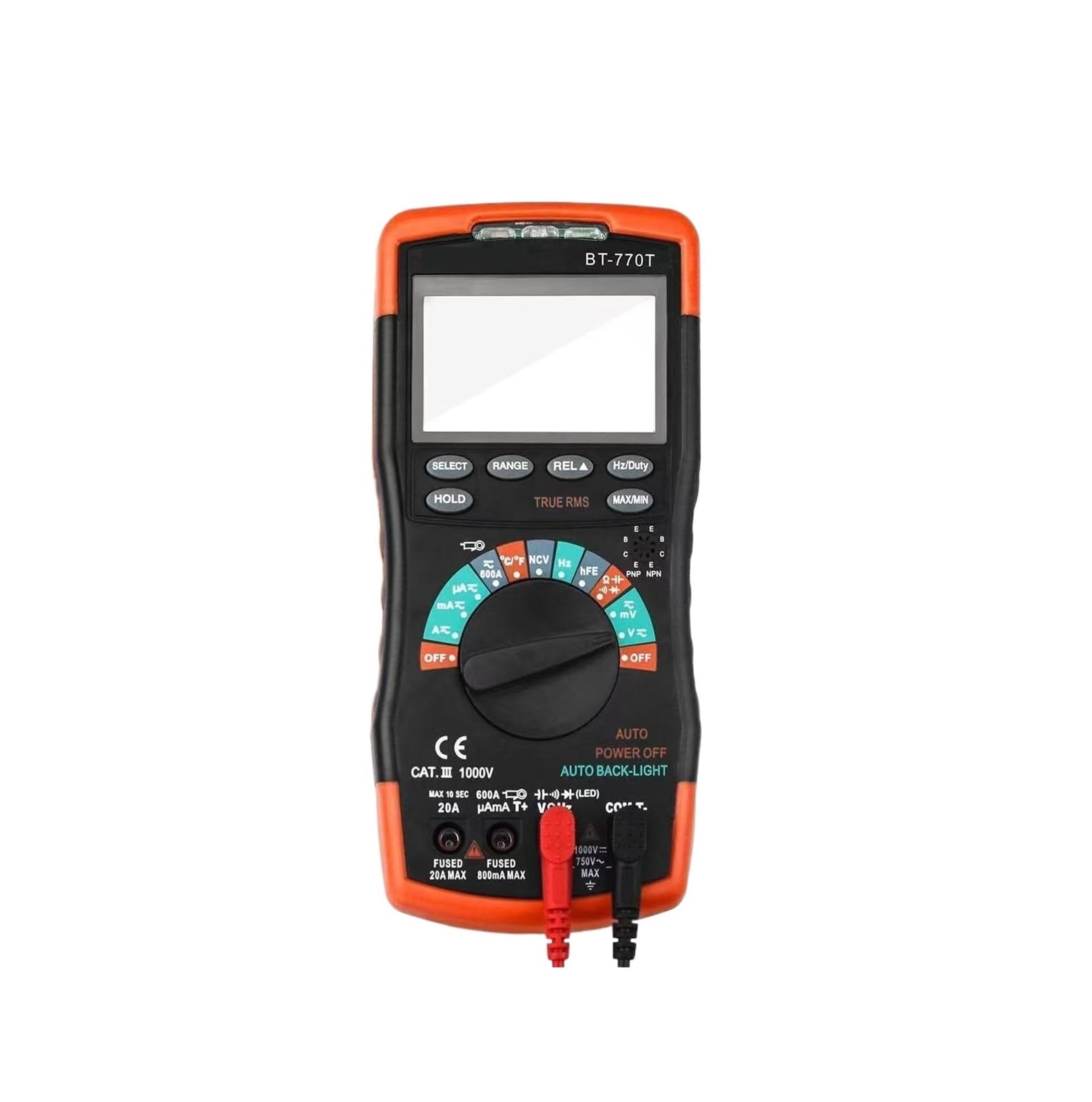
Figure 1: YHNNH Pro Digital Multimeter BT-770T 9103 with included test leads.
2. Safety Information
Always observe safety precautions when using any electrical testing equipment. Failure to do so may result in injury or damage to the multimeter or equipment under test.
- Do not apply voltage or current that exceeds the maximum specified limits for the multimeter.
- Ensure test leads are in good condition, without cracks or damaged insulation.
- Always disconnect power to the circuit before making connections or disconnections, especially when measuring current.
- Use caution when working with voltages above 30V AC RMS, 42V peak, or 60V DC. These voltages pose a shock hazard.
- Do not operate the multimeter if it appears damaged or is not functioning properly.
- Refer to the UL safety standard for electrical testing equipment.
3. Package Contents
Verify that all items are present in the package:
- YHNNH Pro Digital Multimeter BT-770T 9103
- Test Leads (Red and Black)
- User Manual (this document)
4. Setup
4.1 Battery Installation
The multimeter is powered by batteries. Ensure fresh batteries are installed correctly before use.
- Locate the battery compartment cover on the back of the multimeter.
- Use a screwdriver to open the battery compartment.
- Insert the required batteries, observing correct polarity (+ and -).
- Replace the battery compartment cover and secure it with the screw.
4.2 Connecting Test Leads
Connect the test leads to the appropriate input jacks on the multimeter.
- Insert the black test lead into the "COM" (common) jack.
- Insert the red test lead into the "VΩmA" jack for voltage, resistance, and low current measurements. For high current measurements, refer to the specific current input jack (if available on your model).
5. Operating Instructions
5.1 Power On/Off
Rotate the function dial to any measurement setting to power on the multimeter. Rotate it to the "OFF" position to power off.
5.2 Automatic Ranging
This multimeter features an automatic range function, eliminating the need to manually select the measurement range. The device will automatically adjust to the appropriate range for the measurement being taken.
5.3 Measuring AC/DC Voltage
- Rotate the function dial to the AC Voltage (V~) or DC Voltage (V-) setting.
- Connect the test leads in parallel across the component or circuit to be measured.
- Read the voltage value displayed on the screen.
5.4 Measuring Current (AC/DC)
- WARNING: Always disconnect power to the circuit before connecting the multimeter for current measurement.
- Rotate the function dial to the AC Current (A~) or DC Current (A-) setting.
- Connect the multimeter in series with the circuit where current is to be measured.
- Apply power to the circuit and read the current value displayed.
5.5 Non-Contact Voltage (NCV) Detection
The NCV function allows for detecting the presence of AC voltage without direct contact.
- Rotate the function dial to the NCV setting (if available as a dedicated setting, otherwise activate via a button).
- Bring the top of the multimeter near the wire, socket, or switch you wish to test.
- The multimeter will indicate the presence of AC voltage through an audible beep and/or visual indicator.
5.6 True-RMS Measurement
This multimeter features True-RMS technology, which provides accurate measurements of AC voltage and current for both sinusoidal and non-sinusoidal waveforms. This is particularly useful for circuits involving motor drives, inverters, and dimming devices where standard multimeters may provide inaccurate readings.
6. Maintenance
6.1 Cleaning
Wipe the multimeter casing with a damp cloth and mild detergent. Do not use abrasives or solvents. Ensure the device is powered off and disconnected from all circuits before cleaning.
6.2 Battery Replacement
When the low battery indicator appears on the display, replace the batteries as described in Section 4.1. Remove batteries if the multimeter will not be used for an extended period.
6.3 Storage
Store the multimeter in a cool, dry place, away from direct sunlight and extreme temperatures. Keep it away from strong magnetic fields.
7. Troubleshooting
| Problem | Possible Cause | Solution |
|---|---|---|
| No display or faint display | Low or dead batteries; Incorrect battery installation | Replace batteries; Check battery polarity |
| Incorrect readings | Incorrect function selected; Poor test lead connection; Exceeding measurement range | Verify function dial setting; Ensure leads are firmly connected; Check specifications for max range |
| NCV not detecting voltage | Voltage too low; Multimeter too far from source; NCV function not activated | Ensure voltage is present; Bring multimeter closer; Activate NCV function |
8. Specifications
- Model: BT-770T 9103
- Brand: YHNNH
- Measurement Type: True RMS
- Voltage Measurement: AC/DC
- Current Measurement: AC/DC
- Special Features: Automatic Ranging, NCV (Non-Contact Voltage) Detection
- Power Source: Battery Powered
- Item Weight: Approximately 300 Grams (10.6 ounces)
- Product Dimensions: Approximately 0.39 x 0.39 x 0.39 inches (L x W x H)
- Safety Standard: UL, CE
9. Warranty and Support
For warranty information and technical support, please contact the manufacturer, YHNNH, directly through their official website or the retailer where the product was purchased. Keep your purchase receipt as proof of purchase.


