
1. Introduction
Thank you for choosing the GALAXHERO 3-Drawer Wood Mobile File Cabinet. This manual provides essential information for the safe assembly, operation, and maintenance of your new file cabinet. Please read these instructions carefully before assembly and retain them for future reference.
2. Safety Information
- Ensure all parts are present and undamaged before assembly. Do not use if any parts are missing or broken.
- Assemble the unit on a soft, clean surface to prevent scratches.
- Do not overtighten screws during assembly to avoid damaging the material.
- Do not exceed the maximum weight capacity of 150 lbs (evenly distributed) for the entire unit.
- Keep small parts and packaging materials away from children.
- Always lock the casters when the cabinet is in a stationary position to prevent accidental movement.
3. Package Contents
Please verify that all components listed below are included in your package. If any parts are missing or damaged, please contact customer support.
- Cabinet panels (top, bottom, sides, back)
- Drawer components (fronts, sides, backs, bottoms)
- Drawer slides
- Casters (4 units, 2 with locks)
- Hardware pack (screws, dowels, cam locks, drawer pulls, file hanging bars)
- Assembly instructions

Figure 1: Product Dimensions and Weight Capacity. The cabinet measures 31.3 inches wide, 15.7 inches deep, and 24.7 inches high (including casters). It has a maximum weight capacity of 150 lbs.
4. Setup and Assembly
Assembly is required for this product. Please follow the detailed step-by-step instructions provided in the separate assembly manual included in your package. Ensure you have a Phillips head screwdriver and any other specified tools ready.
- Unpack Components: Carefully remove all parts from the packaging and lay them out on a protected surface.
- Identify Parts: Refer to the parts list in the assembly manual to identify each component.
- Assemble Frame: Follow the instructions to connect the main cabinet panels.
- Install Drawer Slides: Attach the drawer slides to the cabinet frame and drawer sides as directed.
- Assemble Drawers: Construct the three drawers according to the manual.
- Install Casters: Attach the four casters to the bottom of the cabinet. Ensure the two locking casters are placed at the front for stability.
- Insert Drawers: Carefully slide the assembled drawers into their respective tracks.
- Final Checks: Verify all screws are tightened and the cabinet is stable.

Figure 2: Assembled File Cabinet. The cabinet features three drawers, open storage shelves, and a spacious top surface.
5. Operating Instructions
5.1 Using the Drawers
- Top Two Drawers: These drawers are designed for storing office accessories, stationery, and small personal items.
- Bottom File Drawer: This drawer is equipped with full-extension slides and adjustable hanging bars to accommodate A4 or letter-sized hanging files. Pull the drawer out completely for easy access to all files.

Figure 3: Three-Drawer Storage. The top two drawers are for accessories, and the bottom drawer is for files.
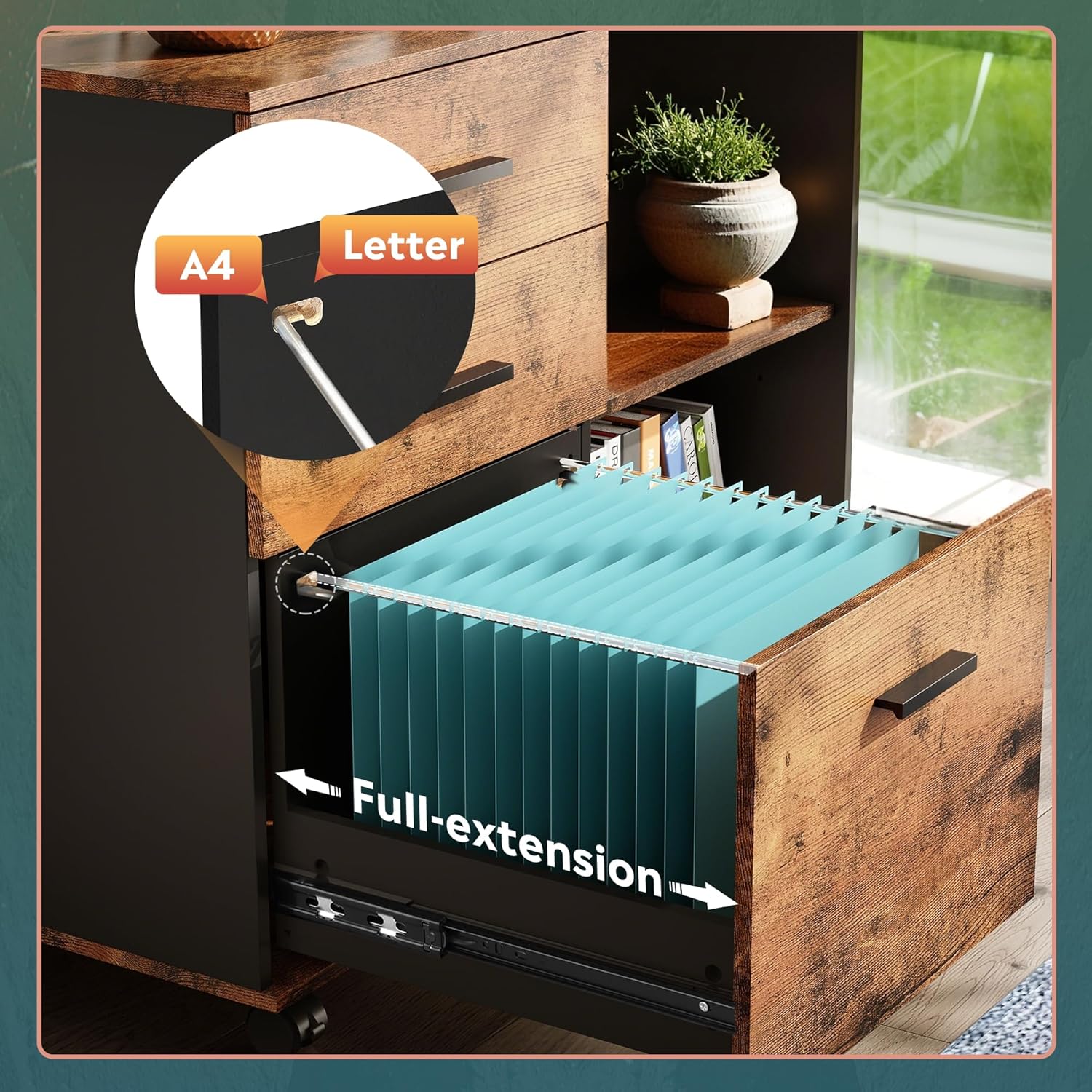
Figure 4: Full-Extension File Drawer. The bottom drawer supports A4 and letter-sized hanging files for organized storage.
5.2 Open Storage Shelves
The open shelves provide convenient access for frequently used items, books, binders, or decorative elements. The shelves are fixed and offer stable storage.
5.3 Mobile Functionality
- Moving the Cabinet: The four 360° swivel casters allow for easy movement of the cabinet across your workspace.
- Locking the Cabinet: To secure the cabinet in place, press down on the levers of the two front casters to engage the brakes. To unlock, lift the levers.

Figure 5: Swivel and Lockable Casters. The casters provide mobility, and the front two can be locked for stability.
6. Maintenance
- Cleaning: Wipe the cabinet surfaces with a soft, damp cloth. Avoid using harsh chemicals, abrasive cleaners, or polishes that may damage the finish.
- Hardware Check: Periodically check all screws and fasteners to ensure they are tight. Retighten if necessary to maintain stability.
- Caster Care: Keep casters free of debris to ensure smooth movement.
7. Troubleshooting
7.1 Drawers Do Not Slide Smoothly
- Check Alignment: Ensure drawer slides are correctly aligned and installed on both the drawer and the cabinet frame.
- Obstructions: Look for any objects or debris obstructing the drawer slides.
- Overload: Reduce the weight in the drawer if it is overloaded.
7.2 Cabinet is Unstable or Wobbles
- Tighten Fasteners: Check and tighten all screws and connections throughout the cabinet.
- Level Surface: Ensure the cabinet is placed on a flat, level surface.
- Caster Locks: Make sure the front casters are locked when the cabinet is stationary.
7.3 Casters Not Locking
- Engage Lever Fully: Ensure the locking lever on the caster is fully pressed down.
- Check for Damage: Inspect the caster mechanism for any visible damage or obstructions.
8. Specifications
| Brand | GALAXHERO |
| Model | B0FY64CH5 |
| Material | Wood |
| Color | Rustic Brown |
| Product Dimensions (L x W x H) | 31.34" x 15.75" x 24.65" (including casters) |
| Weight Capacity | 150 lbs (evenly distributed) |
| Assembly Required | Yes |
9. Warranty and Support
GALAXHERO products are manufactured with quality and durability in mind. This product comes with a limited warranty against manufacturing defects. For specific warranty terms and conditions, please refer to the documentation included with your purchase or contact our customer support.
If you encounter any quality problems, require assistance with assembly, or have questions regarding your product, please do not hesitate to contact GALAXHERO customer support. Our team is ready to assist you.
Customer Support Contact: Please refer to your purchase documentation or the GALAXHERO official website for the most current contact information.