
Introduction
This manual provides essential instructions for the safe and efficient operation of your AMZCHEF XL Contact Grill PG206. This versatile 6-in-1 electric grill features a temperature sensor, GrillBoost function up to 280°C, 6 intelligent programs, 2 independent cooking zones, and 4 interchangeable plates for preparing steak, waffles, and panini. Please read this manual thoroughly before first use and retain it for future reference.
Important Safety Instructions
- Always ensure the appliance is placed on a stable, heat-resistant surface.
- Do not immerse the appliance body, cord, or plug in water or any other liquid.
- Keep the appliance out of reach of children.
- Unplug the grill from the power outlet when not in use and before cleaning.
- Do not operate the appliance with a damaged cord or plug, or after the appliance malfunctions or has been damaged in any manner.
- Avoid touching hot surfaces. Use handles or knobs.
- Ensure proper ventilation during use.
- Only use accessories recommended by the manufacturer.
Product Components
The AMZCHEF XL Contact Grill PG206 comes with the following components:
- Main Grill Unit with Control Panel
- 2 Reversible Grill/Griddle Plates (non-stick coating)
- 2 Waffle Plates (non-stick coating)
- Temperature Probe
- Cleaning Scraper
- Drip Tray (integrated)

Image: Overview of the AMZCHEF XL Contact Grill PG206, showing its dimensions and the included accessories: scraper, temperature probe, and the four interchangeable plates (two grill/griddle, two waffle).
Setup
- Unpacking: Carefully remove all packaging materials and ensure all components are present.
- Initial Cleaning: Before first use, wipe the exterior of the grill with a damp cloth. Wash the removable grill plates, waffle plates, and scraper with warm, soapy water, then rinse and dry thoroughly.
- Plate Installation: Ensure the grill is unplugged. Place the desired cooking plates (grill or waffle) onto the heating elements, ensuring they click securely into place.
- Positioning: Place the grill on a flat, stable, heat-resistant surface, away from walls and flammable materials, ensuring adequate ventilation.
- Power Connection: Plug the power cord into a grounded electrical outlet. The display will illuminate.
Operating Instructions
Control Panel Overview

Image: The digital control panel displaying various cooking programs and temperature controls, including icons for steak, waffles, sausage, bread/panini, fish, and defrosting.
The digital control panel allows you to select cooking programs, adjust temperature, and set timers. Familiarize yourself with the icons and buttons before operation.
Preheating
Close the grill and select your desired program or manual temperature. Allow the grill to preheat completely before adding food. The indicator light or display will signal when the target temperature is reached.
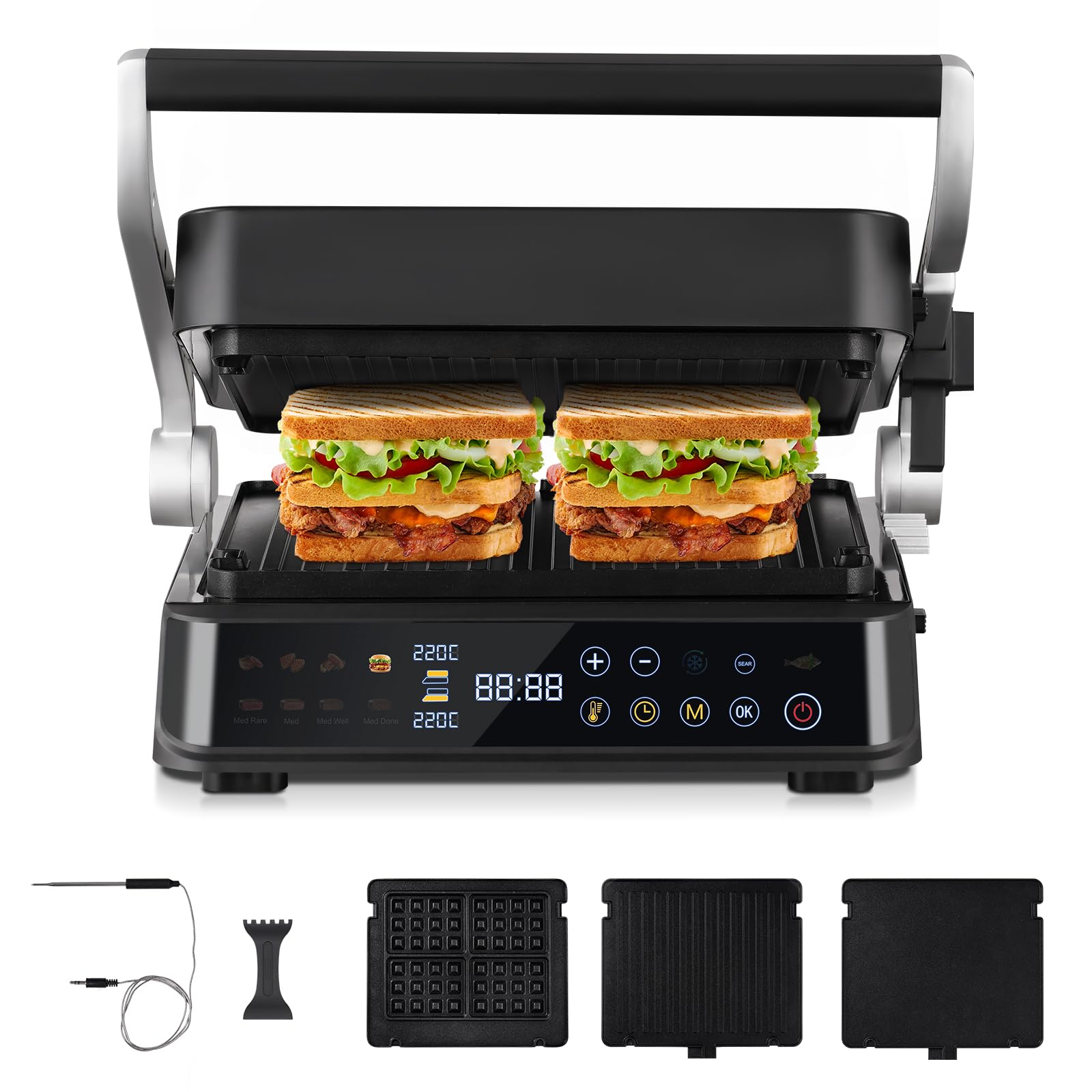
Image: Close-up view of the grill's heating elements, illustrating the even and fast heating capability with 2000W power for optimal cooking results.
Using Intelligent Grill Programs
The grill features 6 preset programs for common foods:
- Burger: Optimized for cooking various burger patties.
- Poultry: Suitable for chicken breasts, thighs, and other poultry.
- Steak: Designed for different steak cuts, with doneness levels.
- Sausages: For even cooking of sausages.
- Sandwich/Panini: Ideal for toasted sandwiches and paninis.
- Fish: Gentle cooking for various types of fish.
Select the desired program from the control panel. The grill will automatically adjust temperature and cooking time. Additionally, a manual mode and a defrost mode are available for custom cooking or frozen ingredients.
Sear Function (Up to 280°C)
Activate the Sear function for a high-temperature burst up to 280°C. This is ideal for creating a crispy crust on steaks while keeping the interior juicy. The function will automatically stop after a set period.

Image: The grill actively searing a steak, demonstrating the 280°C GrillBoost function for a crispy exterior and juicy interior.
Temperature Sensor and Cooking Level Control
The integrated temperature sensor monitors the core temperature of your food in real-time, especially useful for precise cooking of meats like steak or fish. The display will show the current doneness level (e.g., rare, medium, well-done).

Image: The intelligent cooking system with a temperature probe, illustrating different doneness levels for steak (Medium Rare, Medium, Medium Well, Medium Done) with corresponding internal temperatures.
180° Design and Dual Zone Cooking
The grill can be fully opened 180 degrees to function as a large table grill, allowing you to cook different ingredients simultaneously. The top and bottom plates can be operated with separate temperature settings, providing flexibility for various recipes and cooking times.

Image: The AMZCHEF XL Contact Grill opened flat at 180 degrees, demonstrating its use as a large table grill with independent temperature control for cooking different foods simultaneously.
5-Stage Height Adjustment
The top plate features a 5-level height adjustment mechanism. This allows the grill to adapt to different food thicknesses without crushing delicate items like panini or vegetables, preserving their juices and texture.
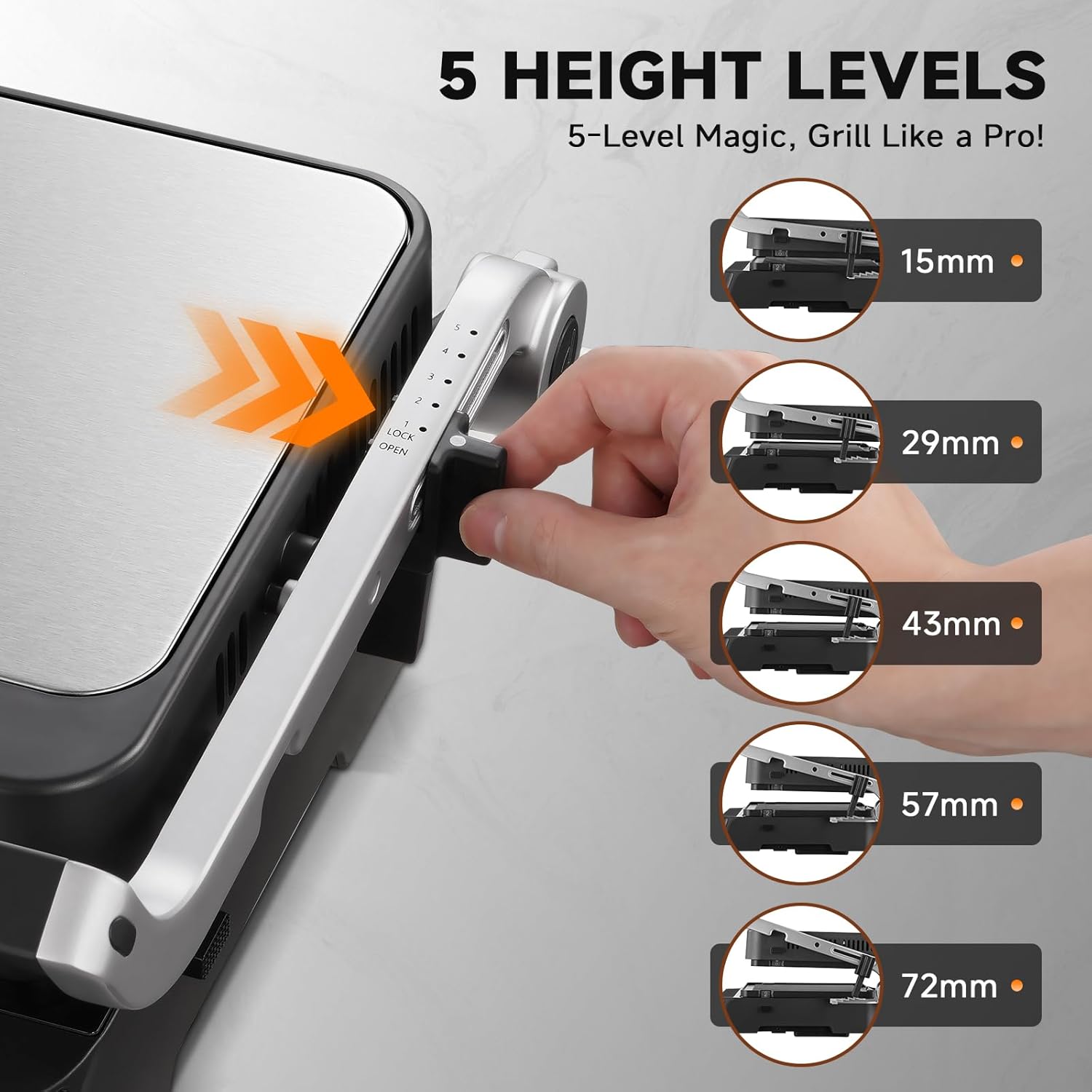
Image: Illustration of the grill's 5-stage height adjustment feature, showing how the top plate can be set at different distances from the bottom plate (15mm, 29mm, 43mm, 57mm, 72mm) to accommodate various food thicknesses.
Cleaning and Maintenance
Proper cleaning ensures the longevity and performance of your grill.
- Unplug and Cool: Always unplug the grill and allow it to cool completely before cleaning.
- Remove Plates: Detach the cooking plates by pressing the release buttons.
- Clean Plates: The removable grill and waffle plates are dishwasher safe. Alternatively, they can be hand-washed with warm, soapy water and the included scraper to remove food residues. Rinse thoroughly and dry.
- Clean Drip Tray: Empty and wash the drip tray after each use.
- Clean Exterior: Wipe the exterior of the grill body with a damp cloth. Do not use abrasive cleaners or scourers.
- Storage: Store the clean and dry grill in a cool, dry place.

Image: Demonstration of the dishwasher-safe grill plates being cleaned, showing both hand-washing in a sink and placement in a dishwasher for convenience.
Troubleshooting
| Problem | Possible Cause | Solution |
|---|---|---|
| Grill does not turn on. | Not plugged in; power outlet malfunction; appliance fault. | Ensure plug is securely in a working outlet. Check household circuit breaker. If problem persists, contact customer support. |
| Food not cooking evenly. | Grill not preheated; plates not properly installed; uneven food thickness. | Allow grill to fully preheat. Ensure plates are securely locked. Use the height adjustment for thicker items. |
| Smoke or unusual odor during use. | Initial use (manufacturing residues); food residue buildup; excessive fat. | A small amount of smoke on first use is normal. Ensure plates are clean. Trim excess fat from food. Ensure drip tray is empty. |
Specifications
| Brand | AMZCHEF |
| Model | PG206 |
| Power | 2000 Watts |
| Material | Aluminum |
| Color | Silver and Black |
| Dimensions (D x W x H) | 42.2 cm x 23.4 cm x 42.7 cm |
| Special Feature | Temperature Control, GrillBoost 280°C, 6 Programs, 2 Zones, 5-Stage Height Adjustment |
| Included Components | 4 interchangeable plates (2 grill/griddle, 2 waffle), Temperature Probe, Scraper |
| UPC | 850079022218 |
Warranty and Support
AMZCHEF products are manufactured to high-quality standards. For warranty information, please refer to the warranty card included with your purchase or visit the official AMZCHEF website. For technical support, troubleshooting assistance, or to inquire about replacement parts, please contact AMZCHEF customer service through their official channels.
Please note: Unauthorized repairs or modifications will void the product warranty.