1. Product Overview
Thank you for choosing the HOMIDEC Gaming Desk. This desk is designed for versatility and comfort, featuring an adjustable monitor stand, integrated storage drawers, and a durable carbon fiber surface. It is suitable for various uses, including gaming, office work, and study.

Image 1.1: The HOMIDEC Gaming Desk in a typical setup, showcasing its design and features.
2. Assembly Instructions
The HOMIDEC Gaming Desk is designed for straightforward assembly. All necessary components are logically labeled, and clear, step-by-step instructions are provided in the included manual. Please follow these instructions carefully to ensure proper and safe assembly.
- Unpack Components: Carefully remove all parts from the packaging and verify against the parts list in your manual.
- Assemble Frame: Connect the metal frame components using the provided hardware. Ensure all screws are tightened securely.
- Attach Desktop: Secure the carbon fiber desktop to the assembled frame.
- Install Monitor Stand: Attach the adjustable monitor stand to the desktop.
- Insert Drawers and Hook: Place the fabric drawers into their designated compartments and attach the headphone hook.
- Adjust Leveling Feet: Once assembled, adjust the leveling feet at the base of the desk to ensure stability on uneven surfaces.

Image 2.1: Detailed product dimensions for the HOMIDEC Gaming Desk, including the main desktop, monitor stand, and drawers.
3. Key Features and Usage
3.1 Ergonomic Adjustable Monitor Stand
The desk includes an adjustable monitor stand designed to promote ergonomic posture. It features three height settings, allowing users to customize their viewing angle to prevent neck and back strain during prolonged use.
- Height Settings: Adjust the stand to 8.5cm (3.3"), 11.5cm (4.5"), or 14.5cm (5.7") above the main desktop.
- Optimal Viewing: Select the height that aligns the top of your monitor screen with your eye level when seated comfortably.

Image 3.1: Visual representation of the monitor stand's adjustable height settings, promoting ergonomic posture.
3.2 Integrated Storage Drawers
Two spacious fabric drawers are integrated into the desk design, offering convenient storage for accessories, documents, or stationery. These drawers help maintain a tidy and organized workspace.
- Dimensions: Each drawer measures approximately 36cm (14.2") L x 46cm (18.1") W x 11.5cm (4.5") H.
- Usage: Pull the drawers out gently using the handles. Avoid overloading with excessively heavy items to ensure smooth operation and longevity.

Image 3.2: The two fabric drawers provide ample hidden storage to keep your desktop clear.
3.3 Carbon Fiber Surface and Headphone Hook
The desktop features a carbon fiber texture, which is both aesthetically pleasing and functional. A convenient hook is also included for hanging headphones or other items, keeping them easily accessible and off the desk surface.
- Scratch Resistance: The carbon fiber texture provides enhanced durability against scratches.
- Headphone Storage: Utilize the side hook to store headphones, cables, or other small accessories.
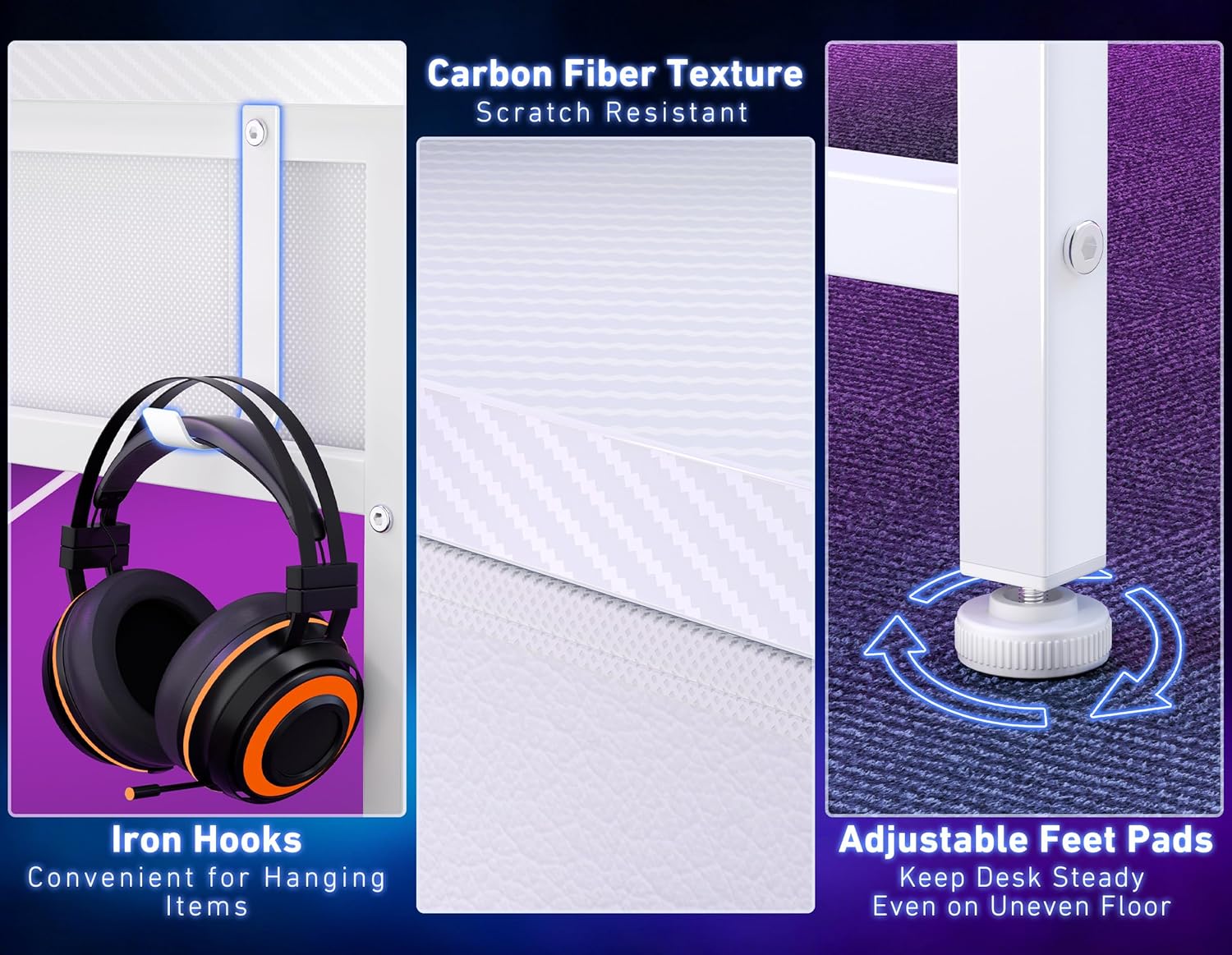
Image 3.3: Close-up of the headphone hook, carbon fiber surface texture, and adjustable leveling feet.
4. Maintenance
Proper maintenance ensures the longevity and appearance of your HOMIDEC Gaming Desk.
- Cleaning the Surface: The carbon fiber surface is easy to clean. Use a soft, damp cloth with mild soap and water. Avoid abrasive cleaners or harsh chemicals that could damage the finish.
- Frame Care: Wipe the metal frame with a dry or slightly damp cloth to remove dust.
- Drawer Care: The fabric drawers can be spot cleaned with a damp cloth. Ensure they are completely dry before returning them to the desk.
- Regular Checks: Periodically check all screws and connections to ensure they remain tight. Retighten if necessary to maintain stability.
5. Troubleshooting
If you encounter any issues with your desk, refer to the following common solutions:
- Desk Wobbles:
- Ensure all assembly screws are fully tightened.
- Adjust the leveling feet at the bottom of the desk legs to compensate for uneven flooring.
- Drawers Not Sliding Smoothly:
- Check if the drawers are overloaded. Reduce the weight if necessary.
- Ensure the drawer compartments are clear of obstructions.
- Missing Parts:
- If any parts are missing upon unpacking, please contact customer support with your purchase details.
6. Specifications
| Feature | Detail |
|---|---|
| Brand | HOMIDEC |
| Model Number | TJZ-80WH-UK |
| Desk Design | Computer Desk |
| Product Dimensions (D x W x H) | 18.9"D x 31.5"W x 36.22"H (48cm D x 80cm W x 92cm H) |
| Color | White |
| Style | Modern |
| Number of Drawers | 2 |
| Item Weight | 11.85 Kilograms |
| Material Type | Alloy Steel |
| Assembly Required | Yes |
7. Warranty and Support
For warranty information or technical support, please refer to the documentation included with your purchase or contact HOMIDEC customer service. Keep your purchase receipt for warranty claims.


