
1. Introduction
This manual provides instructions for the proper use, setup, and maintenance of your Skullcandy Jib XT Wireless Earbuds. Please read this guide thoroughly before using the product to ensure optimal performance and longevity.
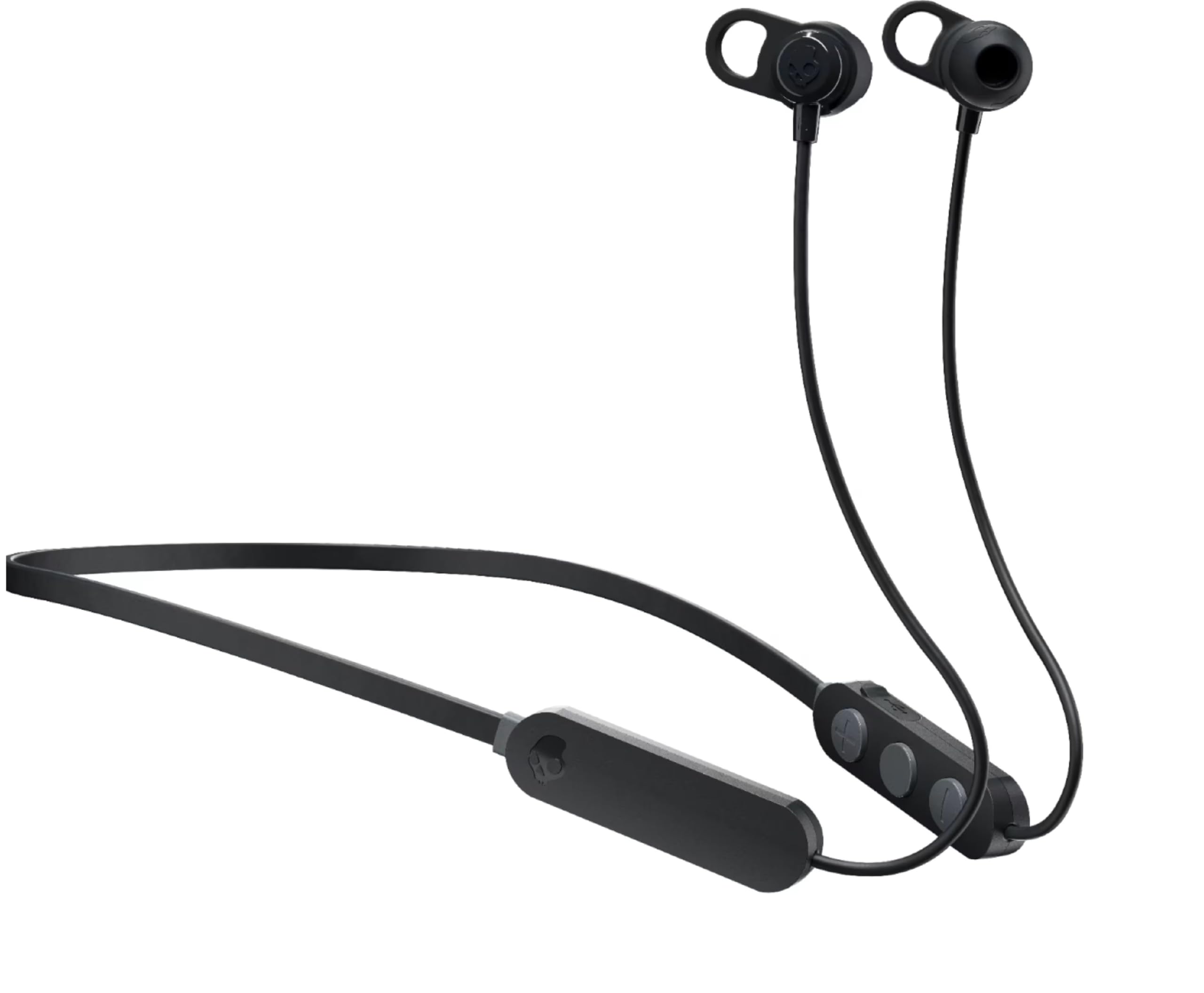
Figure 1: Skullcandy Jib XT Wireless Earbuds
The image displays the Skullcandy Jib XT Wireless Earbuds in black. They feature an in-ear design with a flexible neckband connecting the two earbuds. Control buttons are visible on the right side of the neckband.
2. What's Included
Verify that all items are present in the package:
- Skullcandy Jib XT Wireless Earbuds
- 3 pairs of silicone ear gels (Small, Medium, Large)
- Micro-USB charging cable
- Secure clip
- User guide (this document)
3. Setup
3.1 Charging the Earbuds
Before first use, fully charge the earbuds. Use the provided Micro-USB cable to connect the earbuds to a USB power source. A full charge typically takes approximately 2 hours and provides up to 6 hours of continuous playback.

Figure 2: Charging Port Location
This image shows a close-up of the control module on the Skullcandy Jib XT Wireless Earbuds, highlighting the Micro-USB charging port, typically located on the side of the module.
3.2 Bluetooth Pairing
- Ensure the earbuds are charged and powered off.
- Press and hold the multi-function button (usually the center button on the control module) until the LED indicator flashes blue and red, indicating pairing mode.
- On your device (smartphone, tablet, etc.), enable Bluetooth and search for available devices.
- Select "Jib XT Wireless" from the list of found devices.
- Once connected, the LED indicator will typically show a solid blue light or flash blue periodically.
3.3 Custom Fit
The Jib XT Wireless Earbuds come with three sizes of silicone ear gels (S, M, L) and additional removable stability gels. Experiment with different sizes to find the most comfortable and secure fit. A proper fit is essential for optimal sound quality and noise isolation.
4. Operating Instructions
4.1 Power On/Off
- Power On: Press and hold the multi-function button for approximately 3 seconds until the LED indicator flashes blue and you hear an audible prompt.
- Power Off: Press and hold the multi-function button for approximately 3 seconds until the LED indicator flashes red and you hear an audible prompt.
4.2 Music Playback Controls
- Play/Pause: Press the multi-function button once.
- Next Track: Press and hold the "+" volume button for 2 seconds.
- Previous Track: Press and hold the "-" volume button for 2 seconds.
4.3 Call Management
- Answer/End Call: Press the multi-function button once.
- Reject Call: Press and hold the multi-function button for 2 seconds.
- Volume Up: Press the "+" volume button.
- Volume Down: Press the "-" volume button.
4.4 Voice Assistant Activation
To activate your device's voice assistant (e.g., Siri, Google Assistant), quickly press the multi-function button twice.
5. Maintenance
- Cleaning: Regularly clean the ear gels and earbuds with a soft, dry cloth. Do not use harsh chemicals or abrasive materials.
- Storage: When not in use, store the earbuds in a clean, dry place, away from extreme temperatures and direct sunlight.
- Sweat Resistance: The earbuds are designed to be sweat-resistant, making them suitable for active lifestyles. However, avoid submerging them in water.
- Charging: Always use the provided Micro-USB cable for charging.
6. Troubleshooting
| Problem | Possible Solution |
|---|---|
| Earbuds do not power on. | Ensure the earbuds are fully charged. Connect them to a power source using the Micro-USB cable. |
| Cannot pair with device. |
|
| No sound or low volume. |
|
| Poor sound quality. |
|
7. Specifications
| Feature | Detail |
|---|---|
| Model Name | Jib XT Wireless |
| Model Number | S2JPW-M707 |
| Brand | Skullcandy |
| Connectivity | Bluetooth 5.0 |
| Ear Placement | In Ear |
| Noise Control | Sound Isolation |
| Battery Life | Up to 6 hours |
| Battery Charge Time | Approximately 2 hours |
| Microphone | Built-in |
| Water Resistance Level | Sweat Resistant |
| Frequency Range | 20Hz - 20,000Hz |
| Control Type | Volume Control, Track Control, Call Management |
| Material | Plastic |
8. Warranty and Support
8.1 Warranty Information
The Skullcandy Jib XT Wireless Earbuds come with a 1-year manufacturer's warranty. This warranty covers defects in materials and workmanship under normal use. For full warranty terms and conditions, please refer to the official Skullcandy website or contact customer support.
8.2 Customer Support
For further assistance, technical support, or warranty claims, please visit the official Skullcandy support website or contact their customer service department. Contact information can typically be found on the Skullcandy website or product packaging.


