
FOSSIBOT F110L
FOSSIBOT F110L Rugged Smartphone User Manual
Model: F110L | Brand: FOSSIBOT
1. Introduction
This manual provides detailed instructions for the FOSSIBOT F110L rugged smartphone. It covers device setup, operation, maintenance, and troubleshooting to ensure optimal performance and longevity of your device. The F110L is designed for durability and performance in challenging environments, featuring a large battery, powerful speaker, and robust construction.
2. Package Contents
Verify that all items are present in your product package:
- 1 x FOSSIBOT F110L Rugged Smartphone
- 1 x Charger (Power Adapter 9V2A)
- 1 x USB Cable (Type-C, 2A)
- 1 x SIM Card Pin
- 1 x User Manual
- 1 x Warranty Card
- 1 x TP Screen Protector (Pre-applied)
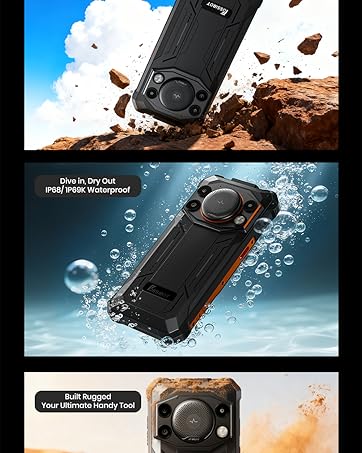
Image: Standard package contents including the FOSSIBOT F110L smartphone, charger, USB cable, SIM ejector tool, and documentation.
3. Product Overview
The FOSSIBOT F110L is engineered for resilience and high performance. Familiarize yourself with the device's key components.
- Display: 6.745-inch HD+ screen with 480 nits brightness.
- Rear Camera System: Features a 50MP main camera, 5MP macro camera, and a powerful 128dB loudspeaker.
- Front Camera: 8MP for selfies and video calls.
- Flashlight: Integrated high-intensity 120 Lumen flashlight.
- Ports: USB Type-C for charging and data transfer.
- SIM/SD Card Slot: Supports Dual SIM (Nano SIM) or one Nano SIM with a TF/MicroSD card up to 2TB.
- Custom Button: Programmable side button for quick access to functions.
- Biometric Security: Side fingerprint unlock and Face Recognition.
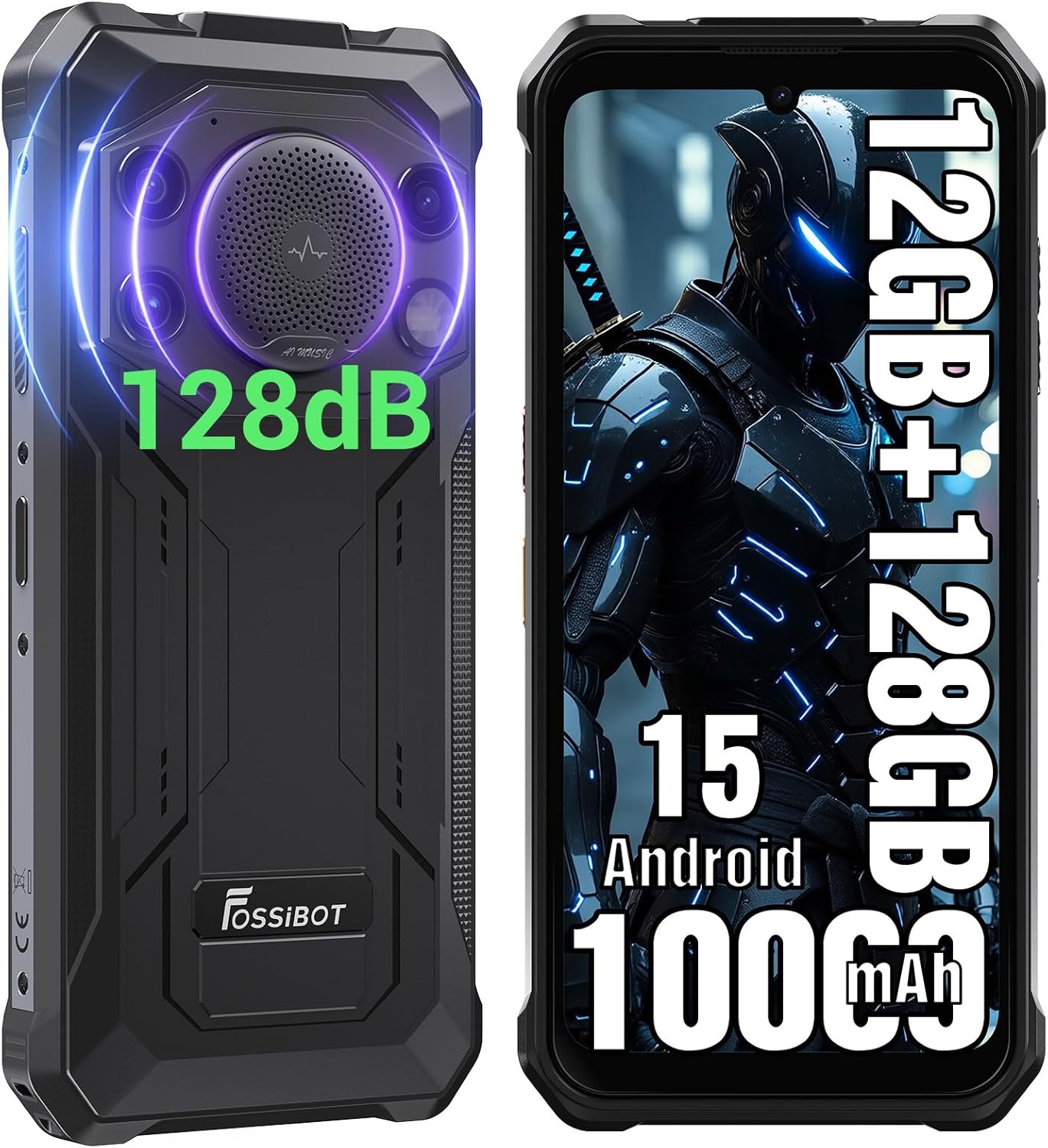
Image: Front and back view of the FOSSIBOT F110L rugged smartphone, highlighting its robust design and camera module.

Image: Detailed view of the FOSSIBOT F110L's 128dB loudspeaker, showing its 34mm diameter and 3W peak output for powerful audio.

Image: The FOSSIBOT F110L's high-brightness flashlight in use, illuminating outdoor environments and demonstrating its utility for camping and emergencies.
4. Setup Instructions
4.1 SIM Card and MicroSD Card Installation
- Locate the SIM card tray on the side of the device.
- Insert the provided SIM ejector pin into the small hole next to the tray to open it.
- Carefully pull out the SIM card tray.
- Place your Nano SIM card(s) and/or MicroSD card into the designated slots on the tray. Ensure the cards are correctly oriented as indicated on the tray.
- Gently push the tray back into the device until it is flush with the phone's body.

Image: Diagram illustrating the correct placement of Nano SIM cards and a MicroSD card in the FOSSIBOT F110L's card tray.
4.2 Initial Power On
- Press and hold the Power button (usually on the right side) until the FOSSIBOT logo appears on the screen.
- Follow the on-screen prompts to complete the initial setup, including language selection, Wi-Fi connection, and Google account setup.
5. Operating Instructions
5.1 Basic Phone Functions
- Making Calls: Open the Phone app, dial the number, and tap the call icon.
- Sending Messages: Open the Messages app, start a new conversation, enter the recipient and message, then send.
- Internet Access: Connect to Wi-Fi via Settings > Network & internet > Wi-Fi, or enable mobile data via Settings > Network & internet > Mobile network.
5.2 Camera Operation
The F110L features a 50MP AI main camera, an 8MP front camera, and a 5MP macro camera.
- Open the Camera app.
- Select your desired mode (Photo, Video, Portrait, Macro, Night Mode, Underwater Camera Mode).
- Tap the shutter button to capture photos or start/stop video recording.
- Use the front/rear camera switch icon to change cameras.

Image: Overview of the FOSSIBOT F110L's camera system, highlighting the 50MP main camera, 5MP macro camera, and 8MP front camera capabilities.

Image: A hand holding the FOSSIBOT F110L underwater, demonstrating its underwater camera mode for capturing marine life.
5.3 Loudspeaker and Flashlight
- Loudspeaker: The 128dB loudspeaker provides clear audio even in noisy environments. Adjust volume using the volume buttons.
- Flashlight: Activate the 120 Lumen flashlight from the quick settings panel or by programming the custom button.
Video: Official product video showcasing the FOSSIBOT F110L's features, including its ruggedness, loud speaker, and flashlight in various outdoor scenarios.
5.4 Custom Button and Software Toolbox
- Custom Button: Navigate to Settings to customize the side button for single press, double press, or long press actions (e.g., camera, flashlight, PTT).
- Software Toolbox: Access the pre-installed toolbox for utilities like Compass, Gradienter, Sound Meter, Magnifier, Protractor, Plumb Bob, Warning light, and Height Measure.

Image: Illustration of the FOSSIBOT F110L's software toolbox features and the customizable side button for quick access to various tools and functions.
6. Durability Features
The FOSSIBOT F110L is built to withstand harsh conditions.
- MIL-STD-810H Certified: Meets military standards for drop resistance, ensuring durability against accidental falls.
- IP68/IP69K Waterproof and Dustproof: Protected against dust ingress and immersion in water up to 1.5 meters for 30 minutes, and resistant to high-pressure, high-temperature water jets.

Image: Visual representation of the FOSSIBOT F110L's MIL-STD-810H drop resistance, IP68 waterproof rating, and IP69K dustproof capabilities.
7. Battery Management
The F110L is equipped with a large 10000mAh battery for extended use.
- Charging: Use the provided 9V2A power adapter and USB Type-C cable for 20W fast charging.
- Reverse Charging (OTG): The device supports OTG reverse charging, allowing you to use your F110L as a power bank to charge other compatible devices. Connect devices using an OTG cable (not included).

Image: Infographic detailing the FOSSIBOT F110L's 10000mAh battery life for various activities and its OTG reverse charging function.
8. Software Features
- Operating System: Runs on Android 15, providing a smooth and updated user experience.
- Performance: Equipped with 12GB RAM (including virtual RAM) and 128GB internal storage, expandable up to 2TB with a TF card, for efficient multitasking and ample storage.
- Navigation: Supports GPS, Galileo, Glonass, and Beidou for accurate positioning.

Image: The FOSSIBOT F110L displaying the Android 15 operating system interface with various applications.

Image: Visual representation of the FOSSIBOT F110L's 12GB RAM and 128GB ROM, indicating its powerful performance and storage capacity.
9. Network and Connectivity
- Wireless Carrier: Unlocked for all carriers, supporting T-Mobile but not AT&T SIM cards.
- Network Bands:
- GSM: 850/900/1800/1900MHz
- 3G: B1/2/4/5/8
- 4G: B38/B40/B41/B1/B2/B3/B4/B5/B7/B8/B12/B17/B19/B20/B25/B26/B28A/B28B/B66
- NFC: Supports Full-Scenario NFC for contactless payments and data transfer.

Image: Illustration of the FOSSIBOT F110L's global network band support, dual SIM/MicroSD slot, and NFC functionality for various uses.
10. Maintenance and Care
- Cleaning: Wipe the device with a soft, damp cloth. Avoid harsh chemicals.
- Water Exposure: While waterproof, ensure all port covers are securely closed before exposing the device to water. After water exposure, dry the device thoroughly, especially the charging port, before charging.
- Temperature: Avoid exposing the device to extreme temperatures (very hot or very cold) to prevent damage to the battery and internal components.
- Storage: Store the device in a cool, dry place when not in use for extended periods.
11. Troubleshooting
If you encounter issues with your FOSSIBOT F110L, try the following steps:
- Device Not Turning On: Ensure the battery is charged. Connect the charger and wait a few minutes before attempting to power on again.
- Screen Unresponsive: Try restarting the device by holding the Power button for about 10-15 seconds.
- Network Issues: Check if your SIM card is properly inserted. Verify network settings in the Settings app. If issues persist, contact your network provider.
- App Crashing: Clear the cache and data of the problematic app via Settings > Apps > [App Name] > Storage & cache. If the issue continues, uninstall and reinstall the app.
- Slow Performance: Close unnecessary background apps. Clear cached data regularly. Consider a factory reset as a last resort (back up your data first).
12. Specifications
| Feature | Specification |
|---|---|
| Brand | FOSSIBOT |
| Model Name | F110L |
| Operating System | Android 15 |
| RAM Memory Installed Size | 12GB (including virtual RAM) |
| Memory Storage Capacity | 128 GB (Expandable to 2TB) |
| Screen Size | 6.745 Inches |
| Resolution | 720x1640 HD+ |
| Refresh Rate | 120 Hz |
| Wireless Carrier | Unlocked for All Carriers (T-Mobile supported, AT&T not supported) |
| SIM Card Slot Count | Dual SIM (Nano) |
| Connector Type | USB Type C |
| Biometric Security Feature | Face Recognition, Side Fingerprint |
| Water Resistance Level | IP68/IP69K Waterproof |
| Front Photo Sensor Resolution | 8 MP |
| Rear Facing Camera Photo Sensor Resolution | 50 MP (Main) |
| Optical Sensor Resolution | 50 MP |
| Battery Capacity | 10000mAh (45 Watt Hours) |
| Phone Talk Time | 80 Hours |
| GPS Geotagging Functionality | True (GPS, Galileo, Glonass, Beidou) |
| Cellular Technology | 4G LTE |
| Model Year | 2026 |
| Effective Video Resolution | 1080 Pixels |
| Video Capture Resolution | 1080p |
| Frame Rate | 60 fps |
13. Warranty and Support
The FOSSIBOT F110L comes with a 2-year warranty.
For any inquiries or technical assistance, FOSSiBOT provides 24/7 online after-sales support with real-time response. Please refer to the contact information provided in your Warranty Card or visit the official FOSSIBOT website for support details.