
ApisQueen U5 CCW
ApisQueen U5 Underwater Thruster Instruction Manual
Model: U5 CCW | Brand: ApisQueen
1. Introduction
This manual provides essential information for the safe and effective use of your ApisQueen U5 Underwater Thruster. Please read it thoroughly before operation and retain it for future reference.
What's in the Box:
- U5 CCW Underwater Thruster x 1
- 80mm CCW Red Propeller x 1
- Screws x 1 pack
Note: Other components shown in demonstration videos, such as ESC, remote control, and battery, are not included and must be purchased separately.
2. Safety Information
- The U5 brushless underwater thruster is designed for freshwater environments only. Do not use in saltwater.
- Ensure all electrical connections are secure and properly insulated before submersion.
- Keep hands and loose objects clear of the propeller during operation to prevent injury.
- The Electronic Speed Controller (ESC) is anti-splash water but should not be soaked in water for extended periods.
- Recommended battery: 24V LiPo battery, supporting up to 29.4V (7S LiPo). Using an incorrect battery type or voltage may damage the thruster.
- Always disconnect the battery when the thruster is not in use or during maintenance.
3. Product Overview
The ApisQueen U5 Underwater Thruster is a high-performance brushless motor designed for various watercraft. It features a robust construction and provides significant thrust for propulsion.
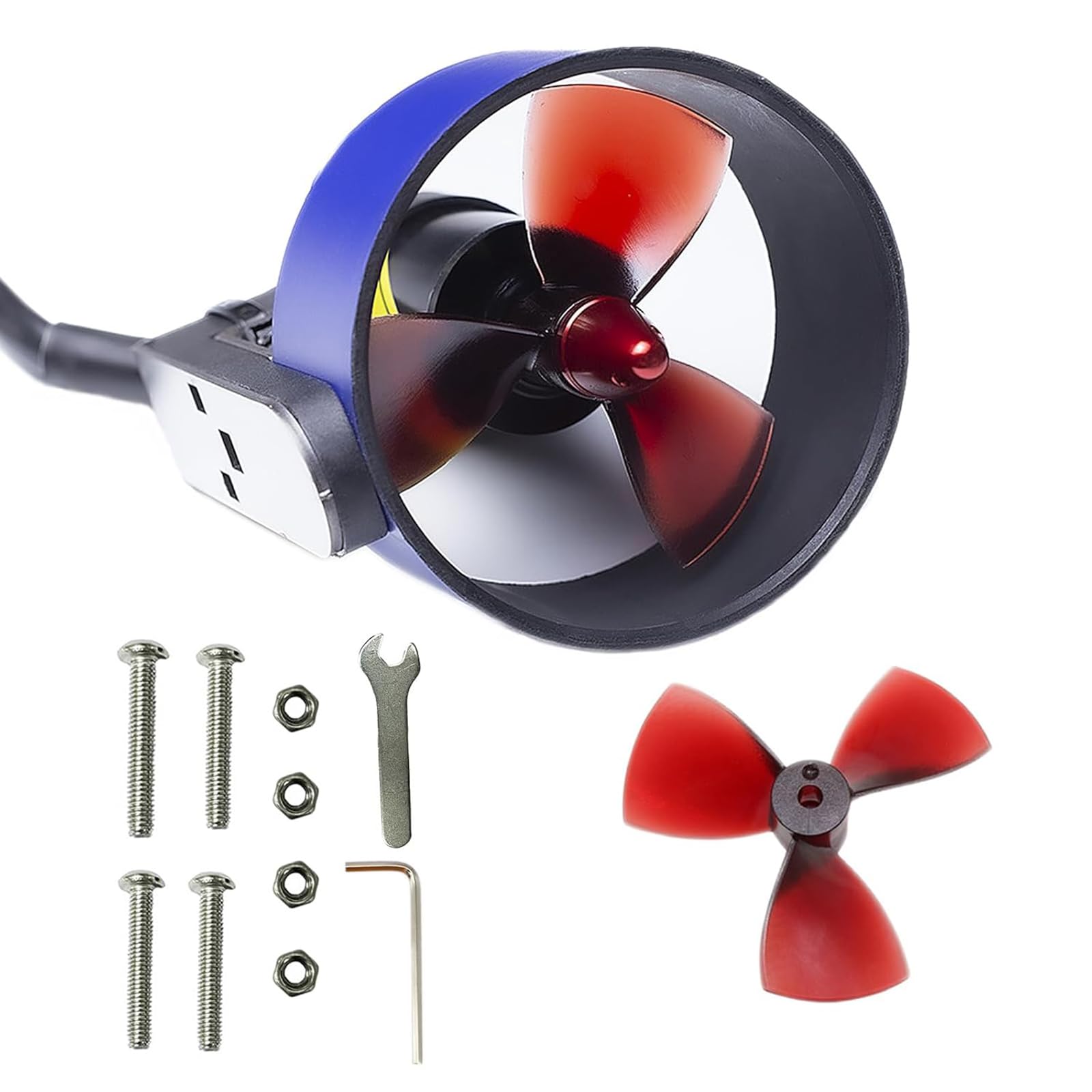
Figure 1: Front view of the ApisQueen U5 Underwater Thruster.
Key Features:
- High Quality Construction: Made of high-strength plastic and stainless steel bearings for rust and corrosion prevention.
- Powerful Thrust: Provides a maximum thrust of 7Kg (15.43 Lbs).
- Waterproof Design: Potted seal allows for a waterproof depth of 50 meters.
- Brushless Motor: Efficient and durable brushless motor design.

Figure 2: ApisQueen U5 Underwater Thruster with propeller.
4. Setup Instructions
Follow these steps to set up your U5 Underwater Thruster. An Electronic Speed Controller (ESC) and a remote control system are required for operation and are sold separately.
- Turn on the Remote Control: Power on your remote control. You should hear a beep indicating it's successfully turned on.
- Connect Thruster to ESC: Connect the thruster's motor wires to the corresponding output wires of the ESC. Ensure connections are firm.
- Connect ESC Receiver to Remote Control Receiver: Insert the signal wire from the ESC into the first channel hole of your remote control receiver. If your ESC does not have a BEC 5V output and cannot power the receiver, you will need to provide additional power to the remote control receiver.
- Connect ESC to Battery: Connect the ESC to the recommended 24V LiPo battery. Upon connection, the thruster should emit a "bi-bi-bi" sound, indicating it is in working condition.
Video 1: Demonstration of connecting the U5 underwater thruster with an ESC, remote control, and battery for operation.
Wiring Diagrams:

Figure 3: Wired Control Method. If water outlet direction is incorrect, change any two motor wires. For ESCs without BEC 5V output, provide external power to the receiver.

Figure 4: Wireless Control Method. If water outlet direction is incorrect, change any two motor wires. For ESCs without BEC 5V output, provide external power to the receiver. Connect the small white, red, and black wires to the "S+" of the throttle channel port.
5. Operating Instructions
Once the thruster system is properly connected and powered, use your remote control to operate the thruster.
- Throttle Control: Use the throttle stick or button on your remote control to adjust the speed and direction of the thruster.
- Forward Motion: Increase the throttle to move forward. The forward rotation speed gradually increases from 1.5ms to 2ms.
- Reverse Motion: Decrease the throttle to move backward. The reversal speed gradually increases from 1.5ms to 1ms.
- Neutral Position: At 1.5ms (middle throttle), the thruster/motor will not operate.
Ensure the thruster is submerged in water before operating at high speeds to prevent damage and ensure proper cooling.
6. Maintenance
- After each use, rinse the thruster with fresh water to remove any debris or residue.
- Inspect the propeller for any damage or entanglement. Clear any obstructions carefully.
- Check all electrical connections for corrosion or wear. Replace any damaged components.
- Store the thruster in a dry, cool place away from direct sunlight.
7. Troubleshooting
- Thruster not spinning:
- Check battery connection and charge level.
- Ensure ESC is properly connected to the battery and receiver.
- Verify remote control is powered on and paired with the receiver.
- Confirm throttle is not in the neutral (1.5ms) position.
- Incorrect water outlet direction:
- Disconnect power. Swap any two of the three motor wires connecting the thruster to the ESC.
- Reduced thrust or unusual noise:
- Inspect the propeller for damage or debris.
- Check for loose connections or internal damage to the thruster.
8. Specifications

Figure 5: U5 Thruster Parameter details.
| Parameter | Value |
|---|---|
| Brand | ApisQueen |
| Model Name | U5 UNDERWATER THRUSTER |
| Item Model Number | U5 CCW |
| Material | Plastic |
| Voltage Range | 12-24V (3-7S LiPo, up to 29.4V fully charged) |
| Motor KV | 350KV |
| Max Thrust | 7Kg (15.43 Lbs) |
| Power | 800W |
| Item Weight | 0.64 Pounds (approx. 290g) |
| Product Dimensions | 3.78 x 3.81 x 3.81 inches (approx. 96 x 97 x 97 mm) |
| Waterproof Depth | 50 meters |

Figure 6: ApisQueen U5 Thruster dimensions.
9. Warranty and Support
ApisQueen products are manufactured to high-quality standards. For warranty information, technical support, or service inquiries, please refer to the contact information provided with your purchase or visit the official ApisQueen website.
Always ensure you are using genuine ApisQueen parts and accessories for optimal performance and to maintain warranty validity.
Related documentsU5 CCW


Ask a question about this manual
Ask about setup, troubleshooting, compatibility, parts, safety, or missing instructions. Manuals+ will review the question and use this page’s manual context to help answer it.