Introduction
The LOLBOX Music Boxing Machine is an innovative fitness device designed for engaging boxing workouts. It features intelligent light effects, various speed modes, and Bluetooth connectivity for a personalized training experience. This manual provides detailed instructions to help you set up, operate, and maintain your device effectively.
What's Included
- Music Boxing Machine Unit
- Boxing Gloves
- USB-C Charging Cable
- Installation Accessories (Velcro strips, mounting pad)
- User Manual
Setup
Installation Methods
The Music Boxing Machine offers two convenient installation methods. Choose the method best suited for your wall surface and desired adjustability.
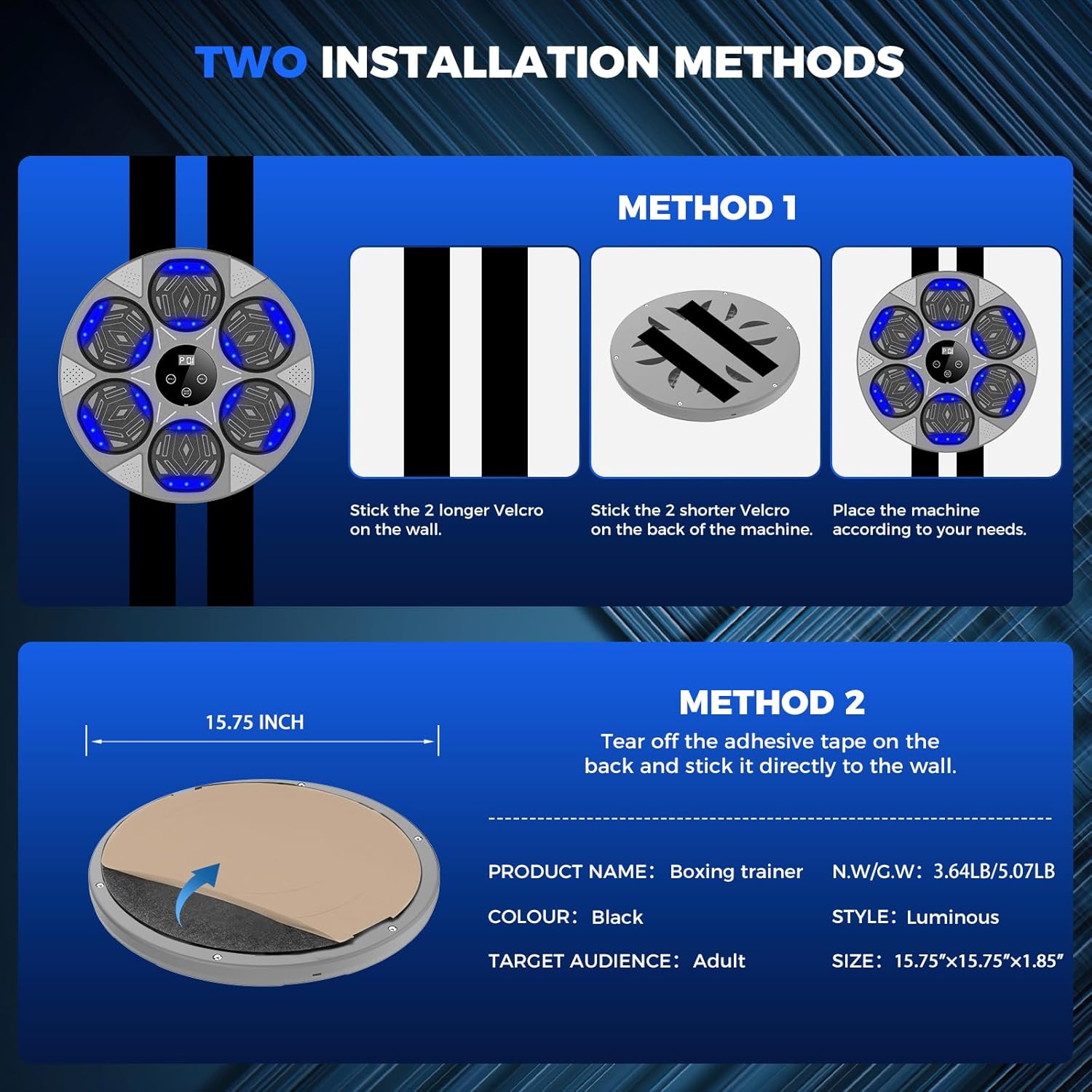
Image: Illustration of the two available installation methods.
Method 1: Adhesive Mounting Pad
- Ensure the wall surface is clean, dry, and smooth.
- Peel off one side of the protective film from the large circular adhesive mounting pad.
- Carefully align and stick the pad to the back of the boxing machine.
- Peel off the remaining protective film from the other side of the mounting pad.
- Press the boxing machine firmly against the desired wall location for at least 30 seconds to ensure secure adhesion.
Method 2: Velcro Strips
- Clean and dry the wall surface thoroughly.
- Attach the longer set of Velcro strips to the back of the boxing machine, ensuring they are parallel and vertically aligned.
- Attach the shorter set of Velcro strips to the wall at your desired height and spacing, ensuring they align with the strips on the machine.
- Press the boxing machine firmly onto the wall-mounted Velcro strips. This method allows for easy height adjustment by repositioning the machine on the wall strips.
Note: For optimal adhesion, allow 24 hours after installation before heavy use, especially for adhesive methods.
Operating Instructions

Image: Central control panel with LED display and buttons.
Power On/Off
- To power on, press and hold the ON/OFF/MODE button located in the center of the display until the lights illuminate and a sound indicates it's active.
- To power off, press and hold the ON/OFF/MODE button again until the lights turn off.
Bluetooth Connectivity
Connect your smartphone or other Bluetooth-enabled device to play your favorite music during workouts.
- Ensure the boxing machine is powered on.
- Activate Bluetooth on your mobile device.
- Search for available devices and select the device named "Bluetooth".
- Once connected, you can play music from your device, and the boxing machine's lights will synchronize with the rhythm.

Image: Steps for connecting your device via Bluetooth.
Mode Selection and Speed Adjustment
- Press the ON/OFF/MODE button briefly to cycle through the available training modes. The LED display will show the current mode (e.g., P1, P2, etc.).
- Each mode offers different light patterns and speed challenges.
- Use the VOL+ and VOL- buttons to adjust the volume of the music and sound effects.
Smart Counting Feature
The integrated smart counting feature tracks every successful punch, displayed on the central LED screen. This helps monitor your progress and keeps you motivated.
Wearing Boxing Gloves
For optimal performance and protection, wear the included boxing gloves during your workout. The gloves are designed to provide comfort and impact absorption.

Image: LOLBOX Music Boxing Machine with included boxing gloves.
Maintenance
- Cleaning: Wipe the surface of the boxing machine with a soft, damp cloth. Avoid using abrasive cleaners or solvents.
- Storage: Store the device in a cool, dry place away from direct sunlight and extreme temperatures.
- Charging: Recharge the device using the provided USB-C cable when the battery is low. Avoid overcharging.
- Gloves Care: Air out boxing gloves after each use to prevent odor. Wipe clean with a damp cloth as needed.
Troubleshooting
| Problem | Possible Cause | Solution |
|---|---|---|
| Device does not power on. | Low battery or power button not pressed correctly. | Charge the device using the USB-C cable. Ensure the ON/OFF/MODE button is pressed and held for a few seconds. |
| Bluetooth not connecting. | Bluetooth not enabled on device, or machine not in pairing mode. | Ensure Bluetooth is active on your phone and the boxing machine is powered on. Restart both devices and try pairing again. |
| Lights not responding to music. | Bluetooth connection issue or music volume too low. | Verify Bluetooth connection. Increase music volume on your connected device. |
| Punches not registering. | Insufficient force or sensor malfunction. | Ensure you are hitting the pads with adequate force. If the issue persists, contact customer support. |
Specifications
- Brand Name: LOLBOX
- Model Name: QJB-Grey-CR1
- Color: Ash
- Material: Acrylonitrile Butadiene Styrene
- Item Dimensions (LxWxH): 15.7 x 15.7 x 1.85 inches
- Item Package Dimensions (LxWxH): 16.5 x 16 x 3.5 inches
- Package Weight: 2.04 Kilograms
- Suggested Users: Unisex-adult
- Included Components: Boxing gloves
- Sport Type: Boxing
Warranty
This product comes with a Two Year Warranty. For warranty claims or further details, please refer to the contact information in the Support section.
Support
If you have any questions, require assistance, or need to make a warranty claim, please contact LOLBOX customer support. Refer to the product packaging or the official LOLBOX website for the most up-to-date contact information.
For additional resources and product information, visit the LOLBOX Store on Amazon.
Product Videos
What you should know about LOLBOX Boxing Machine
Video Description: An overview of the LOLBOX Boxing Machine, highlighting its features and benefits for users. This video demonstrates the product's design and functionality.
Boxing Machine with Lights and Music.
Video Description: A demonstration of the boxing machine's interactive lights and music synchronization during a workout session. This video showcases the engaging aspects of the device.


