
Introduction
This manual provides essential information for the safe and efficient use of your MeoWant MW-SC09 Automatic Self-Cleaning Cat Litter Box. Please read these instructions thoroughly before operation to ensure proper functionality and the safety of your pet.

Image: The MeoWant MW-SC09 Automatic Self-Cleaning Cat Litter Box, showcasing its design and size.
Key Features
- 106L Extra-Large Space: Provides ample room for cats weighing 3.3 to 30 pounds, including multiple cats. The 8.27-inch low entrance accommodates short-legged, overweight, and senior cats.
- Enhanced Safety: Features an integrated rotating design that ensures the machine opening always faces outwards, preventing cats from getting stuck. Multiple high-precision sensors detect weight and movement, stopping operation immediately if a cat is present.
- Dual Odor Control: Includes an upgraded silicone pad for reduced leakage and a sealed waste bin lid. Deodorizing gel helps break down ammonia odors, maintaining a fresh environment.
- APP Control & Health Monitoring: Connects via 2.4GHz Wi-Fi for remote control and tracking of usage data, cat weight, and activity. Supports monitoring for over 30 cats.
- Multiple Self-Cleaning Modes: Offers automatic, manual, and timer-based cleaning. Compatible with various clumping cat litter types (length <15mm).
- Quiet Operation & Easy Cleaning: Operates at a low noise level of 36dB. The drum is detachable for rinsing, while the base should be wiped clean.
Package Contents
Verify that all items are present in the package:
- Automatic Litter Box (1)
- Cat Litter Mat (1)
- Litter Box Liner (1)
- Deodorant Gel (1)
- Power Adapter (1)
- Instruction Manual (1)
Note: Accessories are packaged inside the waste bin. Please remove the waste bin upon receipt to locate them.
Setup
1. Initial Placement
- Place the litter box on a firm, level surface. Avoid carpets or soft surfaces, as this may affect the internal weight sensors.
- Do not drag the litter box, as this can cause the bottom sensor to malfunction.
2. Filling with Litter
- Ensure the litter box is empty before adding new litter.
- Use clumping cat litter with a length of less than 15mm. Suitable types include bentonite, mixed, and tofu litter. Crystal, paper, or wooden litter are not suitable.
- Pour litter into the drum, ensuring it does not exceed the warning line. Overfilling can lead to excess litter being disposed of during cleaning cycles.

Image: Visual guide to suitable clumping cat litter types.
3. App Connection (AIRPET APP)
The MeoWant automatic litter box supports 2.4GHz Wi-Fi connectivity only. Follow these steps to connect your device:
- Download the AIRPET APP from your device's app store.
- Open the app and register an account.
- Scan the QR code located on the right side of the litter box base, or manually select the model to add your device.
- Hold the pairing button on the litter box for 3 seconds until the indicator light flashes.
- Follow the in-app instructions to connect to your 2.4GHz Wi-Fi network and enter the password.
- Wait for the device to connect; the indicator light will turn solid blue upon successful connection.

Image: Visual steps for connecting the litter box to the AIRPET app.
Video: An overview of the MW-SC09 Automatic Litter Box, demonstrating its features and setup.
Operating Instructions
Cleaning Modes
- Automatic Mode: The litter box will automatically clean itself after your cat exits the unit, based on the set delay time in the app.
- Manual Mode: Initiate a cleaning cycle manually via the control panel on the device or through the AIRPET APP.
- Timer Mode: Schedule specific cleaning times using the AIRPET APP.
App Control Features
The AIRPET APP provides comprehensive control and monitoring capabilities:
- Remote Control: Start/stop cleaning cycles, adjust settings, and activate child lock or 'Do Not Disturb' modes.
- Health Monitoring: Track your cat's usage data, weight, and activity in real-time. The app can record data for over 30 cats and push periodic updates, helping you detect any abnormalities.
- Status View: Monitor the current status of the litter box, including cleaning progress and litter levels.

Image: The AIRPET app interface showing various control and monitoring options.

Image: Detailed view of the app's settings and data display.
Safety Features
The MeoWant MW-SC09 is designed with multiple safety mechanisms to protect your cat:
- Anti-Pinch Design: The integrated rotating drum and waste bin ensure the opening always faces outwards, eliminating pinch points.
- High-Precision Sensors: Equipped with multiple sensors for weight detection, movement monitoring, and abnormal alarms. The device stops immediately if a cat enters during operation.
- Protection Mechanism: All sensors are tested before each cleaning cycle to ensure optimal safety.
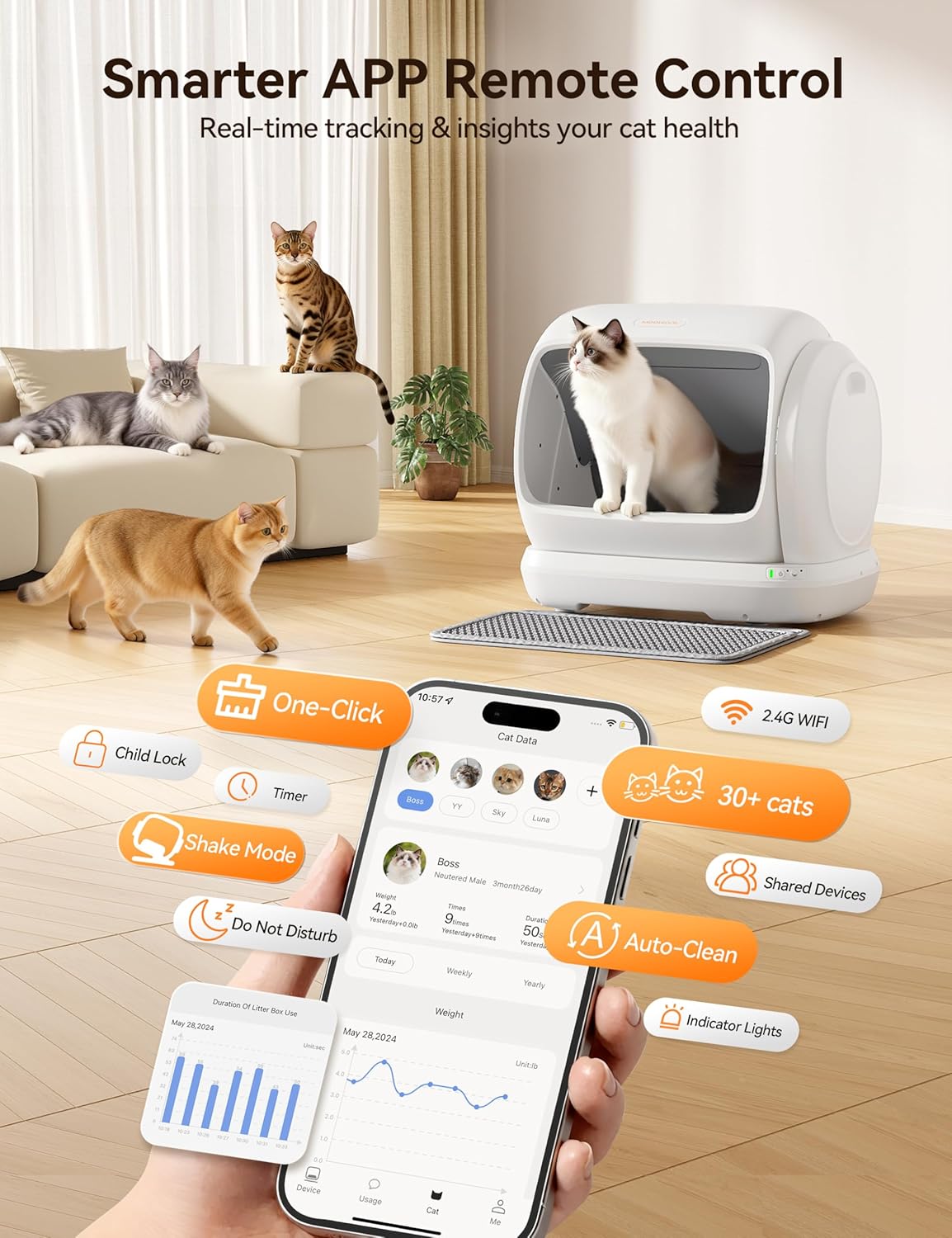
Image: Illustration of the anti-pinch mechanism and safety sensors.

Image: Diagram detailing the comprehensive security protections.
Maintenance
1. Emptying the Waste Bin
The 6.7-liter waste bin should be emptied regularly, especially in multi-cat households, to prevent odors and ensure efficient operation.

Image: The 6.7L large capacity waste bin.
2. Cleaning the Drum and Base
Regular cleaning ensures hygiene and extends the product's lifespan.
- The drum is detachable and can be rinsed with water. It features three drainage holes for quick water removal.
- The base of the unit cannot be washed directly. Clean it by wiping with a damp cloth.
- The upgraded silicone pad is waterproof, non-stick, and scratch-resistant, designed for easy cleaning.

Image: Instructions for removing the cover and drum for cleaning.

Image: Visual guide for rinsing the drum and cleaning the base.
3. Odor Control
The litter box incorporates a dual odor control system:
- A sealed waste bin lid physically isolates odors.
- The included deodorizing gel actively breaks down ammonia, reducing unpleasant smells. Replace the gel as needed.
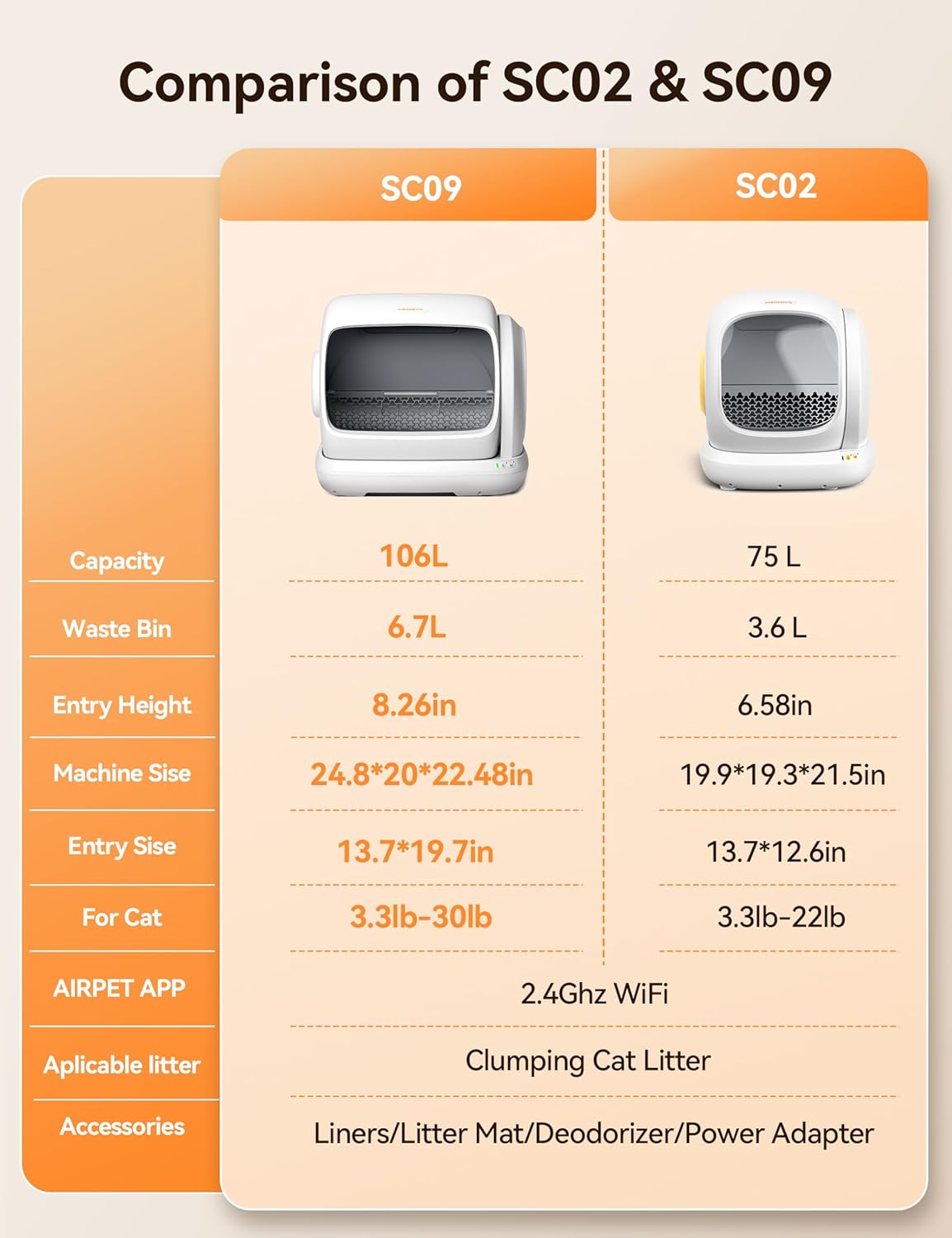
Image: Components of the dual odor removal system, including the sealed waste bin and deodorizing gel.
Troubleshooting
If you encounter issues with your MeoWant MW-SC09, refer to the following common problems and solutions:
| Problem | Possible Cause | Solution |
|---|---|---|
| Device not connecting to Wi-Fi | Incorrect Wi-Fi band (not 2.4GHz); incorrect password; device too far from router. | Ensure your router is broadcasting a 2.4GHz signal. Verify Wi-Fi password. Move the litter box closer to the router. |
| Litter not clumping or sticking to the drum | Litter type not suitable; insufficient litter depth; cleaning cycle too soon after use. | Use recommended clumping litter. Ensure litter is filled to the warning line. Adjust the cleaning delay in the app to allow more time for clumping. |
| Persistent odors | Waste bin full; deodorizing gel needs replacement; improper cleaning. | Empty the waste bin more frequently. Replace the deodorizing gel. Ensure the drum and base are cleaned regularly as per maintenance instructions. |
| Device stops unexpectedly or shows error | Cat detected during operation; unit on an uneven surface; sensor malfunction. | Ensure no cat is near or in the unit. Relocate to a firm, level surface. If the problem persists, contact customer service. |
For issues not listed above, or if troubleshooting steps do not resolve the problem, please contact MeoWant customer service.
Specifications
| Feature | Detail |
|---|---|
| Model Number | MW-SC09 |
| Product Dimensions (L x W x H) | 24.8" x 22.48" x 20" (630 x 508 x 571mm) |
| Internal Space | 106 Liters |
| Item Weight | 10.2 kg (22.49 pounds) |
| Rated Voltage | 12V/1A |
| Rated Power | 12W |
| Power Cord Length | 1.8 meters |
| Waste Bin Capacity | 6.7 Liters |
| Entrance Height | 8.27 inches |
| Suitable for Cats | 4 months and older, weighing 3.3-30 lbs |
| Compatible Litter | Clumping cat litter (length <15mm) |
| Connectivity | 2.4GHz Wi-Fi (not 5GHz) |
| Main Materials | PP, PC, POM, ABS |
Warranty and Support
MeoWant provides a 12-month after-sales service for your MW-SC09 Automatic Self-Cleaning Cat Litter Box. This warranty covers manufacturing defects and malfunctions under normal use.
Customer Service
If you have any questions, experience issues, or require assistance with your product, please contact MeoWant customer service immediately. Our support team is available to help you.

Image: MeoWant customer service details, highlighting 24-hour support and 1-year coverage.


