
1. Introduction
The ORCATAB WT1 Pro 2026 is a rugged 5G tablet designed for demanding environments. It features an 11-inch 2K 120Hz display, runs on Android 15 (upgradeable to Android 16), and is powered by a 6nm Unisoc T8200 octa-core processor. With a large 20080mAh battery, 33W fast charging, and OTG reverse charging, it offers extended usage. The tablet includes a versatile camera system with 64MP main, 16MP front, and 20MP night vision cameras, along with an underwater mode. Its durable construction is IP68, IP69K, and MIL-STD-810H certified, providing resistance to drops, dust, and water. Integrated Gemini AI optimizes performance, and multi-system GPS ensures reliable navigation. A built-in 380-lumen camping light and flexible stand enhance its utility for outdoor and professional use.
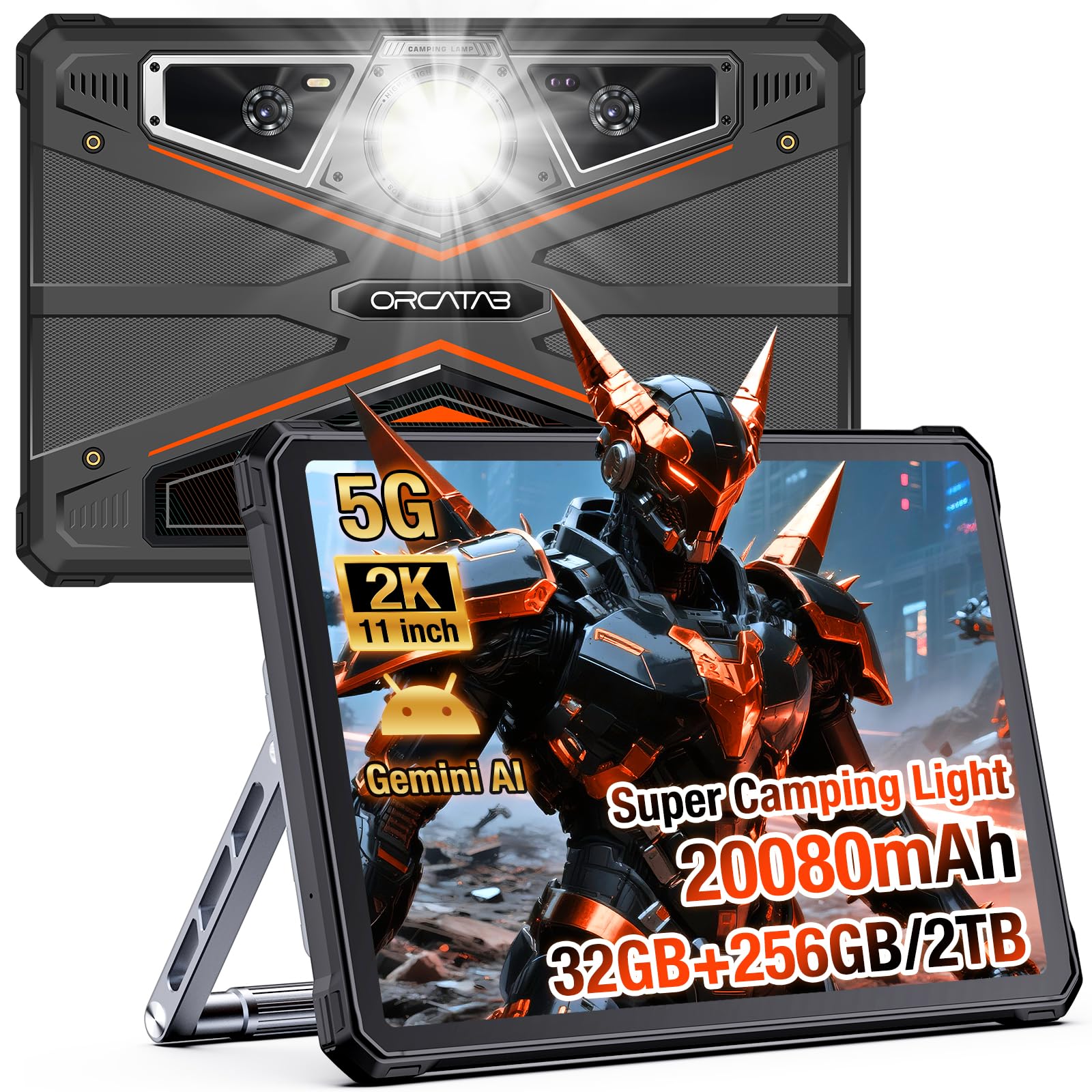
Figure 1: ORCATAB WT1 Pro 2026 5G Rugged Tablet
2. What's in the Box
The ORCATAB WT1 Pro package includes the following items:
- 1x ORCATAB WT1 Pro Rugged Tablet
- 1x USB Type-C Cable & OTG Cable
- 1x Explosion-Proof Film (Screen Protector)
- 1x Tablet Stand & Tablet Strap
- 1x User Manual
- 1x SIM Ejector Tool
- 8x Screws
- 1x Dual C-port Charging Cable
- 1x Charging Head
- 1x Steel Protective Film
Video 1: ORCATAB WT1 Pro Unboxing Video. This video demonstrates the unboxing process and shows all included accessories.

Figure 2: Included accessories with the ORCATAB WT1 Pro tablet.
3. Setup
3.1 Screen Protector Installation
Carefully clean the tablet screen using the provided wipes. Align the explosion-proof film (screen protector) with the screen edges and gently apply, pressing out any air bubbles.
3.2 Stand and Hand Strap Assembly
Attach the flexible aluminum stand and leather hand strap to the designated points on the back of the tablet using the provided screws and screwdriver. Ensure all screws are tightened securely for stable operation.
Video 2: Tablet Stand Assembly Tutorial. This video provides step-by-step instructions for attaching the tablet stand.
3.3 SIM Card / TF Card Insertion
Locate the TF/SIM card slot on the side of the tablet. Use the provided SIM ejector tool to open the tray. Insert your 5G SIM card(s) and/or a microSD card (up to 2TB) into the tray, then reinsert the tray into the tablet.
4. Key Features
4.1 Display
The tablet features an 11-inch 2K display with a resolution of 1920 x 1200 pixels and a 120Hz refresh rate for smooth visuals. With 450 NIT brightness and Widevine L1 certification, it supports full HD streaming on platforms like Netflix and Amazon Prime.

Figure 3: The 11-inch 2K scratch-resistant display.
4.2 Performance
Powered by a 6nm Unisoc T8200 octa-core processor, the WT1 Pro offers responsive performance. It comes with 8GB of RAM, expandable to 32GB with virtual RAM technology, and 256GB of internal storage, expandable up to 2TB via microSD card.

Figure 4: Advanced 6nm Unisoc T8200 processor with expansive memory and storage.
4.3 Battery & Charging
A large 20080mAh battery provides extended usage, with up to 2880 hours of standby time. The tablet supports 33W fast charging and OTG reverse charging, allowing it to function as a power bank for other devices.

Figure 5: Massive 20080mAh battery for extended use and 33W fast charging capability.
4.4 Cameras
Equipped with a 64MP main rear camera, a 16MP front camera, and a 20MP night vision camera. It also features a dedicated underwater mode for capturing photos and videos in aquatic environments.

Figure 6: Powerful camera system for various scenarios including night vision and underwater mode.
4.5 Rugged Design
The ORCATAB WT1 Pro is built to withstand harsh conditions, certified with IP68, IP69K, and MIL-STD-810H standards. This ensures resistance to water submersion, dust ingress, and drops from up to 1.5 meters.

Figure 7: IP68, IP69K, and MIL-STD-810H certified for extreme environments.
4.6 Connectivity
Supports ultra-fast 5G LTE dual SIM connectivity and dual-band Wi-Fi (802.11ac, 802.11ax). It also includes Bluetooth 5.0 and multi-system GPS (BEIDOU/GLONASS/Galileo/GPS) for accurate navigation.

Figure 8: Multi-system GPS for precise and reliable navigation.
4.7 Gemini AI
Integrated Gemini AI optimizes tablet performance and battery life by learning user habits, and can assist with tasks like photo editing.

Figure 9: Gemini AI for optimized performance and intelligent assistance.
4.8 Camping Light
A powerful built-in 380-lumen camping light offers various modes including bright beam, flashing SOS, and ambient lighting.

Figure 10: The powerful 380-lumen camping light on the tablet's rear.
5. Operating Instructions
5.1 Basic Operation
Press and hold the power button to turn the tablet on or off. Use the volume buttons to adjust audio levels. Navigate the Android 15 interface using touch gestures.
5.2 Camera Modes
Open the camera application to access various modes such as 64MP Main, 16MP Selfie, 20MP Night Vision, and Underwater Mode. Select the desired mode from the camera interface.
5.3 Camping Light Operation
Access the camping light settings through the quick settings panel or a dedicated application. Choose between full brightness, half brightness, quarter brightness, SOS flash, or super flash modes.
5.4 OTG Reverse Charging
Connect your device to the tablet's USB Type-C port using the OTG cable. The tablet will then act as a power bank to charge the connected device.
6. Maintenance
To ensure the longevity and optimal performance of your ORCATAB WT1 Pro rugged tablet, follow these maintenance guidelines:
- Cleaning: Use a soft, damp cloth to clean the screen and body. Avoid harsh chemicals or abrasive materials.
- Water Exposure: While waterproof, ensure all port covers are securely closed before exposing the tablet to water. Rinse with fresh water after saltwater exposure.
- Temperature: Avoid exposing the tablet to extreme temperatures (below -20°C or above 55°C) for prolonged periods.
- Charging: Use only the provided charger and cable. Avoid overcharging the battery.
- Storage: When not in use for extended periods, store the tablet in a cool, dry place with approximately 50% battery charge.
7. Troubleshooting
If you encounter issues with your ORCATAB WT1 Pro, try the following steps:
- Tablet Not Turning On: Ensure the battery is charged. Connect the tablet to the charger and wait a few minutes before attempting to power it on.
- Screen Unresponsive: Perform a forced restart by holding down the power button for approximately 10-15 seconds.
- Connectivity Issues (5G/Wi-Fi): Check if airplane mode is off. Restart the tablet and your router (for Wi-Fi). Verify SIM card insertion for 5G issues.
- Apps Crashing: Clear the cache for the problematic app in Settings > Apps. If the issue persists, reinstall the app.
- Slow Performance: Close unnecessary background applications. Clear system cache. Consider a factory reset as a last resort (back up data first).
8. Specifications
| Feature | Specification |
|---|---|
| Brand | ORCATAB |
| Model Name | WT1 Pro |
| Operating System | Android 15 (Upgradeable to Android 16) |
| Processor | Unisoc T8200 (6nm, Octa-core), 2.3 GHz |
| RAM | 8 GB (32 GB with virtual expansion) |
| Internal Storage | 256 GB |
| Expandable Storage | Up to 2 TB (microSD) |
| Screen Size | 11 inches |
| Display Resolution | 1920 x 1200 Pixels (2K) |
| Display Refresh Rate | 120 Hz |
| Maximum Display Brightness | 450 Nit |
| Battery Capacity | 20080 mAh |
| Fast Charging | 33W |
| Rear Camera | 64 MP Main, 20 MP Night Vision |
| Front Camera | 16 MP |
| Connectivity | 5G Cellular, Wi-Fi (802.11ac, 802.11ax), Bluetooth, USB 3.1 Type C |
| GPS | BEIDOU, GLONASS, Galileo, GPS |
| Ruggedness | IP68, IP69K, MIL-STD-810H |
| Special Features | OTG Reverse Charging, Gemini AI, 380-Lumen Camping Light, Face ID |
| Item Weight | 1.87 Pounds |
| Dimensions (L x W x Thickness) | 10.5"L x 7"W x 0.62"Th |
9. Warranty & Support
The ORCATAB WT1 Pro comes with a 2-year manufacturer's warranty. For any support inquiries or technical assistance, please contact ORCATAB customer service. They aim to provide a reply within 24 hours.