
1. Introduction
Thank you for choosing the HUMILABS 20L Electric Dehumidifier. This appliance is designed to efficiently reduce humidity in large spaces up to 60m² (180m³), helping to prevent mold, mildew, and musty odors. It features smart control options, multiple operating modes, and convenient drainage solutions. Please read this manual thoroughly before use to ensure safe and optimal operation.
2. Setup
2.1 Unpacking and Placement
Carefully remove the dehumidifier from its packaging. Place the unit on a flat, stable surface in the desired room. Ensure there is at least 20 cm of space around the unit for proper airflow. The integrated 360° wheels and handle allow for easy relocation.

2.2 Power Connection
Connect the power cord to a grounded electrical outlet. Ensure the voltage matches the specifications listed on the product label.
2.3 Wi-Fi and App Connection
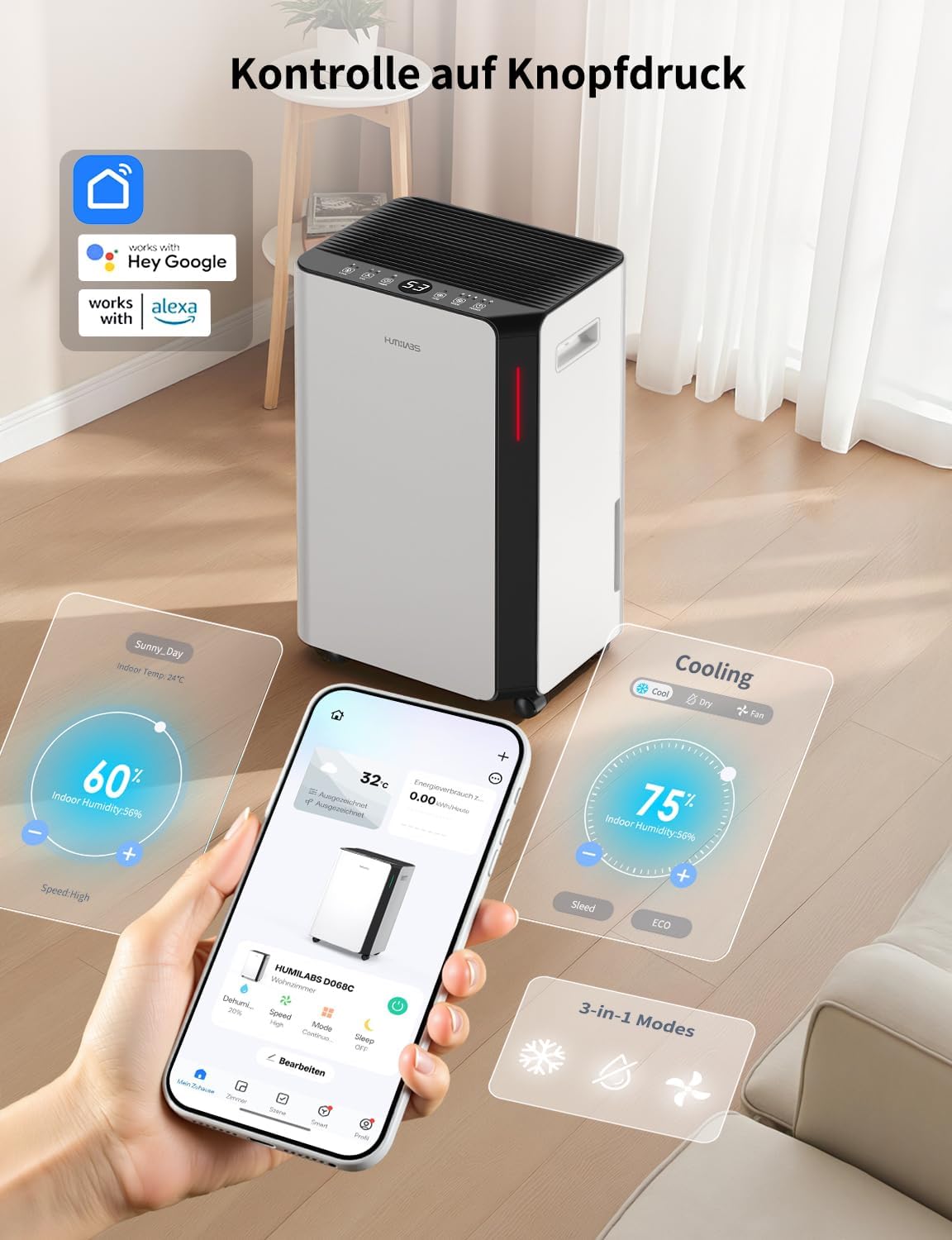
This dehumidifier supports Wi-Fi connectivity for remote control via the SmartLife app, as well as voice control through Alexa and Google Home. Follow the instructions in the SmartLife app to connect your device to your home Wi-Fi network.
3. Operation
3.1 Control Panel Overview
The intuitive digital control panel allows for easy operation. Use the buttons to power on/off, select modes, adjust settings, and set the timer.
3.2 Operating Modes
- Drying Mode: This mode is designed to remove excess moisture from clothes, helping them dry faster and remain fresh.
- Automatic Mode: In this mode, you can set your desired humidity level. The dehumidifier will automatically adjust its operation to maintain this level, ensuring optimal comfort.
- Standby Mode: When activated, the display light turns off, and the noise level is reduced to 41 decibels, providing a quiet environment suitable for sleeping or studying.

3.3 24-Hour Timer
Utilize the 24-hour timer function to schedule the dehumidifier to switch on or off at your convenience. This allows for automated operation, saving energy and ensuring your desired humidity levels are maintained.
4. Water Drainage
The HUMILABS dehumidifier offers two convenient drainage options:
4.1 Automatic Drainage
For continuous operation without needing to empty the water tank, connect the included 1-meter drainage hose to the drainage outlet. This allows water to drain directly into a floor drain or suitable container.
4.2 Manual Drainage
The unit features a 4.5-liter water tank. When the tank reaches its maximum capacity, the dehumidifier will automatically shut off, and the "tank full" indicator will illuminate. Simply remove the tank, empty the collected water, and reinsert it to resume operation.

5. Maintenance
5.1 Filter Cleaning
The rear air inlet is equipped with a removable and washable filter that captures dust, hair, and other impurities. Regularly clean the filter to maintain optimal performance and air quality. To clean, remove the filter, rinse it under running water, and allow it to dry completely before reinserting.

5.2 Water Tank Cleaning
Periodically clean the water tank to prevent mold or bacterial growth. Remove the tank, wash it with mild soap and water, rinse thoroughly, and dry before placing it back into the unit.
6. Troubleshooting
If you encounter any issues with your dehumidifier, please refer to the following common problems and solutions:
- Unit does not turn on: Check if the power cord is securely plugged in and if the power outlet is functioning. Ensure the water tank is correctly inserted and not full.
- Dehumidifier is not collecting water: Verify that the humidity setting is lower than the current room humidity. Check if the air filter is clean and not obstructed. Ensure the unit is not in fan-only mode.
- "Tank Full" indicator remains on after emptying: Ensure the water tank is fully and correctly reinserted into the unit.
- Unusual noise: Check for any obstructions in the air inlet or outlet. Ensure the unit is on a stable, flat surface.
- Wi-Fi connection issues: Ensure your Wi-Fi network is active and the dehumidifier is within range. Follow the troubleshooting steps in the SmartLife app.
For issues not covered here, please contact customer support.
7. Specifications
| Feature | Specification |
|---|---|
| Brand | HUMILABS |
| Model Name | OL20-BD068CF |
| Color | White |
| Product Dimensions | 23.5 x 30.5 x 49 cm |
| Product Weight | 13.5 kg |
| Water Tank Capacity | 4.5 Liters |
| Dehumidification Capacity | 20 Liters/day (at 30°C, 90% RH) |
| Power | 330 Watts |
| Floor Area Coverage | Up to 60 m² (180 m³) |
| Special Features | Automatic Shut-off, Washable Filter, Quiet Operation, App & WLAN Control, 3 Operating Modes, 24h Timer |
8. Warranty and Support
HUMILABS provides a one-year warranty for this product. If any quality problem occurs within 12 months of purchase, warranty or replacement service is available. Our professional after-sales team is on standby to assist you.


For any questions or support, please contact our customer service. We aim to reply to your message within 24 hours.