
XikeStor PoE |8x 2.5G|2x SFP+|Web-managed
XikeStor 10-Port 2.5G PoE+ Web Managed Switch User Manual
Model: PoE |8x 2.5G|2x SFP+|Web-managed
Brand: XikeStor
1. Introduction
This user manual provides detailed instructions for the installation, configuration, and operation of your XikeStor 10-Port 2.5G PoE+ Web Managed Switch. Please read this manual thoroughly before using the device to ensure proper functionality and to prevent damage.
2. Product Overview
The XikeStor 10-Port 2.5G PoE+ Web Managed Switch is designed for high-performance network environments. It features 8 PoE+ 2.5 Gigabit Ethernet ports and 2x 10 Gigabit SFP+ uplink ports, offering advanced network control and efficient power delivery.

Image: Front view of the XikeStor 10-Port 2.5G PoE+ Web Managed Switch, showing 8 RJ45 ports and 2 SFP+ ports, along with status indicators.
Key Features:
- Intelligent PoE+ Management: 8 PoE+ 2.5 GbE ports, IEEE 802.3af/at compliant, 30W per port, 100W total budget. Supports auto-detection and power supply, compatible with non-PoE devices.
- Advanced Network Control: Fully managed switch supporting VLAN, LACP link aggregation, and QoS prioritization. Flexible configuration via web interface.
- Multi-Gigabit Speed & 10G Uplink: 8x 2.5 GbE ports for high transfer rates. 2x 10G SFP+ fiber uplink ports to eliminate bandwidth bottlenecks.
- Fanless Design: All-metal casing with passive cooling for silent operation and efficient heat dissipation.
- Flexible Installation: Supports desktop or wall-mounted installation.
- Broad Compatibility: Compatible with common NAS devices, IP cameras, professional access points, and more.
3. Package Contents
Verify the contents of your package. If any items are missing or damaged, please contact customer support.
- 1x XikeStor 10-Port 2.5G PoE+ Web Managed Switch
- 1x European Power Adapter
4. Setup
4.1 Physical Installation
The switch supports multiple installation methods:
- Desktop Placement: Place the switch on a flat, stable surface. The product includes non-slip foot pads.
- Wall-Mounted Installation: Use appropriate screws and anchors (not included) to mount the switch to a wall. The distance between the two installation pivot points is 14.7 cm.
- Rack-Mounted Installation: Mounting ears are not included in the package. If rack mounting is desired, compatible accessories must be sourced separately.

Image: Illustration of the three supported installation methods: wall-mounted, rack-mounted (requires separate ears), and flat desktop placement, highlighting the dimensions and non-slip feet.
4.2 Connecting Devices
- Power Connection: Connect the provided European power adapter to the DC 54V input port on the switch and then to a power outlet.
- Network Devices:
- Connect your network devices (e.g., computers, IP cameras, Wi-Fi 6 APs, NAS) to the 2.5GbE RJ45 PoE+ ports (ports 1-8) using Ethernet cables (Cat6a or higher recommended).
- For high-speed uplinks, connect to other network equipment using SFP+ modules (not included) in the 10GbE SFP+ ports (ports 9-10).

Image: The XikeStor switch with power and network cables connected, demonstrating the plug-and-play feature for 2.5GbE RJ45 PoE ports and 10GbE SFP+ ports.
The switch supports Auto-MDI/MDIX technology, eliminating the need to distinguish between upstream and downstream ports. Any port can serve as either an upstream or downstream port.
5. Operating Instructions
5.1 Powering On and Status Indicators
Once connected to power, the switch will automatically power on. Observe the LED indicators on the front panel:
- SYS LED: Indicates system status. (e.g., Solid green for normal operation)
- PWR LED: Indicates power status. (e.g., Solid green when powered)
- PoE LEDs (per port): Indicate PoE status for each port.
- Link/Act LEDs (per port): Indicate network link and activity for each port.
5.2 Basic L2 Management Functions (Web Interface)
The XikeStor switch is web-managed, allowing configuration through a web browser.
- Accessing the Web Interface:
- The default IP address is 192.168.10.12.
- Default Username: admin
- Default Password: admin
- To enter the management page, the switch's IPv4 address must be changed to 192.168.10.X (where X is any number between 2 and 254, but not 12) and the subnet mask must be set to 255.255.255.0.
- Configuration Options: The web interface provides access to various Layer 2 management functions, including:
- Energy-saving Mode
- Port Mirroring
- Link Aggregation (LACP)
- Port VLAN
- Tagged VLAN
- IGMP Snooping
- Storm Control
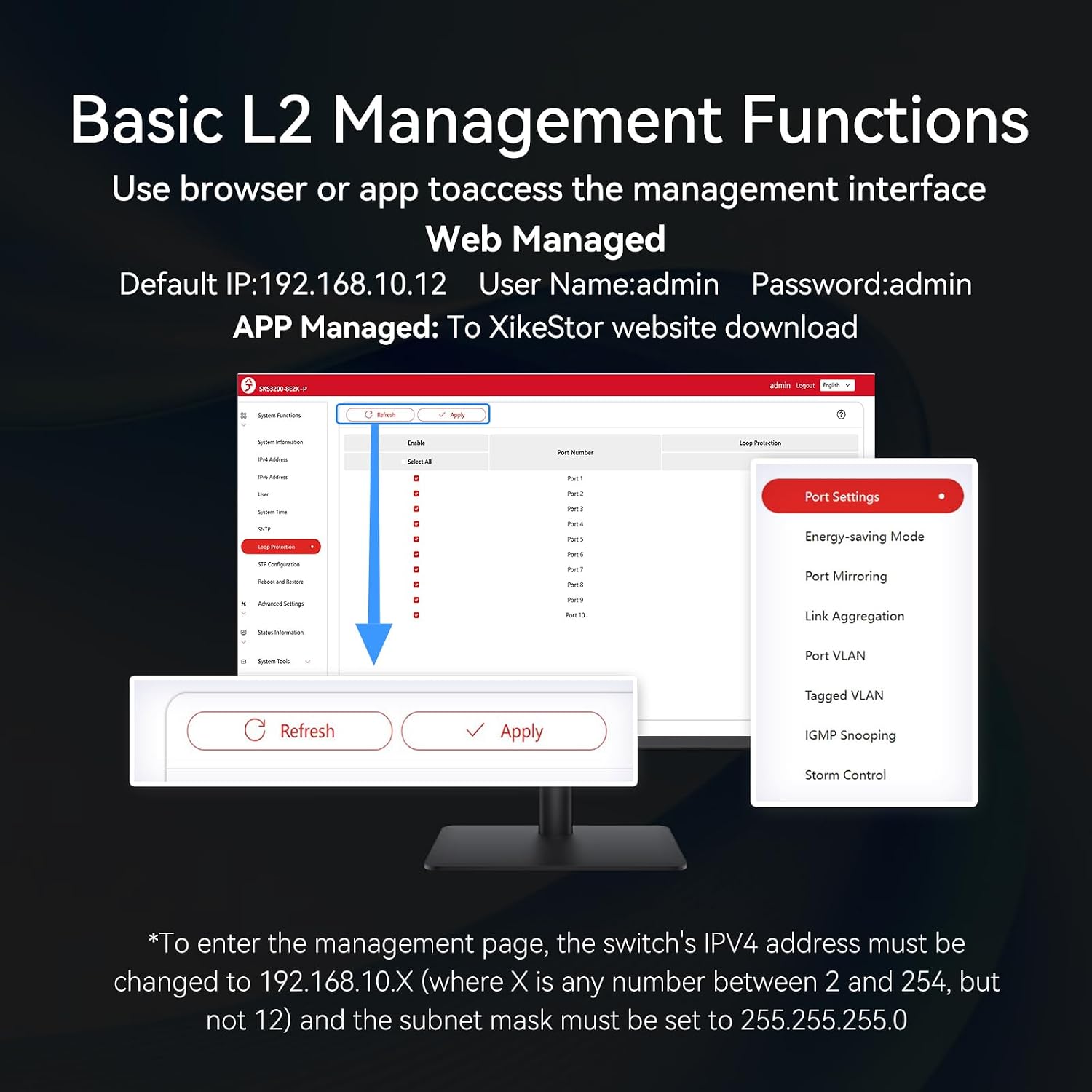
Image: Screenshot of the web management interface, illustrating basic L2 management functions such as port settings, VLAN, LACP, and QoS. The default IP, username, and password are also displayed.
For detailed configuration steps for each function, refer to the online PDF manual available on the XikeStor website.
5.3 PoE+ Power Supply
The switch provides Power over Ethernet Plus (PoE+) on ports 1-8, compliant with IEEE 802.3af/at standards. This allows compatible devices to receive both data and power over a single Ethernet cable.
- Maximum output per port: 30W
- Total power budget: 100W
- The switch automatically detects and supplies power to PoE-compatible devices. It is also compatible with non-PoE devices, which will only receive data.
- Intelligent dynamic adjustment of PoE power.
- Automatic recovery of PoE power supply in case of abnormality.

Image: The XikeStor switch highlighting its PoE+ power supply capabilities, indicating support for devices like Wifi 6/7 APs, 8K surveillance cameras, and signal stations, with a maximum output of 30W per port and 100W total.

Image: A comparison illustrating the benefits of PoE power supply, showing how a single cable transmits both electricity and data, simplifying wiring compared to non-PoE solutions.
5.4 Network Topology Example

Image: A schematic diagram illustrating a typical network topology using the XikeStor switch. It shows connections to a PC, monitor, two access points (APs), and a 10Gbps NAS, distinguishing between power, network, and 10G network connections.
- Non-PoE devices do not supply power and only perform data transmission.
- PoE devices supply power and transmit data.
- Intelligent dynamic adjustment of PoE power.
- Automatic recovery of PoE power supply.
6. Maintenance
6.1 General Care
- Keep the device in a cool, dry, and well-ventilated environment.
- Avoid exposing the switch to direct sunlight, high temperatures, or high humidity.
- Clean the exterior of the switch with a soft, dry cloth. Do not use liquid or aerosol cleaners.
- Ensure proper airflow around the device, especially since it is fanless and relies on passive cooling.

Image: A baby sleeping, symbolizing the 24-hour silent and stable operation of the fanless XikeStor switch, which uses passive cooling for heat dissipation.
6.2 Firmware Updates
Periodically check the XikeStor official website for firmware updates. Firmware updates can improve performance, add new features, or fix bugs. Follow the instructions provided with the firmware update package carefully.
7. Troubleshooting
| Problem | Possible Cause | Solution |
|---|---|---|
| No power / PWR LED off | Power adapter not connected or faulty; power outlet issue. | Ensure power adapter is securely connected. Test power outlet with another device. Try a different power adapter if available. |
| No link on a port / Link/Act LED off | Ethernet cable faulty or disconnected; connected device is off or faulty. | Check cable connections. Try a different Ethernet cable. Ensure the connected device is powered on and functioning correctly. |
| PoE device not receiving power / PoE LED off | Device is not PoE compatible; cable issue; total power budget exceeded. | Verify the device is IEEE 802.3af/at compliant. Check Ethernet cable. Ensure total PoE power consumption does not exceed 100W. |
| Cannot access web management interface | Incorrect IP address or subnet mask; network configuration issue on PC. | Ensure your PC's IP address is in the same subnet as the switch (e.g., 192.168.10.X, subnet mask 255.255.255.0). Verify the switch's default IP (192.168.10.12). Clear browser cache. |
| Slow network performance | Cable quality; network congestion; device limitations. | Use Cat6a or higher cables for 2.5G/10G connections. Check for network loops. Ensure connected devices support the desired speeds. |
If the problem persists after attempting these solutions, please contact XikeStor customer support.
8. Specifications
| Model Number | PoE |8x 2.5G|2x SFP+|Web-managed |
| Brand | XikeStor |
| Network Ports | 8x 2.5GbE RJ45 (PoE+), 2x 10GbE SFP+ |
| PoE Standard | IEEE 802.3af/at |
| Max PoE Output per Port | 30W |
| Total PoE Power Budget | 100W |
| Switching Capacity | 80 Gbps |
| Forwarding Rate | 59.52 Mpps |
| Power Input | DC 54V |
| Dimensions (L x W x H) | 207mm x 136mm x 35mm |
| Shell Material | Thickened iron shell, die-casting process |
| Heat Dissipation | Natural heat dissipation (Fanless) |
| Operating Temperature | Up to 40°C |
| Management Type | Web Managed (Basic Layer 2 features) |
| Included Components | 1x Switch, 1x European Power Adapter |
9. Warranty and Support
For warranty information and technical support, please refer to the official XikeStor website or contact your local distributor. Keep your purchase receipt for warranty claims.
Manufacturer: Anhui Seeker Electronic Technology Co., LTD.
Contact: Refer to the XikeStor official website for contact details and support resources.
Related documentsPoE |8x 2.5G|2x SFP+|Web-managed

Ask a question about this manual
Ask about setup, troubleshooting, compatibility, parts, safety, or missing instructions. Manuals+ will review the question and use this page’s manual context to help answer it.