
Introduction
Thank you for choosing the Lefant M5 MAX Robot Vacuum and Mop Cleaner. This manual provides essential information for the safe operation, maintenance, and troubleshooting of your device. Please read it thoroughly before use and keep it for future reference.
The Lefant M5 MAX is an advanced cleaning solution designed to simplify your home maintenance. It features powerful suction, an innovative roller mop system, smart navigation, and convenient control options.
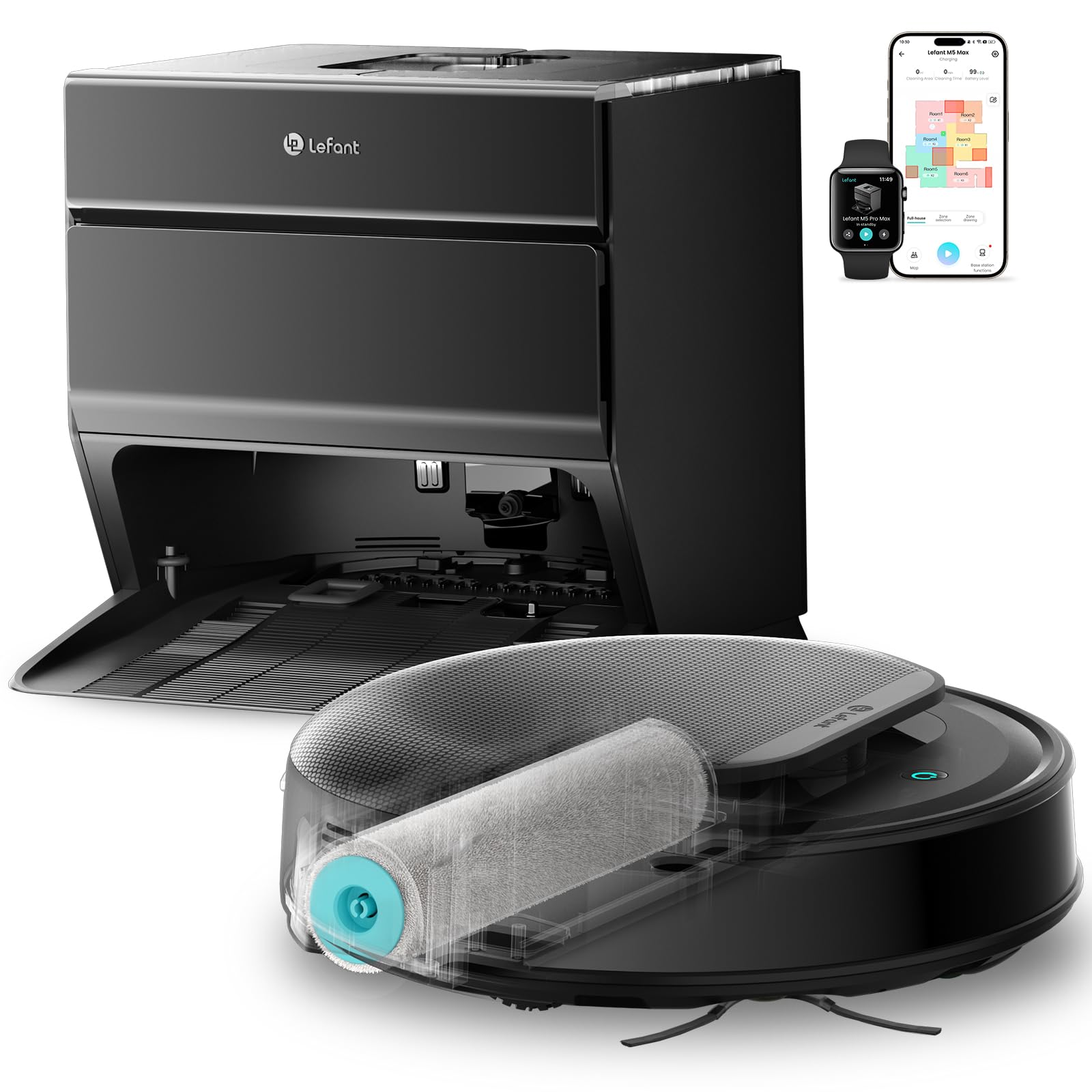
Figure 1: Lefant M5 MAX Robot Vacuum and Mop Cleaner
Getting Started (Setup)
1. Unboxing and Component Identification
Carefully remove all components from the packaging. Ensure all items listed below are present:
- Lefant M5 MAX Robot Vacuum and Mop Cleaner
- Docking Station
- Filter
- Dust Collection Bag
- Water Tank
- Side Brush
2. Charging the Robot
Place the docking station in an open area with good Wi-Fi coverage. Connect the power adapter to the docking station and plug it into a wall outlet. Place the robot onto the docking station to charge. Ensure the charging contacts on the robot align with those on the station. A full charge is recommended before first use.
3. Connecting to the Lefant App
The Lefant app allows for advanced control and customization of your robot cleaner.
- Download the Lefant app from your app store.
- Add your M5 MAX robot vacuum to the app.
- Connect to a 2.4 GHz / 5 GHz Wi-Fi network.
- Turn on the robot vacuum by pressing the power button.
- Press and hold the start button for 6 seconds.
- Select M5 Max and wait for the robot to pair correctly.

Figure 2: Step-by-step guide to connecting the Lefant robot to the mobile app.
4. Connecting to Alexa
Integrate your M5 MAX with Amazon Alexa for convenient voice control.
- Open the Lefant APP and navigate to 'Mine' -> 'Third-party voice access' to access the service.
- Register your voice account and password.
- Open the Alexa APP and go to 'More' -> 'Skills & Games'.
- Search for 'Smart Life'.
- Click on 'Enable to use'.
- Select your region and enter your voice account and password from step 2.
- Wait for the connection to complete successfully.

Figure 3: Instructions for connecting the Lefant M5 MAX to Amazon Alexa.
Operation
1. Basic Operation
To start a cleaning cycle, press the power button on the robot or use the Lefant app. The robot will automatically begin cleaning based on its current mode or scheduled tasks. To pause or stop cleaning, press the power button again.
2. App Control and Customization
The Lefant app offers comprehensive control over your robot's cleaning functions:
- Zone Prohibited: Set virtual boundaries to prevent the robot from entering specific areas.
- Scheduled Cleaning: Program cleaning times and modes for automated cleaning.
- One-Click Cleaning: Initiate cleaning with a single tap.
- Mop Washing Interval: Adjust how frequently the mop is washed during cleaning.
- Mop Washing Temperature: Select hot water for deep cleaning or room temperature water.
- Mop Drying Duration: Set drying time (2, 3, or 4 hours) to prevent odors.
- Auto Dust Collection: Configure automatic dust emptying when the robot returns to the base station.

Figure 4: Overview of versatile app controls for cleaning plan customization.
3. Voice Control
Control your M5 MAX using voice commands through Alexa or Google Assistant. For example, say "Alexa, tell M5 Max to start cleaning."

Figure 5: Voice control functionality with Alexa or Google Assistant.
4. Apple Watch Control
Manage your Lefant robot directly from your Apple Watch.
- Download the Lefant App and the Apple Watch App on your phone.
- Pair your Apple Watch with your iPhone.
- Select the Lefant App on your Apple Watch.
- You must click on the Lefant App on your phone and log in.
- Once logged in, connect your robot.
- Return to your Apple Watch, from which you can now control your robot.

Figure 6: Steps to control the Lefant robot using an Apple Watch.
5. Smart Navigation and Mapping
The M5 MAX utilizes advanced navigation for efficient cleaning.
- 360° Laser Navigation: Equipped with a LiDAR sensor, the M5 MAX scans your entire home up to 15 meters for precise mapping.
- Multi-floor Mapping: Creates and manages maps for multiple levels, supporting up to 3 stored floor plans.
- Precise Path Planning: Ensures thorough cleaning without missing spots.
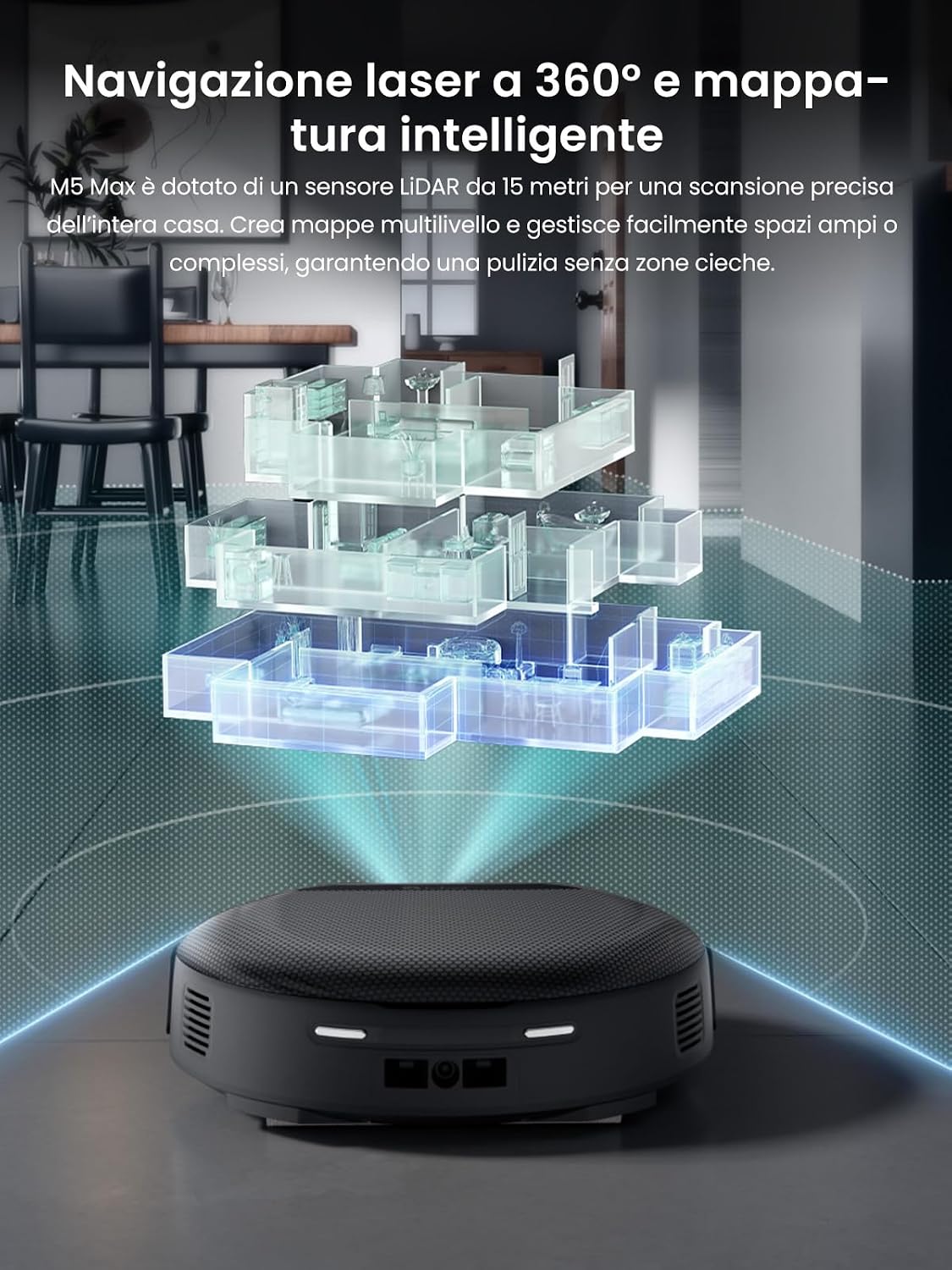
Figure 7: The robot's 360° laser navigation system creates precise maps for efficient cleaning across multiple floors.
6. Carpet Detection and Mop Lifting
The robot intelligently detects carpets and adjusts its cleaning mode.
- When a carpet is detected, the 8mm rotary mop automatically lifts to prevent wetting the carpet during mopping cycles.
- This ensures carpets remain dry while hard floors are thoroughly mopped.

Figure 8: The M5 MAX automatically lifts its 8mm mop when transitioning from hard floors to carpets.
7. Precise Obstacle Avoidance
The M5 MAX is equipped with an upgraded PSD 2.0 obstacle avoidance system.
- The system detects low obstacles up to 25 ± 5 mm.
- PSD triangulation measures distances with millimeter precision, reducing collisions.
- 12 PSD units create a 190° field of view, eliminating blind spots and ensuring smooth navigation even in complex environments.

Figure 9: The 190° PSD system allows the robot to precisely detect and avoid obstacles.
Maintenance
1. Fully Automatic Maintenance Base
The multi-function base handles most maintenance tasks automatically, reducing manual effort.
- Automatic Dust Collection: The base automatically empties the robot's dustbin into a 3.2L dust bag, providing up to 120 days of hands-free operation.
- Hot Water Roller Washing: The base uses 75°C hot water to thoroughly clean the roller mop.
- Cold Air Drying: After washing, the roller is dried with cold air to prevent odors and bacterial growth.
- Real-time Fresh Water System: Ensures the mop is always cleaned with fresh water, and dirty water is drained immediately.

Figure 10: Diagram of the integrated multi-function base, showing clean water, cold air drying, dust collection, and hot water washing.

Figure 11: The base provides fully automatic maintenance, including hot water washing, cold air drying, and automatic dust collection.
2. Roller Mop Self-Cleaning
The roller mop features continuous self-cleaning during operation.
- A constant pressure blade and 16 high-density nozzles work together to continuously clean the mop.
- This ensures the mop is always clean and ready for the next cleaning cycle.
- The system prevents the use of stagnant water and avoids leaving streaks.

Figure 12: The roller mop self-cleaning system with continuous rinsing and dirty water discharge.
3. Hot Water Mop Washing
The base washes the mop with 75°C hot water for deep cleaning.
- Hot water effectively removes stubborn dirt and grease from the roller.
- This process ensures the mop is thoroughly cleaned and remains like new over time.

Figure 13: The base washes the mop with 75°C hot water for effective cleaning.
4. Cold Air Drying
After washing, the mop is dried with cold air.
- Silent cold air circulation naturally dries the mop.
- This process effectively reduces residual moisture and prevents unpleasant odors, keeping the mop fresh and hygienic.

Figure 14: The silent cold air drying system ensures the mop is dry and fresh after cleaning.
5. Real-time Fresh Water Cleaning System
The M5 MAX ensures optimal cleaning performance by using a real-time fresh water system.
- Clean water is automatically injected while dirty water is drained in real-time.
- This continuous circulation prevents residual dirty water, keeping the mop moist, fresh, and hygienic throughout the cleaning process.
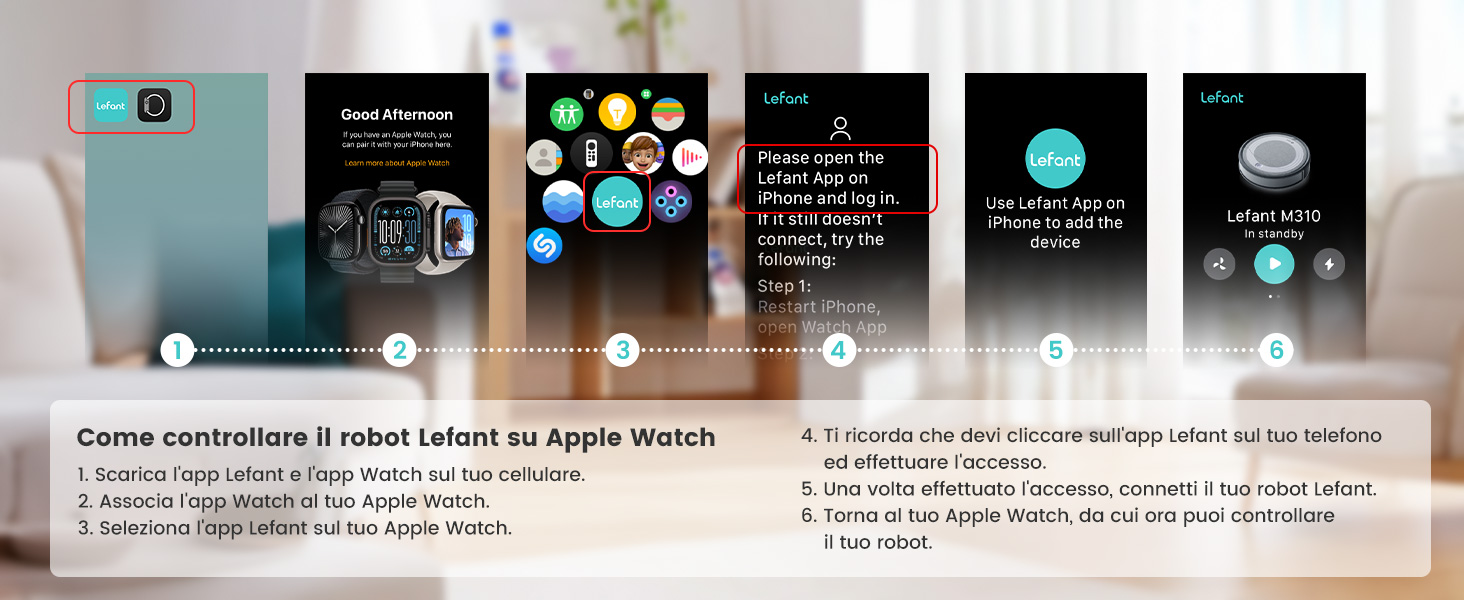
Figure 15: The real-time fresh water system ensures continuous clean water supply and dirty water drainage.
6. Dust Collection and Filter
The robot features an antibacterial dust collection system with a high-efficiency filter.
- The 3.2L dust bag in the base station allows for up to 120 days of maintenance-free dust collection.
- The antibacterial design helps maintain a hygienic environment.

Figure 16: The 3.2L antibacterial dust collection system provides extended maintenance-free operation.
Troubleshooting
If you encounter any issues with your Lefant M5 MAX, please refer to the following general troubleshooting tips. For more detailed solutions, consult the full user manual available for download or contact customer support.
- Robot not charging: Ensure the docking station is powered on and the robot's charging contacts are aligned. Clean the charging contacts if necessary.
- Robot not starting: Check if the battery is charged. Ensure no error indicators are present. Restart the robot.
- Poor cleaning performance: Check if the dustbin is full or the filter is clogged. Clean the roller brush and side brushes. Ensure the water tank has sufficient clean water.
- Robot getting stuck frequently: Clear obstacles from the cleaning path. Ensure the PSD sensors are clean.
- App connection issues: Verify your Wi-Fi network is 2.4 GHz or 5 GHz and stable. Restart your router, phone, and robot. Follow the app connection steps carefully.
- Unusual noise: Check for any foreign objects tangled in the brushes or wheels.
Specifications
| Feature | Specification |
|---|---|
| Brand | Lefant |
| Model Name | M5 Max |
| Recommended Surfaces | Hard floor, Carpet, Parquet, Tiles |
| Special Features | Cylinder live water washing, dToF laser navigation, PSD triangular telemetry, 23000Pa suction power, All-in-one base station, Low noise, Deep cleaning |
| Color | Black |
| Control Unit Type | App Control / Voice Control / Button Control |
| Filter Type | HEPA |
| Battery Cell Composition | Lithium Ion |
| Voltage | 19 Volts |
| Power Source | Battery Powered |
| Batteries Included? | Yes |
| Control Method | App |
| Compatible Devices | Smartphone |
| Form Factor | Robot |
| Item Dimensions (L x W x H) | 32L x 32W x 10H cm |
| Item Weight | 9.7 Kilograms |
| Noise Level | 55 Decibels |
| Portable | No |
| Included Components | Docking station, Filter, Dust collection bag, Water tank, Side brush |
| Model Number | M5Max |
| UPC | 609484081002 |
| Product Type Name | LEFANT M5 Max robot vacuum cleaner |
| Manufacturer | Lefant |
Warranty and Support
The Lefant M5 MAX comes with a 2-year manufacturer's warranty. For warranty claims, technical support, or any questions regarding your product, please contact Lefant customer service through their official website or the contact information provided in your product packaging.
You can also visit the Lefant Store on Amazon for additional product information and support resources.


