
Introduction
This manual provides essential information for the safe and efficient operation of your OUKITEL WP60 5G Rugged Phone. Please read this manual thoroughly before using the device to ensure proper functionality and to prevent damage. Keep this manual for future reference.
What's in the Box
Upon opening the package, verify that all items are present and in good condition. The standard package contents typically include:
- OUKITEL WP60 5G Rugged Phone
- Power Adapter (33W)
- USB Type-C Cable
- SIM Ejector Tool
- Quick Start Guide and Warranty Card
Video: OUKITEL WP60 Unboxing and Initial Overview. This video demonstrates the contents of the OUKITEL WP60 package and provides a first look at the device's design and features.
Device Overview
The OUKITEL WP60 is designed for durability and performance, featuring a robust build and advanced components. Familiarize yourself with the key physical aspects of your device.
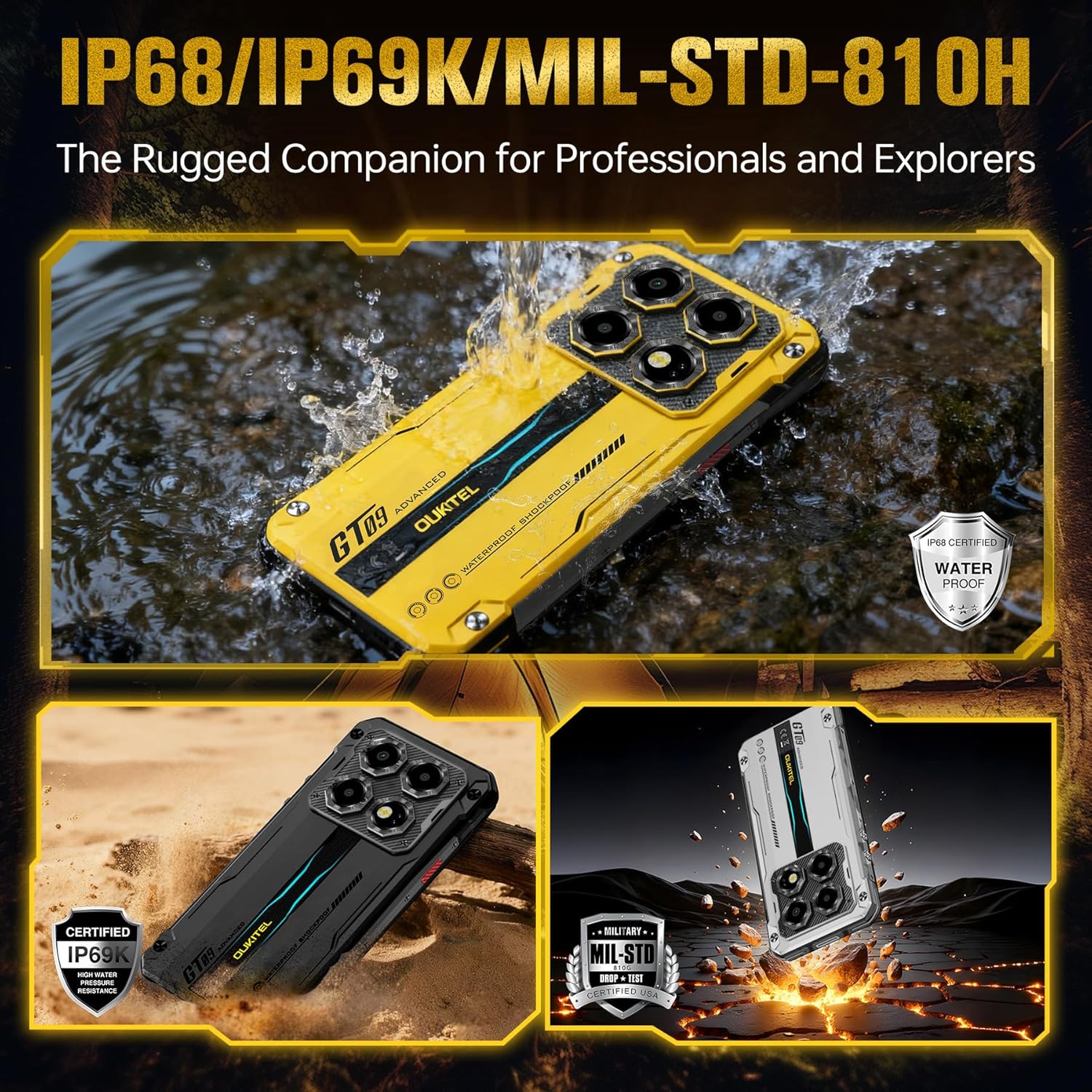
Image: OUKITEL WP60 demonstrating its IP68/IP69K water and dust resistance, and MIL-STD-810H shockproof rating. The phone is shown being splashed with water and partially buried in sand, highlighting its rugged design.
Physical Features
- Display: Large 7.2-inch HD+ display with a 120Hz refresh rate.
- Camera Module: Rear quad-camera setup (108MP main, 8MP night vision, 2MP macro) and a 32MP front camera.
- Side Buttons: Power button (with integrated fingerprint sensor) and volume rockers.
- Ports: USB Type-C port for charging and data transfer.
- SIM/TF Card Slot: Located on the side, accessible with the provided ejector tool.
Setup
1. Installing SIM/TF Cards
- Locate the SIM card tray on the side of the phone.
- Insert the SIM ejector tool into the small hole next to the tray and push gently until the tray pops out.
- Place your Nano-SIM card(s) and/or TF card into the designated slots on the tray. Ensure the gold contacts are facing down.
- Carefully push the tray back into the phone until it is flush with the device's side.
2. Initial Power On
- Press and hold the Power button (located on the side) until the OUKITEL logo appears on the screen.
- Follow the on-screen prompts to complete the initial setup, including language selection, Wi-Fi connection, and Google account setup.
Operating Instructions
Display
The OUKITEL WP60 features a large 7.2-inch HD+ display with a 120Hz refresh rate for smooth visuals. Adjust brightness, screen timeout, and other display settings via the Settings menu.

Image: The OUKITEL WP60's 7.2-inch 120Hz display, showcasing its large size and high refresh rate with a vibrant gaming scene. Key features like 120Hz Refresh Rate, 500nit Brightness, 89% STB Ratio, and 720*1560 Resolution are highlighted.
Performance and Storage
Powered by the MediaTek Dimensity 7025 octa-core processor and running Android 15, the WP60 offers efficient multitasking and fast app performance. With 48GB RAM (16GB physical + 32GB virtual) and 512GB internal storage, expandable up to 2TB with a TF card, you have ample space for applications and media.

Image: Visual representation of the MediaTek Dimensity 7025 5G Processor within the OUKITEL WP60, emphasizing its role in delivering fast 5G connectivity and overall performance.

Image: A graphic illustrating the OUKITEL WP60's memory configuration, featuring 48GB RAM and 512GB ROM, along with the capability to expand storage up to 2TB using a TF card.
Video: OUKITEL WP60 Performance and Storage Overview. This video highlights the phone's MediaTek Dimensity 7025 processor, 48GB RAM, and 512GB ROM, demonstrating its capability for gaming and multitasking.
Camera System
Capture high-quality photos and videos with the versatile camera system:
- 108MP Main Camera: For detailed and sharp images in various conditions.
- 8MP Night Vision Camera: Enables clear photography in complete darkness.
- 2MP Macro Lens: For capturing intricate close-up details.
- 32MP Front Camera: Ideal for selfies and video calls.
Supported shooting modes include Panorama, HDR, Beauty, AI, and Pro mode.

Image: A visual breakdown of the OUKITEL WP60's camera capabilities, including the 108MP main sensor, 32MP front camera, 8MP night vision, and 2MP macro lens, accompanied by sample images demonstrating their functions.
Battery and Charging
The OUKITEL WP60 is equipped with a 10000mAh battery, providing extended usage times. The 33W fast charging technology allows for quick recharges. The phone also supports 7W OTG reverse charging, enabling it to act as a power bank for other devices.

Image: The OUKITEL WP60's 10000mAh massive capacity battery and 33W fast charging feature, detailing estimated standby, talk, music, web, and video times.
Video: OUKITEL WP60 Battery and Charging Demonstration. This video illustrates the phone's 10000mAh battery capacity and 33W fast charging capabilities.
Durability and Design
The WP60 is built to withstand harsh environments, certified with IP68/IP69K for dust and water resistance, and MIL-STD-810H for military-grade shockproof standards. Its cyberpunk-mech design combines durability with a secure, ergonomic grip.

Image: The OUKITEL WP60's cyberpunk-mech design, emphasizing its robust construction and aesthetic details, along with its weight (368g) and thickness (13.5mm).
Video: OUKITEL WP60 Durability Features. This video demonstrates the ruggedness of the OUKITEL WP60, including its water resistance and robust build.
Connectivity and Multi-Function Toolkit
The WP60 supports 5G dual-SIM functionality (Nano+Nano or Nano+TF) and a wide range of frequency bands. It includes integrated GPS+GLONASS+BeiDou+Galileo for precise navigation, NFC for contactless payments, and facial/side-mounted fingerprint recognition for security. Essential outdoor tools like a compass, gyroscope, and FM radio are also integrated.
Note: OUKITEL WP60 supports T-Mobile carriers but does NOT support AT&T/Verizon/Cricket. Verify SIM card compatibility before purchase.
Maintenance
- Cleaning: Use a soft, damp cloth to clean the phone. Avoid harsh chemicals or abrasive materials. Ensure all port covers are securely closed before cleaning with water.
- Temperature: Avoid exposing the phone to extreme temperatures (very hot or very cold) for prolonged periods.
- Storage: When not in use for extended periods, store the phone in a cool, dry place.
- Software Updates: Regularly check for and install software updates to ensure optimal performance and security.
Troubleshooting
Common Issues and Solutions
| Issue | Possible Cause | Solution |
|---|---|---|
| Phone does not power on | Low battery, software crash | Charge the phone for at least 30 minutes. Press and hold the Power button for 10-15 seconds to force restart. |
| Poor network signal | SIM card not properly inserted, out of network coverage, carrier incompatibility | Reinsert SIM card. Move to an area with better coverage. Confirm carrier compatibility (T-Mobile supported, AT&T/Verizon/Cricket not supported). |
| Battery drains quickly | Too many background apps, high screen brightness, intensive usage | Close unused apps. Reduce screen brightness. Enable battery saver mode. |
| Apps crashing or freezing | Insufficient RAM, app bugs, outdated software | Clear app cache. Update apps and phone software. Restart the phone. |
If issues persist, contact OUKITEL customer support for further assistance.
Specifications
- Model: OUKITEL WP60
- Display: 7.2-inch HD+ (720x1560), 120Hz Refresh Rate, 500 nits brightness
- Processor: MediaTek Dimensity 7025 Octa-core 5G
- RAM: 48GB (16GB physical + 32GB virtual)
- ROM: 512GB, expandable up to 2TB via TF card
- Operating System: Android 15
- Rear Camera: 108MP Main, 8MP Night Vision, 2MP Macro
- Front Camera: 32MP
- Battery: 10000mAh, 33W Fast Charging, 7W OTG Reverse Charging
- Durability: IP68/IP69K Water & Dust Resistant, MIL-STD-810H Shockproof
- Connectivity: 5G Dual SIM (Nano+Nano or Nano+TF), Wi-Fi, Bluetooth, NFC
- Navigation: GPS+GLONASS+BeiDou+Galileo
- Security: Facial Recognition, Side-mounted Fingerprint Sensor
- Dimensions: Weight: 368g, Thickness: 13.5mm
- Supported Carriers: T-Mobile (Does NOT support AT&T/Verizon/Cricket)
Warranty and Support
Your OUKITEL WP60 5G Rugged Phone comes with a limited warranty. Please refer to the warranty card included in your package for detailed terms and conditions. For technical support, troubleshooting assistance, or warranty claims, please visit the official OUKITEL website or contact their customer service directly.
Official OUKITEL Store: OUKITEL Amazon Store