
1. Introduction
This manual provides detailed instructions for the installation, operation, and maintenance of your NHOPEEW Android Car Stereo. Please read this manual thoroughly before using the product to ensure proper function and to prevent damage. This device is designed for BMW Mini Cooper R56 and Mini Clubman R55 models from 2007-2014.
2. Product Overview
Key Features:
- Android 15 Operating System with 4GB RAM + 64GB ROM
- 9-inch 1280x720p IPS Capacitive Touchscreen
- Wireless CarPlay and Android Auto support
- Digital Sound Processor (DSP) with 32-band EQ adjustment
- GPS Navigation (online and offline maps)
- 5G/WiFi Connectivity
- Steering Wheel Control (SWC) and Canbus integration
- Multiple UI Themes and Customizable Homepage
- Three Split Screen functionality
- Bluetooth 5.0 for hands-free calls and audio streaming
- FM/RDS Radio
- Dual USB ports, 1080P Video Playback, AUX Audio & Video Input
Included Components:
- NHOPEEW Android Radio Unit
- Power Cable
- Small Horn
- Radio Antenna
- RCA Cable
- GPS Antenna
- USB Cables
- External Microphone
- Installation Tools

Figure 2.1: Package Contents
3. Setup and Installation
3.1 Vehicle Compatibility
This Android stereo is specifically designed for BMW Mini Cooper R56 (2007-2013) and Mini Clubman R55 models. Before purchasing and installing, carefully confirm your car's center console shape and year. Refer to the images below for compatibility guidance.

Figure 3.1: Dashboard Compatibility Check
Important Note: The air vent design is crucial for fitment. This unit is compatible only with the dashboard configuration shown in Figure A. If your car's dashboard matches Figure B or C, this product is not compatible.
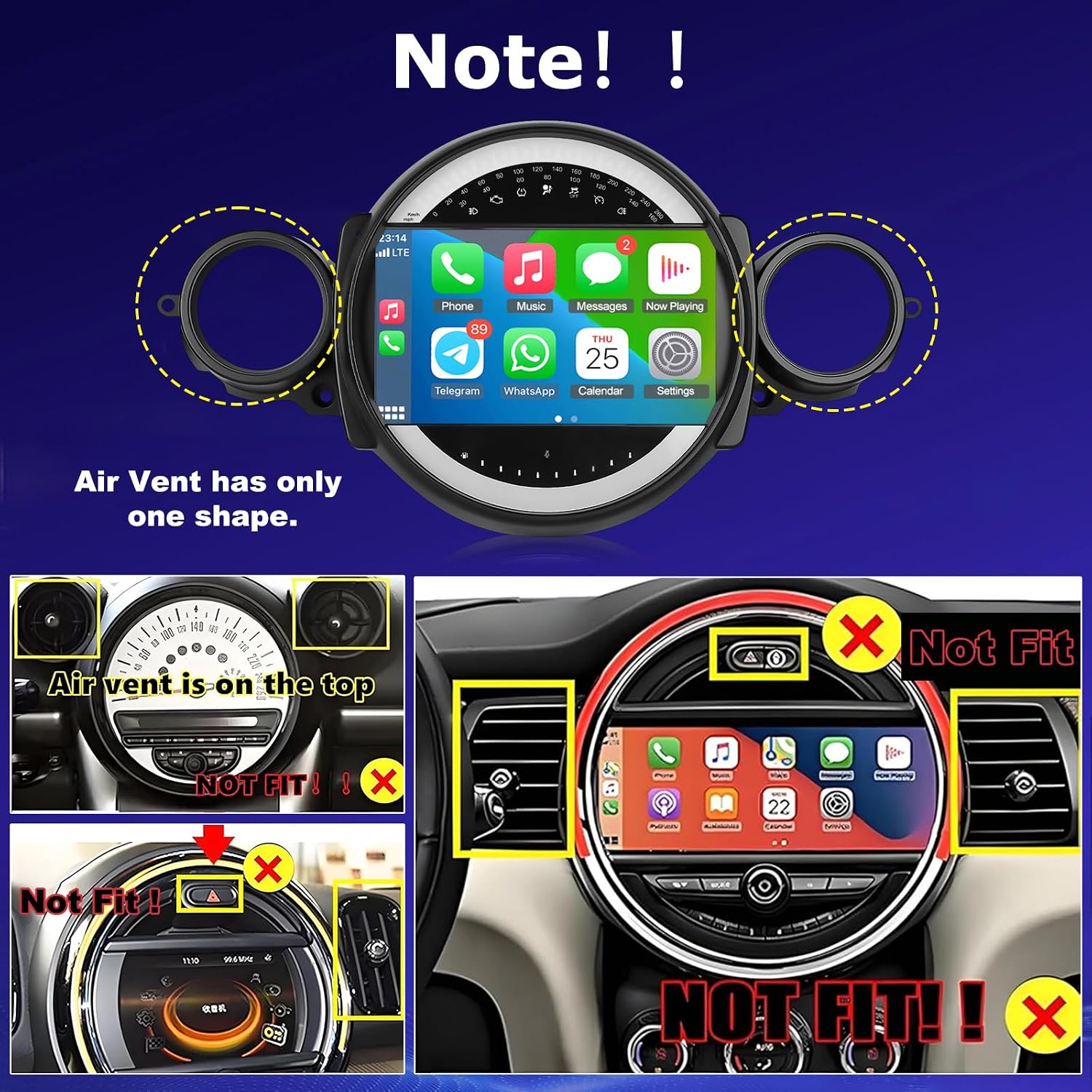
Figure 3.2: Air Vent Compatibility
3.2 Installation Steps
Follow these general steps for installation. Professional installation is recommended.
- Step 1: Prepare the mounting frame.
- Step 2: Connect the main unit to the wiring harness.
- Step 3: Secure the main unit within the mounting frame.
- Step 4: Complete the installation by integrating the assembly into the dashboard.

Figure 3.3: Installation Process
4. Operating Instructions
4.1 System Overview
The unit runs on the Android 15 operating system, powered by a 4-core processor with 4GB RAM and 64GB ROM, ensuring smooth performance for various applications.

Figure 4.1: System Specifications
4.2 Display and User Interface
The 9-inch 1280x720p IPS capacitive touchscreen provides a clear and responsive interface. You can customize your experience with multiple UI themes and arrange your homepage with preferred applications.

Figure 4.2: Three-Panel Homepage Display

Figure 4.3: UI Themes and Homepage Customization
4.3 Wireless CarPlay & Android Auto
Connect your smartphone wirelessly to access navigation, calls, messages, and music through CarPlay or Android Auto. This unit supports wireless connections only.

Figure 4.4: Wireless CarPlay and Android Auto Interface
4.4 GPS Navigation & WiFi Connectivity
Utilize both offline and online navigation maps. Connect to a WiFi hotspot for internet access, app downloads, and browsing.
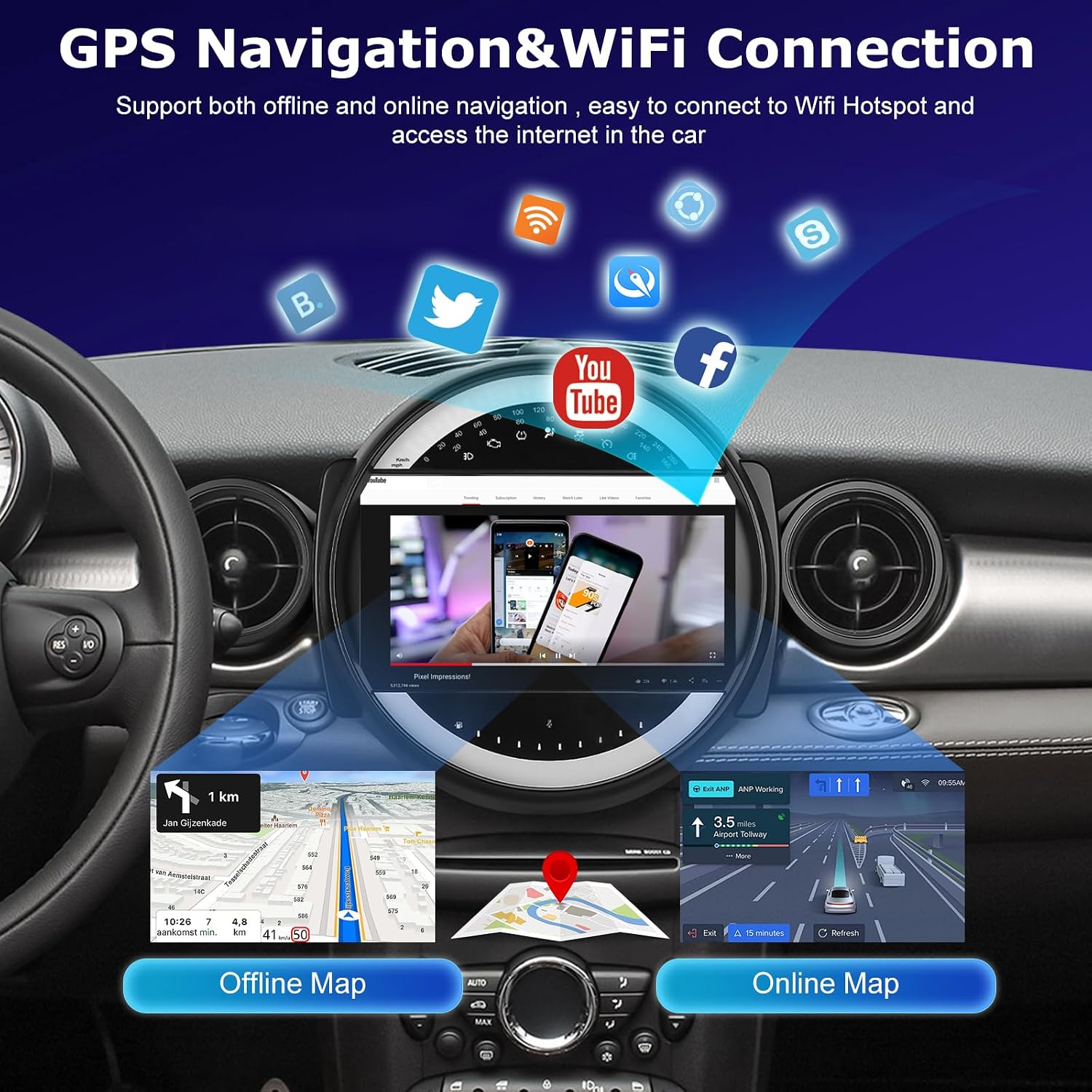
Figure 4.5: GPS Navigation and WiFi Features
4.5 Audio Features (DSP/EQ)
The integrated DSP (Digital Sound Processor) allows for 32-band frequency adjustment, providing a customizable and immersive audio experience.

Figure 4.6: DSP and EQ Settings
4.6 Steering Wheel Control (SWC)
Control various functions of the stereo directly from your vehicle's steering wheel, enhancing driving safety and convenience.

Figure 4.7: Steering Wheel Control Configuration
4.7 FM/RDS Radio
Access FM radio stations with RDS (Radio Data System) functionality for station information display.

Figure 4.8: FM/RDS Radio Interface
4.8 Bluetooth Functionality
Connect your phone via Bluetooth 5.0 for hands-free calling and wireless audio streaming.

Figure 4.9: Bluetooth Interface
4.9 Radio Basic Functions Video
Video 4.1: Demonstrating basic radio functions and controls.
5. Maintenance
To ensure the longevity and optimal performance of your NHOPEEW Android Car Stereo, follow these maintenance guidelines:
- Screen Cleaning: Use a soft, lint-free cloth slightly dampened with water or a screen cleaning solution. Avoid harsh chemicals or abrasive materials that could scratch the screen.
- General Cleaning: Keep the unit free from dust and debris. Use a soft, dry cloth to wipe down the exterior.
- Avoid Liquids: Do not spill liquids on the unit. If liquid enters the device, disconnect power immediately and contact support.
- Temperature: Operate the unit within normal vehicle operating temperatures. Extreme temperatures can affect performance and lifespan.
6. Troubleshooting
If you encounter issues with your NHOPEEW Android Car Stereo, refer to the following common troubleshooting tips. For more complex problems, please contact customer support.
- No Power: Check all power connections and fuses. Ensure the vehicle's ignition is on.
- No Sound: Verify speaker connections. Check volume levels and ensure the mute function is not active. Confirm audio source selection.
- Touchscreen Unresponsive: Try restarting the unit. If the issue persists, a factory reset might be necessary (note: this will erase custom settings).
- Bluetooth/CarPlay/Android Auto Connection Issues: Ensure Bluetooth is enabled on both the stereo and your phone. Forget and re-pair the device. For CarPlay/Android Auto, ensure your phone's software is up to date.
- GPS Signal Loss: Ensure the GPS antenna is properly installed and has a clear view of the sky.
- System Lag: Close unnecessary background applications. Ensure sufficient storage space. A system update or factory reset may resolve persistent lag.
7. Specifications
| Feature | Specification |
|---|---|
| Brand | NHOPEEW |
| Model Name | A8342A3662MI2 |
| Operating System | Android 15 |
| RAM | 4GB |
| ROM (Storage) | 64GB |
| Screen Size | 9 inches |
| Display Type | IPS Capacitive Touchscreen |
| Display Resolution | 1280x720p |
| Connectivity | Bluetooth 5.0, Wi-Fi (5G supported) |
| Navigation | GPS (Worldwide Map Type) |
| Audio Features | DSP, 32-band EQ |
| Compatible Devices | Smartphone (Wireless CarPlay & Android Auto) |
| Mounting Type | Dashboard Mount |
| Included Components | Power cable, Android Radio, Radio antenna, RCA cable, Small horn |
8. Warranty and Support
8.1 Warranty Information
This NHOPEEW product comes with a 2-year manufacturer's warranty. Please retain your proof of purchase for warranty claims.
8.2 Customer Support
For any questions, technical assistance, or warranty claims, please contact NHOPEEW customer support. We offer 7*24 hours after-sales service and 2-years post-sales support. If the radio harness does not fit, please get in touch with us for assistance.
You may also refer to the brand's official store on Amazon for further information and support resources.


