1. Introduction
The YHNNH SZ308 is a versatile digital multimeter designed for accurate measurement of various electrical parameters. It features a 1999-count display and supports full-function measurements including AC/DC voltage, DC current, resistance, hFE triode, diode, and continuity (buzzer). Its automatic/manual ranging capability and high-definition LCD with backlight make it suitable for both professional and DIY electrical tasks.
This manual provides essential information for the safe and effective operation, maintenance, and troubleshooting of your SZ308 digital multimeter.
2. Safety Information
Always observe the following safety precautions when using the multimeter to prevent electric shock, injury, or damage to the meter or equipment under test.
- Do not exceed the maximum input values specified for each range.
- Exercise extreme caution when working with voltages above 30V AC RMS, 42V peak, or 60V DC. These voltages pose a shock hazard.
- Before changing functions, disconnect the test leads from the circuit under test.
- Ensure the battery cover is securely closed before operation.
- Do not operate the meter if it appears damaged or if the insulation on the test leads is compromised.
- Use the correct terminals, function, and range for your measurements.
- Replace the battery when the low battery indicator appears to ensure accurate readings.
3. Product Overview
The YHNNH SZ308 digital multimeter features a clear LCD display, a rotary function switch, and input jacks for test leads. It is designed for ease of use and durability.
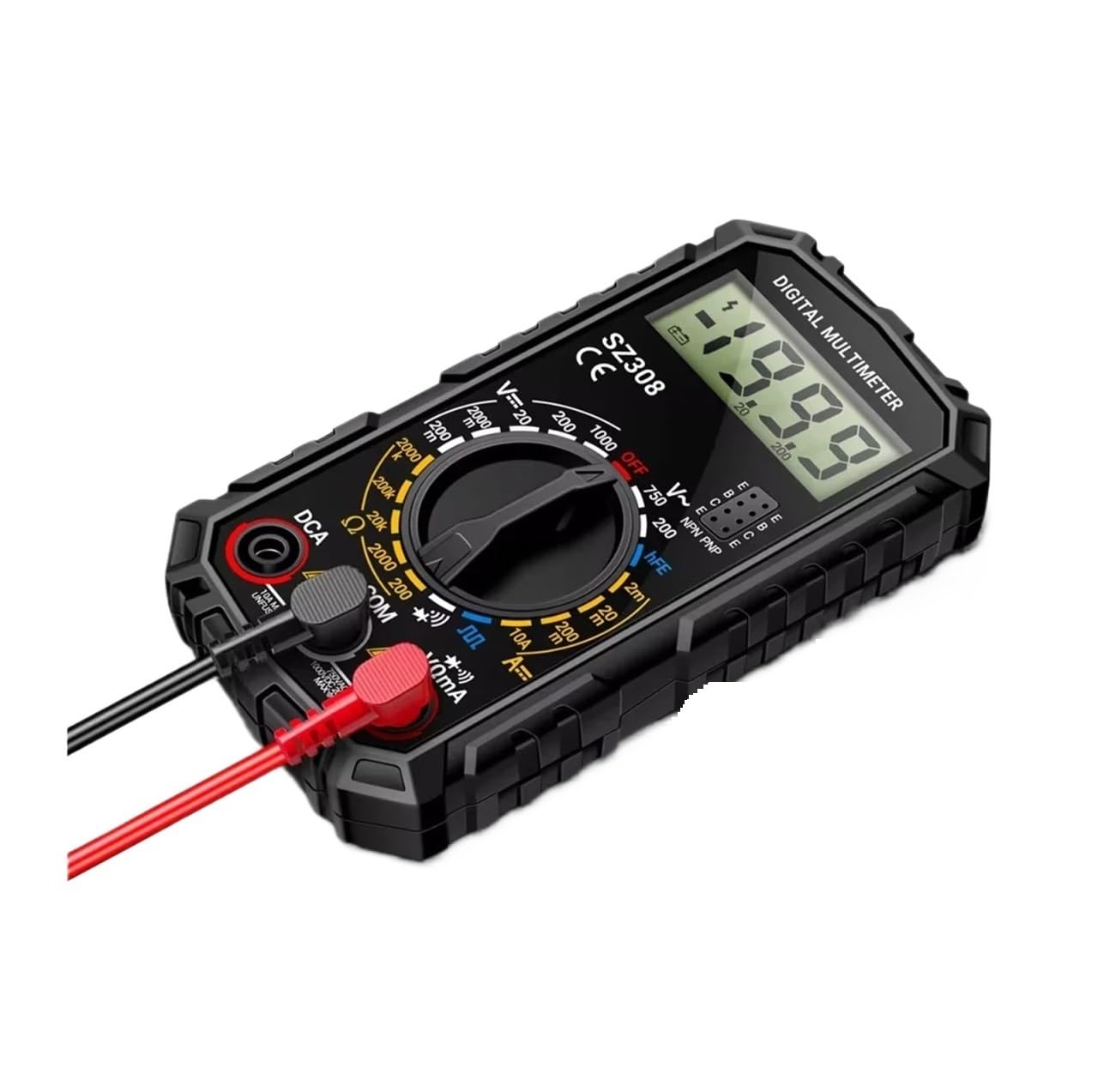
Figure 3.1: YHNNH SZ308 Digital Multimeter with included accessories.
The device dimensions are approximately 121.8mm (4.79 inches) in length, 66.5mm (2.61 inches) in width, and 33.5mm (1.32 inches) in thickness, making it compact and portable.

Figure 3.2: Physical dimensions of the SZ308 Multimeter.
4. Setup
4.1 Battery Installation
The SZ308 multimeter requires a 9V 6F22 battery (not included). To install or replace the battery:
- Ensure the multimeter is turned OFF and disconnect all test leads.
- Locate the battery compartment on the back of the device.
- Use a screwdriver to open the battery cover.
- Insert a new 9V 6F22 battery, observing the correct polarity.
- Replace the battery cover and secure it with the screw.
4.2 Test Lead Connection
Connect the test leads to the appropriate input jacks on the multimeter:
- Insert the black test lead into the "COM" (Common) jack.
- For most voltage, resistance, diode, continuity, and hFE measurements, insert the red test lead into the "VΩmA" jack.
- For current measurements up to 10A, insert the red test lead into the "10A MAX" jack.
5. Operating Instructions
The SZ308 multimeter features an automatic/manual range selection. In automatic mode, the meter intelligently selects the appropriate range. For precise control, manual mode can be used.
5.1 Function Selection
Turn the rotary switch to the desired measurement function. The display will show the corresponding unit or symbol.
5.2 Measuring DC Voltage (V=)
To measure DC voltage (e.g., batteries, DC power supplies):
- Set the rotary switch to the "V=" range.
- Connect the red test lead to the positive (+) side of the circuit and the black test lead to the negative (-) side.
- Read the voltage value on the display. The range is 200mV to 1000V DC.
5.3 Measuring AC Voltage (V~)
To measure AC voltage (e.g., household outlets):
- Set the rotary switch to the "V~" range.
- Connect the test leads across the AC voltage source.
- Read the voltage value on the display. The range is 0V to 750V AC.
5.4 Measuring DC Current (A=)
To measure DC current (e.g., current draw of a component):
- Set the rotary switch to the "A=" range (2mA-10A).
- Connect the multimeter in series with the circuit. Ensure the red lead is in the "10A MAX" jack for currents up to 10A, or "VΩmA" for lower currents.
- Read the current value on the display.
5.5 Measuring Resistance (Ω)
To measure resistance:
- Set the rotary switch to the "Ω" range.
- Connect the test leads across the component to be measured. Ensure the component is de-energized.
- Read the resistance value on the display. The range is 0Ω to 2000kΩ.
5.6 Diode Test
To test diodes:
- Set the rotary switch to the diode symbol (►|).
- Connect the red test lead to the anode and the black test lead to the cathode of the diode.
- A forward voltage drop will be displayed. Reverse the leads; the display should show 'OL' (Open Loop) for a good diode.
5.7 Continuity Test (Buzzer)
To check for circuit continuity:
- Set the rotary switch to the continuity symbol (•))).
- Connect the test leads across the circuit or component.
- If the resistance is below approximately 50Ω, the buzzer will sound, indicating continuity.
5.8 hFE Transistor Test
To measure the DC current gain (hFE) of a transistor:
- Set the rotary switch to the "hFE" position.
- Identify if the transistor is NPN or PNP type.
- Insert the transistor leads (Emitter, Base, Collector) into the corresponding sockets on the multimeter's hFE test port.
- Read the hFE value on the display.

Figure 5.1: Performing an hFE Triode test.
5.9 Square Wave Output
The multimeter can generate a square wave signal for testing purposes.
- Set the rotary switch to the square wave symbol.
- Connect the test leads to an oscilloscope or other suitable device to observe the square wave signal.
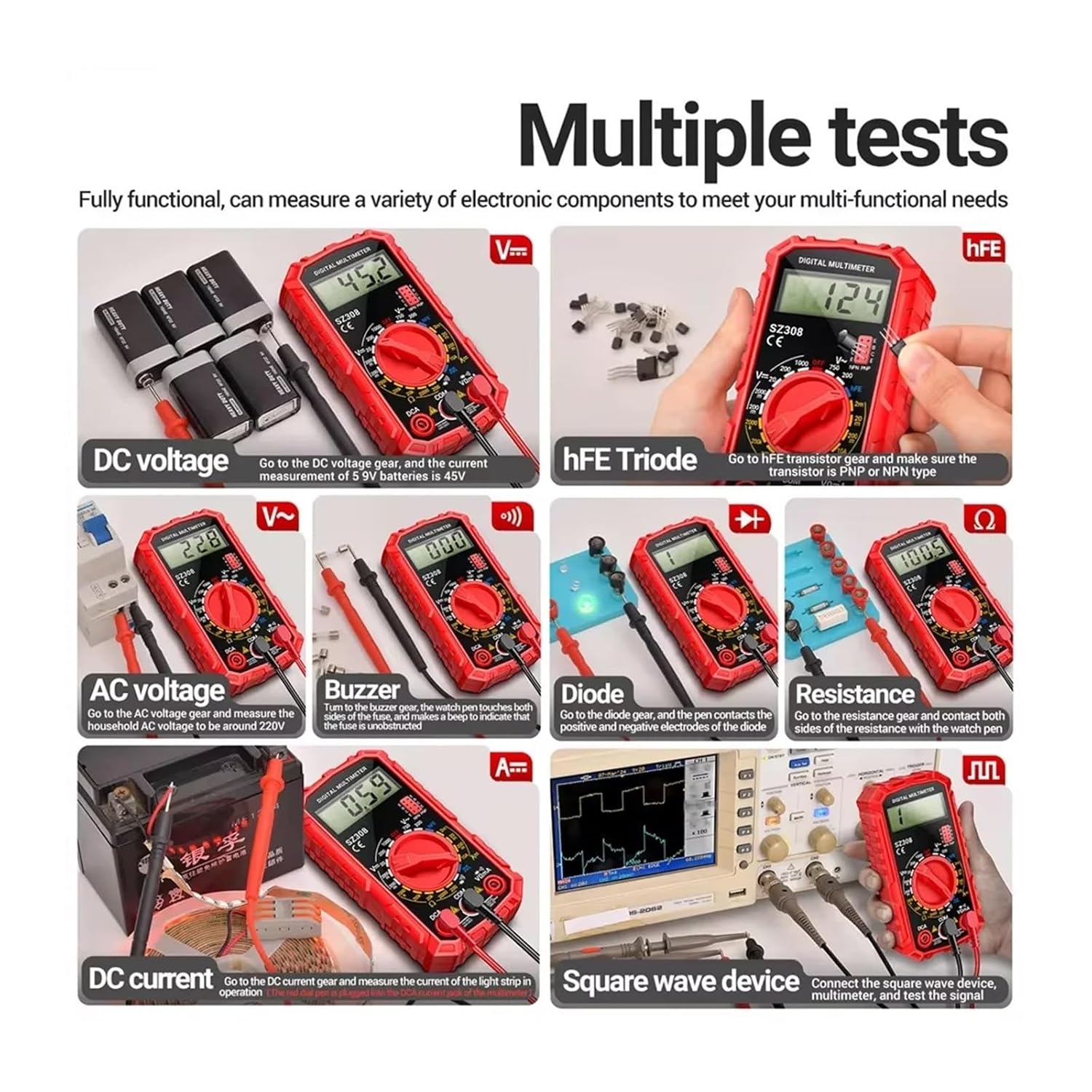
Figure 5.2: Overview of various measurement capabilities.
6. Maintenance
6.1 Cleaning
To clean the multimeter, wipe the case with a damp cloth and a mild detergent. Do not use abrasives or solvents. Ensure the device is powered off and test leads are disconnected before cleaning.
6.2 Battery Replacement
Replace the 9V battery when the low battery indicator appears on the display to maintain measurement accuracy. Refer to Section 4.1 for battery installation instructions.
6.3 Storage
If the multimeter is not used for an extended period, remove the battery to prevent leakage and damage. Store the device in a cool, dry place away from direct sunlight and extreme temperatures.
7. Troubleshooting
This section addresses common issues you might encounter with your SZ308 multimeter.
| Problem | Possible Cause | Solution |
|---|---|---|
| No display or dim display | Dead or low battery | Replace the 9V battery. |
| Incorrect readings | Incorrect function/range selected; poor test lead connection; damaged test leads | Verify function and range; ensure leads are securely connected; inspect and replace damaged leads. |
| "OL" (Overload) displayed | Input value exceeds selected range; open circuit (for resistance/continuity) | Select a higher range or check for an open circuit. |
| Buzzer not sounding during continuity test | Resistance is above 50Ω; open circuit | Check the circuit for breaks or high resistance. |
8. Specifications
The following table details the technical specifications of the YHNNH SZ308 Digital Multimeter.

Figure 8.1: Detailed Parameter Table.
| Parameter | Value |
|---|---|
| Model Number | ANENG SZ308 |
| Display Type | Digital Display (1999 Counts) |
| Operating Mode | Auto Range |
| DC Voltage Range | 200mV - 1000V |
| AC Voltage Range | 0V - 750V |
| DC Current Range | 2mA - 10A |
| Resistance Range | 0Ω - 2000kΩ |
| Operating Temperature | 0 - 40°C |
| Dimensions | 121.8 x 66.5 x 33.5 mm (4.79 x 2.61 x 1.32 inches) |
| Power Source | 9V 6F22 Battery (not included) |
| Certification | CE, UL |
9. Warranty Information
This product is covered by a standard manufacturer's warranty against defects in materials and workmanship. The warranty period typically begins from the date of purchase. Please retain your proof of purchase for warranty claims. For specific warranty terms and conditions, refer to the documentation provided with your product or contact the manufacturer directly.
10. Customer Support
If you have any questions, require technical assistance, or need to report an issue with your YHNNH SZ308 Digital Multimeter, please contact your retailer or the manufacturer's customer support. Contact information can typically be found on the product packaging or the manufacturer's official website.
For further assistance, you may visit the YHNNH Store on Amazon: YHNNH Store