1. Introduction
The YJHQJNLE XY6020LS is an adjustable DC stabilized power supply designed for precise voltage and current regulation. This step-down power supply offers constant voltage and constant current modes, with a maximum output of 20A and 1200W. It features automatic voltage regulation, rapid response to load changes, and comprehensive protection mechanisms to ensure stable and safe operation for various applications.
2. Safety Instructions
- Always ensure proper ventilation around the device to prevent overheating.
- Do not operate the device in wet or damp conditions.
- Verify input voltage and current limits before connecting to a power source. Exceeding specified limits can damage the device and connected equipment.
- Ensure all connections are secure and correctly polarized before powering on.
- Avoid touching internal components when the device is powered on.
- In case of smoke, unusual odors, or abnormal operation, immediately disconnect power.
- This device is intended for indoor use only.
3. Product Overview
The XY6020LS consists of a main power board and a separate control panel with a display. The control panel allows for setting and monitoring voltage, current, and power parameters.
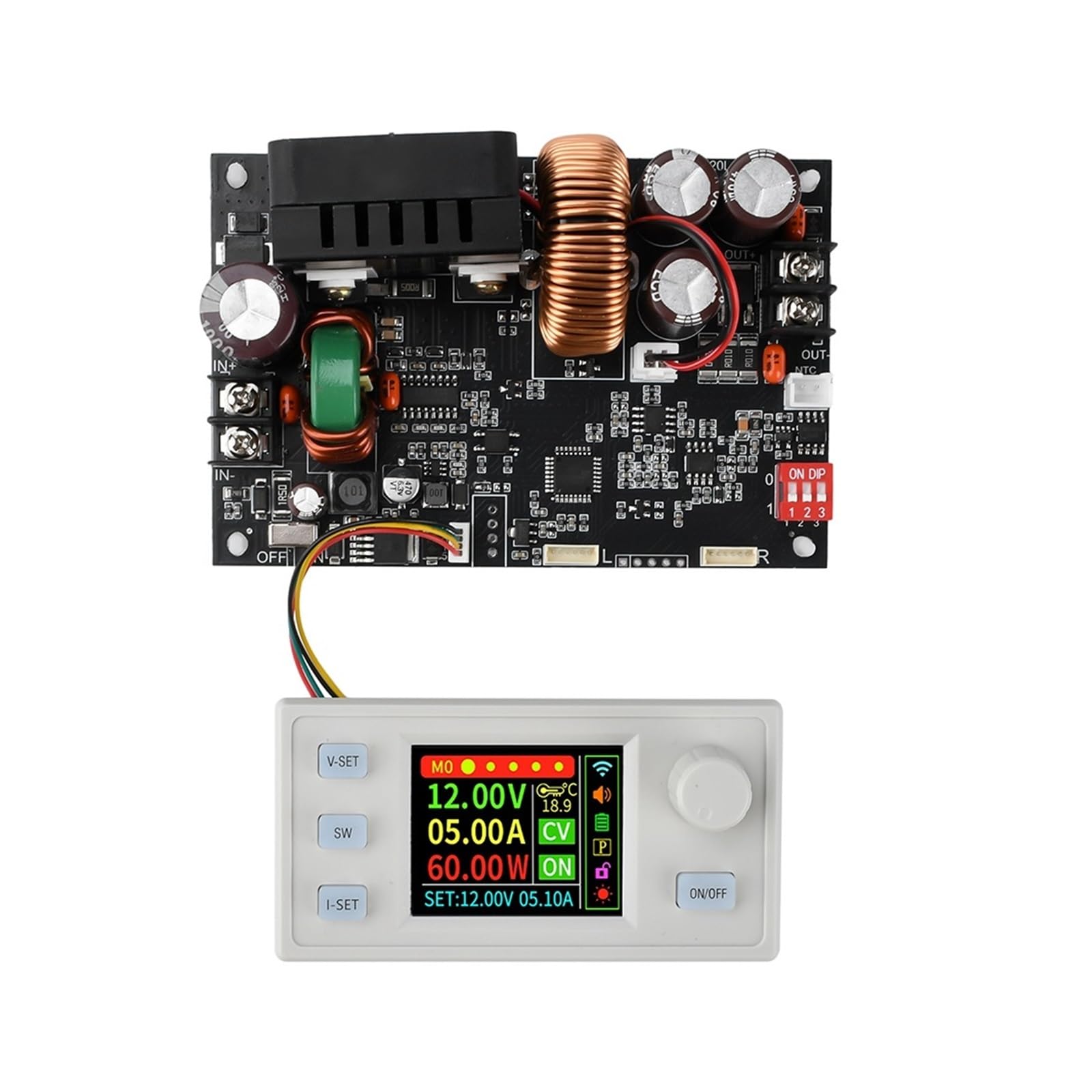
Image 1: YJHQJNLE XY6020LS Power Supply showing the main board and the connected control panel with its display.
4. Setup
- Unpacking: Carefully remove the power supply and control panel from its packaging. Inspect for any visible damage.
- Connections:
- Connect the control panel to the main power board using the provided ribbon cable. Ensure the connector is properly seated and oriented.
- Connect the input power source (6.0V to 70V DC) to the 'IN+' and 'IN-' terminals on the main power board. Observe correct polarity.
- Connect your load to the 'OUT+' and 'OUT-' terminals on the main power board. Ensure the load is within the device's output specifications (0-60V, 0-20A, 0-1200W).
- Initial Power-Up: Once all connections are secure, apply power to the input terminals. The control panel display should illuminate.
5. Operating Instructions
5.1. Display Overview
The control panel display shows real-time output voltage, current, and power, along with set parameters and status indicators.
5.2. Setting Output Voltage (V-SET)
- Press the V-SET button. The voltage setting on the display will become active.
- Use the rotary encoder (knob) to adjust the desired output voltage. Turn clockwise to increase, counter-clockwise to decrease.
- Press the V-SET button again to confirm the setting, or wait a few seconds for it to auto-confirm.
5.3. Setting Output Current (I-SET)
- Press the I-SET button. The current setting on the display will become active.
- Use the rotary encoder to adjust the desired output current limit.
- Press the I-SET button again to confirm the setting, or wait a few seconds for it to auto-confirm.
5.4. Output ON/OFF
Press the ON/OFF button to enable or disable the power output to the load. The display will indicate the output status.
5.5. Mode Switching (SW Button)
The SW button allows cycling through different display modes or accessing additional settings, if available. Refer to the on-screen prompts for specific functions.
6. Maintenance
- Cleaning: Use a soft, dry cloth to clean the exterior of the device. Do not use liquid cleaners or solvents. Ensure the device is powered off and disconnected before cleaning.
- Ventilation: Regularly check that the ventilation openings are clear of dust and debris to ensure proper airflow.
- Storage: When not in use for extended periods, store the device in a cool, dry place, away from direct sunlight and extreme temperatures.
- Inspection: Periodically inspect all cables and connections for signs of wear or damage. Replace any damaged components immediately.
7. Troubleshooting
- No Power/Display Off:
- Check the input power source and ensure it is within the specified voltage range (6.0V-70V).
- Verify all input power connections are secure and correctly polarized.
- Ensure the ribbon cable connecting the control panel to the main board is properly seated.
- No Output Voltage/Current:
- Ensure the output is enabled by pressing the ON/OFF button.
- Check if the set voltage or current is too low or zero.
- Verify the load is properly connected and not short-circuited.
- The device may be in protection mode (e.g., overcurrent, overvoltage). Disconnect the load, power cycle the device, and re-evaluate the settings and load.
- Unstable Output:
- Ensure the input power source is stable and capable of supplying the required current.
- Check for loose connections on both input and output.
- Verify the load is not drawing excessive current or causing oscillations.
8. Specifications

Image 2: YJHQJNLE XY6020LS highlighting key specifications such as input/output voltage, current, and power.
| Parameter | Value |
|---|---|
| Input Voltage | 6.0V ~ 70V DC |
| Output Voltage | 0.0V ~ 60V DC |
| Output Current | 0 ~ 20.00A |
| Output Power | 0 ~ 1200W |
| Current Type | DC |
| Phase | Single Phase |
| Product Dimensions | 0.39 x 0.39 x 0.39 inches |
| Item Weight | 11.02 pounds |
| Manufacturer | YJHQJNLE |
| Item Model Number | YJHQJNLE (XY6020LS) |
| Batteries Required | No |
9. Warranty and Support
For technical assistance, troubleshooting beyond this manual, or inquiries regarding warranty information, please contact the retailer from whom the product was purchased. Please have your purchase details and product model number (XY6020LS) available when contacting support.
