
Introduction
Welcome to the KOWSI AI Interactive Talking Highland Cow Plush, Hamish! This innovative plush toy combines interactive AI technology with comforting features like microwavable warmth and lavender aromatherapy. Designed to engage and educate, Hamish is a companion for learning, conversation, and relaxation.
Initial Setup
Unboxing and First Steps
Your KOWSI Hamish plush arrives in a beautiful gift box, vacuum-sealed for protection. Upon opening, the plush will expand to its full size. Inside the box, you will find the Hamish plush, a user manual, and a greeting card.

Image Description: A KOWSI Hamish plush toy is shown next to its purple gift box, a user guide, and a greeting card, illustrating the product's packaging and included items.
Powering On and Charging
Locate the power switch and charging port on the back of the plush.

Image Description: A close-up view of the KOWSI Hamish plush's back, revealing a small panel with a power switch (ON/OFF) and a Type-C charging port, discreetly hidden within its fur.
Use a 5V/1A adapter with a "CCC" mark for charging. Do NOT use fast chargers (e.g., iPhone 20W). A red light indicates charging, and a green light indicates a full charge. No light means sleep mode or power off. Never use while charging.
Wi-Fi and App Connection
To enable AI features, connect Hamish to a 2.4G Wi-Fi network using the "Smart Life" app.
- Download the "Smart Life" app from your device's app store.
- Power on Hamish.
- Open the "Smart Life" app and click "Add Device".
- Follow the in-app instructions to connect Hamish to your 2.4G Wi-Fi network.
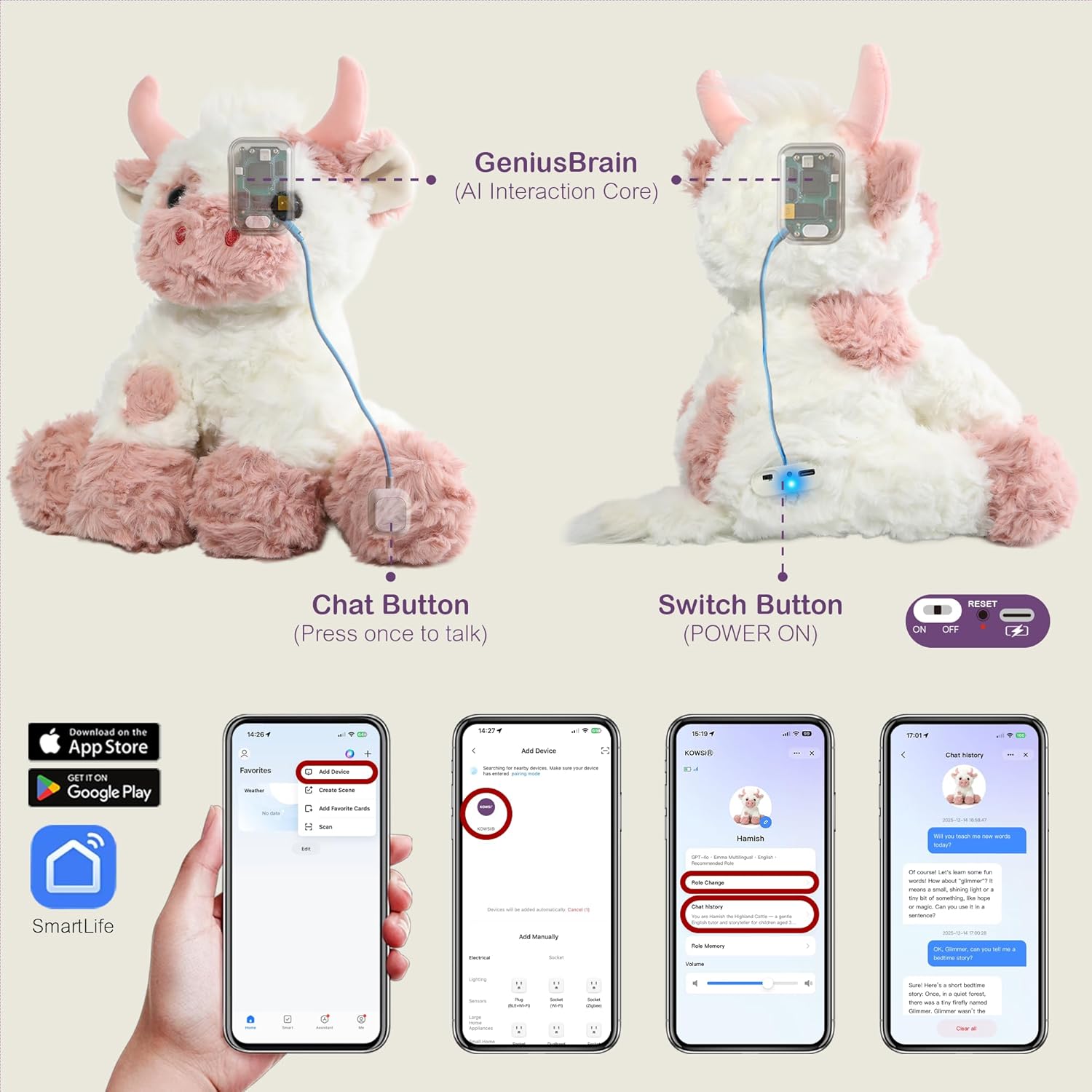
Image Description: A series of smartphone screenshots demonstrating the process of connecting the KOWSI plush to the "Smart Life" app via a 2.4G Wi-Fi network, including adding a device and managing settings.
Video Description: An official seller video demonstrating the AI interactive features and microwavable heating capabilities of the Highland Cow Plush, including app connectivity.
Operating
Interaction Modes
Hamish offers three interaction modes:
- Mode 1: Press to Talk: Single-press the talk button to wake the AI. Converse freely after AI responds. Re-press the button to override speech.
- Mode 2: Wake Up to Chat: Rapidly say "Hi TOO-yuh" to wake the AI. Speak freely after AI's response. Re-say "Hi TOO-yuh" to override AI speech.
- Mode 3: Free to Chat: Wake via wake phrase "Hi TOO-yuh". Interact freely without re-waking. Natural barge-in is enabled.
Video Description: An official seller video showcasing the AI interaction capabilities of the KOWSI plush animals, including various talking modes and responses.
Microwavable Heat Pad
Hamish contains a removable heat pack filled with tourmaline and lavender for soothing warmth and scent.
- Unzip the back pocket of the plush.
- Carefully remove the lavender heat pack.
- Place the heat pack in a microwave.
- Microwave for 60-90 seconds (600-800W for 90s, 850-1000W for 60s). NEVER heat beyond 1.5 minutes. Heat ONLY from room temperature.
- Wait 10 seconds, then carefully insert the heated pack back into the plush's back pocket.
- Enjoy the warmth and relaxing lavender scent.

Image Description: A visual guide illustrating five steps: unzipping the plush, removing the tourmaline lavender heat pack, placing it in the microwave, microwaving for 1.5 minutes, and reinserting it into the plush.

Image Description: A diagram detailing the internal composition of the heat pack, highlighting 90% natural tourmaline thermal beads for long-lasting heat retention and 10% Provence lavender for aromatherapy.
Cooling Therapy
The removable pack can also be chilled for cold therapy. Place the pack in the freezer for 15 minutes. Do not freeze the entire plush toy. Maximum 3 freeze/thaw cycles per day.
Maintenance
Plush Cleaning
Hamish is spot clean only. Do NOT throw the entire plush in the wash, as it will ruin the interior components. Surface wipe with a damp cloth only.
Lavender Pack Refresh
Natural lavender scent may fade over time. To refresh, add 1 drop of essential oil to the pack every 3 months.
Troubleshooting
Wi-Fi Won't Connect
Check if your router is on 2.4GHz (not 5G). Hold the reset button for 5 seconds until "Reset successfully" is heard.
No Response
Ensure the battery is charged (if dead after 30 days unused, charge fully). Press the power switch button to restart.
Product Specifications
| Feature | Detail |
|---|---|
| Brand | KOWSI |
| Model Name | GaoDiNiu |
| Character | Hamish |
| Item Weight | 1.4 Pounds |
| Item Dimensions | 10"L x 8"W x 8"H |
| Material Type | Microfiber |
| Age Range Description | 3 Years + |
| Included Components | AI Chip |
| Power Source | Battery (1 Lithium Ion battery included) |
| Educational Objective | Learning Practice Speaking & Homework Help |
Important Safety Guidelines
- Crafted from premium, non-toxic, and eco-friendly materials.
- Certified safe (ASTM/EN71/UKCA).
- Adults must operate the microwave for heating the lavender pack.
- Always supervise heating – surface may cause burns if overheated.
- Keep the plush away from water/damp areas.
- Do not heat the entire plush toy in the microwave; only the removable lavender thermal bead pack.
- Moisture damages lavender filling.
Warranty and Customer Support
For warranty information or customer support, please refer to the contact details provided on the product packaging or visit the official KOWSI website.