1. Introduction
This manual provides comprehensive instructions for the NORTH EDGE ET585 Smartwatch. It covers device setup, operational procedures for various health and fitness tracking features, maintenance guidelines, and troubleshooting tips. The ET585 is designed to monitor your health and fitness with advanced features including ECG, HRV, blood oxygen, stress, and sleep tracking, alongside over 130 sports modes and smart connectivity.
2. Product Overview
2.1 Key Features
- Advanced ECG & HRV Monitoring: Track heart activity and assess stress, fatigue, and HRV levels.
- 2.04” AMOLED Retina Display: Bright, clear, and full-touch screen for superior visibility and control.
- 30-Second Micro Health Exam: Instantly measures heart rate, blood oxygen, and stress levels.
- 130+ Sports Modes: Supports multiple workout types including running, cycling, yoga, and more.
- Body Composition Analysis: Monitors BMI, uric acid, and blood lipid indicators.
- Sleep & Emotion Tracking: Analyzes sleep quality, fatigue, and emotional well-being.
- Bluetooth Calling & Music Control: Make calls, play music, and receive notifications hands-free.
- Water-Resistant & Durable: Built for everyday wear, workouts, and outdoor adventures.
2.2 Package Contents
- NORTH EDGE ET585 Smartwatch
- Charging Cable
2.3 Device Components
The NORTH EDGE ET585 Smartwatch features a sleek design with essential components for its functionality.
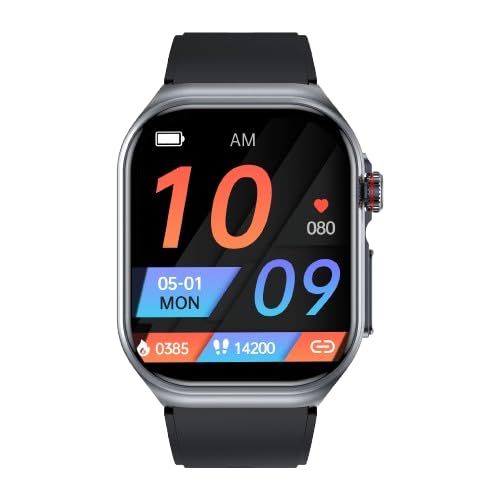
Image: Front view of the NORTH EDGE ET585 Smartwatch, showcasing its 2.04-inch AMOLED display with a digital watch face showing time, date, battery status, heart rate, steps, and calorie count.

Image: Side view of the NORTH EDGE ET585 Smartwatch, worn on a wrist, highlighting the watch's metallic frame and black silicone strap. The side button and crown are visible.

Image: Rear view of the NORTH EDGE ET585 Smartwatch, displaying the central optical heart rate and blood oxygen sensors, along with the magnetic charging contacts and regulatory markings.
- Display: 2.04-inch AMOLED full-touch screen for clear visuals and intuitive interaction.
- Side Button/Crown: Used for navigation, returning to the watch face, and accessing menus.
- Rear Sensors: Optical sensors on the back of the watch for heart rate, blood oxygen, and other health metrics.
- Charging Contacts: Magnetic contacts located on the back for secure charging.
3. Setup
3.1 Charging the Smartwatch
Before first use, fully charge your smartwatch. Connect the magnetic charging cable to the charging contacts on the back of the watch. Connect the USB end to a power adapter (not included) or a computer USB port. The watch display will indicate charging status.
3.2 Powering On/Off
- To Power On: Press and hold the side button until the NORTH EDGE logo appears.
- To Power Off: Press and hold the side button, then select the 'Power Off' option on the screen.
3.3 App Installation and Pairing
- Download the App: Scan the QR code provided in the quick start guide or search for the official NORTH EDGE companion app in your smartphone's app store (e.g., Google Play Store or Apple App Store).
- Install and Register: Download and install the app. Open the app and follow the on-screen instructions to create an account and set up your personal profile.
- Enable Bluetooth: Ensure Bluetooth is enabled on your smartphone.
- Pair the Device: In the app, navigate to the device pairing section. Search for your NORTH EDGE ET585 (it may appear as 'ET585' or a similar identifier). Select your device and confirm the pairing request on both your phone and the smartwatch.
4. Operating Instructions
4.1 Navigating the Interface
- Swipe: Swipe up, down, left, or right on the touchscreen to access different menus, notifications, and quick settings.
- Tap: Tap an icon or option to select it.
- Side Button: Press the side button to return to the previous screen or the watch face. A long press may access specific functions or power options.

Image: A close-up of the NORTH EDGE ET585 Smartwatch's AMOLED display, illustrating its vibrant color and clarity. The screen shows a grid of application icons, representing various functions of the smartwatch.
4.2 ECG & HRV Monitoring
The ET585 provides advanced electrocardiogram (ECG) and Heart Rate Variability (HRV) analysis.
- Ensure the watch is securely worn on your wrist, about one finger's width above the wrist bone.
- Navigate to the ECG or HRV function on the watch or through the companion app.
- Follow the on-screen instructions, which may involve placing a finger on the side electrode (if applicable) or remaining still for the duration of the measurement.
- The watch will display the results, and detailed analysis, including risk assessments, will be available in the app.

Image: A smartphone screen showing the NORTH EDGE companion app's interface for ECG monitoring. It displays historical ECG records, heart rate, QT interval, and HRV data, along with potential risk assessments for various heart conditions.
4.3 30-Second Micro Health Exam
Perform a quick health check to measure multiple indicators simultaneously.
- Access the "Micro Health Exam" feature on your smartwatch.
- Remain still and follow the prompts on the screen. The watch will measure heart rate, blood oxygen, and stress levels within 30 seconds.
- Results will be displayed on the watch and synchronized with the app for historical tracking.

Image: A smartphone screen showing the NORTH EDGE companion app's interface for the 30-second micro health examination. It displays results for heart rate, blood pressure, blood oxygen, stress, and body temperature, indicating a comprehensive health overview.
4.4 Sports Modes
The ET585 supports over 130 sports modes to track your physical activities.
- From the main menu, select "Sports Modes."
- Choose from the available activities (e.g., running, cycling, yoga, walking).
- Tap to start the activity. The watch will track duration, calories burned, distance, and heart rate during your workout.
- Tap to pause or end the activity. Data will be saved and synced to the app.
4.5 Health Tracking (Blood Oxygen, Stress, Sleep, Body Composition)
- Blood Oxygen (SpO2) Tracking: Navigate to the SpO2 measurement function on your watch. Keep your arm still and the watch snug on your wrist for an accurate reading.
- Stress & Sleep Tracking: The watch automatically monitors your stress levels throughout the day and analyzes your sleep patterns at night. View detailed reports and insights into sleep quality, fatigue, and emotional well-being in the companion app.
- Body Composition Analysis: This feature provides insights into BMI, uric acid, and blood lipid indicators. Access this function via the app for detailed analysis and historical data.

Image: The rear of the NORTH EDGE ET585 Smartwatch with its optical sensors emitting green light, indicating active heart rate monitoring. An inset graphic shows a heart rate trend graph, illustrating continuous tracking.
4.6 Smart Features (Bluetooth Calling, Music Control, Notifications)
- Bluetooth Calling: Once paired with your smartphone, you can answer incoming calls, dial numbers, and make calls directly from your smartwatch.
- Music Control: Control music playback on your phone (play, pause, skip tracks, adjust volume) from the watch interface.
- Notifications: Receive real-time notifications for calls, messages, and app alerts directly on your smartwatch. Manage notification settings through the companion app.
5. Maintenance
5.1 Cleaning
Regularly clean your smartwatch and strap with a soft, damp cloth. Avoid using harsh chemicals, abrasive materials, or solvents, as these can damage the device. Ensure the charging contacts are clean and dry.
5.2 Water Resistance
The NORTH EDGE ET585 is designed to be water-resistant for daily use and light water exposure, such as hand washing or rain. It is not recommended for swimming, diving, showering with hot water, or high-pressure water activities, as this may compromise the water seal.
5.3 Storage
When not in use for extended periods, store the smartwatch in a cool, dry place. Avoid exposing it to extreme temperatures, direct sunlight, or high humidity.
6. Troubleshooting
6.1 Watch Not Turning On
- Ensure the watch is fully charged. Connect it to the charging cable and allow it to charge for at least 30 minutes.
- If it still doesn't turn on, try a soft reset by pressing and holding the side button for an extended period (e.g., 10-15 seconds).
6.2 Charging Issues
- Check that the charging cable is securely connected to both the watch and the power source.
- Ensure the charging contacts on the watch and cable are clean and free of debris.
- Try using a different USB power adapter or port.
6.3 Bluetooth Connection Problems
- Ensure Bluetooth is enabled on your smartphone.
- Make sure the watch is within close range of your phone.
- Restart both your phone and the smartwatch.
- Try unpairing the device from your phone's Bluetooth settings and then re-pairing it through the companion app.
6.4 Inaccurate Readings
- Ensure the watch is worn snugly on your wrist, about one finger's width above the wrist bone.
- Avoid excessive movement or talking during measurements (e.g., heart rate, SpO2, ECG).
- Ensure the sensors on the back of the watch are clean.
6.5 App Sync Issues
- Check your phone's internet connection.
- Ensure the companion app is updated to the latest version.
- Close and reopen the app, or restart your phone.
7. Specifications
| Feature | Specification |
|---|---|
| Brand | NORTH EDGE |
| Model | ET585 |
| Display Size | 2.04 Inches |
| Display Type | AMOLED |
| Connectivity Technology | Bluetooth |
| Compatible Devices | Smartphone |
| Material | Alloy metal |
| Item Weight | 199 g |
| Special Features | Lightweight |
| Country of Origin | China |
8. Warranty and Support
The NORTH EDGE ET585 Smartwatch comes with a standard manufacturer's warranty. For specific warranty terms and conditions, please refer to the documentation included with your purchase or visit the official NORTH EDGE website. For technical assistance, product inquiries, or customer support, please contact NORTH EDGE customer service through their official channels.


