Introduction
Thank you for choosing the SUNVIVI ZEC007BK Espresso Machine. This all-in-one appliance is designed to provide a versatile coffee experience, offering options from hot espresso to refreshing cold brew, along with automatic milk frothing for lattes and cappuccinos. This manual provides essential information for the safe and efficient operation, maintenance, and troubleshooting of your new espresso machine.
Important Safeguards
Please read all instructions carefully before using the appliance. Keep this manual for future reference.
- Always ensure the appliance is unplugged before cleaning or when not in use.
- Do not immerse the appliance, cord, or plug in water or other liquids.
- Keep the appliance out of reach of children.
- Do not operate the appliance with a damaged cord or plug.
- Use only cold, filtered water in the water tank.
- Ensure the water tank is securely in place before operation to prevent leaks.
Product Overview
Familiarize yourself with the components of your SUNVIVI Espresso Machine.
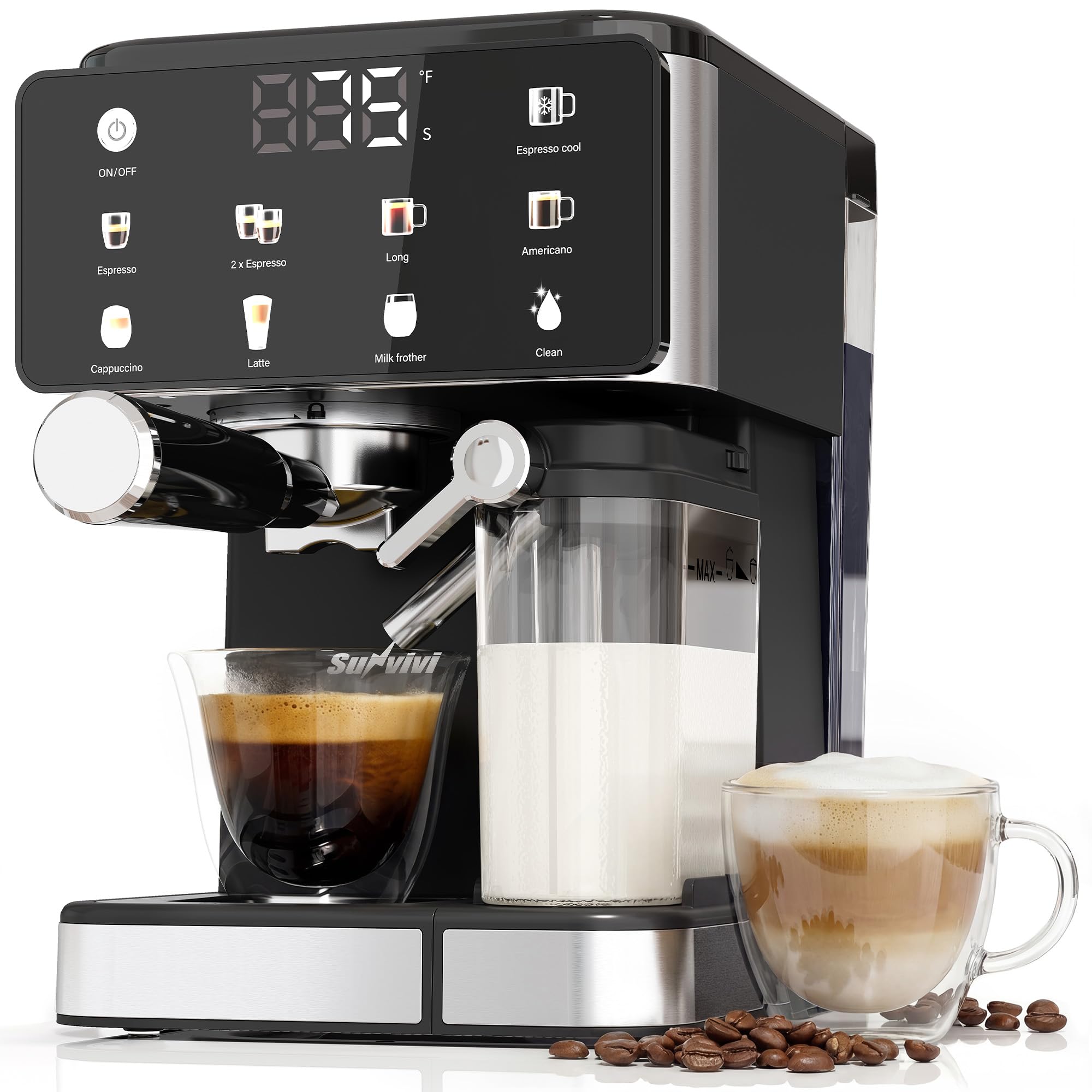
Figure 1: Overall view of the SUNVIVI Espresso Machine, showcasing its compact design and integrated milk frother.

Figure 2: Close-up of the LED touchscreen interface, displaying various drink options and the ON/OFF button.

Figure 3: Included accessories: portafilter, capsule adapter funnel, precision coffee scoop, 1-cup and 2-cup filters, removable drip tray, 16.9 fl oz integrated milk tank, and 50.7 fl oz removable water tank.

Figure 4: The compact dimensions of the espresso machine, measuring 11.8 inches in height, 10.8 inches in depth, and 7.8 inches in width.
Setup
1. Unpacking and Initial Cleaning
- Remove all packaging materials and stickers from the machine.
- Wash the water tank, milk container, portafilter, filters, and drip tray with warm, soapy water. Rinse thoroughly and dry.
- Important: Before first use or after a long period of inactivity, run the "Clean" mode to activate the coffee machine pump system. This primes the machine and removes any manufacturing residues.
2. Filling the Water Tank
The machine is equipped with a 51 oz removable water tank located at the back. Ensure the tank is properly seated and filled with cold, filtered water between the MIN and MAX marks.
Video: Demonstrates the process of filling and securely attaching the water tank to the espresso machine. It highlights the importance of proper seating to prevent leaks and shows the water level indicators.
3. Attaching the Portafilter
Insert the desired filter (1-cup or 2-cup) into the portafilter. Align the portafilter with the group head on the machine and twist it firmly to the right until it is securely locked in place.
Operating Instructions
The LED touchscreen provides easy visibility of brewing status and settings.
1. Power On/Off
Press the ON/OFF button on the LED touchscreen to power the machine on or off. The machine will preheat to the optimal brewing temperature.
2. Brewing with Ground Coffee
- Ensure the portafilter is clean and dry.
- Add freshly ground coffee to the filter in the portafilter. Use the precision coffee scoop for accurate measurement.
- Lightly tamp the coffee grounds to create an even, compact puck. Avoid over-tamping, which can choke the machine, or under-tamping, which can lead to a weak shot.
- Securely attach the portafilter to the group head.
- Place your cup(s) on the drip tray.
- Select your desired drink: Espresso, 2x Espresso, Long, or Americano. The machine will automatically brew.
3. Cold Brew Function
This machine features a dedicated cold brew function, delivering smooth, low-acid coffee for iced enjoyment. Select the Cold Brew option on the touchscreen to initiate the process.

Figure 5: The machine dispensing cold brew coffee into a glass with ice, highlighting its low-acid, refreshing output.
4. Automatic Milk Frother
The integrated milk container and automatic milk frother simplify the creation of milk-based drinks like lattes and cappuccinos. Simply fill the milk container with your desired milk, select Latte or Cappuccino, and the machine will froth and dispense automatically. Note: This machine cannot produce hot milk independently.

Figure 6: Detailed view of the automatic milk system, showing milk being frothed and dispensed into a cup, emphasizing ease of use compared to manual frothing.
5. Running Practice Shots (Initial Setup)
Before brewing your first coffee, it is recommended to run two practice shots with just water. This helps to clean out any manufacturing chemicals and warms up the internal components of the machine and the portafilter for optimal brewing.
Video: Shows the machine dispensing water during a practice shot, demonstrating the initial priming process and the LED display counting down seconds.
Maintenance and Cleaning
Regular cleaning ensures the longevity and optimal performance of your espresso machine.
1. One-Touch Self-Cleaning
The machine features a built-in one-touch self-cleaning function. Select the Clean option on the touchscreen to simplify daily maintenance and reduce residue buildup.

Figure 7: The machine performing a self-clean cycle, with hot water flowing into a glass on the drip tray, illustrating the ease of maintenance.
2. Cleaning the Drip Tray
The drip tray is removable for easy cleaning. Empty and rinse the drip tray regularly to prevent overflow and maintain hygiene.
3. Cleaning the Portafilter and Filters
After each use, remove the portafilter and discard used coffee grounds. Rinse the portafilter and filter thoroughly with water. Ensure they are completely dry before next use to prevent residue buildup and maintain optimal flavor.
Troubleshooting
If you encounter issues with your espresso machine, refer to the following common solutions:
- Machine not brewing / Pump not activating: Ensure the water tank is filled and securely seated. If it's the first use or after a long period of inactivity, run the "Clean" mode to prime the pump system.
- Espresso shot runs too fast (weak coffee): The coffee grind may be too coarse. Adjust your grinder to a finer setting.
- Espresso shot runs too slow or is choked (no coffee): The coffee grind may be too fine or tamped too firmly. Adjust your grinder to a coarser setting or reduce tamping pressure.
- Coffee tastes bitter: Consider using a medium roast coffee instead of a dark roast, as medium roasts tend to be less bitter. Ensure fresh beans are used and ground properly.
- Milk not frothing properly: Ensure the milk container is clean and filled with fresh, cold milk. Check that the milk frother nozzle is clear of any blockages.
Specifications
| Feature | Detail |
|---|---|
| Brand | SUNVIVI |
| Model Number | ZEC007BK |
| Coffee Maker Type | Espresso Machine |
| Operation Mode | Semi-Automatic |
| Wattage | 1350 watts |
| Water Tank Capacity | 51 oz |
| Milk Container Capacity | 16.9 fl oz |
| Human Interface Input | Touchscreen |
| Coffee Input Type | Ground Coffee |
| Special Features | Adjustable Brew Strength, Water Filter, Cold Brew Function, Automatic Milk Frother, Self-Clean |
| Product Dimensions | 10.79"D x 7.8"W x 11.81"H |
Warranty and Support
For warranty information, technical support, or customer service inquiries, please refer to the contact information provided with your product packaging or visit the official SUNVIVI website. Keep your purchase receipt as proof of purchase.


