
Introduction
This manual provides instructions for the AQUANEAT LED Aquarium Light, a full spectrum lighting solution designed for freshwater fish tanks. This light features energy-efficient LEDs to support the healthy growth of fish and plants. Please read this manual thoroughly before installation and operation to ensure proper use and safety.

Figure 1: Main view of the AQUANEAT LED Aquarium Light.
Safety Information
- WARNING: This light is NOT WATERPROOF. Keep the light away from splashing water to prevent electrical hazards.
- Ensure the power supply is disconnected before performing any maintenance or installation.
- Do not operate the light if the cord or plug is damaged.
- This product is designed for indoor use only.
Setup Instructions
The AQUANEAT LED Aquarium Light is designed with extendable brackets to fit various tank sizes. Follow these steps for proper installation:
- Unpack the Light: Carefully remove the LED light and its components from the packaging.
- Adjust Brackets: The light features two extendable brackets. Adjust these brackets to fit the length of your aquarium. The light is suitable for tanks ranging from 11 inches to 14 inches long. The minimum size after assembly with docking brackets is 11 inches L x 2.7 inches W. The light body without docking brackets measures 9.25 inches L x 2.7 inches W.
- Position the Light: Place the light securely on top of your aquarium. Ensure the light is stable and centered over the tank. The tank thickness has no limit for rim size.
- Connect Power: Plug the power cable into a suitable electrical outlet.

Figure 2: The AQUANEAT LED Aquarium Light with its extendable brackets, showing how it adjusts to fit different tank lengths.
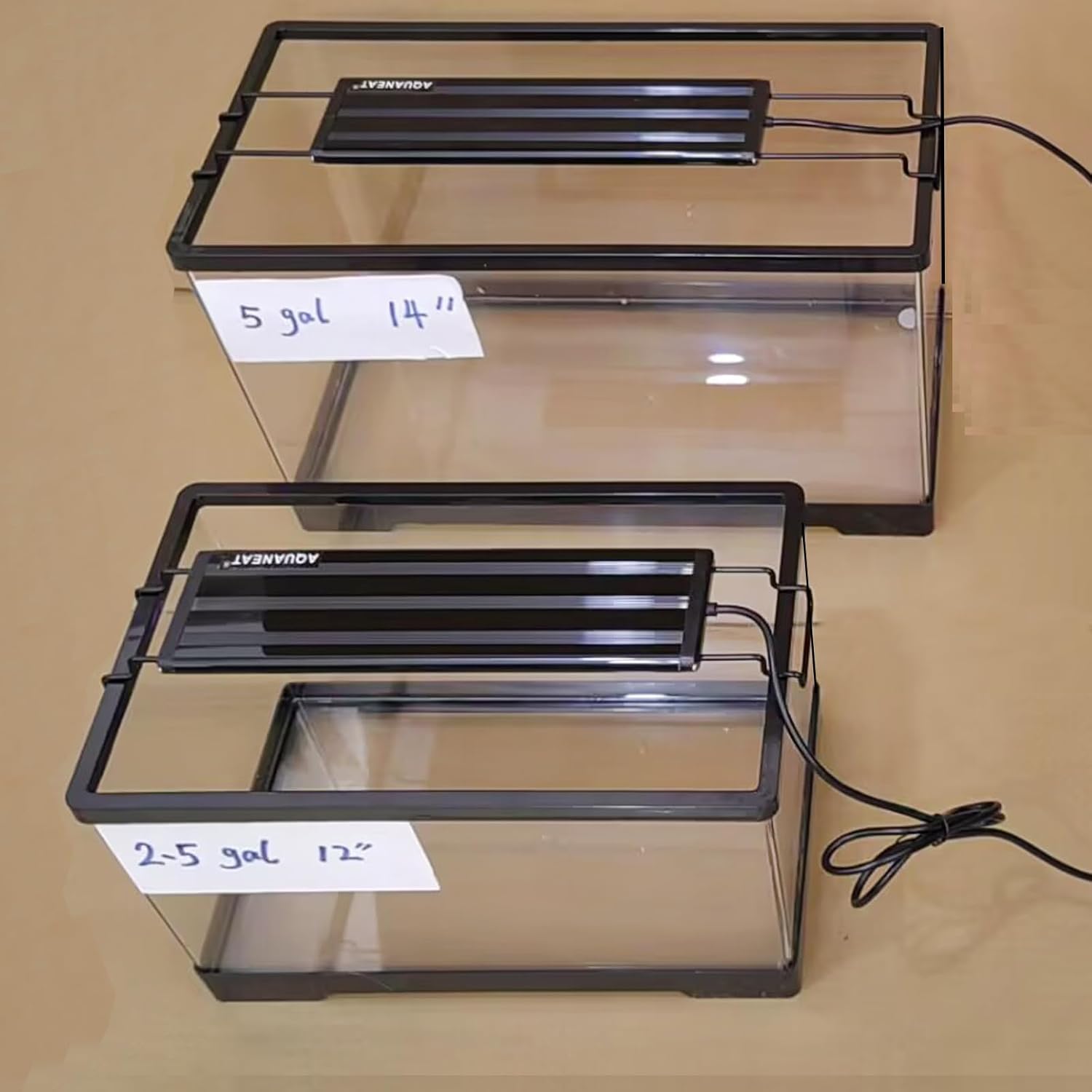
Figure 3: Demonstration of the AQUANEAT LED Aquarium Light installed on both a 2.5-gallon and a 5-gallon tank, illustrating its adaptability.
Video 1: Visual demonstration of the AQUANEAT 12-inch light's effect on 2.5-gallon and 5-gallon aquariums, showcasing its illumination.
Operating Instructions
The AQUANEAT LED Aquarium Light is designed for simple operation:
- Power On/Off: Use the integrated on/off switch on the power cable to turn the light on or off.
- Light Modes: The light operates in two modes: all lights on or all lights off. There is no timer function or dimmer; the light brightness is not adjustable.
- LED Configuration: The light features a total of 30 LEDs, including 22 pcs 6500K white LEDs, 4 pcs blue LEDs, 2 pcs pink LEDs, and 2 pcs green LEDs, providing a full spectrum for freshwater environments.

Figure 4: Close-up of the simple on/off switch located on the power cord for easy operation.

Figure 5: Detailed view of the various colored LEDs (white, blue, pink, green) that make up the full spectrum lighting.
Maintenance
To ensure the longevity and optimal performance of your AQUANEAT LED Aquarium Light, follow these maintenance guidelines:
- Regular Cleaning: Periodically wipe the light fixture with a dry, soft cloth to remove dust and water spots. Ensure the light is unplugged before cleaning.
- Avoid Water Contact: As the light is not waterproof, take extreme care to prevent any water from coming into contact with the fixture or electrical components.
- Inspect Power Cable: Regularly check the power cable and plug for any signs of damage. If damage is found, discontinue use immediately and replace the unit.
Troubleshooting
If you encounter issues with your AQUANEAT LED Aquarium Light, refer to the following common troubleshooting steps:
- Light Not Turning On:
- Check if the power plug is securely inserted into the electrical outlet.
- Ensure the on/off switch is in the 'on' position.
- Verify that the electrical outlet is functioning by plugging in another device.
- Inspect the power cable for any visible damage. If damaged, do not use.
- Inconsistent Lighting:
- Ensure the light fixture is clean and free from debris that might obstruct light output.
- Confirm that the power connection is stable.
If problems persist after attempting these steps, contact AQUANEAT customer support for further assistance.
Specifications
| Feature | Specification |
|---|---|
| Brand Name | AQUANEAT |
| Model Number | LED-A993, LED-A994, LED-A996 |
| Product Dimensions | 2.7"D x 11"W x 0.4"H |
| Tank Compatibility | 11" to 14" long aquariums |
| LED Count | 30 (22 white, 4 blue, 2 pink, 2 green) |
| Light Source Type | LED |
| Wattage | 6 watts |
| Voltage | 110 Volts |
| Power Source | Corded Electric |
| Switch Type | Toggle |
| Waterproof | No |
| Material Type | Plastic |
| Color | Light cover is black |
| Indoor/Outdoor Usage | Indoor |
What's in the Box
The product package includes:
- AQUANEAT LED Aquarium Light Fixture
- Power Cable with On/Off Switch

Figure 6: The included power cable with an integrated on/off switch.
Warranty and Support
Specific warranty information is not provided in the product details. For any questions, technical support, or warranty inquiries, please contact AQUANEAT customer service directly.