1. Introduction
This manual provides essential information for setting up, operating, and maintaining your HP OMEN 35L Gaming Desktop PC, model GT16-0099. Designed for high-performance gaming, this system features an Intel Core Ultra 9 processor, NVIDIA GeForce RTX 5080 graphics, and a robust cooling system. Please read this manual thoroughly to ensure optimal performance and longevity of your device.
2. Product Overview
The HP OMEN 35L GT16-0099 is a powerful gaming desktop PC housed in a sleek black chassis with customizable RGB lighting and a tempered glass side panel. Its design prioritizes airflow and easy access for future upgrades.
2.1. Exterior Views

Figure 2.1: Angled front view of the HP OMEN 35L Gaming Desktop PC, showcasing the front RGB fans and tempered glass side panel.

Figure 2.2: Direct front view of the HP OMEN 35L Gaming Desktop PC, highlighting the OMEN logo and perforated front panel with RGB fan illumination.

Figure 2.3: Side view of the HP OMEN 35L Gaming Desktop PC, showing the OMEN branding on the side panel.
2.2. Port Layout
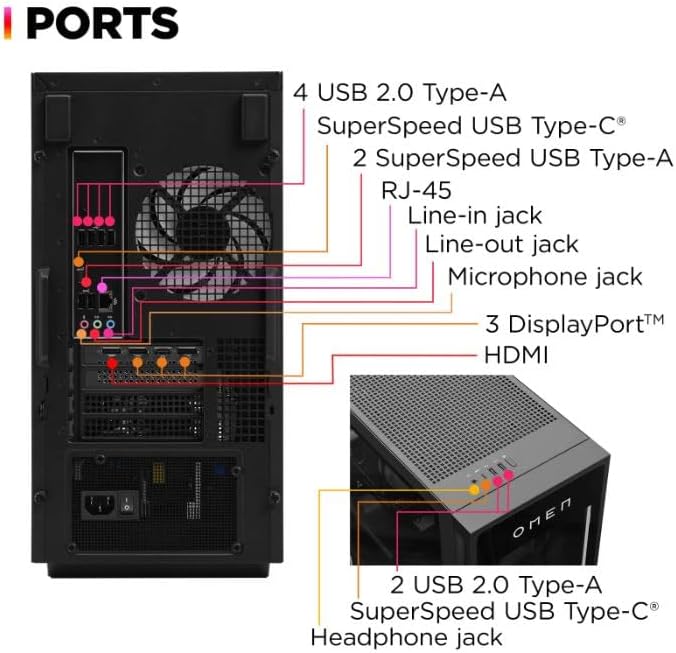
Figure 2.4: Detailed diagram illustrating the rear and top port configurations of the HP OMEN 35L Gaming Desktop PC.
The OMEN 35L provides extensive connectivity options for all your peripherals:
- Rear Ports:
- 1x USB Type-C 10Gbps signaling rate
- 2x USB Type-A 5Gbps signaling rate
- 4x USB 2.0 Type-A
- 1x Microphone jack
- 1x RJ-45 Ethernet port
- 1x Line-in audio jack
- 1x Line-out audio jack
- 1x Thunderbolt 4 with USB Type-C 40Gbps signaling rate (DisplayPort 2.1 compatible)
- Multiple DisplayPort and HDMI outputs from the NVIDIA GeForce RTX 5080 graphics card
- Top/Front Ports:
- 2x USB 2.0 Type-A
- 1x SuperSpeed USB Type-C
- 1x Headphone jack
3. Setup Guide
- Unpack the PC: Carefully remove the desktop PC and any included accessories (keyboard, mouse, power cable) from the packaging. Retain packaging for future transport or service.
- Position the PC: Place the desktop on a stable, flat surface with adequate ventilation around all sides. Ensure no vents are obstructed.
- Connect Peripherals:
- Connect your monitor(s) to the graphics card ports (DisplayPort or HDMI) on the rear of the PC.
- Connect your keyboard and mouse to any available USB ports.
- If using a wired network, connect an Ethernet cable to the RJ-45 port.
- Connect any other desired peripherals (speakers, webcam, etc.).
- Connect Power: Plug the power cable into the PC's power input and then into a grounded electrical outlet.
- Power On: Press the power button located on the front of the PC. The system will boot up, and you will be guided through the initial Windows 11 Pro setup process.
4. Operating Instructions
4.1. Initial Windows 11 Pro Setup
Follow the on-screen prompts to complete the Windows 11 Pro setup, including language selection, network connection, account creation, and privacy settings. Ensure your system is connected to the internet to download necessary updates.
4.2. OMEN Gaming Hub
Your HP OMEN 35L comes pre-installed with the OMEN Gaming Hub software. This application allows you to:
- Monitor system performance (CPU, GPU, RAM usage, temperatures).
- Customize RGB lighting effects.
- Manage network booster settings for optimized gaming.
- Access game libraries and other OMEN features.
Refer to the OMEN Gaming Hub's built-in help for detailed instructions on its features.
4.3. System Upgradability
The OMEN 35L is designed for tool-less access to key components, facilitating easy upgrades of RAM, storage, and graphics cards. Always power down and unplug the PC before opening the chassis for any internal modifications.
5. Maintenance
5.1. Cleaning
- Exterior: Use a soft, damp cloth to wipe down the exterior surfaces. Avoid harsh chemicals.
- Vents and Fans: Periodically use compressed air to clear dust from the intake and exhaust vents, as well as the internal fans. Ensure the PC is powered off and unplugged before cleaning internal components.
5.2. Software Updates
Regularly update your operating system (Windows Update), graphics drivers (NVIDIA GeForce Experience), and OMEN Gaming Hub software to ensure optimal performance, security, and compatibility.
5.3. Thermal Management
The OMEN 35L features liquid cooling for the CPU to maintain optimal temperatures during intensive tasks. Ensure the PC is placed in a well-ventilated area and that airflow is not restricted to prevent overheating.
6. Troubleshooting
- No Power:
- Check if the power cable is securely connected to both the PC and the electrical outlet.
- Verify the power outlet is functional.
- No Display:
- Ensure the monitor is powered on and correctly connected to the graphics card ports (DisplayPort or HDMI) on the rear of the PC, not the motherboard ports.
- Try a different display cable or monitor if available.
- System Slowdown/Performance Issues:
- Check for background applications consuming resources.
- Ensure all drivers (especially graphics drivers) and Windows are up to date.
- Monitor system temperatures using OMEN Gaming Hub to check for overheating.
- Peripheral Not Working:
- Try connecting the peripheral to a different USB port.
- Ensure necessary drivers for the peripheral are installed.
For more advanced troubleshooting or issues not covered here, please refer to the HP support website or contact customer service.
7. Specifications
| Component | Detail |
|---|---|
| Processor | Intel Core Ultra 9 285K (up to 5.7 GHz, 24 cores, 24 threads, 36 MB L3 cache) |
| RAM | 64 GB DDR5-5600 MT/s XMP RGB Heatsink (4 x 16 GB) |
| Storage | 2 TB PCIe Gen4 NVMe M.2 SSD |
| Graphics Card | NVIDIA GeForce RTX 5080 (16 GB dedicated GDDR6) |
| Operating System | Windows 11 Pro |
| Wireless Connectivity | Realtek RTL8852BE Wi-Fi 6 (2x2) and Bluetooth 5.3 |
| USB Ports | 1x USB-C 10Gbps, 2x USB-A 5Gbps, 4x USB 2.0 Type-A (rear); 1x Thunderbolt 4 with USB-C 40Gbps (DisplayPort 2.1); 2x USB 2.0 Type-A, 1x SuperSpeed USB Type-C (front/top) |
| Audio Ports | Microphone, Line-in, Line-out (rear); Headphone jack (front/top) |
| Ethernet | 1x RJ-45 |
| Cooling | Liquid Cooling |
| Dimensions (Approx.) | 26.46 x 23.31 x 12.91 inches (Package Dimensions) |
| Weight (Approx.) | 32 pounds |
8. Warranty and Support
This product is covered by an Amazon Renewed Warranty. For specific details regarding your warranty coverage, please refer to the documentation provided with your purchase or visit the Amazon Renewed program page.
For technical assistance, driver downloads, or further support, please visit the official HP support website:
When contacting support, please have your product model (GT16-0099) and serial number ready.