
Introduction
This manual provides detailed instructions for the assembly, operation, maintenance, and troubleshooting of your Garvee Full Size Floating Bed Frame with LED Lights and Storage Headboard. Please read all instructions carefully before assembly and use to ensure safe and proper operation.
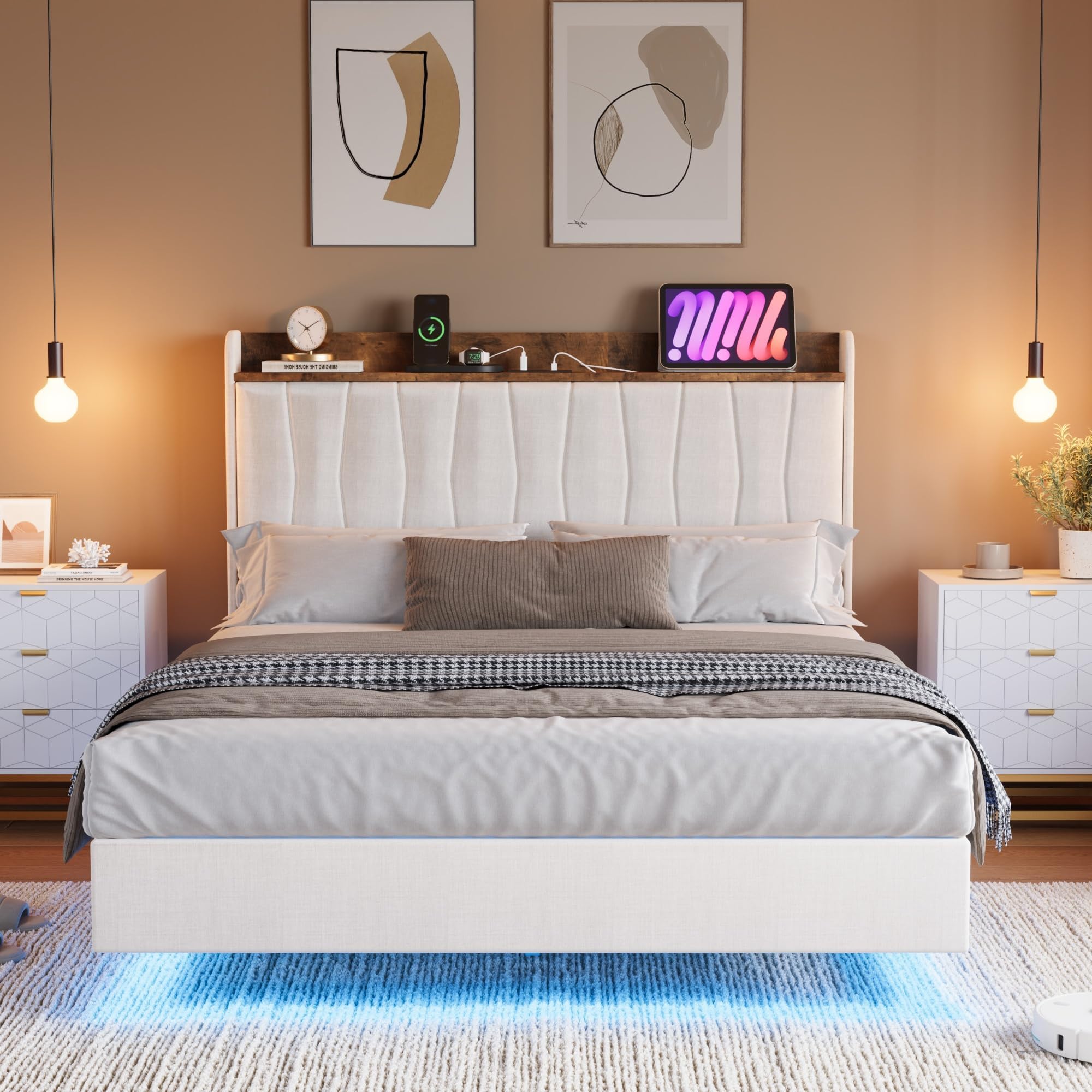
Image: Garvee Full Size Floating Bed Frame with LED Lights and Storage Headboard. This image displays the complete bed frame with its upholstered headboard, integrated LED lighting, and floating design.
Key Features:
- Unique Floating Design: Hidden support legs create a suspension effect, enhancing modern aesthetics while providing stability.
- Integrated LED Lighting: Features LED lights on the headboard and three hidden strips under the bed, offering over 60,000 color options, brightness control, various modes, and timing functions via app or remote.
- Storage Headboard with Charging Station: A two-tier headboard provides storage space and includes 2 AC outlets, 1 USB port, and 1 Type-C port for convenient device charging.
- Durable and Noise-Free Construction: Constructed with a metal frame and solid wood slats, reinforced for durability. EVA strips are included to prevent noise from friction.
- Easy Assembly: Designed for straightforward assembly with clearly labeled parts and detailed instructions.
Setup Instructions
The Garvee Full Size Floating Bed Frame is designed for easy assembly. Please follow the step-by-step instructions provided in the separate assembly guide included with your product. Ensure all parts are present before beginning assembly.
Before You Begin:
- Unpack all components and verify against the parts list in your assembly guide.
- Lay out all parts on a clean, soft surface to prevent scratches.
- Ensure you have the necessary tools as specified in the assembly guide.
- It is recommended to have two people for assembly.
Assembly Overview:
- Assemble the headboard components, including the storage shelves and charging station.
- Attach the side rails to the headboard and footboard.
- Install the central support beam and support legs.
- Place the solid wood slats onto the frame, ensuring the EVA mute strips are correctly positioned to prevent noise.
- Connect the LED light strips and charging station power cable.

Image: Detailed view of the bed frame's construction, highlighting the upholstered surrounding, strong slat support, ease of assembly, and noise-free design. This image illustrates the structural components and features that contribute to the bed's stability and quiet operation.
Assembly typically takes less than 45 minutes. Refer to the included detailed instructions for specific steps and diagrams.
Operating Instructions
LED Lighting System:
Your Garvee bed frame features integrated LED lights on the headboard and under the bed. These lights can be controlled via a dedicated mobile application or the included remote control.
- Power On/Off: Use the power button on the remote or within the app to turn the lights on or off.
- Color Selection: Choose from over 60,000 color options using the color wheel in the app or preset color buttons on the remote.
- Brightness Adjustment: Adjust the light intensity to your preference using the brightness controls.
- Mode Selection: Select various lighting modes (e.g., static, dynamic, fade, strobe) for different ambiance.
- Timing Function: Set timers for the lights to automatically turn on or off at specified times.
- App Control: Download the recommended app (refer to your assembly guide for details) to unlock full customization features, including music sync and custom styles.
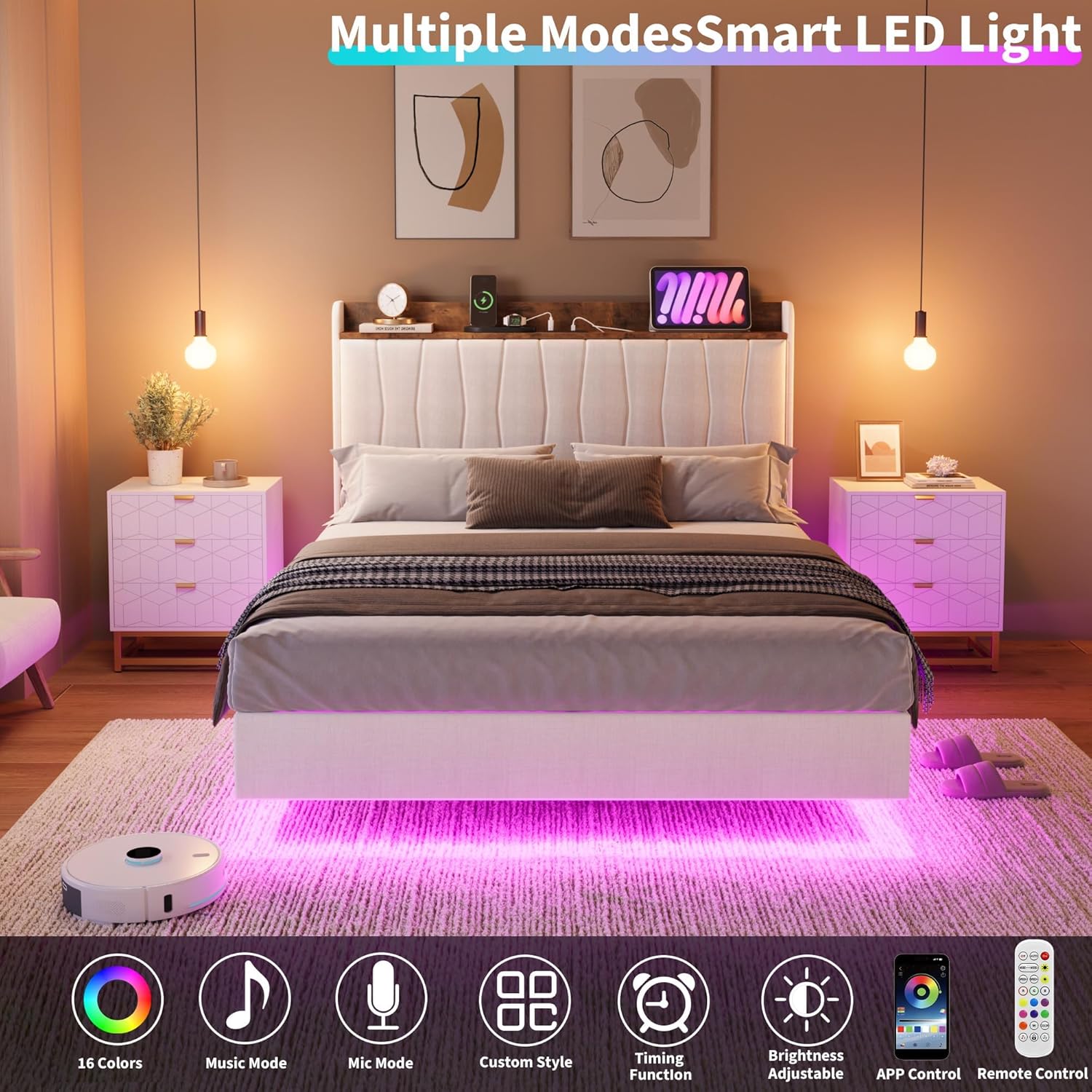
Image: This image illustrates the various modes and smart control features of the LED lighting system, including 16 colors, music mode, mic mode, custom styles, timing function, brightness adjustment, app control, and remote control.
Charging Station:
The headboard is equipped with a convenient charging station to power your electronic devices.
- AC Outlets: Two 125V / 12A AC outlets are available for standard plugs.
- USB Port: One 5V / 2A USB port is provided for charging compatible devices.
- Type-C Port: One 5V / 2A Type-C port is available for modern devices.
- Usage: Simply plug your device's charging cable into the appropriate port. Ensure the bed frame's main power cable is connected to a wall outlet for the charging station to function.

Image: Close-up view of the headboard's integrated charging station, showing 2 AC outlets (125V/12A), 1 USB port (5V/2A), and 1 Type-C port (5V/2A). This image details the power options available for charging electronic devices.
Maintenance
Regular maintenance will help preserve the appearance and functionality of your Garvee bed frame.
Cleaning:
- Upholstered Fabric: For general cleaning, gently vacuum the linen fabric to remove dust and debris. For spills, blot immediately with a clean, dry cloth. For stubborn stains, use a mild fabric cleaner according to its instructions, testing on an inconspicuous area first.
- Metal Frame and Wood Surfaces: Wipe with a soft, damp cloth. Avoid abrasive cleaners or harsh chemicals that may damage the finish.
- LED Lights and Charging Station: Ensure the power is disconnected before cleaning. Wipe gently with a dry, soft cloth. Do not spray liquids directly onto electrical components.
General Care:
- Periodically check all bolts and screws to ensure they remain tight. Retighten as necessary.
- Avoid exposing the bed frame to direct sunlight or extreme temperature changes, which can affect the material.
- Do not exceed the maximum weight capacity of 900 lbs.
Troubleshooting
If you encounter issues with your bed frame, refer to the following common problems and solutions:
| Problem | Possible Cause | Solution |
|---|---|---|
| Bed frame is squeaking or making noise. | Loose connections; missing or displaced EVA mute strips. | Ensure all bolts and screws are tightened. Verify that the EVA mute strips are correctly installed between the slats and the frame. |
| LED lights are not turning on. | Power cable disconnected; remote control battery low; app not connected. | Check if the LED light power cable is securely plugged into a working outlet. Replace remote control batteries. Ensure your mobile device is properly paired with the LED system via the app. |
| Charging station is not working. | Main power cable disconnected; device incompatibility. | Ensure the bed frame's main power cable is securely plugged into a working wall outlet. Test with a different device or charging cable to rule out device-specific issues. |
| Bed frame feels unstable. | Loose connections; uneven floor. | Retighten all assembly hardware. Ensure the bed is placed on a level surface. Adjust any leveling feet if present. |
Specifications
| Feature | Detail |
|---|---|
| Model Number | qZKfwhohi7zsVxe2REVtFwGllf4 |
| UPC | 199809131470 |
| Size | Full |
| Color | White |
| Material | Engineered Wood, Metal, Linen Fabric |
| Product Dimensions (L x W x H) | 79.1" x 55.5" x 44.5" |
| Item Weight | 76.8 Pounds |
| Weight Capacity | 900 lbs |
| Suitable Mattress Thickness | 8" - 10" |
| Box Spring Required | No |
| Included Components | Headboard, Frame, Slats, LED Lights, Charging Station |
| LED Light Strip Length | 26.6 ft / 8.1 m |
| Charging Station Cable Length | 4.9 ft / 1.5 m |
| Charging Station AC Output | 2 x 125V / 12A |
| Charging Station USB Output | 1 x 5V / 2A |
| Charging Station Type-C Output | 1 x 5V / 2A |
| Assembly Required | Yes |

Image: Technical drawing of the Garvee Full Size Floating Bed Frame, showing overall dimensions (79.1"L x 55.5"W x 44.5"H), headboard height (23.6"), and key specifications such as 900 lbs weight capacity, 8"-10" suitable mattress thickness, 26.6 ft LED light strip, and 4.9 ft charging station cable.
Warranty and Support
Return Policy:
This product is eligible for a 30-day easy return policy. Please refer to the retailer's return policy for specific terms and conditions.
Customer Support:
For any questions, missing parts, or assistance with assembly or operation, please contact Garvee customer support through the retailer's platform or visit the official Garvee store page. Please have your model number (qZKfwhohi7zsVxe2REVtFwGllf4) and purchase information ready when contacting support.
Visit the Garvee Store: Garvee Official Store