1. Important Safety Information
Read all instructions before using the appliance. This manual contains important safety messages. Always follow basic safety precautions to reduce the risk of fire, electric shock, or injury to persons when using your refrigerator.
- Do not store explosive substances such as aerosol cans with a flammable propellant in this appliance.
- Do not use electrical appliances inside the food storage compartments of the appliance, unless they are of the type recommended by the manufacturer.
- Keep ventilation openings, in the appliance enclosure or in the built-in structure, clear of obstruction.
- Do not damage the refrigerant circuit.
- This appliance is not intended for use by persons (including children) with reduced physical, sensory or mental capabilities, or lack of experience and knowledge, unless they have been given supervision or instruction concerning use of the appliance by a person responsible for their safety.
- Children should be supervised to ensure that they do not play with the appliance.
2. Product Overview
The LG LT19HBHSIN is a 506-liter top freezer refrigerator designed for efficient food preservation. It features a Smart Inverter Compressor for energy efficiency and durability, LINEARCooling technology to minimize temperature fluctuations, and Hygiene FRESH for internal air purification. The refrigerator also includes ThinQ technology for smart control via Wi-Fi.
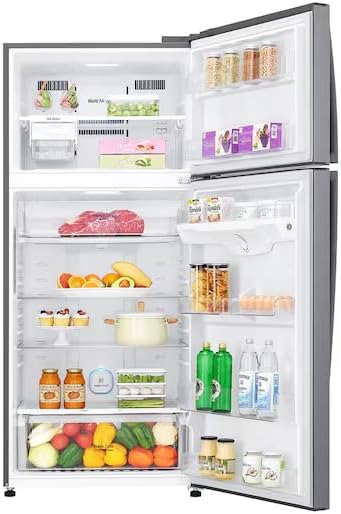
Image: The LG LT19HBHSIN refrigerator with both freezer and fresh food compartments open, displaying various food items stored on shelves and in drawers.
3. Setup and Installation
3.1 Unpacking
Carefully remove all packaging materials, including tape and temporary labels. Clean the interior of the refrigerator with a soft cloth and warm water before use.
3.2 Location Requirements
- Place the refrigerator on a firm, level floor.
- Ensure adequate ventilation. Maintain at least 5 cm (2 inches) clearance from the back and sides of the refrigerator to allow for proper air circulation.
- Avoid direct sunlight or heat sources.
3.3 Power Connection
Connect the power cord to a dedicated grounded outlet. Do not use extension cords or multi-outlet adapters. Allow the refrigerator to stand for at least 2-3 hours before plugging it in to allow refrigerants to settle.
3.4 Initial Power-On
After plugging in, the refrigerator will begin cooling. It may take several hours for the appliance to reach its optimal operating temperature. Avoid placing food inside until the temperature stabilizes.

Image: The fresh food compartment of the LG LT19HBHSIN refrigerator, showing the arrangement of empty shelves and the Fresh Zone drawer.
4. Operating Instructions
4.1 Temperature Control
The refrigerator features electronic temperature controls, typically located inside the fresh food compartment or on the freezer door. Adjust the temperature settings according to your needs. The LINEARCooling system helps maintain consistent temperatures, minimizing fluctuations.
4.2 Hygiene FRESH Operation
The Hygiene FRESH system purifies the internal air using a 5-step filtering process to reduce odors and bacteria. This system operates automatically. Ensure the air filter is clean for optimal performance.
4.3 ThinQ (Wi-Fi Control)
To use the smart features, download the LG ThinQ app on your smartphone. Follow the in-app instructions to connect your refrigerator to your home Wi-Fi network. This allows for remote monitoring and control of certain functions.
4.4 Food Storage Recommendations
- Fresh Food Compartment: Store fruits, vegetables, dairy products, and cooked foods. Utilize the Fresh Zone drawer for optimal preservation of specific items.
- Freezer Compartment: Store frozen foods. Ensure packages are sealed to prevent freezer burn.
- Avoid overcrowding shelves to allow for proper air circulation.

Image: A user adjusting the humidity control on the Fresh Zone drawer, which contains various fruits and vegetables.
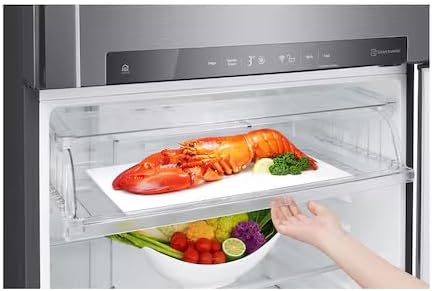
Image: The Fresh Zone drawer with a lobster on a tray, demonstrating its capacity for larger items, with vegetables stored in the compartment below.
5. Maintenance and Cleaning
5.1 Cleaning the Interior
Unplug the refrigerator before cleaning. Use a mild detergent and warm water to clean the interior surfaces, shelves, and drawers. Rinse thoroughly and dry with a soft cloth. Do not use abrasive cleaners or harsh chemicals.
5.2 Cleaning the Exterior
Wipe the exterior surfaces with a soft, damp cloth. For stainless steel finishes, use a specialized stainless steel cleaner. Clean door gaskets regularly to ensure a tight seal.
5.3 Defrosting
This refrigerator features a Frost-Free defrost system, eliminating the need for manual defrosting. If ice buildup occurs, check door seals for proper closure.
5.4 Hygiene FRESH Filter Maintenance
The Hygiene FRESH filter should be cleaned or replaced periodically as indicated by the appliance or the ThinQ app. Refer to the specific instructions for filter removal and maintenance.
6. Troubleshooting
Before contacting service, review the following common issues and solutions:
| Problem | Possible Cause | Solution |
|---|---|---|
| Refrigerator not cooling | Power cord unplugged; temperature set too high; door left open. | Check power connection; adjust temperature setting; ensure door is closed properly. |
| Unusual noises | Refrigerator not level; items rattling inside; normal operating sounds. | Level the appliance; rearrange items; some sounds (e.g., refrigerant flow) are normal. |
| Water on floor | Drain tube clogged; door not sealing properly. | Clear drain tube (refer to service manual); check door gasket for damage or obstruction. |
| Odor inside refrigerator | Food items not covered; Hygiene FRESH filter needs cleaning/replacement. | Cover all food items; clean or replace Hygiene FRESH filter. |
If the problem persists after attempting these solutions, contact LG customer service.
7. Specifications
Detailed technical specifications for the LG LT19HBHSIN refrigerator:
| Feature | Specification |
|---|---|
| Brand Name | LG |
| Model Information | LT19HBHSIN |
| Capacity | 506 Liters |
| Installation Type | Freestanding |
| Form Factor | Top Freezer |
| Special Features | AI Smart, Smart Inverter Compressor, LINEARCooling, Hygiene FRESH, ThinQ |
| Color | Platinum |
| Defrost System | Frost-Free |
| Door Hinges | Right |
| Door Material Type | PET |
| Number of Doors | 1 |
| Batteries Required? | No |
| First Available Date | September 28, 2025 |
8. Warranty and Support
Your LG refrigerator is covered by a limited warranty. Please refer to the warranty card included with your product for specific terms and conditions, including coverage duration and limitations. For technical assistance, spare parts, or to schedule a service appointment, please contact LG customer support.
You can find contact information for LG customer support on the official LG website or in your product documentation. When contacting support, please have your model number (LT19HBHSIN) and serial number ready.
For additional resources and FAQs, visit the official LG support page: LG Global Support