
1. Introduction
This manual provides essential information for the safe and effective use of your HomeTro HM2 Foldable Treadmill. Designed for both walking and running, this versatile fitness equipment features a 7% manual incline, a powerful yet quiet 2.5HP motor, and multiple control options including a remote and a smart application. Please read this manual thoroughly before operation and retain it for future reference.

Figure 1: HomeTro HM2 Foldable Treadmill in use.
2. Safety Information
To ensure safe operation, always adhere to the following guidelines:
- Always attach the safety key clip to your clothing before starting the treadmill. The treadmill will stop automatically if the safety key is dislodged.
- Ensure the area around the treadmill is clear of obstructions.
- Wear appropriate athletic footwear.
- Consult a physician before beginning any new exercise program.
- Keep children and pets away from the treadmill during operation.
- Do not use the treadmill if you feel dizzy, faint, or experience any pain.
3. Package Contents
Verify that all components are present:
- HomeTro HM2 Foldable Treadmill (pre-assembled)
- Remote Control
- Safety Key
- Tool Kit
- User Manual
- Power Cord
- Rotary Knob (x2)
- Pad Holder

Figure 2: Included Components.
4. Setup
The HomeTro HM2 Treadmill comes largely pre-assembled for convenience.
4.1 Unfolding and Handlebar Setup
- Carefully remove the treadmill from its packaging.
- Place the treadmill on a flat, stable surface.
- To raise the handlebars, pull out the locking pins on both sides of the base. Lift the handlebars to the desired height and re-insert the pins to secure them.
4.2 Power Connection
- Connect the power cord to the treadmill's power input.
- Plug the power cord into a grounded electrical outlet.
- Turn on the main power switch located at the front of the treadmill.
4.3 Incline Adjustment
The treadmill features a manual 7% incline. To adjust:
- Locate the rotary knobs at the rear underside of the treadmill.
- Remove the knobs and lift the rear of the treadmill to the desired incline position.
- Re-insert and tighten the rotary knobs to secure the incline.
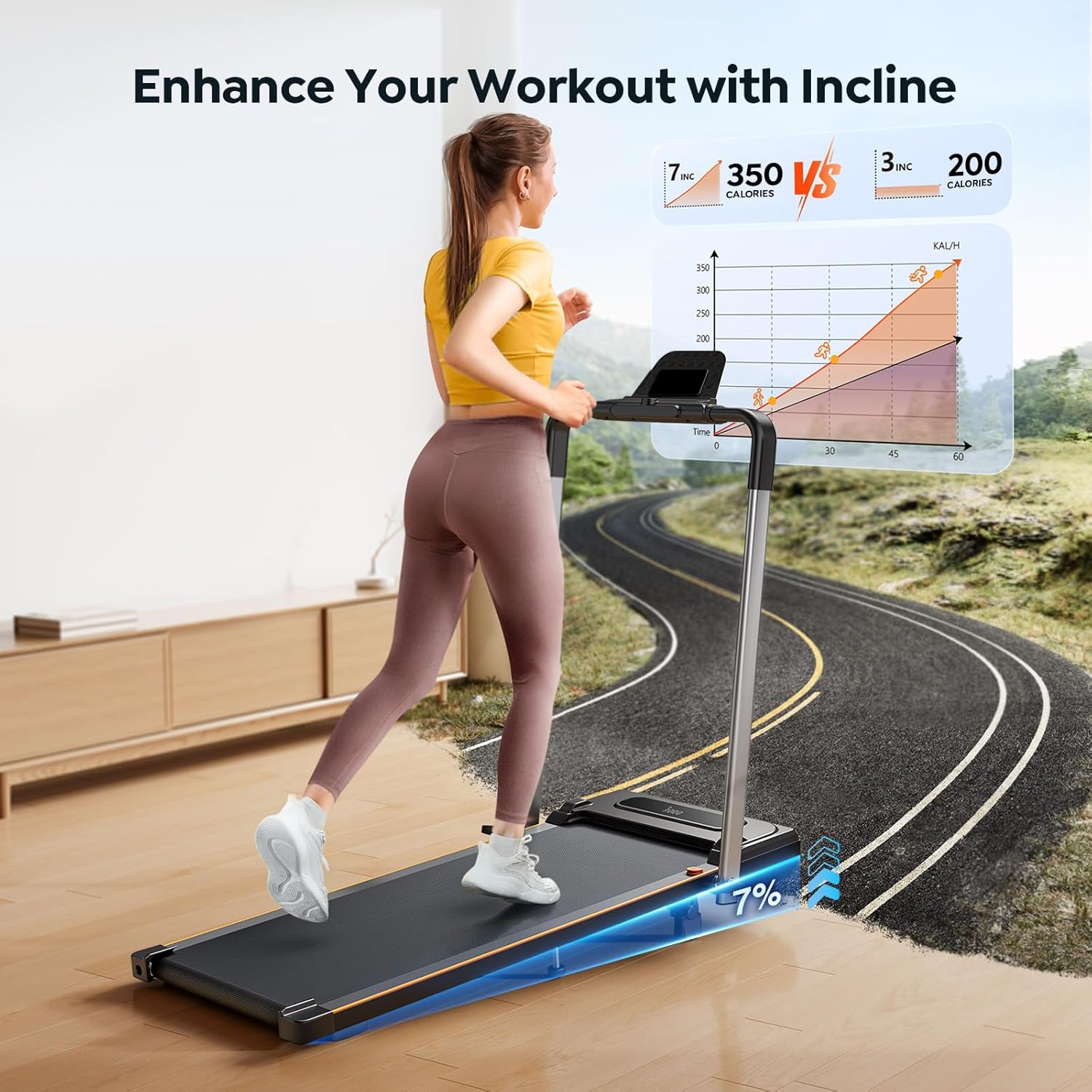
Figure 3: Treadmill with 7% Incline.
5. Operating Instructions
5.1 Basic Operation
- Ensure the safety key is properly attached to the treadmill console and your clothing.
- Press the Start/Pause button on the console or remote control. The treadmill will begin with a 3-second countdown before starting at the lowest speed (0.6 MPH).
- To stop, press the Start/Pause button again. The treadmill will gradually slow down and stop.
5.2 Speed Adjustment
Adjust speed using:
- Remote Control: Use the '+' and '-' buttons to increase or decrease speed. The speed range is 0.6 to 7.5 MPH.
- Handlebar Buttons: Use the integrated buttons on the handlebar for speed control.
- Touchscreen: The LED display also features touch controls for speed adjustment.
5.3 Modes and Programs
The treadmill offers 12 preset programs. Use the 'M' button on the remote or touchscreen to cycle through different workout modes and programs.
5.4 LED Display
The integrated LED display shows real-time workout data:
- Distance
- Speed
- Time
- Calories Burned

Figure 4: LED Display and Remote Control.
5.5 Smart APP Control
Download the dedicated smart APP to control the treadmill remotely, track your workout progress, and access additional interactive fitness experiences. Refer to the user manual for APP download instructions and pairing.
5.6 Phone/Tablet Holder
Utilize the built-in phone/tablet holder on the handlebar to enjoy entertainment or productivity while exercising.
Video 1: HomeTro Foldable Treadmill with Incline - Demonstrates setup and basic operation.
6. Maintenance
Regular maintenance ensures the longevity and optimal performance of your treadmill.
- Cleaning: Wipe down the treadmill with a damp cloth after each use. Avoid abrasive cleaners.
- Lubrication: Periodically lubricate the running belt as instructed in the detailed user manual to maintain smooth operation.
- Belt Adjustment: Check the running belt tension and alignment regularly. Adjust as needed following the instructions in the full user manual.
7. Troubleshooting
If you encounter issues, refer to the following common solutions:
- Treadmill not starting: Ensure the power cord is securely plugged in, the main power switch is on, and the safety key is correctly placed.
- Belt slipping: The running belt may need tensioning or lubrication. Refer to the maintenance section.
- Unusual noise: Check for loose parts or foreign objects under the belt. If the noise persists, contact customer support.
8. Specifications
| Feature | Specification |
|---|---|
| Model Name | HM2 |
| Motor Horsepower | 2.5 HP |
| Speed Range | 0.6 - 7.5 MPH |
| Maximum Incline | 7% (Manual) |
| Maximum Weight Capacity | 265 lbs |
| Product Dimensions (LxWxH) | 53"D x 22.4"W x 5"H |
| Folded Size | 25" x 22.4" x 5" |
| Item Weight | 21.8 Kilograms |
| Material | Metal, Rubber |
| Special Features | Foldable, Adjustable Incline, Remote Control, App Control |
| Included Components | Remote Control, Tool Kit, User Manual |
9. Warranty and Support
For warranty information and customer support, please refer to the specific warranty card included with your product or visit the official HomeTro website. Contact details for support are typically provided in the full user manual.