
Introduction
This manual provides detailed instructions for the setup, operation, and maintenance of your yAyusi Vlogging Kit N01. This kit is designed to enhance your video recording and live streaming experience on both iPhone and Android devices, offering stable support, clear audio, and adjustable lighting.
Product Contents
The yAyusi Vlogging Kit N01 includes the following components:
- Tripod (1)
- Double Phone Clip (1)
- Microphone Receiver (1)
- Microphone Transmitters (2)
- Magnetic Microphone Clips (2)
- Ring Light (1)
- Type-C Charging Cable (1)
- Remote Control (1)
- Storage Bag (1)
- User Manual (1)
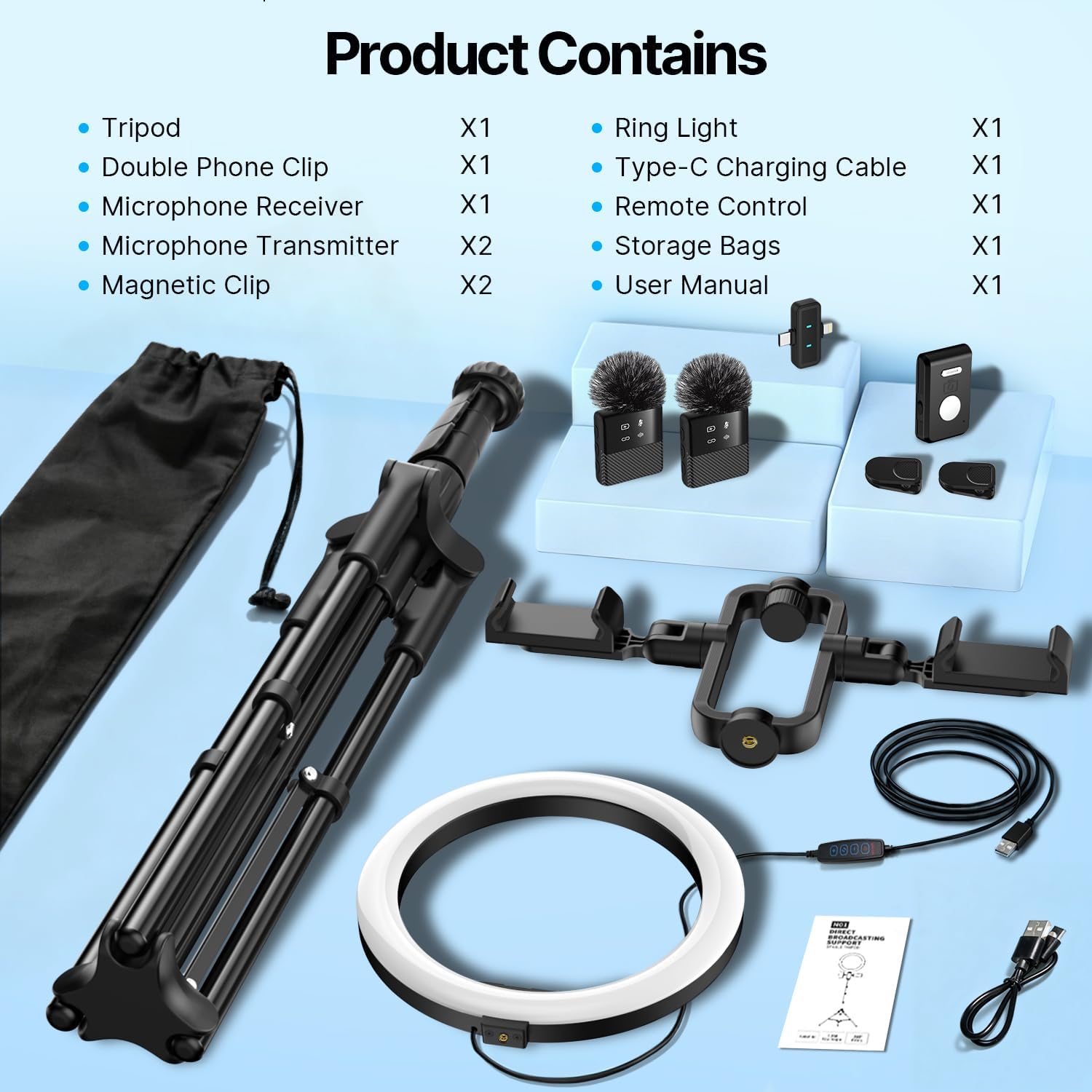
Image: All components of the yAyusi Vlogging Kit N01, including the tripod, double phone clip, ring light, two microphone transmitters, one receiver, magnetic clips, remote control, charging cable, and storage bag.
Setup Instructions
1. Assembling the Tripod
- Unfold the tripod legs until they are fully extended and stable.
- Adjust the height of the tripod by loosening the telescopic pole locks on each leg, extending the pole to the desired height, and then tightening the locks securely.
- Ensure the tripod is placed on a flat, stable surface to prevent tipping.

Image: Close-up of the tripod base and extension mechanisms, highlighting the telescopic pole lock, foot extension lock, and the 1/4-inch screw mount for attaching accessories.
2. Attaching the Double Phone Clip and Ring Light
- Screw the double phone clip onto the 1/4-inch interface at the top of the tripod.
- Attach the ring light to the designated mount on the double phone clip.
- Insert your smartphone(s) into the phone clips. The clips extend up to 3.35 inches and rotate 360 degrees for optimal positioning.

Image: A fully assembled vlogging kit with a tripod, double phone clip holding two smartphones, and a ring light, demonstrating its use for live streaming.
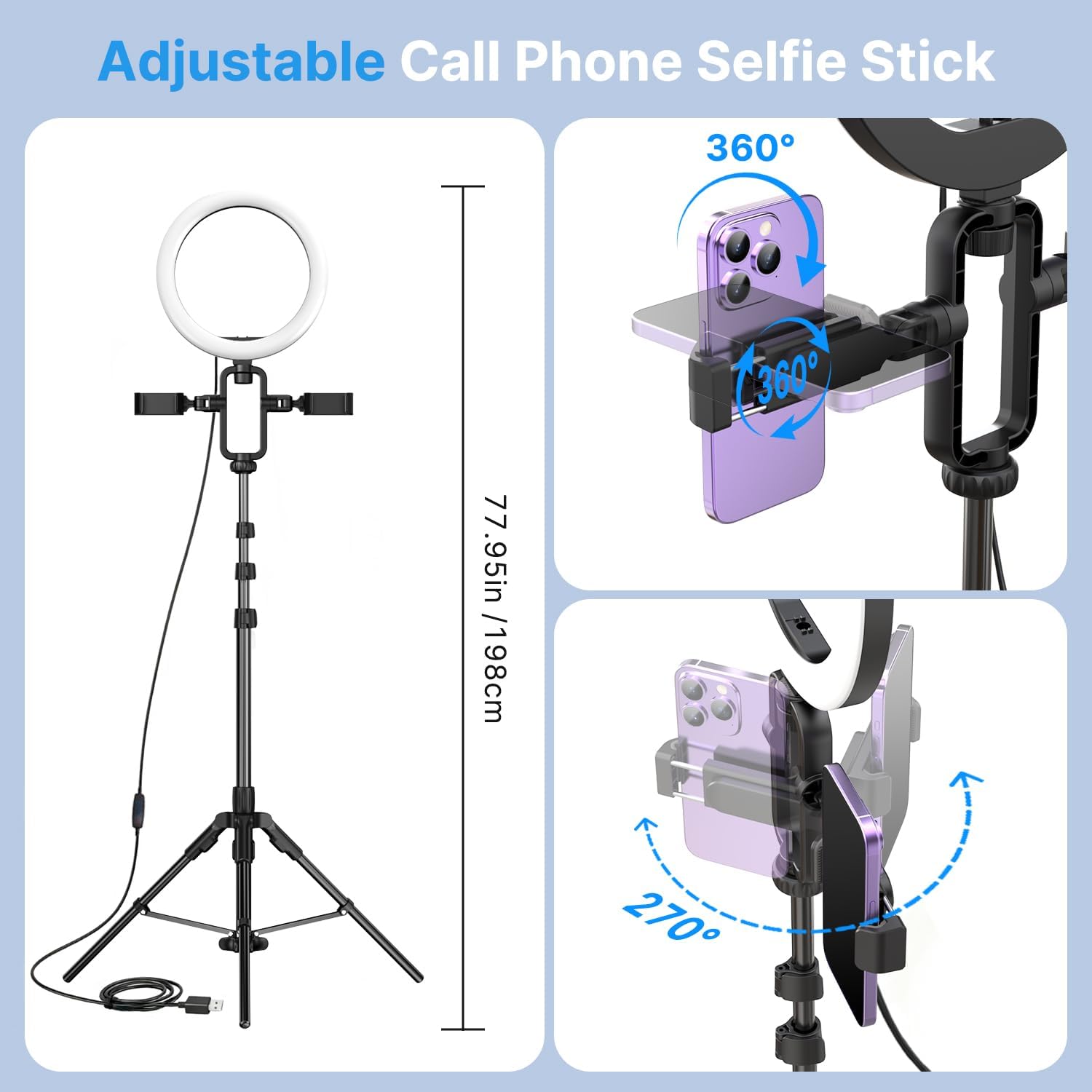
Image: Diagram illustrating the adjustable features of the phone clip and ring light, including 360-degree rotation for the phone and 270-degree tilt for the entire assembly.
3. Connecting the Magnetic Microphone
- Charge the microphone transmitters using the provided Type-C charging cable. A full charge takes approximately 2 hours.
- Plug the microphone receiver into your smartphone's charging port (Type-C or Lightning).
- Turn on the microphone transmitters. They will automatically pair with the receiver. The connection indicator light will confirm pairing.
- Attach the microphone transmitter to your clothing using the magnetic clip.

Image: Detailed view of the magnetic microphone transmitter, showing the battery indicator light, mute indicator light, connection indicator light, and noise reduction indicator light. The receiver is shown with Type-C and Apple Lightning interfaces.
Operating Instructions
Tripod Usage
The tripod can be extended up to 77.95 inches (198 cm). Use the telescopic pole locks to secure the desired height. The wide base provides stability for various shooting angles.
Double Phone Clip Operation
The double phone clip allows you to mount two phones simultaneously. This is useful for multi-platform live streaming or using one phone for recording and another for monitoring comments or lyrics. The 360-degree rotation feature enables quick adjustments between portrait and landscape modes.
Magnetic Microphone Operation
- Power On/Off: Press and hold the power button on the transmitter.
- Pairing: The transmitters automatically pair with the receiver upon power-on.
- Mute Function: Briefly press the power button on the transmitter to mute/unmute. The mute indicator light will show the status.
- Noise Reduction: The microphone features noise reduction technology for clear audio.
- Charging: The microphone transmitters offer up to 12 hours of battery life on a 2-hour charge. The receiver can charge your phone while in use.
- Range: The wireless transmission range is up to 66 feet (20 meters).
Ring Light Operation
The USB-powered ring light offers adjustable illumination:
- Color Temperatures: Choose from 3 color temperatures: cool (6500K), natural (4500K), and warm (3000K).
- Brightness Levels: Adjust brightness with 10 levels to suit your environment.
- Control the settings using the inline remote on the USB cable.

Image: Visual representation of the ring light's three color temperature modes (Warm, Natural, White) and ten brightness levels, demonstrating their effect on lighting.
Remote Control Usage
The included Bluetooth remote control allows you to start and stop video recording or take photos remotely, providing convenience for solo content creation.

Image: Two scenarios demonstrating the vlogging kit in use: one for live streaming with a musician, and another for recording a video of someone baking, highlighting its versatility for various online platforms.
Maintenance
- Cleaning: Use a soft, dry cloth to clean the tripod, phone clips, ring light, and microphones. Avoid abrasive cleaners or solvents.
- Storage: When not in use, store all components in the provided storage bag to protect them from dust and damage.
- Battery Care: For optimal battery life, fully charge the microphones before extended storage.
- Handling: Handle all components with care to prevent damage, especially the delicate electronic parts of the microphone and ring light.
Troubleshooting
| Problem | Possible Cause | Solution |
|---|---|---|
| Microphone not connecting. | Low battery on transmitter; receiver not properly plugged in; out of range. | Charge transmitters; ensure receiver is fully inserted into phone; move closer to receiver (within 66 feet). |
| Ring light not turning on. | USB power source not connected or insufficient power; cable damage. | Ensure USB cable is securely connected to a working power source (e.g., wall adapter, power bank); check cable for damage. |
| Remote control not working. | Not paired via Bluetooth; battery depleted. | Pair the remote control with your phone via Bluetooth settings; replace remote control battery if applicable. |
| Unstable tripod. | Legs not fully extended; locks not tightened; uneven surface. | Fully extend tripod legs; tighten all telescopic pole locks; place on a flat, stable surface. |
Specifications
| Feature | Detail |
|---|---|
| Brand | yAyusi |
| Model Number | N01 |
| Tripod Max Height | 77.95 inches (198 cm) |
| Phone Clip Compatibility | iPhone, Android phones (up to 3.35 inches width) |
| Microphone Battery Life | Up to 12 hours |
| Microphone Charging Time | Approx. 2 hours |
| Microphone Interface | Type-C & Lightning (receiver) |
| Microphone Wireless Range | Up to 66 feet (20 meters) |
| Ring Light Color Temperatures | 3 (Cool, Natural, Warm) |
| Ring Light Brightness Levels | 10 |
| Hardware Interface | USB 3.0 Type C |
| Audio Recording | Yes |
| Water Resistance Level | Not Water Resistant |
Warranty and Support
For warranty information and customer support, please refer to the contact details provided with your purchase or visit the official yAyusi website. Keep your proof of purchase for any warranty claims.