1. Important Safety Instructions
Please read these instructions carefully before using the device and retain them for future reference. Incorrect operation due to disregard of instructions may cause damage.
- Do not expose the device to rain, moisture, or extreme temperatures.
- Ensure proper ventilation around the unit. Do not block ventilation openings.
- Use only the power adapter supplied with the device.
- Do not attempt to open or repair the device yourself. Refer all servicing to qualified personnel.
- Keep the device away from strong magnetic fields.
- This is a standard DVD player and cannot play Blu-ray discs.
2. Package Contents
Verify that all items are present in the package:
- Desobry MD117B DVD Player
- Remote Control
- HDMI Cable
- AV Cable (RCA)
- USB Power Cable
- User Manual (this document)
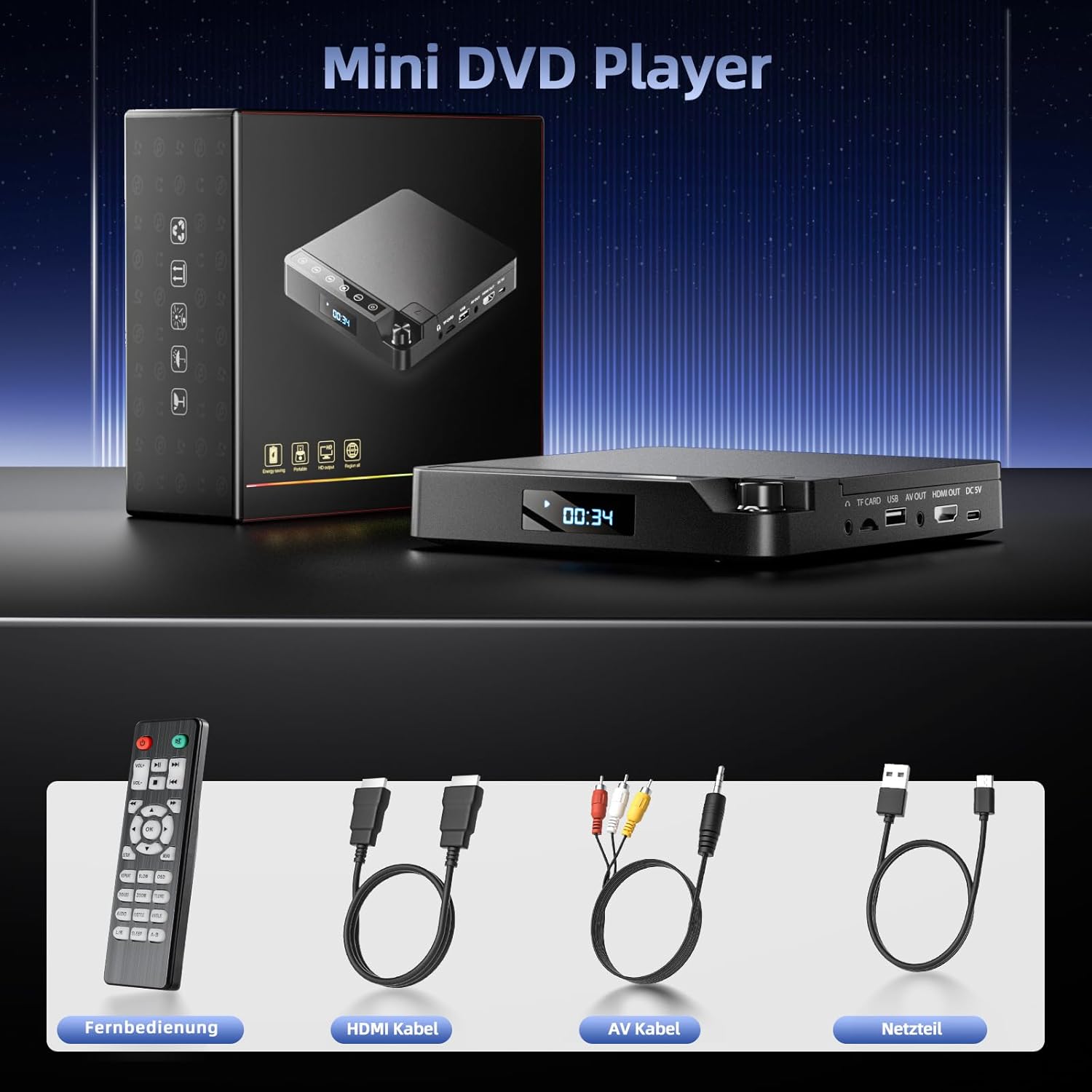
Image: Desobry MD117B DVD Player, remote control, HDMI cable, AV cable, and USB power cable.
3. Product Overview
Familiarize yourself with the player's ports and controls.
Rear Panel Connections
- TF CARD: Slot for TF (MicroSD) memory cards (up to 32GB, FAT32 format).
- USB: Port for USB flash drives (up to 32GB, FAT32 format).
- AV OUT: Analog audio/video output for older TVs or receivers.
- HDMI OUT: Digital audio/video output for modern TVs and projectors.
- DC 5V: Power input port.

Image: Rear panel connections of the DVD player.
Front Panel Controls
- Power Button: Turns the player on/off.
- Play/Pause Button: Starts or pauses playback.
- Stop Button: Stops playback.
- Previous/Next Track Buttons: Navigates between tracks or chapters.
- Volume Knob: Adjusts audio output volume.
- Disc Tray: For inserting DVDs or CDs.
4. Setup
4.1 Connecting to a Display Device
The Desobry MD117B offers both HDMI and AV (RCA) outputs for versatile connectivity.
HDMI Connection (Recommended for 1080p)
- Connect one end of the included HDMI cable to the HDMI OUT port on the DVD player.
- Connect the other end of the HDMI cable to an available HDMI input port on your TV or projector.
- Select the corresponding HDMI input on your TV/projector using its remote control.
AV (RCA) Connection
- Connect the included AV cable to the AV OUT ports (Yellow for Video, White for Left Audio, Red for Right Audio) on the DVD player.
- Connect the other end of the AV cable to the corresponding AV input ports on your TV or display device.
- Select the corresponding AV input on your TV using its remote control.

Image: DVD player connected to a projector for 1080p viewing.
4.2 Power Connection
- Connect the USB power cable to the DC 5V port on the DVD player.
- Plug the other end of the USB power cable into a compatible USB power adapter (not always included, use a standard 5V/1A or higher USB charger) or a powered USB port.
- Press the power button on the player or remote control to turn on the device.
5. Operating Instructions
5.1 Disc Playback (DVD/CD)
- Gently open the disc tray.
- Place a DVD or CD onto the disc spindle with the label side facing up.
- Close the disc tray. The player will automatically begin reading the disc.
- Use the remote control to navigate menus, play, pause, stop, and skip tracks/chapters.
Supported Disc Formats:
- DVD, DVD-R/+R, DVD/+RW, CD, CD-R/-RW, VCD, SVCD.
- This player is region-free, compatible with DVDs from all regions worldwide.

Image: Multi-region compatibility and supported disc types.
5.2 USB/TF Card Playback
- Insert a USB flash drive or TF (MicroSD) card (up to 32GB, FAT32 format) into the corresponding port on the rear panel.
- The player should automatically detect the media and display a menu for file selection. If not, use the remote's 'Source' or 'Input' button (if available) to switch to USB/TF mode.
- Navigate through your files using the remote control and press 'OK' or 'Play' to start playback.
Supported File Formats (USB/TF Card):
- Video: MPEG-1V, MPEG-2V, H.263
- Audio: MP3, MP2, WMA, LPCM
- Image: JPG
5.3 Last Memory Function
The player features a last memory function, allowing you to resume playback from where you left off after the device is powered off and on again. This applies to both disc and USB/TF card playback.

Image: Demonstration of the last memory function.
6. Maintenance
Cleaning the Device
- Ensure the player is powered off and unplugged before cleaning.
- Use a soft, dry cloth to wipe the exterior of the player.
- For stubborn marks, lightly dampen the cloth with water; avoid harsh chemicals or abrasive cleaners.
- Do not spray cleaning liquids directly onto the device.
Disc Care
- Handle discs by their edges to avoid fingerprints.
- Store discs in their cases when not in use to prevent scratches and dust accumulation.
- Clean dirty discs with a soft, lint-free cloth, wiping from the center outwards.
7. Troubleshooting
| Problem | Possible Cause | Solution |
|---|---|---|
| No power | Power cable not connected; Power outlet faulty. | Ensure power cable is securely connected. Try a different power outlet. |
| No picture/sound | Incorrect input selected on TV; HDMI/AV cable loose or faulty. | Select the correct input source on your TV. Check cable connections. Try a different cable. |
| Disc not playing | Disc is dirty, scratched, or unsupported format; Disc inserted incorrectly. | Clean the disc. Ensure the disc is inserted correctly (label side up). Verify disc format is supported (not Blu-ray). |
| USB/TF card not recognized | Card/drive not formatted to FAT32; Unsupported file format; Card/drive capacity too large. | Ensure USB/TF card is FAT32 format and up to 32GB. Check file formats. Reinsert the card/drive. |
| Remote control not working | Batteries are dead or inserted incorrectly; Obstruction between remote and player. | Replace batteries. Ensure correct polarity. Remove any obstructions. Point remote directly at the player. |
8. Specifications
| Feature | Detail |
|---|---|
| Brand | Desobry |
| Model Number | MD117B |
| Resolution | 1920x1080 (1080p) |
| Connectivity Technology | HDMI, AV |
| Output Ports | 1x HDMI, 1x AV (RCA) |
| Input Ports | USB, TF Card |
| Supported Media Types | DVD, CD, DVD-R/+R, DVD/+RW, CD-R/-RW, VCD, SVCD |
| Supported USB/TF Card Formats | FAT32 (up to 32GB) |
| Supported Video Formats | MPEG-1V, MPEG-2V, H.263 |
| Supported Audio Formats | MP3, MP2, WMA, LPCM, Stereo, Dolby Digital |
| Special Features | Multi-format playback, Region-free, Last memory function |
| Compatible Devices | Television, Projector |
| Dimensions (Approx.) | 5.86 x 6.06 x 0.86 inches |

Image: Compact dimensions of the DVD player.
9. Warranty and Support
For warranty information and technical support, please refer to the documentation provided at the time of purchase or contact your retailer. Specific warranty terms may vary by region and seller.
Keep your purchase receipt as proof of purchase for any warranty claims.


