
1. Important Safety Instructions
Please read all instructions carefully before using your new induction cooktop. Keep this manual for future reference. Improper installation, adjustment, alteration, service, or maintenance can cause injury or property damage. Refer to this manual for assistance.
- Electrical Safety: Ensure the cooktop is connected to a properly grounded electrical outlet with the correct voltage (220-240V) and current capacity. Do not use extension cords or adapters.
- Child Safety: Keep children away from the cooktop during operation and when it is cooling down. Utilize the child lock feature to prevent accidental activation.
- Hot Surface Warning: The cooktop surface will remain hot after use. Do not touch the surface until the residual heat indicator ('H') has turned off.
- Proper Cookware: Only use induction-compatible cookware with a flat bottom. Non-compatible cookware will not heat up.
- Ventilation: Ensure adequate ventilation around the cooktop during installation and operation to prevent overheating.
- Cleaning: Always disconnect the power supply before cleaning. Allow the cooktop to cool completely before cleaning.
2. What's in the Box
Verify that all components are present in your package before proceeding with installation.

This image displays the items included in your package: the Gudsunal induction cooktop, a user manual, sealing tape, and installation brackets with screws.
- Gudsunal 2-Burner Induction Cooktop
- User Manual
- Sealing Tape
- Installation Kits (brackets and screws)
3. Installation and Setup
The Gudsunal I3616-2 induction cooktop is designed for built-in installation. Professional installation is recommended.
3.1 Dimensions and Cutout
Ensure your countertop has the correct cutout dimensions for a proper fit.

This diagram illustrates the product dimensions (290mm x 520mm x 58mm) and the required cutout dimensions for built-in installation (270mm x 490mm).
- Product Dimensions (L x W x H): 52 cm x 29 cm x 5.8 cm
- Cutout Dimensions (L x W): 49 cm x 27 cm
3.2 Electrical Connection
The cooktop requires a 220-240V electrical supply. Consult a qualified electrician for proper wiring and connection to ensure safety and compliance with local regulations.
3.3 Mounting the Cooktop
- Place the sealing tape around the edges of the cooktop opening to create a seal against moisture.
- Carefully lower the cooktop into the cutout opening.
- Secure the cooktop from underneath using the provided installation brackets and screws. Ensure it is firmly seated and level.
4. Operating Instructions
Familiarize yourself with the touch controls for efficient and safe cooking.
4.1 Control Panel Overview
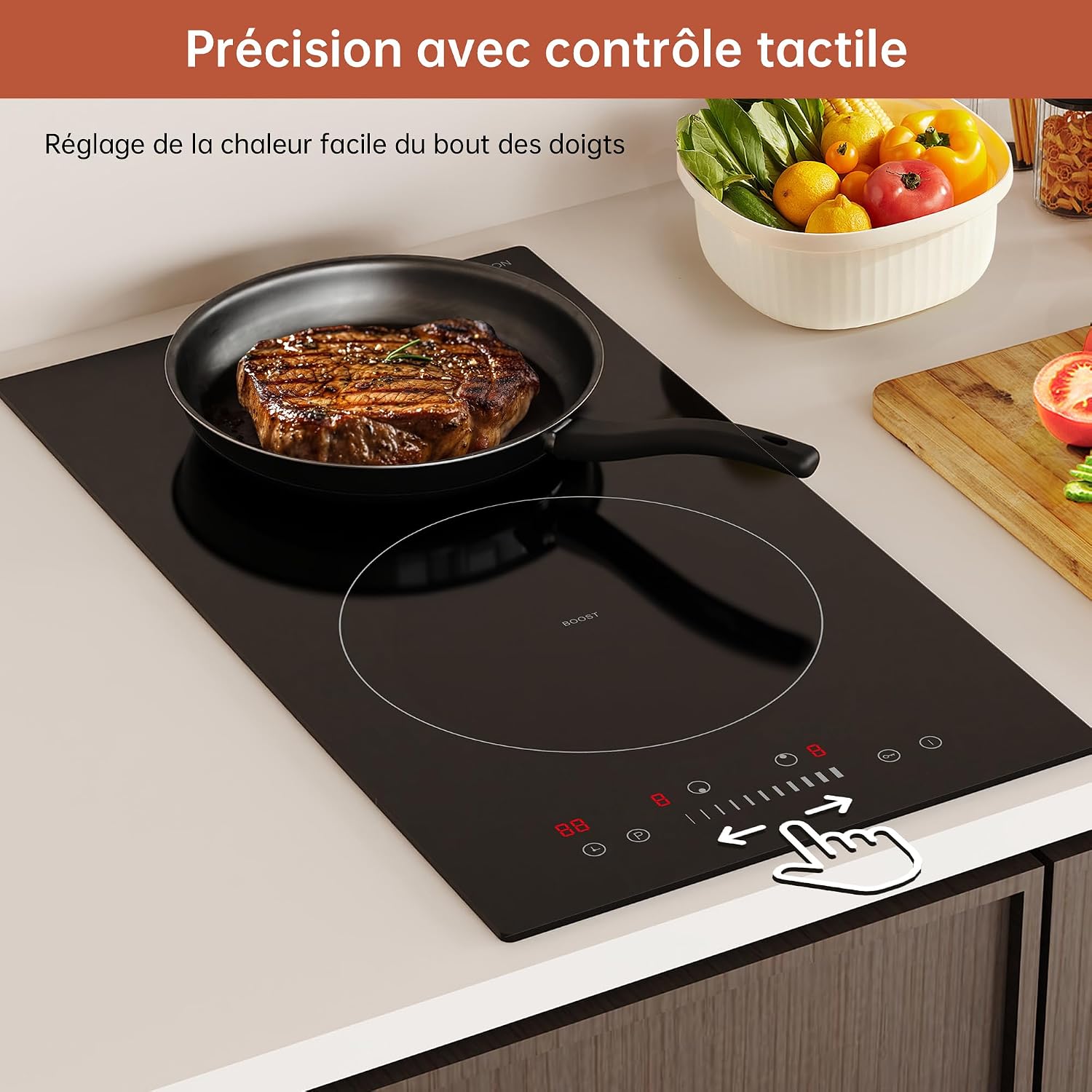
The touch control panel allows for precise temperature adjustment. Slide your finger along the control bar to set the desired power level from 1 to 9.
4.2 Turning On/Off
- To turn on: Press and hold the Power button (O) for a few seconds. The display will show '0'.
- To turn off: Press and hold the Power button (O) again.
4.3 Selecting a Cooking Zone and Power Level
- Place suitable cookware on the desired cooking zone.
- Press the corresponding cooking zone selection button.
- Adjust the power level from 1 to 9 using the sliding touch control.
4.4 Boost Function

Activate the Boost function for a rapid increase in heating power for up to 5 minutes, ideal for quickly boiling water or searing.
The Boost function provides maximum power for rapid heating. Press the 'Boost' button (B) after selecting a cooking zone. This function operates for up to 5 minutes and then automatically reverts to a lower power setting.
4.5 Timer Function

The cooktop features a timer function, allowing you to set cooking durations up to 99 minutes for precise control and automatic shut-off.
To set the timer, press the Timer button (P) and use the '+' and '-' controls to adjust the desired cooking time (up to 99 minutes). The cooktop will automatically turn off the selected cooking zone when the timer expires.
5. Safety Features
Your Gudsunal induction cooktop is equipped with several safety features to ensure a secure cooking environment.

This image highlights the integrated safety features of the cooktop, such as child lock, residual heat indicator, automatic safety cut-off, and pan detection.
5.1 Child Lock

The child lock feature prevents accidental operation by locking the touch controls, ensuring safety in the kitchen.
Activate the child lock by pressing the lock button. This will disable all touch controls, preventing accidental changes to settings or activation by children.
5.2 Residual Heat Indicator

After cooking, an 'H' will appear on the display if the cooking zone is still hot, warning against touching the surface.
After a cooking zone is turned off, an 'H' will appear on the display to indicate that the surface is still hot. Do not touch the surface until the 'H' disappears.
5.3 Automatic Safety Shut-off

The cooktop is equipped with an automatic safety shut-off that activates after a preset time if a cooking zone is left unattended, preventing overheating.
If a cooking zone is left operating for an extended period without any adjustments, the cooktop will automatically shut off as a safety measure.
5.4 Pan Detection System

The integrated pan detection system ensures that heating only occurs when a suitable ferromagnetic pot or pan is placed on the cooking zone, enhancing safety and energy efficiency.
The cooktop will only generate heat when an induction-compatible pot or pan is placed on the cooking zone. If no pan is detected or an unsuitable pan is used, the cooktop will not activate heating.
6. Maintenance and Cleaning
Regular cleaning and maintenance will prolong the life and appearance of your induction cooktop.
- Daily Cleaning: Wipe the ceramic glass surface with a soft cloth and mild detergent after each use, once the cooktop has cooled down.
- Stubborn Stains: For burnt-on food or stubborn stains, use a ceramic hob scraper or a specialized ceramic hob cleaner. Follow the product instructions carefully.
- Avoid Abrasives: Do not use abrasive sponges, scouring pads, or harsh chemical cleaners, as these can scratch or damage the glass surface.
- Control Panel: Wipe the touch control panel with a soft, damp cloth. Ensure it is dry before operating the cooktop.
- Ventilation Openings: Keep the ventilation openings underneath and around the cooktop clear of obstructions to ensure proper airflow.
7. Troubleshooting
If you encounter any issues with your cooktop, refer to the following common problems and solutions.
| Problem | Possible Cause | Solution |
|---|---|---|
| Cooktop does not turn on. | No power supply; Child lock activated. | Check power connection and circuit breaker. Deactivate child lock by pressing and holding the lock button. |
| Cooking zone not heating. | Non-compatible cookware; No cookware detected. | Use induction-compatible cookware. Ensure the pan is centered on the cooking zone. |
| Display shows 'H'. | Residual heat. | This is normal. The surface is still hot. Do not touch. It will disappear when cooled. |
| Unusual noise during operation. | Normal fan noise; Cookware vibration. | A low humming or buzzing sound is normal for induction cooktops due to the cooling fan and electromagnetic fields. Some cookware may vibrate slightly. |
| Cooktop shuts off unexpectedly. | Automatic safety shut-off; Overheating. | Ensure cooking zone was not left unattended for too long. Check for proper ventilation. Allow to cool before restarting. |
If the problem persists after trying these solutions, please contact customer support.
8. Specifications
| Brand | Gudsunal |
| Model Number | I3616-2 |
| Number of Heating Elements | 2 |
| Color | Glossy Black |
| Power Source | Electric Cable |
| Fuel Type | Electric |
| Special Features | Automatic shut-off, Timer, Adjustable temperature, Safety lock, Hot surface indicator |
| Heating Surface Material | Ceramic Glass |
| Material | Metal |
| Product Dimensions (D x W x H) | 52 cm x 29 cm x 5.8 cm |
| Burner Type | Induction |
| Control Type | Touch |
| Installation Type | Drop-in |
| Voltage | 220 Volts |
| Wattage | 3600 Watts |
| Weight | 5 Kilograms |
| Country of Origin | China |
9. Warranty and Support
9.1 Warranty Information
This Gudsunal induction cooktop comes with a 2-year manufacturer's warranty. Please retain your proof of purchase for warranty claims.
9.2 Customer Support
For technical assistance, troubleshooting beyond this manual, or warranty inquiries, please contact Gudsunal customer support through your retailer or the official Gudsunal website. Have your model number (I3616-2) and purchase date ready when contacting support.

