
Gudsunal R7204FA-3
Gudsunal 29cm Induction Cooktop R7204FA-3 User Manual
Model: R7204FA-3
1. Important Safety Information
Please read all instructions carefully before using this appliance. Keep this manual for future reference. Improper installation, adjustment, alteration, service, or maintenance can cause injury or property damage. Refer to this manual. For assistance or additional information, consult a qualified installer, service agency, or the manufacturer.
- Electrical Safety: This appliance must be properly grounded. Ensure the electrical supply matches the voltage (220V) and wattage (7200W) specified for the cooktop. Do not use extension cords or adapters.
- Hot Surface Indicator: The cooktop surface will remain hot after use. A hot surface indicator will illuminate to warn you. Do not touch the cooking zones until the indicator light turns off.
- Child Safety Lock: Activate the child safety lock to prevent accidental operation by children.
- Automatic Shut-off: The cooktop is equipped with an automatic shut-off feature for safety. If a cooking zone is left on for an extended period without adjustment, it will automatically turn off.
- Proper Cookware: Only use induction-compatible cookware. Non-magnetic pots and pans will not heat.
- Ventilation: Ensure adequate ventilation around the cooktop during installation and operation.
2. Product Overview
The Gudsunal R7204FA-3 is a 29cm, 4-zone induction cooktop designed for efficient and precise cooking. It features a sleek metal surface with touch controls for easy operation.
- Cooking Zones: Four independent cooking zones, including two flexible zones that can be combined for larger cookware.
- Power Output: Total maximum power of 7200W.
- Heat Levels: 9 adjustable heat levels for precise temperature control.
- Boost Function: Provides a temporary surge of power for rapid heating.
- Timer: Programmable timer for each cooking zone.
- Control Type: Intuitive touch controls.
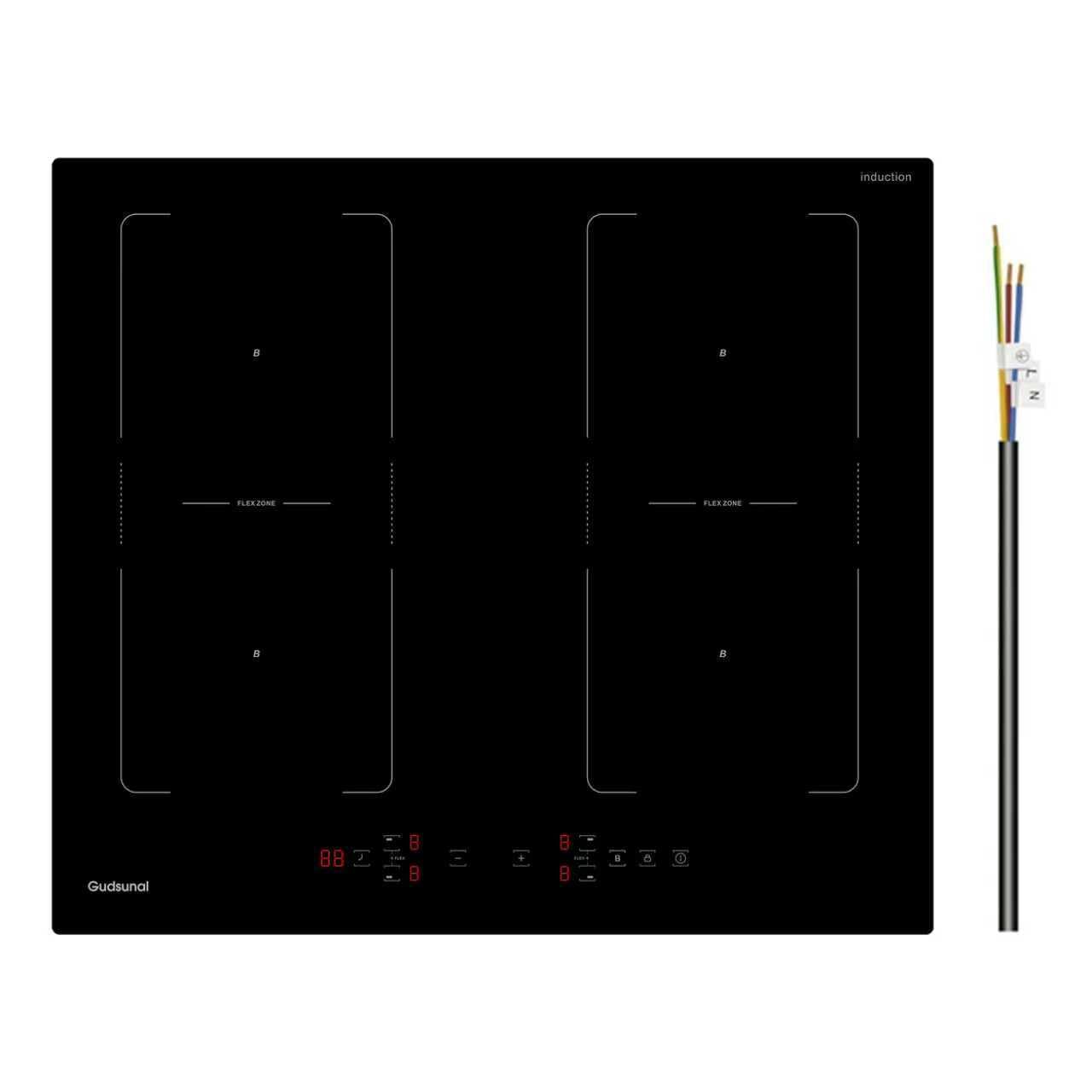
Image 1: Top view of the Gudsunal 29cm Induction Cooktop R7204FA-3, showing the four cooking zones and touch control panel.
3. Setup and Installation
This induction cooktop is designed for built-in installation. Professional installation is recommended to ensure proper electrical connection and ventilation.
3.1 Unpacking
- Carefully remove the cooktop from its packaging.
- Check for any damage during transit. If damaged, do not install and contact your supplier.
- Ensure all included components are present: cooktop unit, instruction manual, cutting size table, sealing tape, and installation kit.
3.2 Countertop Preparation
- Refer to the provided cutting size table for precise countertop cutout dimensions. The unit dimensions are approximately 52cm (Depth) x 29cm (Width) x 5.8cm (Height).
- Ensure the countertop material is heat-resistant.
- Maintain adequate clearance around the cooktop for ventilation as specified in the installation guide.
3.3 Electrical Connection
- The cooktop requires a dedicated 220V electrical circuit.
- The electrical connection must be performed by a qualified electrician in accordance with local wiring regulations.
- Ensure the appliance is properly grounded.
3.4 Securing the Cooktop
- Apply the sealing tape around the edges of the cooktop opening to prevent liquid ingress.
- Lower the cooktop into the cutout.
- Secure the cooktop from underneath the countertop using the provided installation kit.
4. Operating Instructions
4.1 Powering On/Off
- To turn on: Touch the Power symbol. The display will show "00" or "—".
- To turn off: Touch the Power symbol again.
4.2 Selecting a Cooking Zone and Adjusting Heat
- Place induction-compatible cookware on the desired cooking zone.
- Touch the corresponding zone selection button.
- Use the "+" or "-" buttons to adjust the heat level from 1 to 9.
4.3 Boost Function
- Select a cooking zone.
- Touch the Boost symbol. The zone will operate at maximum power for a limited time, indicated by "P" on the display.
- The Boost function automatically deactivates after a set period or if the temperature becomes too high.
4.4 Flexible Zones
- To combine two zones into a flexible zone, place a large pot or pan across both designated flexible zones.
- Select one of the flexible zones, then touch the Flexible Zone symbol (if available, refer to control panel markings). The two zones will now operate as one large cooking area.
4.5 Timer Function
- While a cooking zone is active, touch the Timer symbol.
- Use the "+" or "-" buttons to set the desired cooking time.
- The timer will count down, and the cooking zone will automatically turn off when the time expires.
4.6 Child Safety Lock
- To activate: With the cooktop off or on, press and hold the Lock symbol for a few seconds. An indicator light will show the lock is active.
- To deactivate: Press and hold the Lock symbol again until the indicator light turns off.
5. Maintenance and Cleaning
Regular cleaning and maintenance will ensure the longevity and optimal performance of your induction cooktop.
- Daily Cleaning: After each use, wipe the cooktop surface with a damp cloth and mild detergent. Dry thoroughly with a soft cloth.
- Stubborn Stains: For burnt-on food or stubborn stains, use a ceramic hob scraper (plastic or specialized metal) and a dedicated ceramic hob cleaner. Follow the cleaner's instructions.
- Avoid Abrasives: Do not use abrasive sponges, scouring pads, or harsh chemical cleaners, as these can scratch or damage the glass surface.
- Before Cleaning: Always ensure the cooktop is turned off and has cooled down completely (hot surface indicator is off) before cleaning.
6. Troubleshooting
If you encounter issues with your cooktop, refer to the following common problems and solutions before contacting service.
| Problem | Possible Cause | Solution |
|---|---|---|
| Cooktop does not turn on. | No power supply; Child lock active. | Check circuit breaker; Deactivate child lock. |
| Cooking zone not heating. | Non-induction compatible cookware; Cookware not centered; Zone not selected. | Use magnetic cookware; Center cookware; Select the correct zone. |
| Display shows "E" or error code. | Internal fault; Overheating. | Turn off the cooktop, wait a few minutes, then restart. If the error persists, contact service. |
| Cooktop makes a humming noise. | Normal operation of induction technology; Cookware type. | This is normal. Some cookware may produce more noise than others. |
7. Specifications
| Brand: | Gudsunal |
| Model Number: | R7204FA-3 |
| Number of Heating Elements: | 4 |
| Power Source: | Electric Cable |
| Fuel Type: | Electric |
| Special Features: | Automatic Shut-off, Safety Lock, Timer, Keep Warm, Cool Surface Indicator |
| Material: | Metal |
| Unit Dimensions (D x W x H): | 52cm x 29cm x 5.8cm |
| Burner Type: | Induction |
| Control Type: | Touch |
| Installation Type: | Built-in |
| Voltage: | 220 Volts |
| Wattage: | 7200 W |
| Item Weight: | 9.18 Kilograms |
| UPC: | 783970072245 |
8. Warranty and Support
This Gudsunal induction cooktop comes with a manufacturer's warranty. Please refer to the warranty card included in your packaging for specific terms and conditions.
For technical support, service, or to inquire about replacement parts, please contact Gudsunal customer service through their official website or the contact information provided with your purchase documentation.
Related documentsR7204FA-3


Ask a question about this manual
Ask about setup, troubleshooting, compatibility, parts, safety, or missing instructions. Manuals+ will review the question and use this page’s manual context to help answer it.