
1. Introduction
This manual provides essential information for the proper setup, operation, and maintenance of your ORICO R40 External Solid State Drive. The ORICO R40 is a high-performance portable storage device designed for rapid data transfer and reliable storage across various compatible devices.
2. What's in the Box
- ORICO R40 40Gbps External SSD (1 unit)
- USB Cable (Type-C to Type-C, with Type-A adapter)
- User Manual
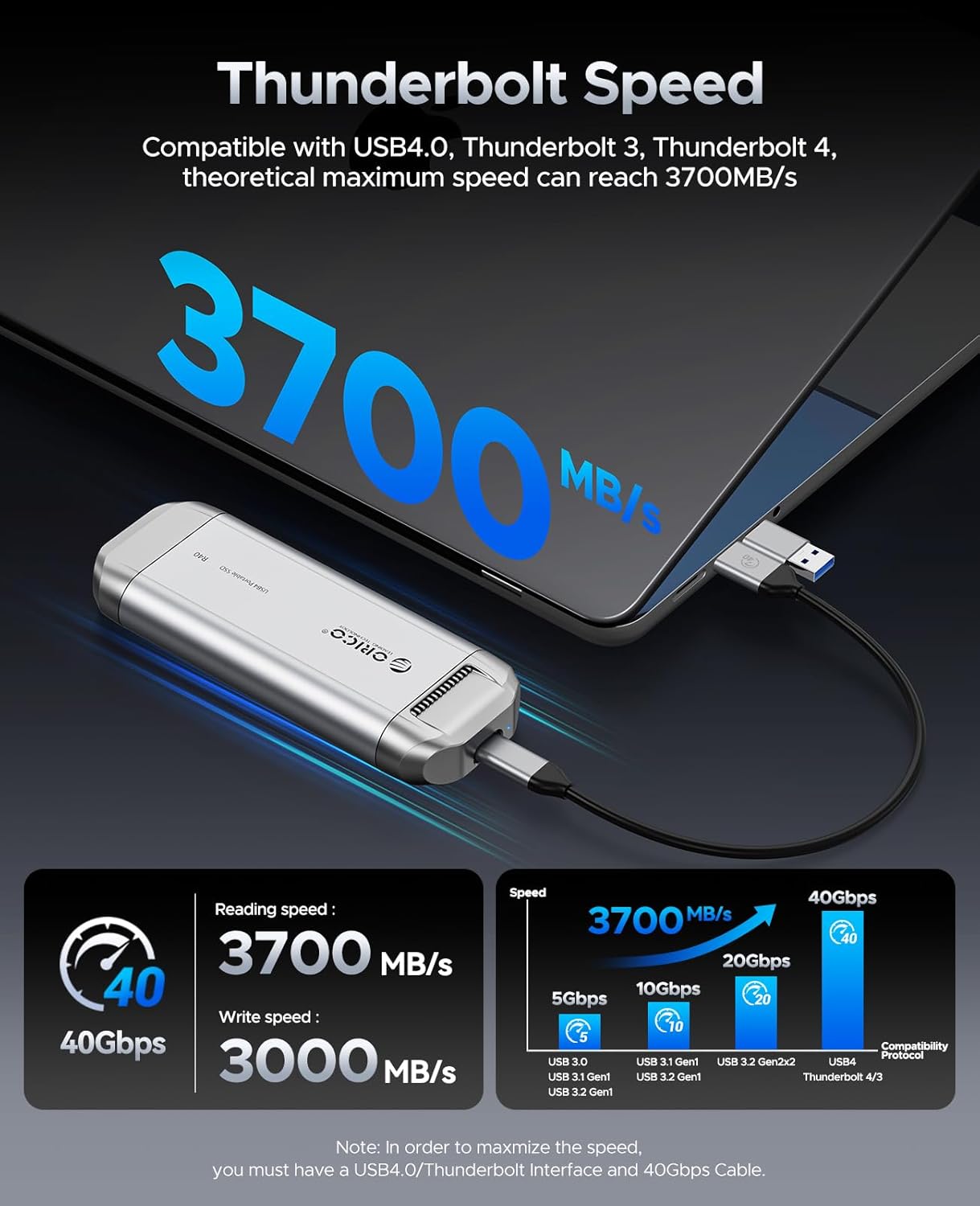
Image: The ORICO R40 External SSD shown with its included USB-C to USB-C cable and a USB-A adapter.
3. Setup
The ORICO R40 SSD is designed for plug-and-play functionality. Follow these steps to begin using your device:
- Connect the Cable: Use the provided USB-C to USB-C cable to connect the ORICO R40 SSD to your computer, smartphone, or tablet. For devices with only USB-A ports, attach the included USB-A adapter to the USB-C cable.
- Ensure Proper Port: For optimal performance and to achieve the advertised 40Gbps transfer speed, connect the SSD to a Thunderbolt 3, Thunderbolt 4, or USB4.0 compatible port on your host device. Connecting to older USB standards (e.g., USB 3.2 Gen 2x2, USB 3.2 Gen 1) will result in lower transfer speeds.
- Device Recognition: Your operating system should automatically detect the ORICO R40 SSD. It will appear as an external storage device.
- Formatting (if necessary): If the drive is not recognized or you wish to change its file system, you may need to format it using your operating system's disk management tools. Warning: Formatting will erase all data on the drive.

Image: The ORICO R40 SSD connected to a laptop, demonstrating its high-speed data transfer capabilities. A note indicates the requirement for a USB4.0/Thunderbolt interface and 40Gbps cable for maximum speed.
4. Operating Instructions
Once connected and recognized by your device, the ORICO R40 SSD functions like any other external storage drive. You can perform the following operations:
- Data Transfer: Drag and drop files or folders to and from the SSD. Use your operating system's copy/paste functions for data management.
- Backup: Utilize the SSD for backing up important documents, photos, videos, and other digital content.
- Direct Editing: For compatible software and devices, you can directly edit large files (e.g., video projects, high-resolution images) stored on the SSD without transferring them to your internal drive.
- Compatibility: The ORICO R40 is compatible with a wide range of devices including PCs, Mac computers, USB-C enabled smartphones (e.g., iPhone 15 series, Samsung S22/S23 series), and tablets (e.g., iPad Pro/Air).

Image: The ORICO R40 SSD being used in various scenarios, including connecting to a camera for outdoor shooting and to a laptop for indoor video editing, highlighting its versatility and instant expansion capabilities.

Image: A visual representation of the ORICO R40's compatibility with various USB-C devices, including iMac, MacBook, Dell XPS, Lenovo Pro M, iPad Pro/Air, iPhone 15 Series, Samsung S22/S23 Series, and Huawei Mate/P Series. It also illustrates different USB interface speeds from 5Gbps to 40Gbps.
5. Maintenance
To ensure the longevity and optimal performance of your ORICO R40 SSD, consider the following maintenance guidelines:
- Heat Management: The ORICO R40 features a built-in cooling fan and an aluminum alloy casing for efficient heat dissipation. Ensure that the ventilation openings are not obstructed during operation to allow proper airflow.
- Physical Protection: The drive is designed with features for waterproof, shockproof, and dustproof protection. While robust, avoid exposing the device to extreme conditions, direct impacts, or prolonged submersion in water.
- Safe Ejection: Always safely eject the SSD from your operating system before physically disconnecting it to prevent data corruption.
- Cleaning: Use a soft, dry cloth to clean the exterior of the drive. Avoid using liquid cleaners or solvents.

Image: An X-ray view of the ORICO R40 SSD highlighting its internal cooling fan and aluminum alloy shell, which contribute to efficient heat dissipation during operation.

Image: Icons illustrating the waterproof, shockproof, and dustproof protective features of the ORICO R40 External SSD, designed for durability in various environments.
6. Troubleshooting
If you encounter issues with your ORICO R40 SSD, refer to the following common problems and solutions:
- Drive Not Detected:
- Ensure the USB cable is securely connected to both the SSD and your host device.
- Try connecting to a different USB port on your device.
- Test with a different compatible USB-C cable.
- Check your operating system's disk management utility to see if the drive is visible but unformatted.
- Slow Transfer Speeds:
- Verify that your host device's port supports Thunderbolt 3/4 or USB4.0. Older USB standards will limit speed.
- Ensure you are using the provided 40Gbps compatible cable.
- Close other applications that might be consuming system resources or bandwidth.
- Large file transfers generally perform better than many small file transfers.
- Drive Overheating or Disconnecting During Use:
- Ensure the drive's ventilation openings are clear and not obstructed.
- Avoid placing the drive in enclosed spaces or direct sunlight.
- Prolonged heavy usage can generate heat. Allow the drive to cool down if it becomes excessively hot.
- Check the cable for damage or loose connections.
- Fan Noise:
- The ORICO R40 includes an active cooling fan. Some fan noise is normal during intensive operations to maintain optimal temperature.
- If the noise is unusually loud or persistent, ensure the drive is on a stable, flat surface and not vibrating against other objects.
7. Specifications
| Feature | Specification |
|---|---|
| Model | R40 |
| Digital Storage Capacity | 1 TB (available in 2TB, 4TB variants) |
| Hard Disk Interface | Thunderbolt |
| Connectivity Technology | USB (Thunderbolt 4/3/USB4.0 compatible) |
| Max Transfer Speed | 40Gbps (Theoretical), up to 3700MB/s Read |
| Special Features | Backward Compatible, LED Light, Built-in Cooling Fan, Aluminum Alloy Shell, Waterproof, Shockproof, Dustproof |
| Hard Disk Description | Solid State Drive |
| Compatible Devices | Laptop, Smartphone, Tablet |
| Installation Type | External Hard Drive |
| Color | Silver |
| Item Weight | 3.2 ounces |
| Package Dimensions | 7.28 x 4.25 x 0.75 inches |
8. Warranty and Support
ORICO products typically come with a standard manufacturer's warranty. Please refer to the warranty card included in your product packaging or visit the official ORICO website for detailed warranty terms and conditions.
For technical support, product inquiries, or warranty claims, please contact ORICO customer service through their official channels. You can find more information and support resources on the ORICO Brand Store on Amazon or their official website.


