
1. Product Overview
The Ceretone Rechargeable OTC Hearing Aids are designed to provide clear sound quality with advanced noise reduction, suitable for individuals with mild to moderate hearing loss. These devices offer ease of use, comfort, and extended battery life, making them a reliable solution for daily listening needs.

Image 1.1: A user wearing the Ceretone hearing aid, demonstrating its discreet design.
The design prioritizes comfort and discretion, resembling standard wireless earbuds. They are engineered to fit the natural curve of the ear canal and come with various ear tip sizes to ensure a secure and comfortable fit.

Image 1.2: The Ceretone hearing aids feature an In-The-Ear (ITE) design for comfort and sound quality.
2. Getting Started
2.1 Unpacking and Initial Charge
Upon receiving your Ceretone hearing aids, carefully unpack all components. Before first use, ensure to remove any protective tape covering the charging contacts on each hearing aid. Place both hearing aids into the charging case.
- The charging case features indicator lights: orange signifies charging, and green indicates a full charge.
- A full recharge takes approximately 2 hours, providing up to 25 hours of continuous use and a total battery life of 100 hours with the charging case.
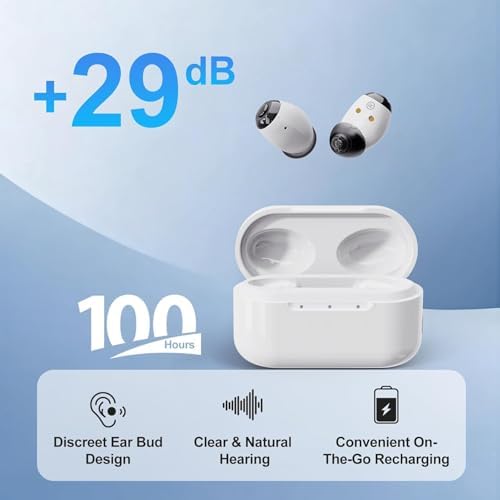
Image 2.1: The charging case provides convenient on-the-go recharging for extended use.
2.2 Selecting Ear Tips
The package includes different sizes of ear tips (small, medium, and large). Selecting the correct ear tip size is crucial for both comfort and optimal sound performance, helping to prevent whistling or feedback. Experiment with the provided sizes to find the best fit for your ear canal.

Image 2.2: Dimensions of the hearing aid, illustrating the compact size and ear tip attachment point.
2.3 Inserting the Hearing Aids
Gently insert the hearing aid into your ear canal. Ensure it sits snugly and comfortably. If you experience any discomfort or whistling, try adjusting the position or changing to a different ear tip size.
3. Operation
3.1 Power On/Off
To power on or off each hearing aid, press and hold the button on the outer surface for approximately 3 seconds.
3.2 Volume Adjustment
The hearing aids feature 5 volume levels. To adjust the volume, short press the button on the hearing aid. Each short press cycles through the available volume settings.
3.3 Hearing Mode Selection
The device offers 4 distinct hearing modes to adapt to various environments. To switch between modes, long press the button on the hearing aid. The modes typically include:
- Normal: General listening in quiet environments.
- Restaurant: Optimized for noisy environments, focusing on speech.
- Outdoor: Reduces wind noise and enhances distant sounds.
- Music: Provides a richer audio experience for music appreciation.

Image 3.1: The hearing aids are designed for optimal performance in various daily listening situations.
3.4 Important Notes
These hearing aids operate independently and do not feature Bluetooth connectivity or a dedicated mobile application. All adjustments for volume and hearing modes are performed directly on the devices.
4. Care and Maintenance
4.1 Cleaning Your Hearing Aids
Regular cleaning helps maintain optimal performance and hygiene. Gently wipe the hearing aids with a dry, soft cloth after each use. Do not use water, solvents, or cleaning solutions, as this can damage the internal components. Ensure the ear tips are free from earwax buildup.
4.2 Charging Case Care
Keep the charging case clean and dry. Use a soft, dry cloth to wipe any dust or debris. Ensure the charging contacts inside the case are clean to facilitate proper charging.
4.3 Storage
When not in use, store the hearing aids in their charging case to protect them from dust, moisture, and physical damage. This also ensures they remain charged for your next use.

Image 4.1: The hearing aids feature an IP53 waterproof rating, offering protection against sweat, rain, and dust.
5. Troubleshooting Guide
5.1 Whistling or Feedback
- Improper Fit: Ensure the hearing aid is securely seated in your ear canal. Try a different size ear tip for a better seal.
- Volume Too High: Reduce the volume level.
- Earwax Buildup: Clean your ear canal and the hearing aid's ear tip to remove any obstructions.
5.2 No Sound or Low Volume
- Low Battery: Place the hearing aids in the charging case to recharge.
- Incorrect Volume Setting: Increase the volume level using the button on the device.
- Wrong Mode: Cycle through the hearing modes to ensure you are in an appropriate setting for your environment.
- Blocked Sound Outlet: Check for and clean any earwax or debris blocking the sound outlet.
5.3 Charging Issues
- Improper Placement: Ensure the hearing aids are correctly seated in the charging case and making proper contact with the charging pins.
- Dirty Contacts: Clean the charging contacts on both the hearing aids and the case with a dry, soft cloth.
- Case Battery Low: Ensure the charging case itself is charged. Connect the case to a power source if its battery is depleted.
6. Product Specifications
| Feature | Specification |
|---|---|
| Model Number | B0FX9Y5BJ2 |
| Manufacturer | AUDICON CORPORATION |
| Package Dimensions | 6.73 x 4.57 x 2.36 inches |
| Item Weight | 10.2 ounces |
| Batteries | 1 Lithium Ion battery required (included) |
| Battery Cell Composition | Lithium Ion |
| Battery Weight | 1 Grams |
| Charging Time | Approx. 2 hours |
| Continuous Use Time | Up to 25 hours |
| Total Battery Life (with case) | Up to 100 hours |
| Waterproof Rating | IP53 (protection against dust and spraying water) |
7. Warranty and Customer Support
Ceretone is committed to providing quality products and excellent customer service. Your purchase includes:
- 60-Day Free Trial: A free return policy allows you to try the hearing aids for 60 days.
- 365-Day Warranty: The product is covered by a 365-day warranty from the date of purchase.
- U.S.-Based Customer Service: Support is available from our U.S.-based customer service center.
Contact Information:
- Online Support: support@ceretone.com
- Phone Support: (866) 283-4262