
1. Introduction
Thank you for choosing the KALWOL Walking Pad Treadmill. This manual provides essential information for the safe and effective use, setup, operation, and maintenance of your new fitness equipment. Please read this manual thoroughly before initial use and retain it for future reference.
The KALWOL Walking Pad Treadmill is designed for home use, offering a compact and versatile solution for walking, jogging, and light running exercises. It features multiple modes, speed adjustments, and a manual incline option to enhance your workout experience.
2. Safety Instructions
To ensure your safety and prolong the life of your treadmill, please adhere to the following safety guidelines:
- Always consult a physician before starting any new exercise program.
- Read all instructions in this manual before operating the treadmill.
- Keep children and pets away from the treadmill during operation.
- Place the treadmill on a flat, stable surface with at least 2 feet of clear space around it.
- Wear appropriate athletic footwear and clothing during use.
- Do not use the treadmill if you feel dizzy, faint, or experience any pain. Stop exercising immediately.
- Ensure the power cord is not damaged and is properly plugged into a grounded outlet.
- Unplug the treadmill from the power source when not in use or before cleaning and maintenance.
- Do not exceed the maximum weight recommendation of 350 pounds.
3. Package Contents
Carefully unpack your KALWOL Walking Pad Treadmill and verify that all components are present:
- KALWOL Walking Pad Treadmill Unit
- Remote Control
- Power Cord
- User Manual (this document)
- Lubricant (small bottle, for belt maintenance)
If any items are missing or damaged, please contact customer support immediately.
4. Setup
4.1 Unpacking and Placement
- Remove the treadmill from its packaging. Inspect the unit for any signs of damage during transit.
- Place the treadmill on a firm, level surface. Ensure there is adequate space around the unit for safe operation and to prevent obstruction. A minimum of 2 feet of clear space behind and on each side of the treadmill is recommended.
- Ensure the area is free from moisture and direct sunlight.
4.2 Initial Power Connection
- Connect the power cord to the treadmill's power input port.
- Plug the other end of the power cord into a standard, grounded electrical outlet.
- Locate the main power switch, usually at the front or rear of the treadmill, and switch it to the 'ON' position. The display panel should illuminate.
5. Operating Instructions
5.1 Powering On/Off
- To power on, ensure the main power switch is 'ON'. The display will light up.
- To power off, press the 'STOP' button on the remote control until the treadmill stops, then switch the main power switch to 'OFF'. Unplug the unit if not in use for an extended period.
5.2 Remote Control Usage
The treadmill is operated primarily via the included remote control. Familiarize yourself with the buttons:

Image: Remote control and treadmill display showing motion data (Distance, Speed, Time, Calories).
- Start/Stop Button: Initiates and pauses/stops the treadmill.
- Speed +/- Buttons: Adjusts the running belt speed.
- Mode (M) Button: Cycles through different exercise modes or settings.
- Program (P) Button: Selects pre-set workout programs.
- Mute Button: Mutes any operational sounds or alerts.
5.3 Exercise Modes
The KALWOL Walking Pad offers four distinct exercise modes:

Image: Visual representation of the four exercise modes: Working (0.6-1.5 MPH), Walking (1.5-3 MPH), Jogging (3-6.2 MPH), and Climbing (10% incline).
- Working Mode (0.6-1.5 MPH): Ideal for light activity while working or performing other tasks.
- Walking Mode (1.5-3 MPH): Suitable for a steady-paced walk.
- Jogging Mode (3-6.2 MPH): For a more intense cardiovascular workout.
- Climbing Mode (10% Incline): Engages more muscles and increases calorie expenditure.
5.4 Speed Adjustment
Use the 'Speed +' and 'Speed -' buttons on the remote control to increase or decrease the running belt speed. The current speed will be displayed on the treadmill's console.
5.5 Manual Incline Adjustment
The treadmill features a 10% manual incline option to intensify your workout. This adjustment is performed manually before starting your exercise.
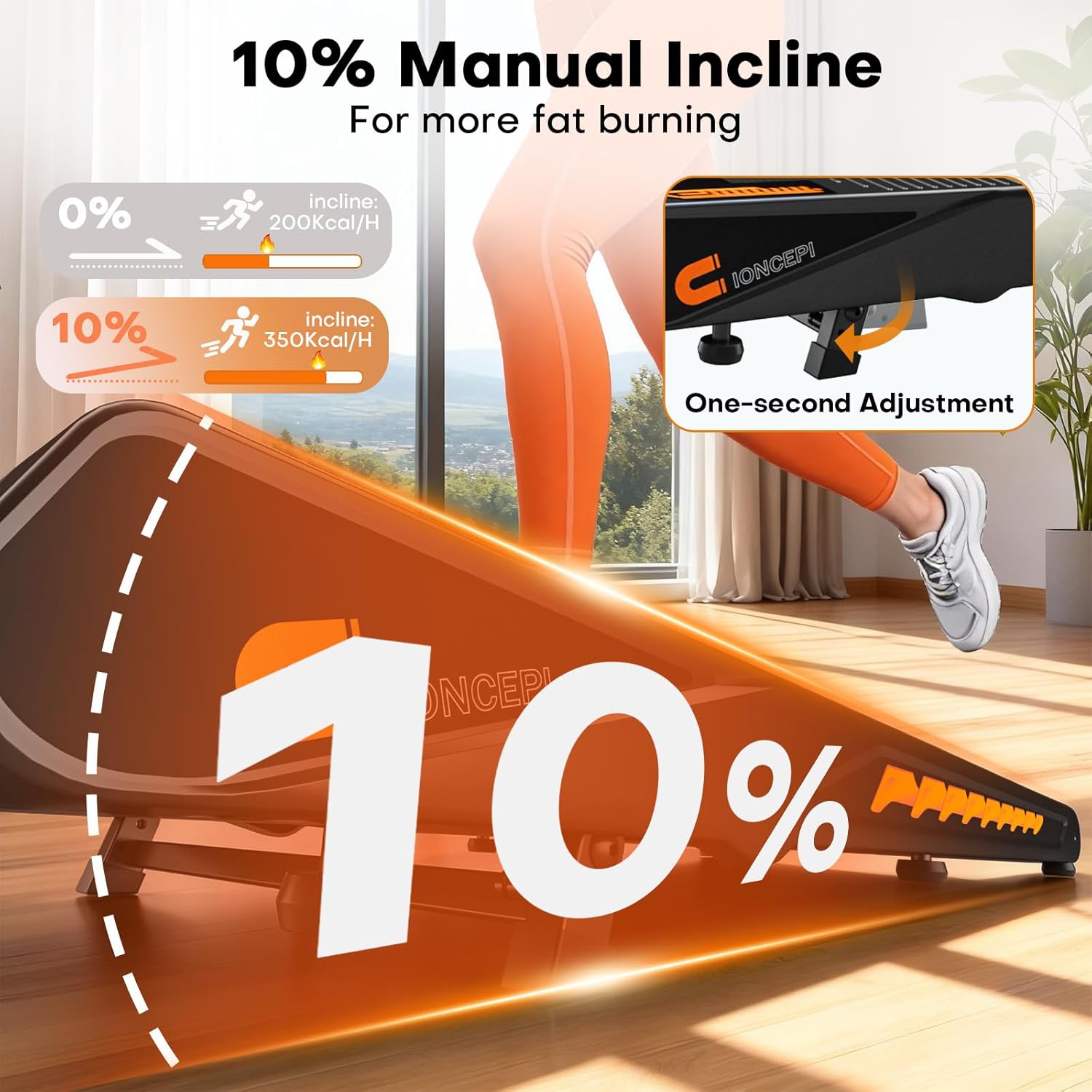
Image: Illustration of the 10% manual incline adjustment mechanism on the treadmill.
To adjust the incline, ensure the treadmill is off and unplugged. Lift the rear of the treadmill and secure the support mechanism into the desired incline position. Always ensure the treadmill is stable before use.
5.6 Programs and Countdown Modes
The treadmill includes pre-set programs and countdown modes to vary your workouts.

Image: Treadmill display indicating the availability of 3 countdown modes and 12 pre-set programs.
- Countdown Modes: Use the 'Mode' button to select countdown options for time, distance, or calories. Set your target, and the treadmill will count down during your workout.
- Pre-set Programs (P1-P12): Press the 'Program' button to cycle through 12 different pre-programmed workouts. Each program has varying speed and intensity profiles.
5.7 Connecting the Fitness App
Enhance your exercise experience by connecting your treadmill to a compatible fitness application via Bluetooth.

Image: A user exercising on the treadmill while connected to a fitness application displayed on a large screen, showing real-time workout data.
- Download the recommended fitness app (refer to product packaging or manufacturer's website for app details) on your smartphone or tablet.
- Ensure Bluetooth is enabled on your device.
- Open the fitness app and follow the on-screen instructions to pair with your KALWOL Walking Pad Treadmill.
- Once connected, you can track your progress, control the treadmill, and access additional features through the app.
5.8 Real-time Motion Data Display
The treadmill's integrated display provides real-time feedback on your workout metrics:
- Distance: Total distance covered during your session.
- Speed: Current speed of the running belt.
- Time: Duration of your workout.
- Calories: Estimated calories burned.
6. Maintenance
Regular maintenance ensures the longevity and optimal performance of your treadmill.
6.1 Cleaning
- After each use, wipe down the treadmill's surface, including the display and handrails, with a soft, damp cloth.
- Do not use abrasive cleaners or solvents, as they may damage the finish.
- Keep the area around the treadmill clean and free of dust and debris.
6.2 Lubrication of the Running Belt
The running belt requires periodic lubrication to reduce friction and ensure smooth operation. Use the provided silicone lubricant or a treadmill-specific silicone lubricant.
- Turn off and unplug the treadmill.
- Loosen the rear roller bolts slightly to lift the belt.
- Apply a small amount of lubricant evenly under the center of the running belt.
- Tighten the rear roller bolts.
- Plug in the treadmill and run it at a low speed (e.g., 1 MPH) for 5 minutes to distribute the lubricant.
Lubricate every 3-6 months, depending on usage frequency.
6.3 Running Belt Adjustment
If the running belt shifts to one side or feels loose, it may need adjustment.
- Centering the Belt: If the belt drifts to the left, turn the left rear roller bolt clockwise a quarter turn. If it drifts to the right, turn the right rear roller bolt clockwise a quarter turn. Run the treadmill at a low speed and observe. Repeat until centered.
- Tensioning the Belt: If the belt slips during use, it may be too loose. Turn both rear roller bolts clockwise in small increments (quarter turns) until the belt no longer slips. Do not overtighten.
7. Troubleshooting
If you encounter issues with your treadmill, refer to the following common problems and solutions:
| Problem | Possible Cause | Solution |
|---|---|---|
| Treadmill does not power on | Power cord not plugged in; Main switch off; Circuit breaker tripped | Check power cord connection; Ensure main switch is ON; Reset circuit breaker |
| Running belt slips | Belt too loose; Insufficient lubrication | Adjust belt tension (Section 6.3); Lubricate belt (Section 6.2) |
| Belt drifts to one side | Belt out of alignment | Adjust belt centering (Section 6.3) |
| Unusual noise during operation | Loose parts; Lack of lubrication; Foreign object | Check for loose bolts; Lubricate belt; Inspect for foreign objects under the belt |
| Remote control not responding | Dead batteries; Obstruction | Replace remote control batteries; Ensure no obstruction between remote and treadmill sensor |
If the problem persists after attempting these solutions, please contact KALWOL customer support.
8. Specifications
Key technical specifications for the KALWOL Walking Pad Treadmill:
- Brand: KALWOL
- Model: B0FX9X68TJ
- Product Dimensions (D x W x H): 46.46" x 20" x 4.53"
- Maximum Weight Recommendation: 350 Pounds
- Motor: 2.75 HP Powerful and Quiet Brushless Motor (≤40dB noise level)
- Running Belt: 7-layer Anti-slip Belt
- Cushioning System: Heavy-duty frame with 10 Silicone shock-absorbers
- Speed Range: 0.6 - 6.2 MPH
- Incline: 10% Manual Incline
- Programs: 12 Pre-set Programs
- Connectivity: Fitness App compatible (Bluetooth)

Image: Internal view highlighting the 2.75HP brushless motor, low noise operation (≤40dB), and 350 lbs weight capacity.
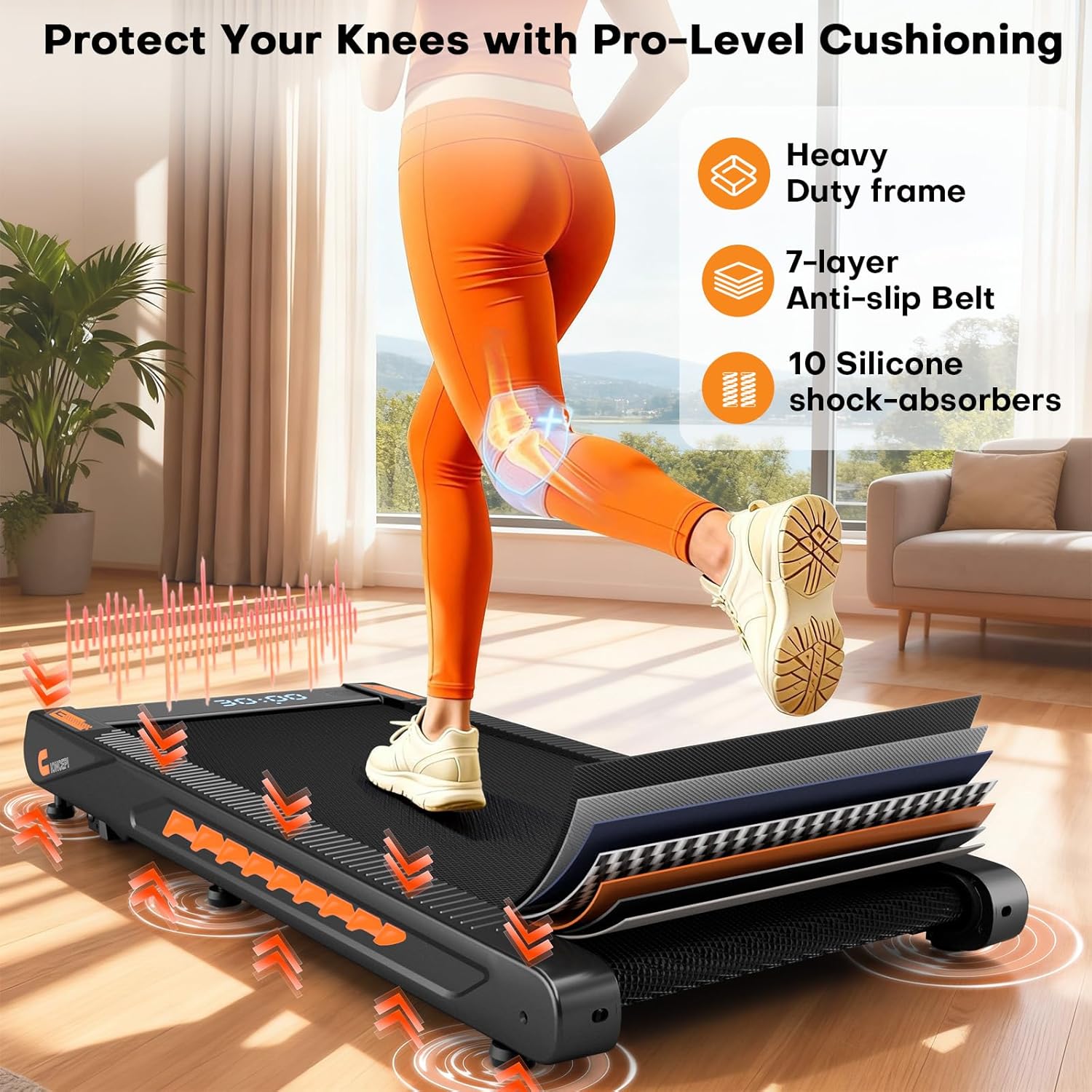
Image: Exploded view illustrating the treadmill's cushioning system, including the heavy-duty frame, 7-layer anti-slip belt, and 10 silicone shock-absorbers for knee protection.
9. Warranty and Support
Your KALWOL Walking Pad Treadmill is covered by a manufacturer's warranty. Please refer to the warranty card included in your package for specific terms and conditions.
For technical assistance, troubleshooting beyond this manual, or warranty claims, please contact KALWOL customer support through the contact information provided on the product packaging or the official KALWOL website. Please have your model number (B0FX9X68TJ) and purchase date ready when contacting support.