
1. Introduction
This manual provides detailed instructions for the setup, operation, and maintenance of your SUNKTA FV10-L Smart Watch. Please read this manual thoroughly before using the device to ensure proper function and to maximize its capabilities. Keep this manual for future reference.
2. What's in the Box
Verify that all items are present in the package:
- SUNKTA FV10-L Smart Watch (1 unit)
- Charging Cable (1 unit)
- User Manual (1 unit)
- Watch Bands (3 units: 1 stainless steel, 1 silicone, 1 leather)
- Strap Adjustment Tool (for stainless steel band)
3. Setup
3.1. Charging the Smart Watch
Before initial use, fully charge the smart watch. Connect the magnetic charging cable to the charging contacts on the back of the watch and plug the USB end into a standard USB power adapter (not included). A full charge takes approximately 2.5 hours.
3.2. Installing/Adjusting Watch Bands
The SUNKTA FV10-L Smart Watch comes with three interchangeable bands: stainless steel, silicone, and leather. To attach a band, align the spring bar with the lug holes on the watch case and slide it into place. For the stainless steel band, use the provided adjustment tool to remove or add links for a comfortable fit.
3.3. Pairing with Your Smartphone
The smart watch is compatible with iOS 8.0 and Android 4.4 or above. Follow these steps to pair your device:
- Download the App: Scan the QR code in the included quick start guide or search for the designated companion app (e.g., 'FitCloudPro') in your smartphone's app store. Install the app.
- Enable Bluetooth: Ensure Bluetooth is enabled on your smartphone.
- Open the App: Launch the companion app on your smartphone.
- Add Device: Within the app, navigate to the 'Device' or 'Add Device' section. The app will search for available smart watches.
- Select Your Watch: Select 'FV10-L' from the list of found devices. Confirm the pairing request on both your phone and the watch if prompted.
- Complete Setup: Follow any on-screen instructions in the app to complete the pairing process and synchronize data.
Video: Unboxing and initial setup of a similar smart watch model. This video demonstrates the general process of unboxing and connecting a smart watch to a smartphone via the companion app.

Image: The SUNKTA FV10-L Smart Watch displayed next to a smartphone, illustrating the app connection process.
4. Operating Instructions
4.1. Display and Navigation
The smart watch features a 1.45-inch AMOLED display with a 466x466 resolution. Navigate through menus and functions using touch gestures (swipe, tap) and the physical crown button. The crown button can be rotated to scroll and pressed to select or return to the home screen.
Image: Close-up of the SUNKTA FV10-L Smart Watch's 1.45-inch AMOLED display, highlighting its clarity and vibrant colors.
4.2. Customizing Watch Faces
The watch comes with 5 built-in watch faces. Through the companion app, you can access a wide variety of additional UI designs. You can also upload a personal photo to create a custom background for your watch face.

Image: A selection of over 300 watch dials available for the SUNKTA FV10-L Smart Watch, including options for DIY customization.
4.3. Bluetooth Calling and Notifications
Once paired with your smartphone, the watch supports Bluetooth calling using its built-in 8Ω speaker and 42dB microphone. You can make and receive calls directly from your wrist. The watch also displays real-time alerts from social media applications such as Facebook, Twitter, and WhatsApp, as well as message pushes.
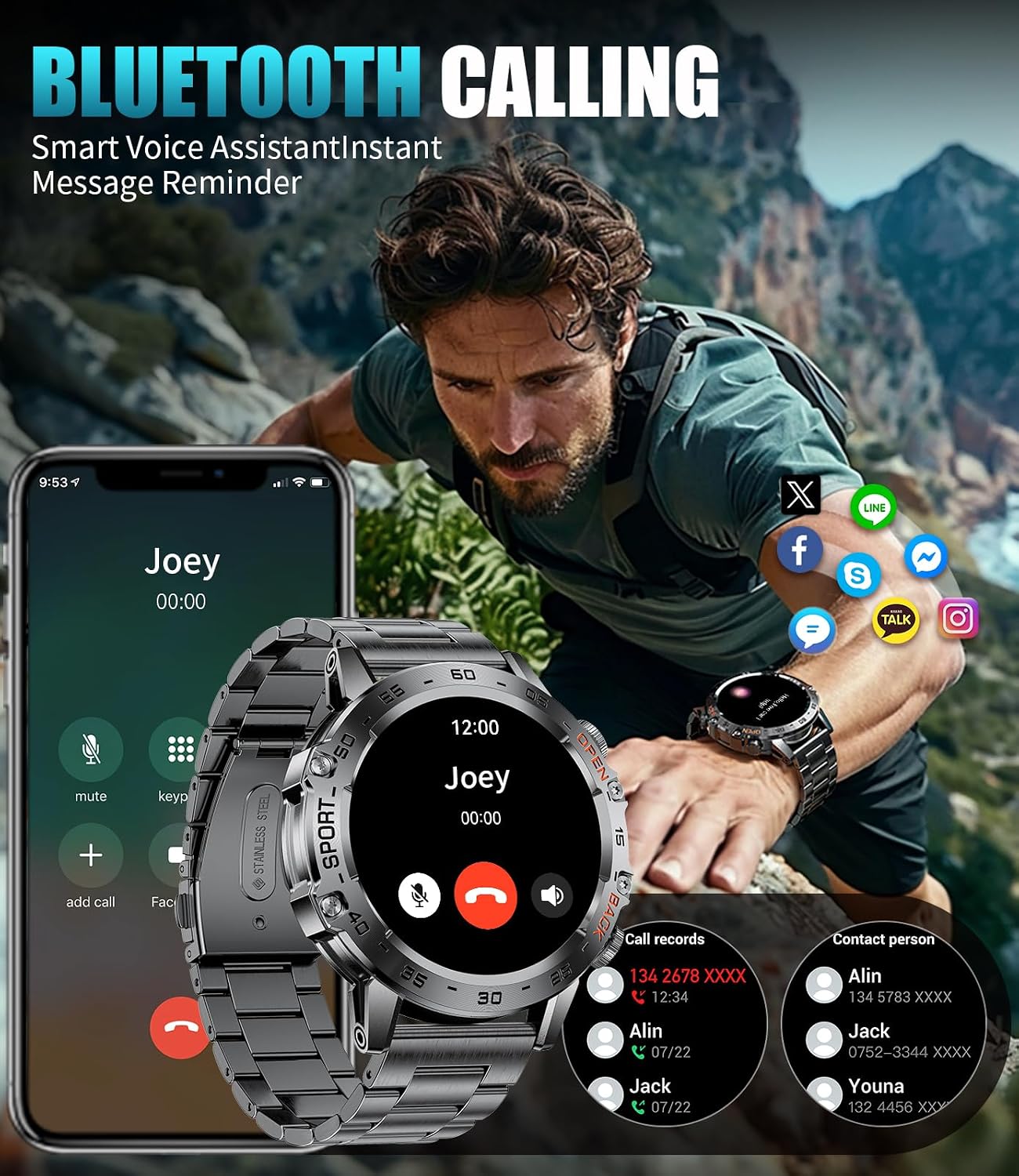
Image: The SUNKTA FV10-L Smart Watch displaying an incoming call, with a smartphone showing the connected call interface.
4.4. AI Voice Assistant
Utilize the integrated AI voice assistant for hands-free control. Activate the voice assistant to perform tasks such as checking the weather or controlling music playback.
4.5. Additional Features
The smart watch includes various practical functions:
- Music Player: Control music playback on your connected smartphone.
- Camera Control: Remotely trigger your smartphone's camera shutter.
- Weather Forecast: View current weather conditions and forecasts.
- Alarm Clock: Set alarms directly on your watch.
- Stopwatch & Timer: Use for timing activities.
- Find My Phone: Locate your paired smartphone by making it ring.
- Calculator: Perform basic calculations.

Image: The SUNKTA FV10-L Smart Watch displaying features such as camera control, weather updates, music playback, and alarm settings.
5. Health Tracking
The SUNKTA FV10-L Smart Watch provides comprehensive health monitoring features. All collected data can be synchronized to the companion app for detailed analysis and historical tracking.
- Heart Rate Monitoring: Tracks your heart rate 24 hours a day.
- Blood Oxygen (SpO2) Monitoring: Measures your blood oxygen levels.
- Sleep Tracking: Automatically monitors your sleep patterns, including awake time, light sleep, and deep sleep.
- Sedentary Reminder: Alerts you when you have been inactive for too long.
- Water Reminder: Prompts you to drink water at regular intervals.
Note: The health measurements provided by this device are for reference only and are not intended for medical diagnosis or treatment.

Image: The SUNKTA FV10-L Smart Watch showing real-time health data, including heart rate, blood oxygen saturation, and sleep analysis.
6. Sports Modes
The smart watch supports over 100 sports modes, catering to various physical activities. These modes allow you to monitor key metrics during your workouts, such as steps taken, distance covered, calories expended, and exercise duration. Examples of supported activities include walking, running, cycling, and tennis.

Image: The SUNKTA FV10-L Smart Watch interface showcasing a selection of its 100+ sports modes, including surfing, riding, rock climbing, and running.
7. Water Resistance
The SUNKTA FV10-L Smart Watch is designed with an IP68 water resistance rating, meaning it is protected against dust ingress and can withstand immersion in water up to 1.5 meters for 30 minutes. It is suitable for daily use, including protection from splashes, rain, and sweat. The watch has a water resistance depth of 50 meters, making it suitable for swimming but not for deep diving.
Video: A demonstration of the smart watch's water resistance, showing it submerged in water and functioning.

Image: The SUNKTA FV10-L Smart Watch depicted in various challenging environments, highlighting its military-grade durability and IP68 water resistance.
8. Battery Life & Charging
The smart watch is equipped with a 530mAh lithium polymer battery. It can be fully charged in approximately 2.5 hours using the provided magnetic charging cable. Battery life varies depending on usage:
- Heavy Use: 3-5 days
- Daily Use: 7+ days
- Energy Saving Mode: 30+ days standby

Image: An infographic detailing the battery performance of the SUNKTA FV10-L Smart Watch under different usage scenarios.
9. Specifications
| Feature | Detail |
|---|---|
| Model Name | FV10-L |
| Brand | SUNKTA |
| Display Type | AMOLED |
| Screen Size | 1.45 Inches |
| Resolution | 466 x 466 |
| Connectivity Technology | Bluetooth (BLE 5.3) |
| Operating System Compatibility | Android Devices (4.4+), iOS Devices (8.0+) |
| Battery Capacity | 530 mAh |
| Battery Cell Composition | Lithium Polymer |
| Battery Charge Time | 2.5 Hours |
| Water Resistance Level | IP68, 50 Meters |
| Special Features | AMOLED Screen, 3 Straps, Phone Call, Notifications, AI Voice, Heart Rate Monitor, SpO2 Monitor, Sleep Monitor, Multisport Tracker, Music Player, Activity Tracker, Pedometer, Alarm Clock, Weather Forecast, Breathing Exercises, Stopwatch, Timer, Find My Phone, Calculator |
| Human Interface Input | Microphone, Touchscreen |
| Band Material Type | Stainless Steel, Silicone, Leather |
| Manufacturer | SUNKTA |
| Country of Origin | China |
10. Troubleshooting
If you encounter issues with your SUNKTA FV10-L Smart Watch, refer to the following common solutions:
- Watch Not Turning On: Ensure the watch is fully charged. Connect it to the charging cable and a power source for at least 30 minutes.
- Unable to Pair with Phone:
- Ensure Bluetooth is enabled on your phone and the watch.
- Make sure the watch is within the Bluetooth range of your phone (typically 10 meters).
- Restart both your phone and the watch.
- Clear the app's cache or reinstall the app.
- Check if the watch is already paired with another device. Disconnect if necessary.
- Notifications Not Appearing:
- Verify that notification permissions are enabled for the companion app in your phone's settings.
- Ensure the app is running in the background and not being closed by your phone's power-saving features.
- Check notification settings within the companion app itself.
- Inaccurate Health Data:
- Ensure the watch is worn snugly on your wrist, not too tight or too loose.
- Clean the sensor on the back of the watch.
- Remember that data is for reference and not medical grade.
- Short Battery Life:
- Reduce screen brightness and screen-on time.
- Limit the number of active background apps or continuous health monitoring features.
- Disable features like 'Always-On Display' if available.
11. Maintenance
Proper care and maintenance will extend the life of your smart watch:
- Cleaning: Regularly wipe the watch screen and body with a soft, dry, lint-free cloth. For the bands, use a damp cloth and mild soap if necessary, then dry thoroughly. Avoid harsh chemicals or abrasive materials.
- Avoid Extreme Conditions: Do not expose the watch to extreme temperatures (hot or cold) or direct sunlight for prolonged periods.
- Storage: When not in use for an extended period, store the watch in a cool, dry place. Ensure it has at least a 50% charge before storing to prevent battery degradation.
- Water Exposure: While water-resistant, it is recommended to dry the watch thoroughly after exposure to water to prevent skin irritation and ensure longevity.
12. Warranty & Support
The SUNKTA FV10-L Smart Watch comes with a 2-year warranty from the date of purchase. This warranty covers manufacturing defects and material faults under normal use. It does not cover damage caused by misuse, accidents, unauthorized modifications, or normal wear and tear.
For warranty claims, technical support, or any inquiries regarding your product, please contact SUNKTA customer service through the retailer where you purchased the device or refer to the contact information provided in the packaging.