
1. Introduction
The LAUNCH X431 i-TPMS TSGUN is a professional, handheld Tire Pressure Monitoring System (TPMS) tool designed for comprehensive TPMS sensor management. This device integrates functionalities for TPMS sensor activation, reading, relearning, and programming. It is compatible with both 315MHz and 433MHz sensors and can be used in conjunction with a LAUNCH X431 diagnostic scanner or the dedicated i-TPMS Android application.
This manual provides detailed instructions for the safe and effective use of your i-TPMS TSGUN, ensuring optimal tire pressure system diagnosis and maintenance.
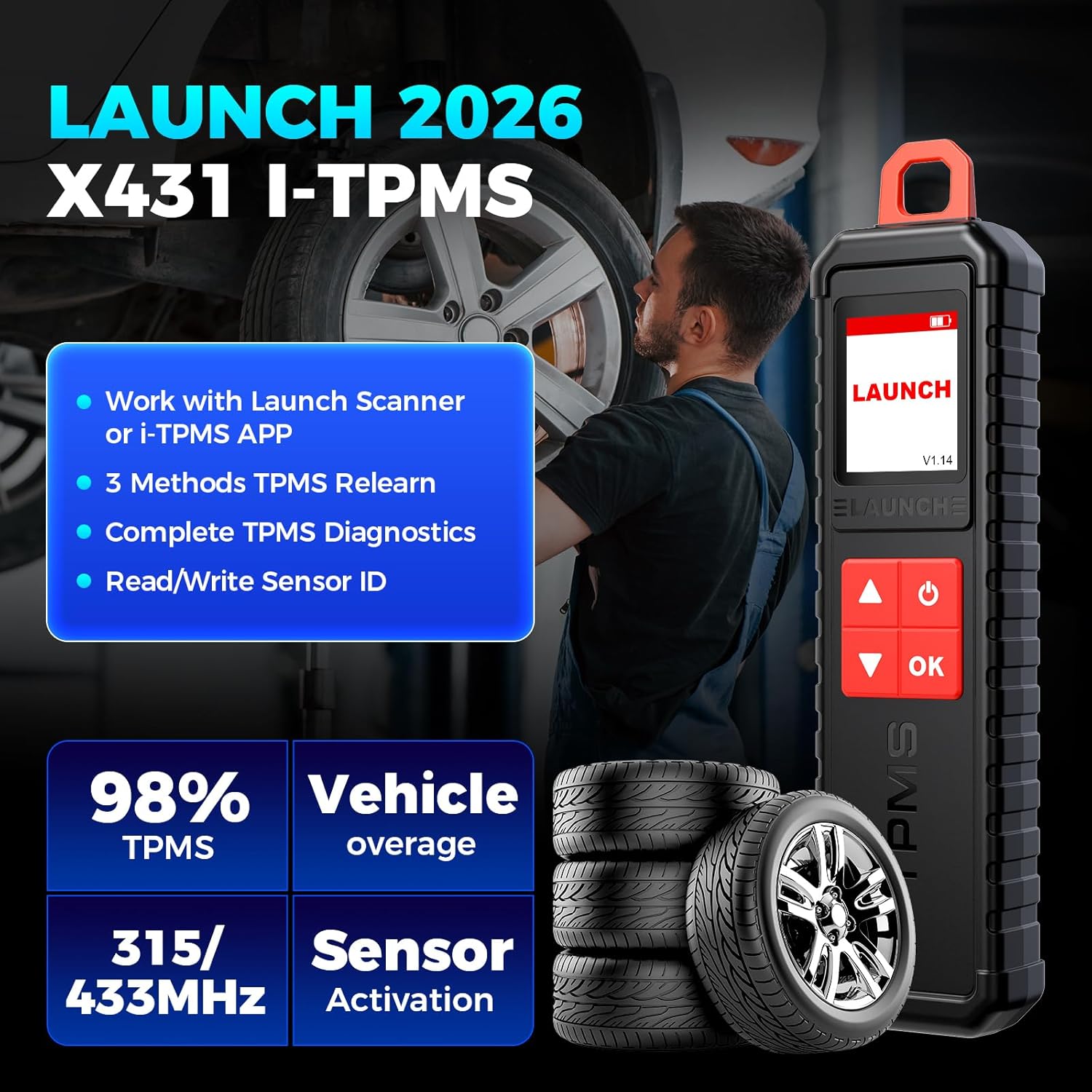
Image 1.1: The LAUNCH X431 i-TPMS TSGUN device, highlighting its core capabilities including working with LAUNCH scanners or the i-TPMS app, 3 methods for TPMS relearn, complete TPMS diagnostics, and read/write sensor ID.
2. Safety Information
Please read all safety warnings and instructions before using this product. Failure to follow these instructions may result in electric shock, fire, and/or serious injury.
- General Safety: Always operate the device in a well-ventilated area. Keep the device away from water, moisture, and extreme temperatures.
- Battery Safety: The device contains a rechargeable battery. Do not disassemble, crush, or expose the battery to high temperatures. Use only the provided charging cable.
- Automotive Use: When working on vehicles, ensure the vehicle is safely parked with the engine off and the parking brake engaged. Avoid contact with hot engine components.
- Electrical Safety: Do not use the device if it appears damaged. Avoid touching internal components.
- Disposal: Dispose of the device and its battery according to local regulations. Do not dispose of in household waste.
3. What's in the Box
Upon opening the package, verify that all components are present and undamaged:
- 1 x LAUNCH X431 i-TPMS TSGUN Handheld Tool
- 1 x Charging Cable
- 1 x User Manual

Image 3.1: The LAUNCH X431 i-TPMS TSGUN package contents, showing the handheld tool, charging cable, and user manual.
4. Setup
4.1 Charging the Device
Before initial use, fully charge the i-TPMS TSGUN using the provided charging cable. Connect the cable to the device's charging port and a standard USB power adapter (not included).
4.2 Connecting to a LAUNCH X431 Scanner
The i-TPMS TSGUN can be paired with compatible LAUNCH X431 diagnostic tablets (8 inches or above) via Bluetooth. Refer to your X431 scanner's manual for specific pairing instructions. Once connected, the full range of TPMS functionalities will be accessible through the scanner's interface.
4.3 Connecting to the i-TPMS Android App
For standalone use with an Android smartphone or tablet, download and install the i-TPMS application. The app is not available on the Google Play Store. To download, locate the official QR code printed on the back of the i-TPMS TSGUN device or within this user manual. Scan the QR code with your Android device to download and install the application securely. After installation, enable Bluetooth on your Android device and pair it with the i-TPMS TSGUN.

Image 4.1: The i-TPMS TSGUN can be used with a LAUNCH X431 scanner for full functionality or with the i-TPMS Android app for essential tasks.
5. Operating Instructions
5.1 Activating TPMS Sensors
The i-TPMS TSGUN can activate both 315MHz and 433MHz OEM and universal TPMS sensors. This process wakes up the sensor and allows the tool to read its data.
- Ensure the i-TPMS TSGUN is powered on and connected to your X431 scanner or i-TPMS app.
- Select the "Activate" function from the menu.
- Hold the i-TPMS TSGUN near the tire valve stem of the sensor you wish to activate.
- Press the "OK" button on the device. The tool will emit a signal to activate the sensor.
- Once activated, the sensor data (ID, pressure, temperature, battery status) will be displayed on the screen.

Image 5.1: Steps for activating TPMS sensors: scan each sensor, connect the LAUNCH scanner to the OBD port, follow instructions, and transfer sensor IDs.
5.2 Reading Sensor Status
After activation, the i-TPMS TSGUN can display real-time data from the TPMS sensors, including:
- Sensor ID
- Tire Pressure (kPa/PSI/Bar)
- Tire Temperature (°C/°F)
- Battery Status
- Sensor Position
- Sensor Frequency

Image 5.2: The i-TPMS TSGUN provides quick and easy TPMS diagnosis, allowing users to read tire status, clear codes, check ID matching, and turn off the TPMS light.
5.3 Relearning TPMS Sensors
After replacing a TPMS sensor or performing tire service, the new sensor IDs must be relearned to the vehicle's ECU. The i-TPMS TSGUN supports three relearn methods:
- OBD Relearn: Connect the X431 scanner (or i-TPMS app with OBD dongle, if supported) to the vehicle's OBD-II port. Follow the on-screen instructions to transfer new sensor IDs to the vehicle's computer.
- Automatic Relearn: For vehicles that support automatic relearn, drive the vehicle for a specified period (e.g., 10-20 minutes) at a certain speed (e.g., above 25 mph) after sensor replacement. The vehicle's ECU will automatically learn the new sensor IDs.
- Stationary Relearn: Some vehicles require a stationary relearn procedure, often involving specific steps like inflating/deflating tires in a particular sequence. The i-TPMS TSGUN, when connected to an X431 scanner, provides guided instructions for these procedures.

Image 5.3: The three easy ways to relearn TPMS sensors: OBD Relearn, Automatic Relearn, and Stationary Relearn, with visual cues for each method.
5.4 Programming TPMS Sensors
The i-TPMS TSGUN exclusively supports programming of LAUNCH LTR RF sensors. It can program these sensors an unlimited number of times, offering a cost-effective alternative to expensive OE sensors. Four programming methods are available:
- Auto Create: The tool generates a new, unique sensor ID.
- Manual Create: Allows you to manually input a desired sensor ID.
- Copy by Activation: Reads the ID from an existing sensor and copies it to a new LAUNCH sensor.
- Copy by OBD: Retrieves sensor IDs from the vehicle's ECU via the OBD-II port and copies them to new LAUNCH sensors.
Note: This tool does not program OEM sensors; it is designed for LAUNCH LTR RF sensors only.

Image 5.4: Four flexible ways to program LAUNCH TPMS sensors: Auto Create, Manual Create, Copy by Activation, and Copy by OBD. This functionality is for LAUNCH sensors only.
6. Maintenance
- Cleaning: Use a soft, dry cloth to clean the device. Do not use abrasive cleaners or solvents.
- Storage: Store the device in a cool, dry place away from direct sunlight and extreme temperatures.
- Battery Care: To prolong battery life, avoid fully discharging the battery frequently. Charge the device regularly, even if not in use for extended periods.
- Firmware Updates: Periodically check for firmware updates through the LAUNCH X431 scanner or the i-TPMS app to ensure optimal performance and compatibility with new sensors and vehicles.
7. Troubleshooting
| Problem | Possible Cause | Solution |
|---|---|---|
| Device does not power on | Low battery; Device damage | Charge the device fully. If problem persists, contact support. |
| Cannot activate sensor | Incorrect positioning; Sensor fault; Incorrect frequency | Ensure tool is close to valve stem. Verify sensor is functional and matches 315/433MHz. |
| OBD Relearn fails | Incorrect vehicle selection; OBD connection issue; Vehicle specific procedure not followed | Confirm correct vehicle make/model/year. Check OBD-II cable connection. Follow on-screen guidance precisely. |
| i-TPMS app not installing | App downloaded from unofficial source; Android security settings blocking installation | Ensure you scan the official QR code from the device or manual. Adjust Android security settings to allow installation from unknown sources (temporarily, if necessary). |
| Cannot program OEM sensors | Device limitation | The i-TPMS TSGUN is designed to program LAUNCH LTR RF sensors only. It does not support programming of OEM sensors. |
8. Specifications
| Feature | Detail |
|---|---|
| Brand | LAUNCH |
| Model | X431 i-TPMS TSGUN |
| Power Source | Battery Powered |
| Operating System (for app) | Android |
| Display Screen Size | 1.77 inches (168*128 DPI) |
| Automotive Fit Type | Universal Fit |
| Input Voltage | DC5V |
| Operating Temperature | -10°C to 50°C (14°F to 122°F) |
| Storage Temperature | -20°C to 60°C (-4°F to 140°F) |
| Battery Capacity | 3000mAh |
| Item Weight | 0.69 Pounds (approx. 313g) |
9. Warranty and Support
9.1 Warranty Information
LAUNCH provides reliable after-sales protection for every i-TPMS tool. Specific warranty terms and conditions may vary by region and retailer. Please refer to your purchase documentation or contact your point of sale for detailed warranty information.
9.2 Technical Support
Should you encounter any questions or issues regarding the operation or functionality of your LAUNCH X431 i-TPMS TSGUN, please feel free to contact LAUNCH customer support. Support can typically be reached via email or through the Q&A section on the product's official sales platform.


