Introduction
The MILESEEY S50 Green-Beam Laser Distance Measure is a high-precision tool designed for accurate distance measurements in various environments. Featuring a 4x brighter green laser, it offers enhanced visibility for both indoor and outdoor applications. This device integrates advanced P2P technology, 18 intelligent measurement modes, and multiple reference points to streamline your workflow. Its durable design, coupled with smart app connectivity and rechargeable batteries, makes it a versatile instrument for construction, interior design, and DIY projects.
Video: Overview of the MILESEEY S50 Green-Beam Laser Distance Measure, highlighting its key features and applications.
Package Contents
Ensure all items are present upon unboxing:
- S50 Green Laser Measuring Tool x1
- Storage Case x1
- Lanyard x1
- AA Ni-MH Rechargeable Batteries x2
- USB-C Charging Cable x1
- User Manual x1
Setup
Battery Installation and Charging
The S50 device operates on 2x AA Ni-MH 1800mAh rechargeable batteries. These batteries can be charged directly within the device via the USB-C port or replaced with standard AA Ni-MH batteries.
- Locate the battery compartment cover on the back of the device.
- Slide the cover open and insert the 2x AA Ni-MH batteries, ensuring correct polarity.
- Close the battery compartment cover securely.
- To charge, connect the provided USB-C charging cable to the device's USB-C port and a power source.

Image: The MILESEEY S50 device showing the battery compartment with rechargeable Ni-MH batteries and the USB-C charging port.
Smart App Connection
The S50 can connect to the Smart Life App for enhanced functionality, including floor plan visualization, data export, and cloud sync.
- Download the 'Smart Life' app from your device's app store (available on iOS and Android).
- Open the app, log in or sign up, and select your region.
- On your S50 device, enter the setting menu and press the 'Measure' button to enable the Link function.
- Return to the Smart Life app, tap the '+' icon in the upper right corner, and select 'Add Device'.
- Allow the app to access all necessary permissions (location, local network, Bluetooth, home data).
- Your phone will automatically detect the S50 device. Tap to complete the connection.
Video: Step-by-step guide on connecting the MILESEEY S50 to the Smart Life mobile application for seamless data synchronization.
Operating Instructions
Basic Measurement
To take a single distance measurement:
- Ensure the device is powered on.
- Point the green laser beam at the target.
- Press the 'Measure' button (green triangle) once. The measured distance will appear on the display.

Image: The MILESEEY S50 device displaying a distance measurement on its screen.
Measurement Modes
The S50 offers 18 intelligent measurement modes. Press the 'Measuring Mode' button (grid icon) to cycle through available modes:
- Single Length: Basic distance measurement.
- Continuous Measurement: Provides real-time distance updates as the device moves.
- Area: Calculates the area of a surface after two measurements.
- Volume: Calculates the volume of a space after three measurements (length, width, height).
- Point-to-Point (P2P): Measures the distance between any two points from a single location.
- Pythagoras (Indirect Height/Length): Calculates inaccessible heights or lengths using indirect measurements.
- Wall Area: Calculates the total area of multiple walls.
- Triangular Area: Calculates the area of a triangle.
- Cylinder Volume: Calculates the volume of a cylinder.

Image: A visual representation of the 18 measurement modes available on the MILESEEY S50, including Area, Volume, P2P, and various indirect measurements.
Reference Points
The S50 allows you to select from 4 different reference points for your measurements, ensuring accuracy based on your setup. Press the 'Reference Switch' button to cycle through them:
- Front Reference: Measurement starts from the front edge of the device.
- Back Reference: Measurement starts from the back edge of the device.
- Tripod Reference: Measurement starts from the tripod mounting hole.
- Side-Laser Alignment: Measurement starts from the side laser.
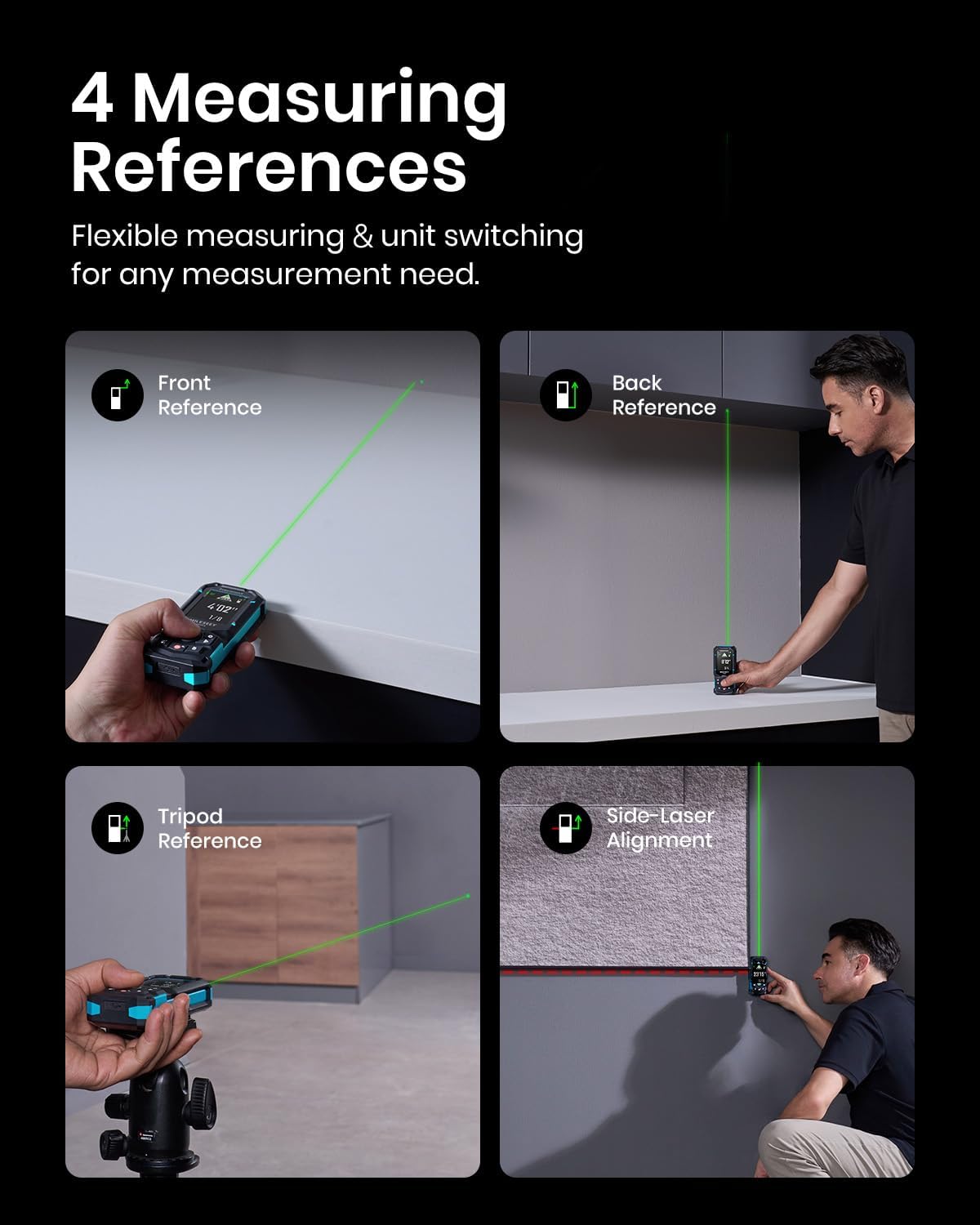
Image: The MILESEEY S50 illustrating the four available measurement reference points: front, back, tripod, and side-laser.
Display Features
The 2.4" IPS Backlit Display provides clear readings in various lighting conditions:
- Low-Light Visible: Optimized for visibility in dim conditions.
- Black & White Background: Switchable background for improved contrast.
- Auto Rotate: Display automatically adjusts orientation.
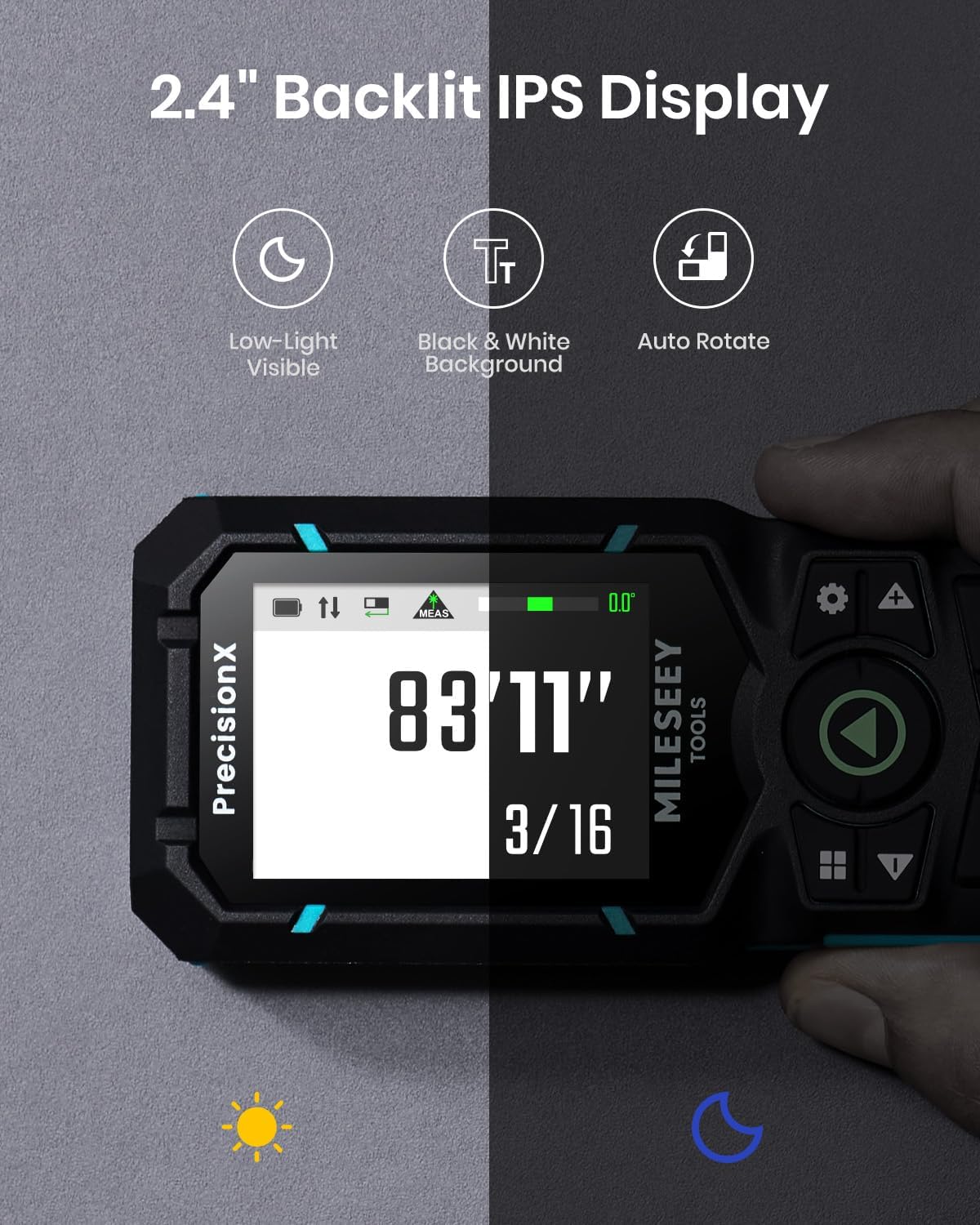
Image: The MILESEEY S50's 2.4-inch IPS Backlit Display showing its features for low-light visibility, switchable black and white background, and auto-rotate functionality.
Settings
To access device settings, press the 'Set' button (gear icon). Use the left/right buttons to navigate options and the 'Measure' button to confirm.
- Units: Switch between 8 units (ft, 0'00'' 1/32, 0'00'' 1/16, in1/32, in1/16, cm, m).
- Auto Rotate: Enable/disable automatic display rotation.
- Background: Switch between black and white display backgrounds.
- Font: Adjust font size for readability.
- Beeper: Turn sound alerts on/off.
- Digital Level: Access the digital bubble level for alignment.
- Language: Select device language.
- Offset Setting: Adjust measurement offset for calibration.
- Timer: Set a delay for measurements (e.g., 3 or 5 seconds).
- Favorite Function: Customize frequently used measurement modes for quick access.
Video: A detailed walkthrough of the MILESEEY S50's settings menu, demonstrating how to adjust various parameters like units, display, and sound.
Maintenance
To ensure the longevity and accuracy of your MILESEEY S50, follow these maintenance guidelines:
- Cleaning: Use a soft, damp cloth to clean the device. Do not use harsh chemicals or abrasive cleaners. Ensure the laser lens is clean and free of dust for accurate readings.
- Storage: Store the device in its protective storage case when not in use. Keep it in a cool, dry place away from direct sunlight and extreme temperatures.
- Battery Care: If the device will not be used for an extended period, remove the batteries to prevent leakage.
- Calibration: While the device is factory calibrated, if you suspect inaccuracies, refer to the offset setting in the menu to make minor adjustments.
Troubleshooting
If you encounter issues with your MILESEEY S50, try the following:
- Device not turning on: Check if the batteries are correctly inserted and charged. Replace batteries if necessary.
- Inaccurate readings: Ensure the laser lens is clean. Verify the correct reference point is selected. Check for any obstructions between the device and the target. Perform an offset setting adjustment if needed.
- App connectivity issues: Ensure Bluetooth is enabled on your phone and the device. Restart both the device and the app. Check app permissions.
- Display not clear: Adjust the background setting (black/white) for better contrast. Ensure the screen is clean.
Specifications
| Feature | Detail |
|---|---|
| Brand | MiLESEEY |
| Model Name | S50 |
| Measuring Range | 400ft (120m) |
| Accuracy | ±1/16" |
| Laser Type | CLASS II GREEN LASER: 500~530nm, <1mW; CLASS II SIDE LASER (RED LASER): 630~670nm, <1mW |
| Display | 2.4" IPS Backlit Display |
| Batteries | 2x AA Ni-MH 1800mAh (Rechargeable) |
| Charging Port | USB-C |
| Material | Rugged Engineering Plastic |
| Dust & Water Resistance | IP54 |
| Item Weight | 145 Grams |
Warranty & Support
The MILESEEY S50 Green-Beam Laser Distance Measure is backed by a 24-month manufacturer's warranty for peace of mind. For technical support, troubleshooting assistance, or warranty claims, please refer to the contact information provided in your product packaging or visit the official MiLESEEY website.


