
1. Introduction
This manual provides essential information for the safe and efficient use of your Lenovo LOQ 15IRX9 Gaming Laptop. Please read this manual thoroughly before operating the device to ensure proper setup, operation, and maintenance. Keep this manual for future reference.
Safety Information
- Do not expose the laptop to extreme temperatures, humidity, or direct sunlight.
- Avoid placing heavy objects on the laptop.
- Use only the power adapter supplied with the device.
- Keep liquids away from the laptop to prevent electrical shock or damage.
- Do not attempt to disassemble or repair the laptop yourself. Refer to qualified service personnel.
2. Package Contents
Verify that all items are present in the package:
- Lenovo LOQ 15IRX9 Gaming Laptop
- Power Adapter (230W AC Adapter)
- 32GB USB Drive
- Quick Start Guide (if applicable)
- Warranty Information (if applicable)
3. Product Overview
The Lenovo LOQ 15IRX9 is a high-performance gaming laptop designed for immersive gaming experiences and demanding tasks. It features a 15.6-inch FHD display, Intel i7-13650HX processor, and NVIDIA GeForce RTX 4060 graphics.
Front View
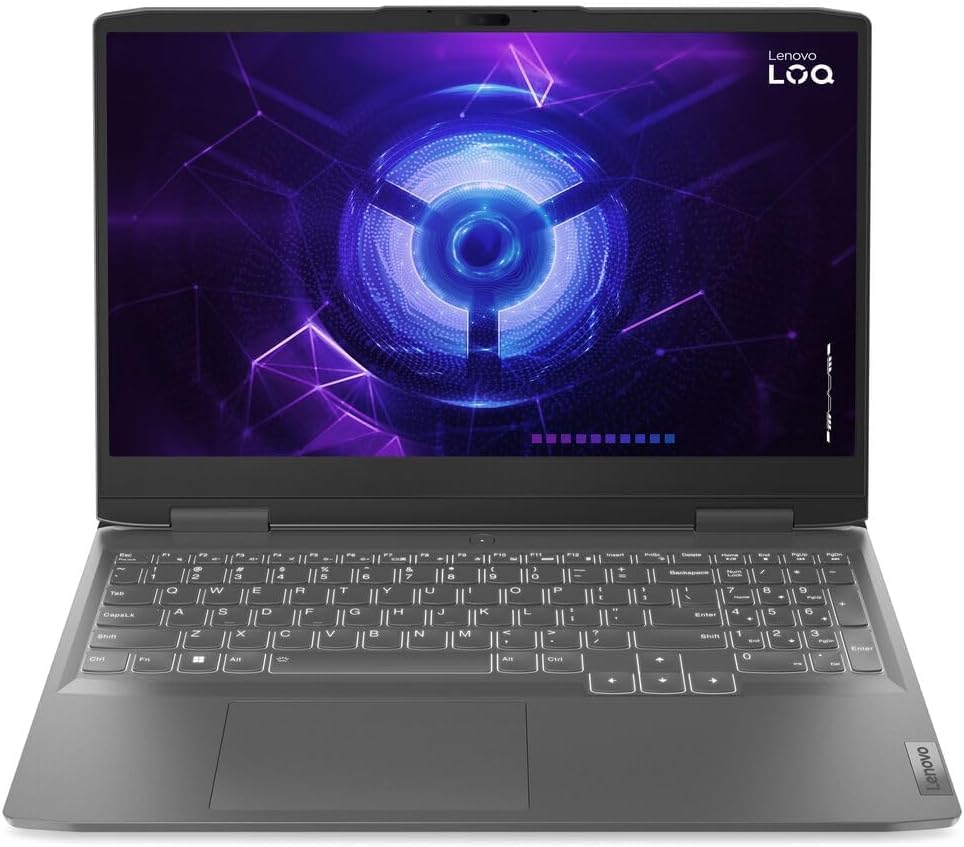
Image: Front view of the Lenovo LOQ 15IRX9 Gaming Laptop, highlighting the 15.6-inch display and the full-size backlit keyboard with numeric keypad.
Ports and Connectors
Familiarize yourself with the available ports for connecting external devices:
- 1 x USB 3.2 Gen 2 Type-C: Supports Power Delivery, DisplayPort, and 10Gbps data transfer.
- 3 x USB 3.2 Gen 1 Type-A: Supports 5Gbps data transfer.
- 1 x RJ-45: Ethernet port for wired network connection.
- 1 x HDMI v2.1: For connecting to external displays.
- 1 x Headphone / microphone combo jack (3.5mm): For audio input/output.
4. Setup
Initial Power-On
- Connect Power: Plug the 230W AC adapter into the laptop's power port and then into a wall outlet.
- Open Display: Carefully open the laptop display.
- Power On: Press the power button, typically located on the keyboard deck.
- Initial Configuration: Follow the on-screen instructions to complete the Windows 10 Home setup, including language, region, network connection, and user account creation.
Connecting Peripherals
Connect external devices such as a mouse, keyboard, or external monitor to the appropriate USB or HDMI ports as described in the "Ports and Connectors" section.
5. Operating Instructions
Keyboard and Touchpad
- The laptop features a full-size backlit keyboard with a numeric keypad.
- Use the touchpad for cursor control and multi-touch gestures.
- Function keys (Fn) combined with F-keys provide quick access to system functions like volume, brightness, and keyboard backlight control.
Display Settings
The 15.6" FHD (1920 x 1080) display supports a 144Hz refresh rate and G-SYNC. You can adjust display settings, including resolution and refresh rate, through Windows Display Settings or the NVIDIA Control Panel.
Audio
The laptop is equipped with stereo speakers (2W x2) optimized with Nahimic Audio. Adjust volume using the keyboard function keys or Windows sound settings.
Wireless Connectivity
- Wi-Fi 6: Connect to wireless networks via Realtek Wi-Fi 6 (2x2). Access Wi-Fi settings through the Windows taskbar network icon.
- Bluetooth 5.2: Pair Bluetooth devices such as headphones or mice via Windows Bluetooth settings.
Webcam
The integrated 720p HD Camera includes an E-Shutter for privacy. Activate or deactivate the camera and its shutter via dedicated function keys or software settings.
6. Maintenance
Cleaning the Laptop
- Screen: Use a soft, lint-free cloth lightly dampened with water or a screen cleaner. Do not spray cleaner directly onto the screen.
- Keyboard and Chassis: Use a soft, dry cloth. For stubborn dirt, a slightly damp cloth with mild soap solution can be used, ensuring no liquid enters openings.
- Vents: Periodically clean dust from the ventilation openings using compressed air to maintain optimal cooling.
Battery Care
- To prolong battery life, avoid fully discharging the battery frequently.
- Store the laptop in a cool, dry place if not used for extended periods.
- The 60Wh Lithium-Ion battery provides up to 6 hours of battery life under typical usage.
7. Troubleshooting
| Problem | Possible Cause | Solution |
|---|---|---|
| Laptop does not power on. | No power, battery drained, or power adapter issue. | Ensure the power adapter is securely connected and the outlet is functional. Charge the battery for at least 30 minutes before attempting to power on again. |
| No display on screen. | Screen brightness too low, external monitor connected, or display driver issue. | Increase screen brightness using function keys. Disconnect any external monitors. Restart the laptop. |
| Wi-Fi connection issues. | Wi-Fi disabled, incorrect password, or router problem. | Ensure Wi-Fi is enabled in Windows settings. Verify the Wi-Fi password. Restart your router and laptop. |
| Keyboard backlight not working. | Backlight disabled or brightness set to minimum. | Use the dedicated function key (often Fn + Spacebar or Fn + Fx) to toggle or adjust keyboard backlight brightness. |
For further assistance, refer to the Lenovo support website or contact customer service.
8. Specifications
| Feature | Detail |
|---|---|
| Model Name | 83DV00FXZS |
| Display | 15.6" FHD (1920 x 1080) IPS, Anti-glare, 300 nits, 100% sRGB, 144Hz, G-SYNC |
| Processor | Intel i7-13650HX (14 Cores: 6 Performance + 8 Efficient, 20 Threads, up to 4.9 GHz) |
| Graphics | NVIDIA GeForce RTX 4060 GDDR6 8GB (Dedicated) |
| Memory | 24GB DDR5 SDRAM 4800 MHz (Upgradable to 64GB) |
| Storage | 1TB NVMe M.2 SSD |
| Operating System | Windows 10 Home |
| Keyboard | Full-size Backlit Keyboard with Numpad |
| Wireless Connectivity | Realtek Wi-Fi 6 (2x2), Bluetooth 5.2 |
| Camera | 720p HD Camera with E-Shutter |
| Audio | Stereo speakers, 2W x2, optimized with Nahimic Audio |
| Ports | 1x USB 3.2 Gen 2 Type-C (PD/DP/10Gbps), 3x USB 3.2 Gen 1 Type-A (5Gbps), 1x RJ-45, 1x HDMI v2.1, 1x Headphone/mic combo jack |
| Battery | 60Wh Lithium-Ion (up to 6 hours) |
| Power Adapter | 230W AC Adapter |
| Dimensions (L x W x H) | 14.17" x 10.19" x 0.94" (360mm x 259mm x 23.9mm) |
| Weight | 5.25 lbs (2.38 kg) |
| Color | Luna Grey |
9. Warranty and Support
Warranty Information
Your Lenovo LOQ 15IRX9 Gaming Laptop comes with a standard manufacturer's warranty. Please refer to the warranty card included in your package or visit the official Lenovo support website for detailed terms and conditions, including warranty period and coverage.
Customer Support
For technical assistance, driver downloads, or service inquiries, please visit the official Lenovo Support website. You can also find FAQs and troubleshooting guides online.
Lenovo Support Website: support.lenovo.com


