
1. Product Overview
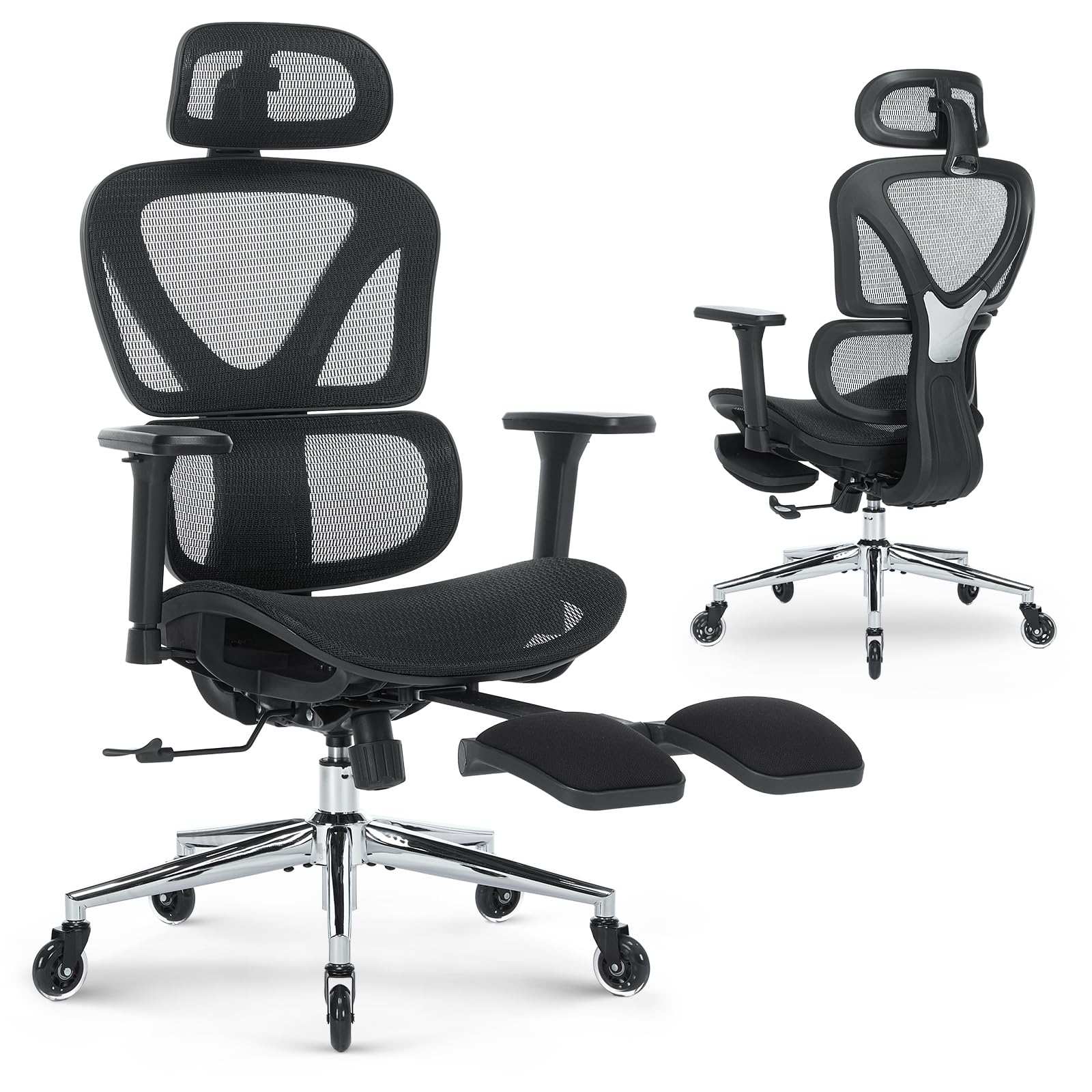
The MALOL Ergonomic Office Chair 9070ZKG is designed to provide superior comfort and support for extended periods of sitting, whether for office work or home use. It features multiple adjustable components to customize your seating experience and promote spinal health.
Key Features:
- Adjustable Headrest: Provides neck support.
- 3D Armrests: Customizable arm support.
- Adjustable Lumbar Support: Conforms to the natural curve of the spine.
- 4-Position Tilt Lock: Allows reclining up to 125 degrees.
- Sliding Seat: Adjusts seat depth.
- Hidden Footrest: Retractable for relaxation.
- Breathable Mesh Material: Ensures air circulation.
- SGS-Certified Gas Lift & Metal Base: Ensures stability and durability.
- Silent PU Casters: Smooth mobility without scratching floors.
2. Assembly Instructions
This section provides a step-by-step guide for assembling your MALOL Ergonomic Office Chair 9070ZKG. All necessary tools are included. For a visual guide, please refer to the installation video below.
Video: Detailed installation guide for the Ergonomic Mesh Office Chair, provided by Nanjing Hengning Home Furnishing Co.,Ltd.
Step-by-Step Assembly:
- Insert Base Legs: Insert the five base legs (H1) into the chair base (H2) in the correct position.
- Fix Base Legs: Secure the base legs (H1) with 10 bolts (L) using the provided wrench (R).
- Press Casters: Press the casters (I) into the holes at the end of each base leg (H1). Ensure wheels are installed precisely in alignment to avoid damage.
- Install Gas Lift: Place the chair base cover (H3) and insert the gas lift (G) into the center hole of the chair base (H1). Remove and discard the gas lift cover before use.
- Install Junction Plate: Use 3 bolts (P) to install the junction plate (C) on the back side of the back cushion (B) using the wrench (R).
- Attach Armrests: Attach the armrests (E) to the back of the seat cushion (D) with 6 bolts (N) using the wrench (R).
- Align Seat Plate: Align the seat plate (F) over the pre-drilled holes underneath the seat cushion (D). Ensure the front of the seat plate faces the front of the seat cushion. Attach the seat plate (F) to the seat cushion (D) using four bolts (M). Tighten all bolts with the wrench (R), being careful not to miss-thread the bolts or damage the seat.
- Attach Back and Seat Cushions: Attach the back cushion (B) and seat cushion (D) with 3 bolts (O). Tighten all bolts with the wrench (R).
- Secure Seat Cushion to Gas Lift: Push the seat cushion (D) down onto the gas lift (G) firmly until the connection is secure.
- Install Headrest: Install the headrest (A) to the back cushion (B), tightening 2 bolts (Q) with the wrench (R).
- Press Decorative Parts: Press the plastic decorative parts J and K into the correct position.
- Assembly is now complete. The chair is ready for use.
3. Operating Instructions
Your MALOL Ergonomic Office Chair offers various adjustments to optimize your comfort and posture. Familiarize yourself with these functions for the best experience.
Height Adjustment:
To adjust the chair's height, locate the lever on the right side beneath the seat. Pull the lever upwards while seated to lower the chair, or pull it upwards while standing to raise the chair. Release the lever to lock the height.
Recline and Tilt Lock:
The chair features a 4-position tilt lock allowing recline up to 125 degrees. To recline, pull the lever on the left side of the chair outwards. Lean back to your desired angle and push the lever inwards to lock the position. To return to an upright position, pull the lever outwards again and lean forward.

Image: Illustration of the four recline positions: Focused Work (95°), Reading (105°), Browsing (115°), and Resting (125°).
Adjustable Headrest:
The 2D adjustable headrest can be moved up and down by approximately 1.97 inches and rotated 35 degrees to provide optimal neck support. Adjust it to align with the natural curve of your neck.

Image: Close-up view of the adjustable headrest and 3D armrests, demonstrating their range of motion.
3D Armrests:
The armrests offer three-dimensional adjustment: forward and back, right and left, and up and down. Use the buttons or levers on the armrests to position them for optimal arm and shoulder support.

Image: Diagram illustrating the forward/back, left/right, and up/down adjustments of the 3D armrests.
Dynamic Lumbar Support:
The chair features dynamic lumbar support that adjusts to your back's movement, providing continuous support to the lower spine. This helps maintain a healthy posture during prolonged sitting.

Image: Visual representation of the dynamic lumbar support system conforming to the user's back.
Retractable Footrest:
A hidden footrest is located beneath the seat. Pull it out when you wish to extend your legs and relax. Push it back in when not in use to keep it concealed.

Image: The MALOL office chair with its retractable footrest extended, allowing for a relaxed posture.
4. Maintenance
Proper maintenance ensures the longevity and optimal performance of your MALOL Ergonomic Office Chair.
Cleaning:
- Mesh Fabric: Use a soft brush or vacuum cleaner to remove dust and debris. For stains, gently wipe with a damp cloth and mild soap solution. Avoid harsh chemicals.
- Plastic and Metal Parts: Wipe with a soft, damp cloth. Do not use abrasive cleaners.
General Care:
- Regularly check all bolts and screws to ensure they are tight. Re-tighten if necessary.
- Avoid exposing the chair to direct sunlight for prolonged periods to prevent material degradation.
- Ensure the silent PU casters are clean and free of hair or debris to maintain smooth movement.
5. Troubleshooting
If you encounter any issues with your chair, please refer to the following common troubleshooting tips:
- Chair does not adjust height: Ensure the gas lift lever is fully engaged and that the gas lift cylinder is properly seated in the base and seat mechanism.
- Chair wobbles: Check all assembly bolts to ensure they are securely tightened. Ensure the base legs are fully inserted into the chair base.
- Casters not rolling smoothly: Inspect casters for any trapped debris (hair, lint) and clean them. Ensure they are correctly installed.
- Backrest does not recline: Verify that the tilt lock mechanism is disengaged.
If the problem persists after attempting these solutions, please contact MALOL customer support for further assistance.
6. Specifications
Detailed specifications for the MALOL Ergonomic Office Chair 9070ZKG:

Image: Diagram illustrating the dimensions and weight capacity of the MALOL Ergonomic Office Chair.
| Feature | Detail |
|---|---|
| Brand | MALOL |
| Model Name | 9070ZKG |
| Product Dimensions | 25.39"D x 25.59"W x 46.06"H |
| Item Weight | 45.3 Pounds |
| Maximum Weight Recommendation | 300 Pounds |
| Material | Metal (Frame), Mesh, Foam (Seat) |
| Back Style | Mesh Back |
| Arm Style | 3D Adjustable |
| Reclining Position Count | 4 |
| Included Components | 1 Ergonomic Office Chair |
| Recommended Uses | Drafting, Gaming, Office, Reading |
7. Warranty and Support
For warranty information or to obtain support for your MALOL Ergonomic Office Chair 9070ZKG, please refer to the documentation included with your purchase or contact MALOL customer service directly. Keep your purchase receipt for warranty claims.