
1. Introduction
The Kiprim WM02 is a versatile pin-type moisture meter designed for quick and accurate measurement of moisture content in various materials. It features a large LCD display, temperature measurement, a data hold function, and four selectable material modes, making it an essential tool for professionals and DIY enthusiasts alike.
2. Safety Information
- Always keep the protective cap on the measurement pins when the device is not in use to prevent injury.
- Do not allow the probes to come into contact with live electrical objects or wires. This can cause electric shock or damage to the device.
- Keep the device out of reach of children.
- Do not attempt to disassemble or modify the device. Repairs should only be performed by qualified personnel.
- Remove the battery if the device will not be used for an extended period to prevent battery leakage.

Figure 2.1: Safety warning regarding probes and protective cap.
3. Package Contents
Verify that all items are present in the package:
- 1 x Kiprim WM02 Moisture Meter
- 1 x 9V 6LR61 Battery
- 2 x Pairs of Replacement Probes (4 total)
- 1 x Probe Replacement Wrench
- 1 x User Manual
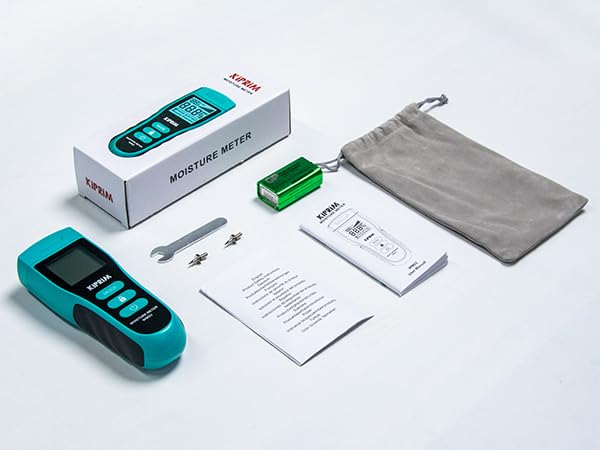
Figure 3.1: Contents included in the Kiprim WM02 package.
4. Product Overview
4.1 Device Layout

Figure 4.1: Front and back view of the Kiprim WM02 with labeled components.
- Measurement Pins: Used to penetrate the material and detect moisture.
- Temperature Display: Shows ambient temperature in °C or °F.
- Battery Status Icon: Indicates remaining battery life.
- Analog Bar Graph: Provides a visual representation of moisture level.
- Measured Value Display: Shows the numerical moisture percentage.
- Material Mode Display: Indicates the currently selected material type (Softwood, Hardwood, Building, Packing).
- MODE Button: Press to cycle through material modes.
- HOLD / °C/°F Button: Short press to hold the current reading; long press to switch between Celsius and Fahrenheit.
- Power On/Off Button: Turns the device on or off.
- Battery Compartment: Located on the back for 9V battery installation.
- Moisture Content Table: Printed on the back for quick reference of moisture levels.
5. Setup
5.1 Battery Installation
The Kiprim WM02 requires one 9V 6LR61 battery (included). To install or replace the battery:
- Locate the battery compartment on the back of the device (refer to Figure 4.1).
- Slide open the battery compartment cover.
- Connect the 9V battery to the battery clip, ensuring correct polarity.
- Place the battery into the compartment and close the cover securely.
5.2 Replacing Measurement Pins
The measurement pins are replaceable. Two additional pairs are included. To replace the pins:
- Ensure the device is powered off and the protective cap is removed.
- Use the provided small wrench to carefully unscrew the old pins.
- Insert the new pins and tighten them with the wrench until secure. Do not overtighten.
- Replace the protective cap after replacement.
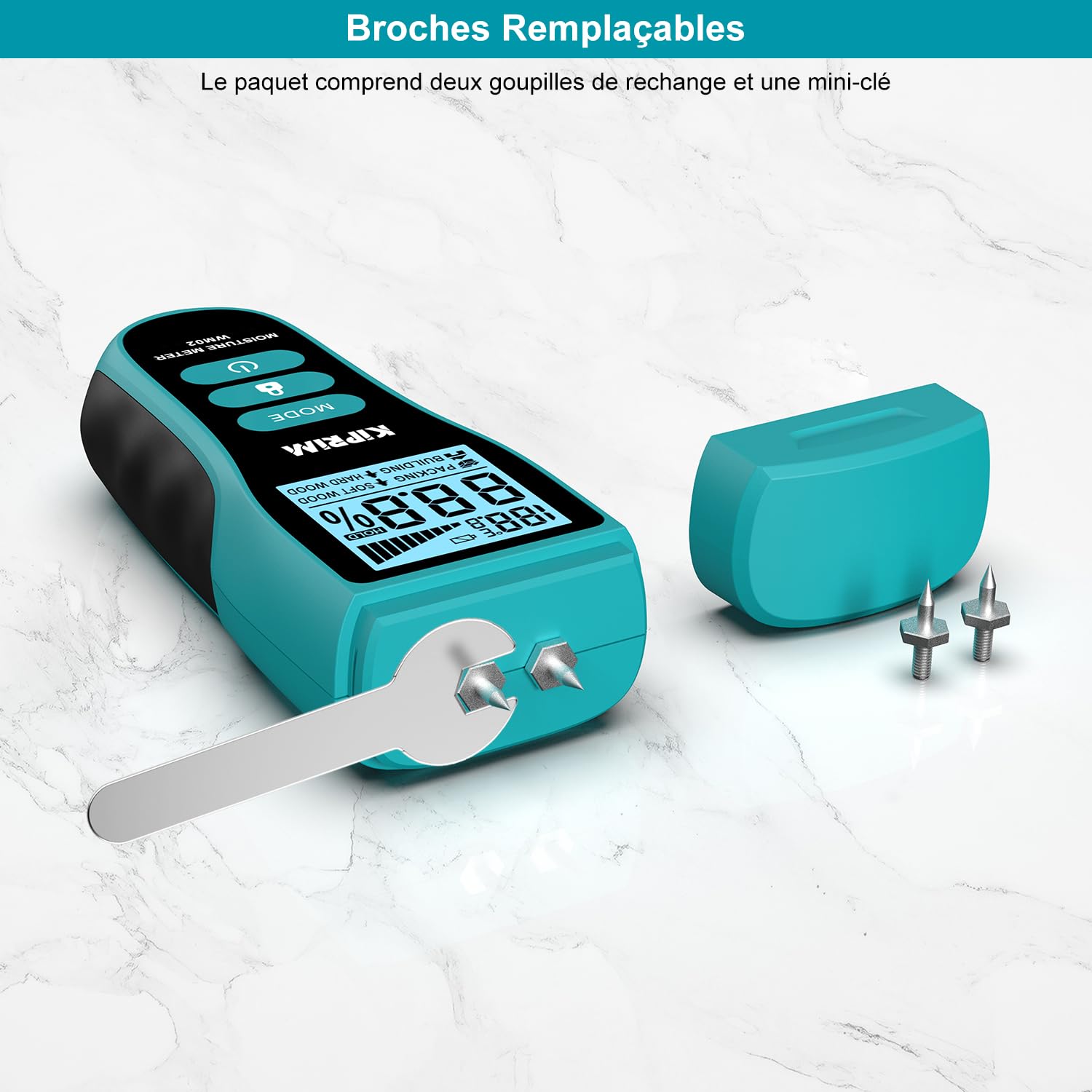
Figure 5.1: Replacing the measurement pins using the provided wrench.
6. Operating Instructions
6.1 Power On/Off
- To power on the device, press the Power On/Off button ().
- To power off the device, press and hold the Power On/Off button for approximately 2 seconds. The device will also automatically shut off after 2 minutes of inactivity to conserve battery life.
6.2 Selecting Material Mode
The WM02 offers four material modes for accurate measurements:
- Softwood: For materials like Lauan, Spruce/Pine, Cork, Cedar, Beech.
- Hardwood: For materials like Teak, Noyer, Afrormosia, Hevea, Imbuia, Kokrodua, Niové, Bilinga, Keruing, Poplar, Tola, Frène, Orme, Érable, Padouk, Chêne, Cerisier, Bouleau.
- Building: For materials like lime mortar, earth walls, cement walls, roofs, brick walls, stone walls, plasterboard, mastic walls.
- Packing: For materials like cardboard, paperboard, corrugated cardboard.
To select a mode, press the MODE button () repeatedly until the desired material type is displayed on the screen.

Figure 6.1: The four material modes available on the Kiprim WM02.
6.3 Taking a Measurement
- Remove the protective cap from the measurement pins.
- Power on the device.
- Select the appropriate material mode using the MODE button.
- Carefully push the measurement pins into the material you wish to test. Ensure both pins are fully inserted and make good contact.
- Read the moisture percentage and temperature from the LCD display. The analog bar graph provides a quick visual reference.
- After measurement, gently pull the pins out and replace the protective cap.
6.4 Using the Hold Function
The HOLD function allows you to freeze the current reading on the display, which is useful when taking measurements in hard-to-reach or poorly lit areas.
- While taking a measurement, short press the HOLD / °C/°F button (). The reading will be frozen, and a "HOLD" icon will appear on the display.
- To exit the HOLD function and resume live readings, short press the HOLD / °C/°F button again.

Figure 6.2: Using the HOLD function to freeze a measurement.
6.5 Switching Temperature Units (°C/°F)
The device can display ambient temperature in either Celsius (°C) or Fahrenheit (°F).
- To switch between temperature units, long press the HOLD / °C/°F button () for approximately 2 seconds. The unit will change on the display.

Figure 6.3: Toggling between Celsius and Fahrenheit temperature units.
6.6 Interpreting Readings (Moisture Level Chart)
The device provides a general guide for moisture levels (DRY, MID, WET) based on the selected material mode. Refer to the chart below and also printed on the back of the device for interpretation:
| Moisture Level | Soft Wood | Hard Wood | Packing | Building |
|---|---|---|---|---|
| DRY | <20% | <12% | <13% | <17% |
| MID | 20-26% | 12-16% | 13-21% | 17-20% |
| WET | >26% | >16% | >21% | >20% |

Figure 6.4: Moisture level interpretation chart and example reading.
7. Calibration
The Kiprim WM02 features a self-calibration function to ensure long-term accuracy. If the device does not read "0" when held in open air (not touching any material), it may require recalibration.
- To recalibrate, ensure the device is powered on and held in open air, away from any moisture sources or materials.
- The device will automatically adjust its baseline to read "0" in this environment. If the reading is still not zero, power off the device and power it back on in open air.
8. Maintenance
8.1 Cleaning
- Wipe the device with a soft, dry cloth.
- Do not use abrasive cleaners or solvents.
- Ensure the measurement pins are clean and free of debris after each use.
8.2 Storage
- Always replace the protective cap over the measurement pins before storing.
- Store the device in a cool, dry place, away from direct sunlight and extreme temperatures.
- Remove the battery if the device will not be used for an extended period to prevent battery leakage and potential damage.
9. Troubleshooting
- Device does not power on: Check if the 9V battery is correctly installed and has sufficient charge. Replace the battery if necessary.
- Inaccurate readings:
- Ensure the correct material mode is selected.
- Verify that the measurement pins are fully inserted into the material and making good contact.
- Perform a self-calibration in open air (refer to Section 7).
- Check if the pins are bent or damaged; replace them if needed.
- Display is dim or flickering: The battery may be low. Replace the 9V battery.
- "HOLD" icon is stuck: Short press the HOLD button to release the function.
10. Specifications
| Model Number | WM02 |
| Display Type | LCD |
| Measurement Principle | Pin-type (Resistance) |
| Accuracy | ±4% RH |
| Material Modes | Softwood, Hardwood, Building, Packing |
| Temperature Measurement Range | 0–50 °C (32–122 °F) |
| Power Source | 1 x 9V 6LR61 Battery |
| Automatic Shutdown | After 2 minutes of inactivity |
| Dimensions | 139 x 52 x 31 mm (5.47 x 2.05 x 1.22 inches) |
| Weight | 78 g (without battery) |
| Special Features | Large LCD display, 4 material modes, temperature measurement, hold function, replaceable probes, auto-calibration |
11. Warranty and Support
Kiprim products are designed for reliability and performance. For warranty information, technical support, or assistance with your WM02 moisture meter, please refer to the contact information provided with your purchase or visit the official Kiprim website. Please retain your proof of purchase for warranty claims.