Introduction
This manual provides detailed instructions for the setup, operation, and maintenance of your Skechers Fairhaven Digital Watch, Model SR6348. Please read this manual thoroughly to ensure proper use and longevity of your watch.
The Skechers Fairhaven Digital Watch is designed with a digital display, a durable silicone strap, and features such as a pedometer. It is suitable for everyday wear and light recreational swimming.
Product Overview

Front view of the Skechers Fairhaven Digital Watch SR6348, showcasing the digital display, burgundy silicone strap, and rose gold-tone bezel.
Key Features:
- Digital display with time, date, and pedometer functions.
- Burgundy silicone strap with magnetic Skechers Slip-Ins band for easy adjustment.
- Durable polycarbonate case with scratch-resistant acrylic crystal.
- Water resistance up to 50 meters (165 feet), suitable for recreational swimming.
Setup and Initial Configuration
1. Adjusting the Watch Band
The Skechers Fairhaven watch features a magnetic Skechers Slip-Ins band for a customized and secure fit. To adjust, simply slide the strap through the buckle until the desired tightness is achieved, then secure the magnetic end.

The Skechers Fairhaven Digital Watch SR6348 displayed on a wrist, illustrating how the band sits when worn.
2. Setting Time and Date
- Press the MODE button repeatedly until the time setting mode is displayed (usually indicated by flashing digits).
- Use the SET button to cycle through the hours, minutes, year, month, and day settings.
- Use the START button to adjust the flashing value upwards.
- Once all settings are correct, press the MODE button to exit the setting mode.
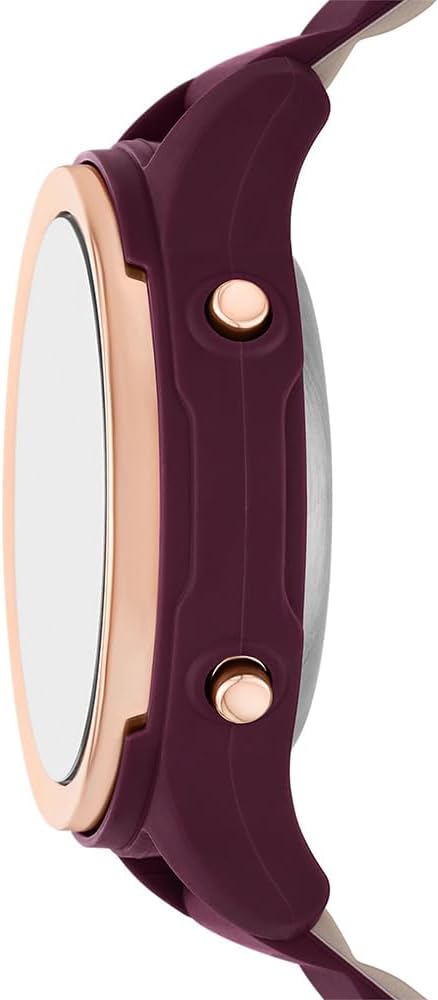
Side view of the watch, highlighting the control buttons: LIGHT/SPL, SET, MODE, and START, which are used for various functions and settings.
Operating Instructions
Button Functions:
- LIGHT / SPL: Activates the backlight for visibility in low light conditions. In stopwatch mode, this button may function as a split timer.
- SET: Used to select items or confirm settings in various modes.
- MODE: Cycles through different watch modes (e.g., Time, Alarm, Stopwatch, Pedometer).
- START: Used to start/stop functions (e.g., stopwatch) or increment values during setting.
Pedometer Function:
The watch includes a digital pedometer to track your steps. To activate or view pedometer data, press the MODE button until the step count is displayed. The watch may also show estimated distance (MILE/KM) and calories burned (KCAL).
Water Resistance:
This watch is water resistant up to 50 meters (165 feet) or 5 ATM. This means it is suitable for short periods of recreational swimming and showering. It is not suitable for diving or snorkeling. Avoid pressing buttons while the watch is submerged in water to prevent water ingress.
Care and Maintenance
Cleaning Your Watch:
To clean your watch, wipe it gently with a soft, damp cloth. Avoid using harsh chemicals, solvents, or abrasive cleaners, as these can damage the watch case, strap, or crystal. For the silicone strap, mild soap and water can be used, ensuring it is thoroughly rinsed and dried.
Battery Replacement:
The watch is powered by a standard watch battery. When the display dims or functions become erratic, it may be time for a battery replacement. It is recommended to have the battery replaced by a qualified watch technician to ensure the water resistance seal is properly maintained.

Rear view of the watch, showing the stainless steel case back where the battery compartment is located.
Storage:
When not in use, store your watch in a cool, dry place away from direct sunlight and extreme temperatures. The original packaging box can be used for storage.

The Skechers Fairhaven Digital Watch SR6348 presented in its retail packaging, which can also be used for safe storage.
Troubleshooting
| Problem | Possible Cause | Solution |
|---|---|---|
| Display is blank or dim. | Low or depleted battery. | Replace the battery. Consult a professional watch technician. |
| Time is incorrect. | Time not set correctly or accidental button press. | Refer to the "Setting Time and Date" section to reset the time. |
| Pedometer not counting steps accurately. | Watch not worn securely or sensor obstruction. | Ensure the watch is worn snugly on the wrist. Avoid loose fit. |
| Water appears inside the watch. | Water resistance seal compromised or buttons pressed underwater. | Immediately take the watch to a qualified technician for inspection and repair. Do not attempt to dry it yourself. |
Specifications
- Model Number: SR6348
- Case Diameter: 38mm
- Band Width: 16mm
- Case Material: Polycarbonate
- Strap Material: Silicone
- Crystal Material: Acrylic (Scratch Resistant)
- Movement: Digital
- Water Resistance: 5 ATM (50 meters / 165 feet) - Suitable for recreational swimming and showering. Not for diving or snorkeling.
- Display: Negative display dial
- Weight: Approximately 5.64 ounces (160 grams)
- Package Dimensions: 4.02 x 3.03 x 2.99 inches
Warranty and Support
Your Skechers Fairhaven Digital Watch SR6348 is covered by a manufacturer's warranty against defects in materials and workmanship. For specific warranty terms and conditions, please refer to the warranty card included with your purchase or visit the official Skechers website.
For technical support, service, or inquiries regarding your watch, please contact Skechers customer service. Contact information can typically be found on the Skechers official website or on the product packaging.


