
Introduction
Thank you for purchasing the DreamSky Sunrise Alarm Clock Radio, Model DS236. This device combines a sunrise simulation alarm, FM radio, Bluetooth speaker, and a dimmable RGB night light to enhance your waking and sleeping experience. This manual provides detailed instructions for setup, operation, and maintenance to ensure optimal performance and longevity of your product. Please read it thoroughly and retain it for future reference.
Safety Information
To ensure safe operation and prevent damage, please observe the following precautions:
- Use only the provided DC adapter for power.
- Do not expose the device to water, moisture, or extreme temperatures.
- Avoid dropping or subjecting the device to strong impacts.
- Keep the device away from heat sources such as radiators, heat registers, stoves, or other apparatus (including amplifiers) that produce heat.
- Do not attempt to disassemble or modify the device. Refer all servicing to qualified service personnel.
- Clean the device with a soft, dry cloth only. Do not use liquid or aerosol cleaners.
Package Contents
Please check the package for the following items:
- DreamSky Sunrise Alarm Clock Radio (Model DS236)
- DC Power Adapter
- User Manual
Product Overview
Familiarize yourself with the various parts and controls of your DreamSky Sunrise Alarm Clock Radio.

Figure 1: Front view of the DreamSky Sunrise Alarm Clock Radio, highlighting its dimensions (6.6 inches wide, 6.9 inches high) and key features such as Sunrise, Alarm, Custom Snooze, USB Port, Bluetooth, FM Radio, Night Light, and Timer.
Control Buttons and Ports:
- Sunrise Button: Activates and sets sunrise simulation.
- Alarm 1 Set / Alarm 2 Set Buttons: Configures individual alarms.
- Light Button: Controls night light and RGB color modes.
- Timer Button: Sets the auto-off timer.
- Snooze / Play/Pause / Rotate Wheel: Multi-function button for snooze, media control, and value adjustment.
- Volume +/- Buttons: Adjusts audio volume.
- FM Button: Activates and controls FM radio.
- Preset Button: Saves and recalls FM radio presets.
- Dimmer / Time Set Button: Adjusts display brightness and enters time setting mode.
- USB Output Port: For charging external devices.
- DC Input Port: Connects to the power adapter.
- Antenna: For FM radio reception.
Setup
1. Power Connection
Connect the provided DC power adapter to the "INPUT" port on the back of the alarm clock and plug the adapter into a standard wall outlet. The clock display will light up.
Video: Demonstrates how to set the time on the DreamSky Sunrise Clock. This video shows the initial setup and adjustment of time settings.
2. Initial Time Setting
- Press and hold the DIMMER / TIME SET button for 2 seconds to enter time set mode. The hour digits will flash.
- Rotate the SNOOZE wheel to adjust the hour. Press SNOOZE to confirm.
- The minute digits will flash. Rotate the SNOOZE wheel to adjust the minutes. Press SNOOZE to confirm.
- The day of the week will flash. Rotate the SNOOZE wheel to set the day. Press SNOOZE to save and exit.
Tip: The clock supports 12H/24H format. You can switch between formats during the initial hour setting by pressing the SNOOZE button after setting the hour but before setting the minutes.
Operating Instructions
Setting Alarms (Alarm 1 & Alarm 2)
The DreamSky Sunrise Alarm Clock allows you to set two independent alarms. The setup process is identical for both.
Video: Illustrates the steps to set an alarm on the DreamSky Sunrise Clock, including time and alarm sound selection.
- Press and hold the ALARM 1 SET or ALARM 2 SET button for 2 seconds to enter alarm set mode. The hour digits will flash.
- Rotate the SNOOZE wheel to set the hour. Press SNOOZE to confirm.
- The minute digits will flash. Rotate the SNOOZE wheel to set the minutes. Press SNOOZE to confirm.
- The alarm sound code (S01-S08 or OFF) will flash. Rotate the SNOOZE wheel to select your desired alarm sound (S01-S07 for built-in sounds, S08 for FM radio, OFF for light-only alarm). Press SNOOZE to confirm.
- If a sound alarm (S01-S08) is selected, the alarm volume (U01-U16) will flash. Rotate the SNOOZE wheel to set the volume. Press SNOOZE to confirm.
- The alarm mode (1-7 for Mon-Sun, 1-5 for Weekday, 6-7 for Weekend) will flash. Rotate the SNOOZE wheel to set the alarm mode. Press SNOOZE to save and exit.
Note: If S08 (FM radio) is selected, the alarm will play the last station listened to when the alarm goes off.
Snooze Function
When an alarm sounds, press the SNOOZE button to activate snooze. The alarm will pause for a set duration and sound again afterward.
- Press and hold the SNOOZE button for 2 seconds to enter snooze set mode. The snooze duration (5-30 minutes) will flash.
- Rotate the SNOOZE wheel to set the desired snooze duration. Press SNOOZE to confirm.
- The sunrise light ON/OFF setting during snooze will flash. Rotate the SNOOZE wheel to select ON or OFF. Press SNOOZE to save and exit.
To stop an alarm: Press the ALARM 1 SET or ALARM 2 SET button. Alternatively, press and hold the SNOOZE button for 3 seconds. If no operation is performed, the alarm will automatically turn off after 30 minutes.
Sunrise Light Simulation
The sunrise alarm clock simulates the sun rising gradually to wake you up naturally.
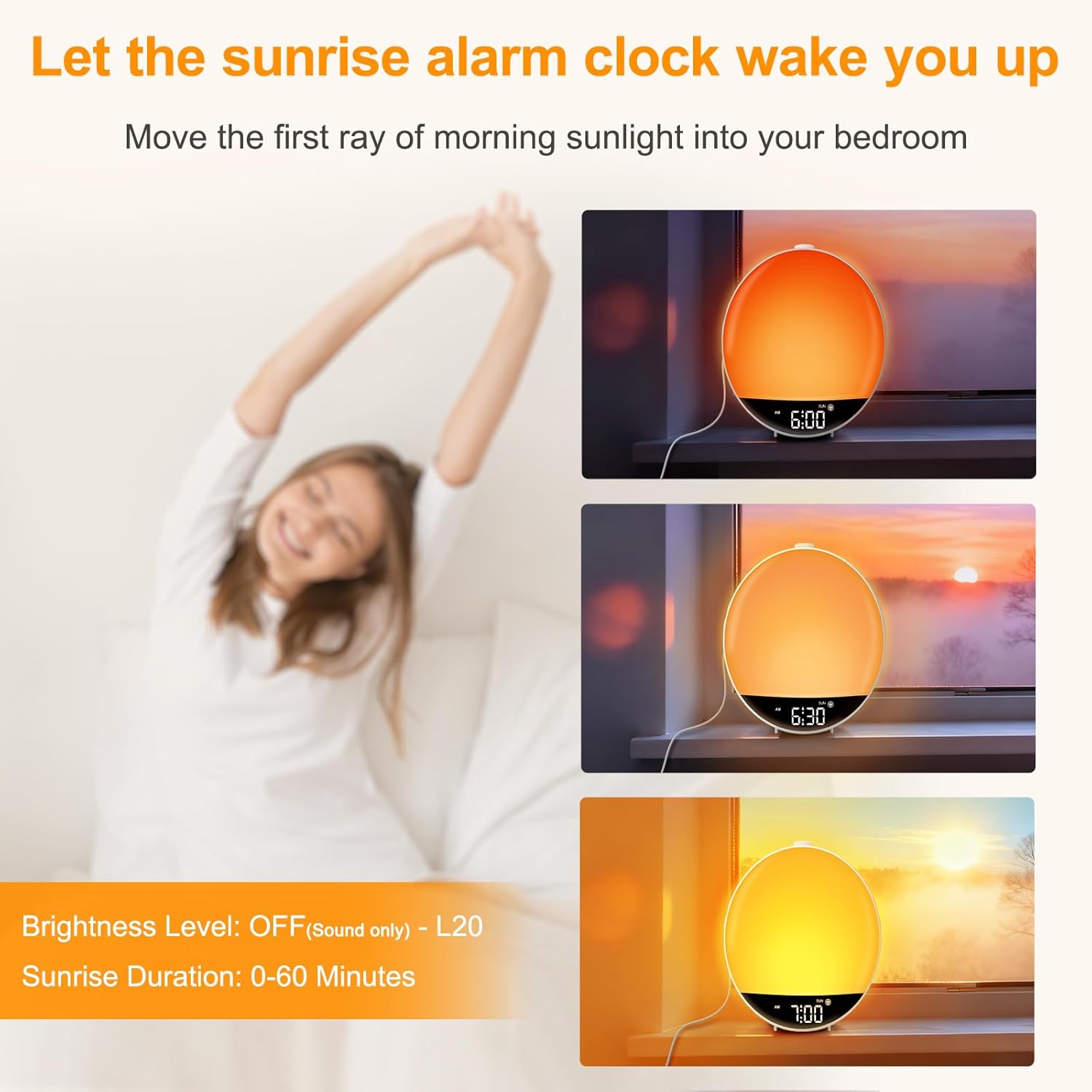
Figure 2: The sunrise simulation feature, showing the light gradually increasing in brightness over time to mimic a natural sunrise.
- Press the SUNRISE button to enter set mode. The sunrise duration (0-60 minutes) will flash.
- Rotate the SNOOZE wheel to set the desired duration (e.g., 30 minutes). Press SNOOZE to confirm.
- The light brightness level (OFF-L20) will flash. Rotate the SNOOZE wheel to set the maximum brightness. Press SNOOZE to save and exit.
Note: If OFF is selected for brightness, the alarm will go off with sound only.
Night Light and RGB Color Light
The clock features a dimmable night light and 15 RGB color modes to create a desired ambiance.
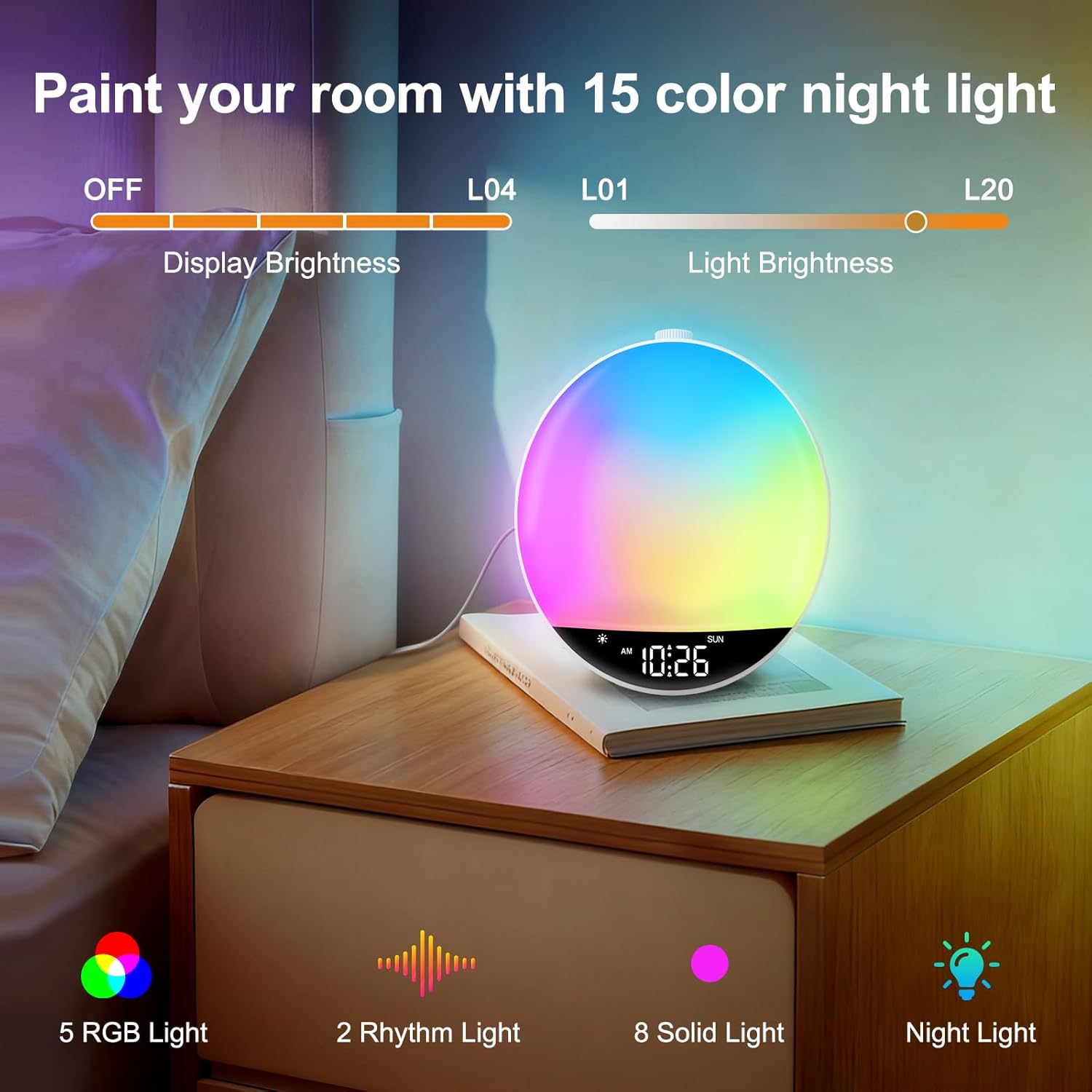
Figure 3: The RGB night light feature, showing the clock illuminating a room with multiple color options and adjustable brightness.
- Press the LIGHT button to turn on the night light.
- Press the LIGHT button repeatedly to cycle through the 15 color modes (5 RGB lights, 2 rhythm lights, 8 solid lights).
- Rotate the SNOOZE wheel to adjust the light brightness (L01-L20).
- Press and hold the LIGHT button for 2 seconds to turn off the color light.
Note: The night light cannot be turned on in Bluetooth mode.
FM Radio Operation
Enjoy your favorite FM radio stations with clear reception.
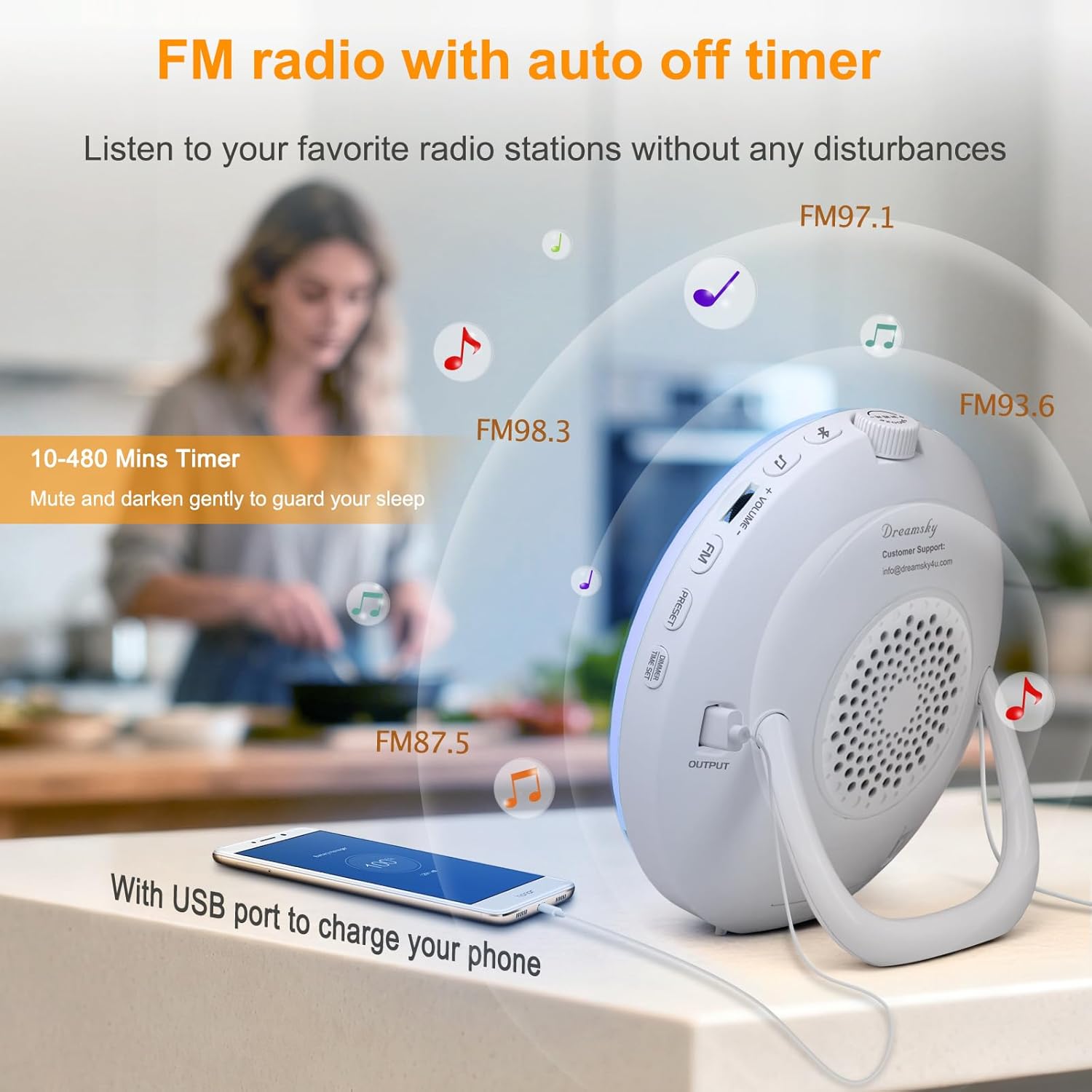
Figure 4: The FM radio feature, showing various frequencies and the USB charging port in use.
- Uncoil the antenna at the back of the clock for best reception.
- Press the FM button to turn on the FM radio.
- Rotate the SNOOZE wheel to manually tune to a radio station.
- To auto-tune and save stations: Press and hold the FM button for 2 seconds. The clock will scan and save available stations automatically.
- To listen to saved presets: Press the PRESET button to cycle through saved stations (P01-P20).
- Adjust volume using the VOLUME +/- buttons.
- Press the FM button again to turn off the radio.
Bluetooth Connectivity and Auto Time Sync
Connect your smartphone or other Bluetooth devices to play audio and automatically synchronize the time.
Video: Demonstrates how to connect a device via Bluetooth to the DreamSky Sunrise Clock, including the auto time sync feature.
- Press the Bluetooth button to turn on Bluetooth. The Bluetooth icon will flash on the display, indicating pairing mode.
- On your smartphone, enable Bluetooth and search for "DS236" in the list of available devices. Select it to initiate pairing.
- Once successfully paired, a voice prompt "connected" will be played, and the Bluetooth icon will remain steady. The clock's time will automatically synchronize with your phone's time.
- Use the SNOOZE button to play/pause audio. Rotate the SNOOZE wheel to skip tracks.
- Adjust volume using the VOLUME +/- buttons or your phone's volume controls.
- Press and hold the Bluetooth button for 2 seconds to turn off Bluetooth.
To clear pairing history: Press and hold the Bluetooth button and the SNOOZE button together for 3 seconds. A "disconnected" prompt will be played, and the Bluetooth icon will flash.
USB Charging Port
The clock includes a USB-A output port (5V/1A) on the back to charge your smartphone or other electronic gadgets.
- Connect your device's USB charging cable to the USB output port on the clock.
- Charging will begin automatically.
Note: It is not recommended to charge high-power electronic products such as tablets or hair dryers using this port.
Auto-Off Timer (Sleep Timer)
Set a timer for the light and/or sound to gradually decrease and turn off, helping you fall asleep.
- Press the TIMER button to turn on the countdown timer. The countdown time (10 MIN/20 MIN...) will flash.
- While the countdown time flashes, rotate the SNOOZE wheel to set the desired countdown time (10-480 minutes optional).
- Press the TIMER button repeatedly to set the countdown time.
- Press and hold the TIMER button for 2 seconds to turn off the timer.
At time keeping mode: Press the TIMER button once to check the remaining countdown time.
Display Brightness Adjustment
Adjust the brightness of the clock's digital display.
- At time keeping mode, press the DIMMER / TIME SET button to adjust display brightness. There are 5 levels of brightness (L01-L04 and OFF).
Maintenance
- Cleaning: Wipe the device with a soft, dry cloth. Do not use abrasive cleaners or solvents.
- Storage: If storing the device for an extended period, unplug it from the power source.
- Battery (Not Included): The clock is powered by adapter only. Batteries (2 x AAA alkaline, not supplied) only work for storing the clock setting during power outage. Replace batteries when needed to maintain settings during power interruptions.
Troubleshooting
| Problem | Possible Solution |
|---|---|
| Alarm did not go off. |
|
| Clock time does not synchronize with phone. |
|
| FM radio reception is poor. |
|
| USB charging port not working. |
|
Specifications
- Model: DS236
- Brand: DreamSky
- Dimensions: 6.6"W x 6.9"H
- Power Source: Corded Electric (DC Adapter)
- Material: Plastic
- Display Type: Digital
- Connectivity: Bluetooth, FM Radio
- USB Output: 5V/1A (for charging)
- Sunrise Duration: 0-60 minutes (adjustable)
- Light Brightness: 20 levels (L01-L20)
- Display Brightness: 5 levels (L01-L04, OFF)
- Alarm Tones: 8 (7 built-in sounds, 1 FM radio)
- Alarm Volume: 16 levels (U01-U16)
- Snooze Duration: 5-30 minutes (adjustable)
- RGB Night Light: 15 color modes
- Sleep Timer: 10-480 minutes (adjustable)
Warranty and Support
DreamSky provides a 1-year replacement warranty for this product. For any questions, concerns, or need of assistance, please contact our customer service center:
- Email: info@dreamsky4u.com
- Warranty Period: 1 year from the date of purchase.
Please retain your purchase receipt as proof of purchase for warranty claims.