
1. Introduction
Thank you for choosing the Roinvou Android 15 Car Radio. This manual provides detailed instructions for installation, operation, and maintenance of your new car multimedia system. Designed for Renault Kangoo (2013-2020) and Nissan NV250 (2013-2021) models, this unit features a 9-inch Incell touchscreen, Wireless CarPlay, Android Auto, GPS navigation, Bluetooth connectivity, Wi-Fi, and rear camera support for an enhanced driving experience.
2. Safety Information
Please read all safety instructions carefully before installation and operation. Failure to follow these guidelines may result in injury, damage to the unit, or vehicle damage.
- Professional Installation Recommended: Due to the complexity of car electrical systems, professional installation is highly recommended.
- Power Disconnection: Always disconnect the vehicle's battery negative terminal before starting any installation work to prevent electrical shorts.
- Wiring: Ensure all wiring is correctly connected according to the provided wiring diagram. Incorrect wiring can cause damage or malfunction.
- Driving Safety: Do not operate the unit in a way that distracts you from driving. Always prioritize road safety.
- Screen Cleaning: Use a soft, dry cloth to clean the touchscreen. Avoid abrasive cleaners or solvents.
- Temperature: Do not expose the unit to extreme temperatures or direct sunlight for extended periods.
3. Package Contents
Verify that all items listed below are included in your package. If any items are missing or damaged, please contact customer support.

Image: Overview of the Roinvou Android 15 Car Radio package contents. This image displays the main head unit, various power and RCA cables, radio antennas, a CANbus decoder, installation tools, a microphone, a rear camera, a GPS antenna, and USB cables.
- Main Head Unit (9-inch Incell Touchscreen)
- Power Cable (x2)
- RCA Cable (x2)
- Radio Antenna (x2)
- Power Extension Line
- Radio Antenna Extension Cable
- CANbus Decoder
- Installation Tool
- Microphone (MIC)
- Rear Camera
- GPS Antenna
- Reverse Line
- USB Cable (x2)
- Accessories (Mounting brackets, screws, etc.)
4. Setup & Installation
This section provides general guidelines for installing your Roinvou car radio. Specific vehicle wiring may vary. Consult your vehicle's service manual or a professional installer if you are unsure.
4.1 Pre-Installation Check
- Ensure the vehicle is turned off and the ignition key is removed.
- Disconnect the negative terminal of the car battery.
- Gather all necessary tools (e.g., screwdrivers, wire strippers, electrical tape).
- Verify the compatibility of the unit with your vehicle model (Renault Kangoo 2013-2020 / Nissan NV250 2013-2021).
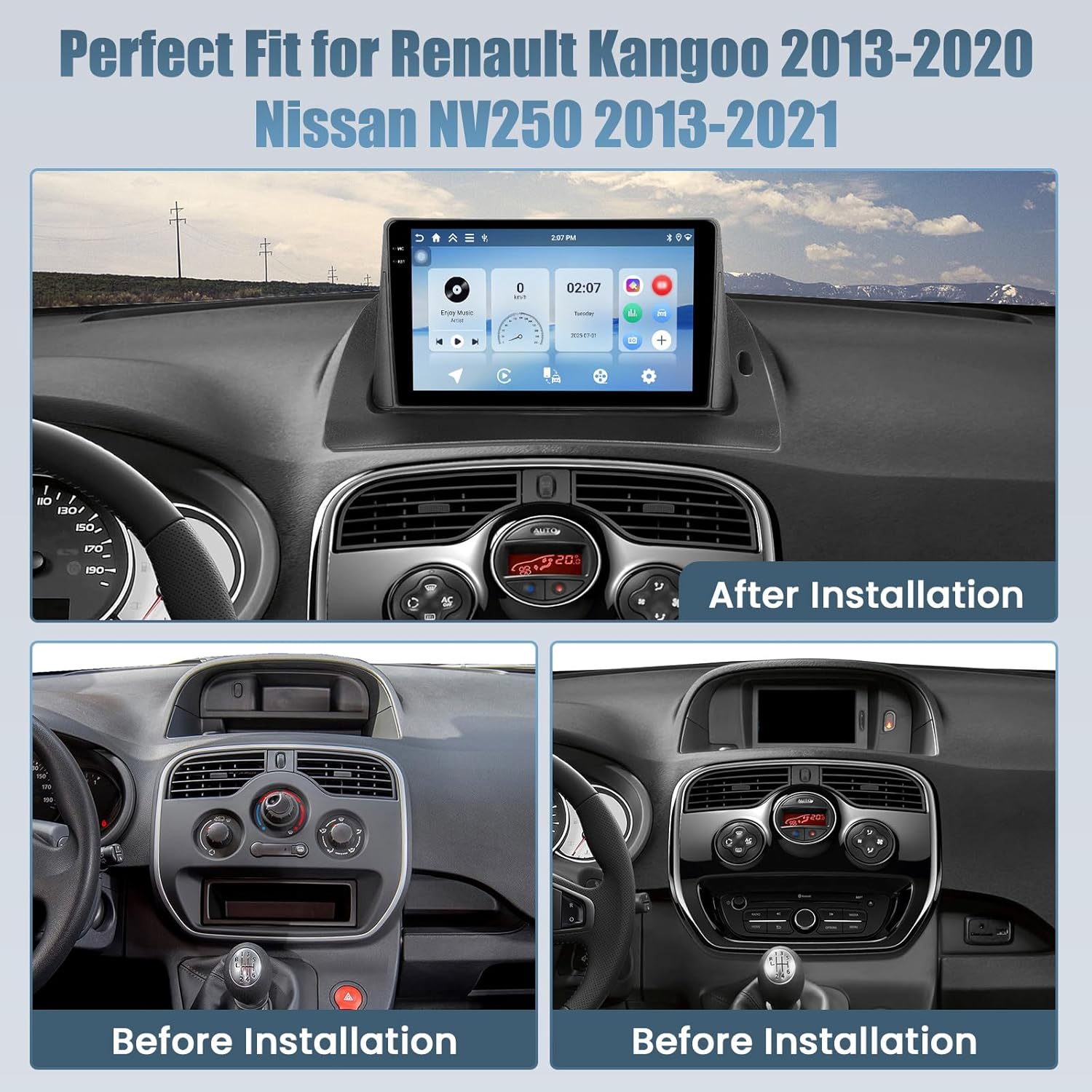
Image: This image illustrates the dashboard of a Renault Kangoo before and after the installation of the Roinvou Android 15 Car Radio, demonstrating the perfect fit and integrated appearance.
4.2 Wiring Connections
Refer to the included wiring diagram for specific connections. General connections include:
- Power: Connect the main power harness to the vehicle's power supply (constant 12V, accessory 12V, ground).
- Speakers: Connect speaker wires to the corresponding vehicle speaker wires. Ensure correct polarity.
- CANbus: Connect the CANbus decoder if your vehicle requires it for steering wheel controls or other vehicle data integration.
- GPS Antenna: Mount the GPS antenna in a location with a clear view of the sky, typically on the dashboard or under the windshield.
- Radio Antenna: Connect the vehicle's radio antenna to the unit. Use the extension cable if needed.
- Rear Camera: Connect the rear camera video input and power wires. Ensure the reverse trigger wire is connected to the vehicle's reverse light circuit.
- USB/RCA: Connect any external USB devices or RCA audio/video inputs/outputs as desired.
4.3 Mounting the Unit
- Carefully route all cables to avoid pinching or interference.
- Secure the main unit into the dashboard opening using the provided mounting brackets and screws.
- Reassemble the dashboard trim panels.
- Reconnect the vehicle's battery negative terminal.
- Turn on the ignition and test the unit's functionality.
5. Operating Instructions
This section covers the basic operation of your Roinvou Android 15 Car Radio.
5.1 Power On/Off and Basic Navigation
- Power On: The unit will power on automatically when the vehicle's ignition is turned on.
- Power Off: The unit will power off automatically when the vehicle's ignition is turned off.
- Touchscreen: Navigate the interface by tapping, swiping, and pinching on the 9-inch Incell touchscreen.
- Home Screen: The home screen provides access to frequently used applications and widgets.
- App Drawer: Swipe up or tap the app icon to access all installed applications.

Image: This image compares the Roinvou unit's single-piece seamless 1280x720 Incell touchscreen, emphasizing its fast response, true color, and high saturation, against a traditional two-stacked composite screen with poor saturation and slow response.
5.2 Wireless CarPlay & Android Auto
Connect your smartphone wirelessly for seamless integration of navigation, calls, messages, and music.
- Ensure Bluetooth and Wi-Fi are enabled on your smartphone.
- On the car radio, open the "CarPlay" or "Android Auto" application.
- Follow the on-screen instructions to pair your phone via Bluetooth.
- Once paired, the system will automatically establish a Wi-Fi connection for CarPlay/Android Auto functionality.
- You can now access compatible apps directly from the car radio's screen.
Mirror Link: The unit also supports wired and wireless Mirror Link for screen mirroring your smartphone.

Image: This image shows the Roinvou car radio displaying various functions accessible via Wireless CarPlay, Android Auto, and Mirror Link, including GPS navigation, music playback, phone calls, and messages. It also highlights the connection methods: Bluetooth for CarPlay/Android Auto and WiFi/USB for Mirror Link.
5.3 Media & Connectivity
- Radio (FM/RDS): Access FM radio stations. RDS (Radio Data System) provides station information.
- Bluetooth: Connect your phone for hands-free calling and audio streaming.
- GPS Navigation: Use pre-installed or downloaded navigation apps for turn-by-turn directions.
- Wi-Fi: Connect to a Wi-Fi hotspot (e.g., from your phone) to access online features and download apps.
- USB Playback: Play audio and video files from USB drives connected to the USB ports.
- EQ Settings: Adjust the equalizer settings to customize your audio experience.
- Split Screen: Utilize the split-screen function to run two applications simultaneously (e.g., navigation and music).
- Customizable UI: Personalize the user interface with various themes and layouts.

Image: This image highlights the Roinvou car radio's support for fast 5G Wi-Fi, enabling access to popular applications like YouTube, Netflix, Facebook, Twitter, and TikTok, demonstrating its multimedia capabilities.

Image: This image demonstrates the split-screen technology, allowing users to view navigation and media playback simultaneously. It also showcases various customizable user interface (UI) options available on the Roinvou car radio.
5.4 Rear View Camera
The included rear view camera provides enhanced safety during parking and reversing.
- When the vehicle is shifted into reverse gear, the screen will automatically display the rear camera feed.
- The camera offers a wide-angle view, assisting with obstacle detection.
- The display supports both day and night vision for clear visibility in various lighting conditions.

Image: This image displays the rear view camera's capabilities, showing clear night and day vision. It also illustrates the process of setting up steering wheel controls (SWC) by mapping vehicle buttons to radio functions like volume, mode, and power.
5.5 Steering Wheel Control (SWC)
If your vehicle supports steering wheel controls, you can configure them to operate the car radio.
- Access the "Steering Wheel Control" settings in the unit's menu.
- Follow the on-screen instructions to program each button on your steering wheel to the desired function (e.g., volume up/down, track skip, mode change).
- This feature enhances driving convenience and safety.
6. Troubleshooting
Refer to this section for common issues and their solutions. If the problem persists, contact customer support.
| Problem | Possible Cause | Solution |
|---|---|---|
| No power | Incorrect wiring; Blown fuse; Loose connection. | Check power connections (constant 12V, accessory 12V, ground). Inspect vehicle fuses and the unit's fuse. Ensure all harnesses are securely connected. |
| No sound | Speaker wires disconnected; Volume too low; Mute function active; Incorrect audio source. | Check speaker wiring. Increase volume. Disable mute. Select the correct audio source. |
| Bluetooth not connecting | Bluetooth off on phone/unit; Incorrect pairing process; Interference. | Ensure Bluetooth is enabled on both devices. Delete previous pairings and re-pair. Move closer to the unit. |
| GPS signal lost/weak | GPS antenna obstructed or improperly placed; Antenna faulty. | Ensure GPS antenna has a clear view of the sky. Check antenna connection. Try repositioning the antenna. |
| Rear camera not displaying | Camera wiring incorrect; Reverse trigger wire not connected; Camera faulty. | Check camera power and video connections. Verify the reverse trigger wire is correctly connected to the vehicle's reverse light circuit. |
| Touchscreen unresponsive | Temporary software glitch; Screen protector interference; Physical damage. | Restart the unit (turn vehicle ignition off and on). Remove any thick screen protectors. If persistent, contact support. |
7. Specifications
Key technical specifications for the Roinvou Android 15 Car Radio.
| Feature | Detail |
|---|---|
| Brand | Roinvou |
| Operating System | Android 15 |
| RAM | 4 GB |
| Internal Storage | 128 GB |
| Processor | 4-core |
| Screen Size | 9 inches |
| Screen Type | Incell Touchscreen |
| Screen Resolution | 1280 x 720 |
| Connectivity | Bluetooth, Wi-Fi (5G), GPS |
| Special Functions | Wireless CarPlay, Android Auto, Mirror Link, EQ, FM/RDS, SWC, Split Screen |
| Audio Output Mode | APE/FLAC/WAV/MP3/WMA |
| Video Encoding | MKV/RMVB/AVI/MP4/MDV |
| Output Power | 45 Watts |
| Compatible Vehicles | Renault Kangoo (2013-2020), Nissan NV250 (2013-2021) |
8. Warranty & Support
Roinvou products are designed for quality and reliability. For warranty information, please refer to the warranty card included in your package or visit the official Roinvou website.
For technical support, troubleshooting assistance, or inquiries about replacement parts, please contact our customer service team through the retailer where you purchased the product or via the contact information provided on the Roinvou website.
Please have your product model number and purchase date ready when contacting support.


