
Cybex 525000599
CYBEX Cloud G Pro Infant Car Seat Instruction Manual
Model: 525000599
1. Important Safety Information
The CYBEX Cloud G Pro Infant Car Seat is designed with advanced safety features to protect your child. Always read and follow all instructions carefully before use.
- Ergonomic Recline: Features a 45% flatter recline to reduce organ compression and support natural breathing.
- Anti-Rebound Base with Load Leg: Absorbs energy and reduces crash forces by up to 30%.
- SensorSafe Technology: Provides real-time safety alerts to your mobile app regarding chest clip status, temperature, and accidental child left behind.
- Linear Side-Impact Protection (L.S.P.): Works with the energy-absorbing shell to disperse crash forces away from your child.
- GREENGUARD Gold Certified: Meets rigorous standards for low chemical emissions, promoting healthier air quality.
- Safety Tested: Fully compliant with new FMVSS 213 side and front-impact safety standards.

Image 1.1: Overview of the CYBEX Cloud G Pro car seat and base highlighting key safety features like the Anti-Rebound Base, Load Leg, Rigid Latch Installation, Linear Side-Impact Protection, and SensorSafe Chest Clip. The GREENGUARD Gold certification logo is also visible.
2. Product Overview
2.1 What's Included
Your CYBEX Cloud G Pro purchase typically includes the infant car seat, SensorSafe chest clip, load leg base, and an infant insert.
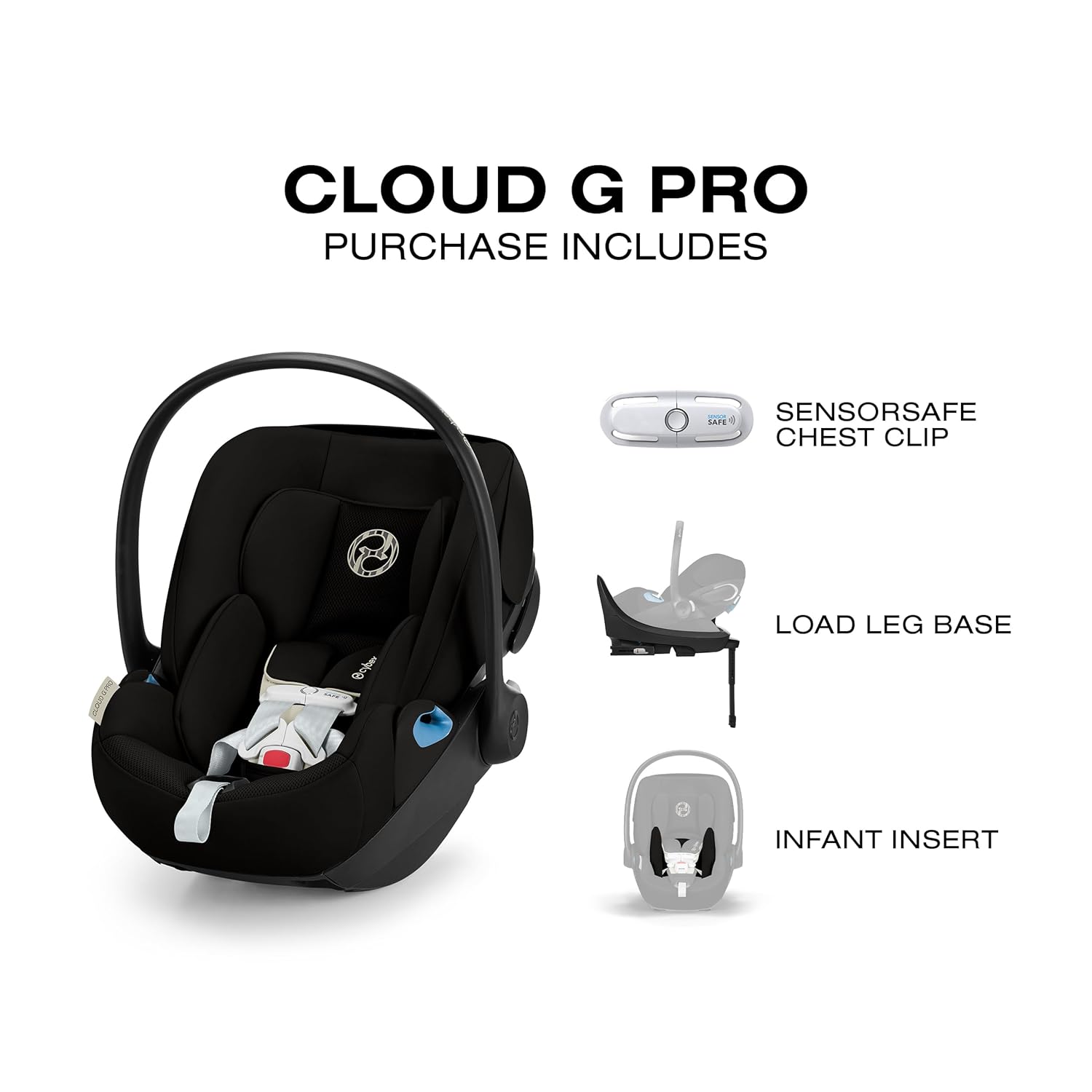
Image 2.1: Components included with the CYBEX Cloud G Pro: the infant car seat, SensorSafe chest clip, load leg base, and infant insert.
2.2 Key Features
- 12-position height-adjustable headrest with integrated harness for a secure fit as your child grows.
- Perforated shell and mesh fabrics for all-around ventilation, keeping your child cool.
- Travel system compatible with all CYBEX strollers.
3. Setup and Installation
3.1 Base Installation using Rigid LATCH
The Cloud G Base simplifies car seat installation. Follow these steps for secure installation:
- Position the base on the vehicle seat.
- Extend the Rigid LATCH connectors from the base.
- Align and click the LATCH connectors onto your vehicle's lower anchor bars. Ensure the color-changing indicators turn green, signifying a correct connection.
- Push the base firmly into the vehicle seat back to remove any slack.
- Adjust the load leg to the vehicle floor until it is firmly supported. The indicator on the load leg should show green.
- Verify the recline angle using the recline indicator on the base. Adjust as needed for your child's age and weight.

Image 3.1: Diagram showing the dimensions of the CYBEX Cloud G Pro car seat and base, including height (15.8"-23" H), width (17.6" W), and depth (26.5"-30" D).
4. Operating the Car Seat
4.1 Ergonomic Recline Function
The Cloud G Pro offers an ergonomic recline feature that allows the backrest to adjust and the leg rest to extend, providing a flatter position for your infant. This helps reduce organ compression and promotes a more natural, relaxed posture, especially when used outside the vehicle or on a stroller.

Image 4.1: An infant car seat demonstrating the ergonomic recline feature, showing how it reduces organ compression compared to an upright position.
4.2 SensorSafe Technology
The integrated SensorSafe Technology provides critical alerts directly to your smartphone. This system monitors the chest clip to ensure it remains buckled, and it tracks the ambient temperature in the back seat. It will notify you if the chest clip is unbuckled, if the temperature becomes too hot or cold, or if your child is accidentally left behind in the vehicle.

Image 4.2: A hand holding a smartphone displaying the SensorSafe app interface, showing real-time monitoring of the car seat's status and temperature, with an infant in the car seat in the background.
4.3 Harness Adjustment
The 12-position height-adjustable headrest is integrated with the harness system. To adjust, simply squeeze the adjustment lever at the top of the headrest and slide it up or down to the appropriate height for your child. Ensure the harness straps are at or below your child's shoulders when rear-facing.
4.4 Travel System Use
The CYBEX Cloud G Pro is designed to be compatible with all CYBEX strollers, allowing for seamless transitions from car to stroller. Consult your stroller's instruction manual for specific attachment procedures.

Image 4.3: The CYBEX Cloud G Pro infant car seat attached to a CYBEX stroller, demonstrating its travel system compatibility.
5. Maintenance
Regular maintenance ensures the longevity and safety of your car seat. The mesh fabrics can be spot cleaned with mild soap and water. Refer to the care labels on the fabric for specific washing instructions. Do not use harsh chemicals or abrasive cleaners. Periodically inspect the harness, buckles, and LATCH connectors for any signs of wear or damage.
6. Troubleshooting
- Installation Difficulty: If the base does not feel secure, re-check the LATCH connections and ensure the load leg is properly extended. The color indicators should be green. Apply firm pressure to the base when tightening.
- SensorSafe Alerts: If you receive unexpected alerts, ensure the SensorSafe chest clip is properly fastened and the mobile app is updated. Check the car's interior temperature if a temperature alert is received.
- Harness Adjustment Issues: If the harness is difficult to adjust, ensure no fabric is caught in the mechanism. The headrest and harness should move smoothly.
7. Specifications
| Feature | Detail |
|---|---|
| Maximum Weight Recommendation | 30 Pounds |
| Rear Facing Minimum Weight | 4 Pounds |
| Installation Type | LATCH |
| Orientation | Rear Facing |
| Harness Type | 5-Point |
| Number of Height Positions | 12 |
| Material Type | Mesh Fabrics |
| Item Dimensions (D x W x H) | 26.5"D x 17.6"W x 23"H |
| Model Number | 525000599 |
8. Warranty and Support
The CYBEX Cloud G Pro Infant Car Seat comes with a 2 Year Limited Warranty. For detailed warranty information, claims, or technical support, please contact CYBEX customer service directly or visit their official website. Keep your proof of purchase for warranty validation.
Ask a question about this manual
Ask about setup, troubleshooting, compatibility, parts, safety, or missing instructions. Manuals+ will review the question and use this page’s manual context to help answer it.