1. Introduction
This manual provides essential instructions for the installation, operation, maintenance, and troubleshooting of the VIHUML HMI 211 Generator Set Controller. The HMI 211 is designed for use with Cummins PCC1.1 Controllers and is a direct replacement for part number 0300-6014. It is supplied fully programmed and tested for immediate use.
2. Product Overview
The HMI 211 is a Power Command Display unit, specifically part number 0300-6014. It is compatible with Cummins Generator Panels and Power Command Systems, including PCC1.1 Controllers (0300-5875). This device functions as a display and control interface for generator sets.
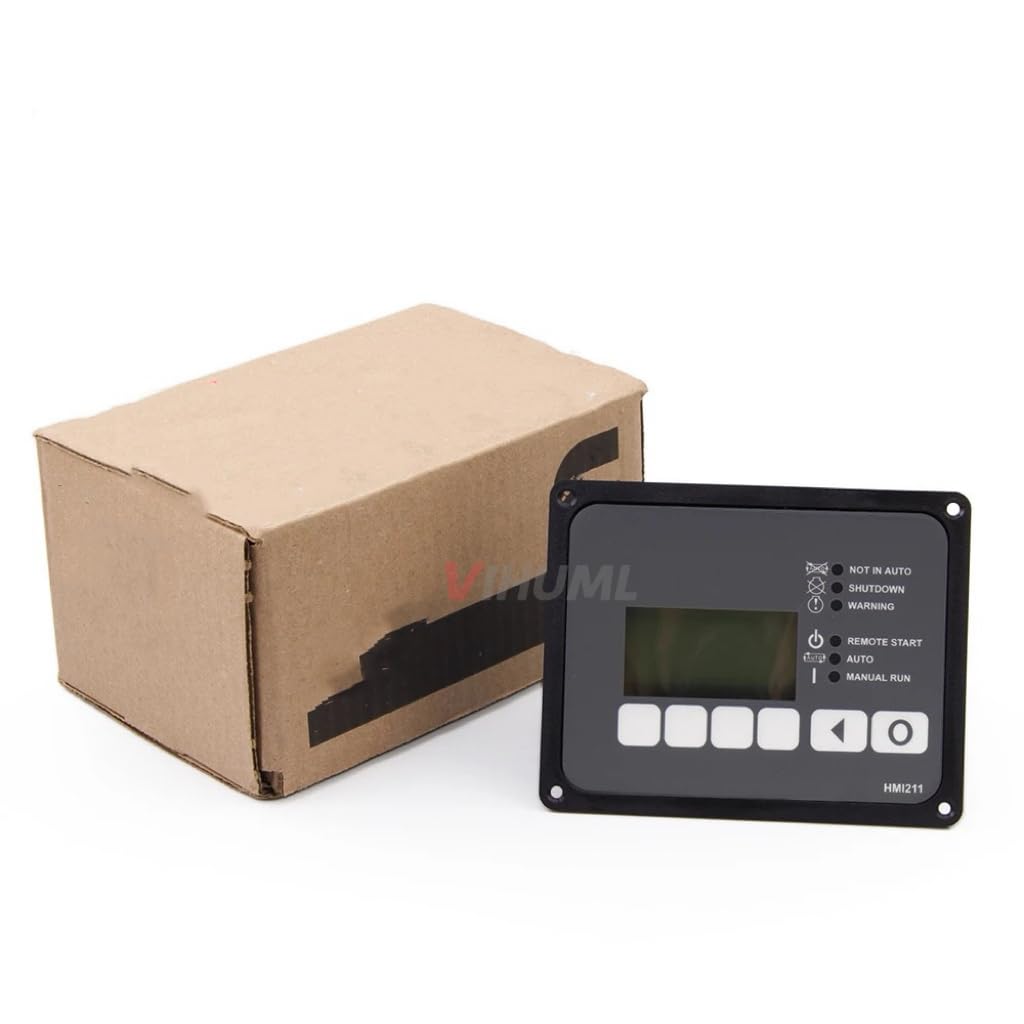
Figure 2.1: Front view of the VIHUML HMI 211 Generator Set Controller, showing the display screen and control buttons.
Key Features:
- Direct replacement for Cummins HMI 211 (Part Number 0300-6014).
- Compatible with Cummins PCC1.1 Controllers (0300-5875).
- Pre-programmed and tested for plug-and-play installation.
- Provides display and control functions for generator sets.
3. Setup and Installation
The HMI 211 controller is designed for straightforward installation. It is provided as a fully programmed and tested unit, ready for integration into your generator set system.
Installation Steps:
- Safety First: Ensure the generator set is completely powered off and isolated from all power sources before beginning installation. Refer to the generator set's primary manual for safety procedures.
- Mounting: Securely mount the HMI 211 display unit into the designated panel opening. Use appropriate fasteners to ensure a stable fit.
- Electrical Connections: Connect the necessary wiring harnesses to the ports on the back of the HMI 211. Ensure all connections are firm and correctly seated. Refer to the wiring diagram of your specific generator set for correct pin assignments.
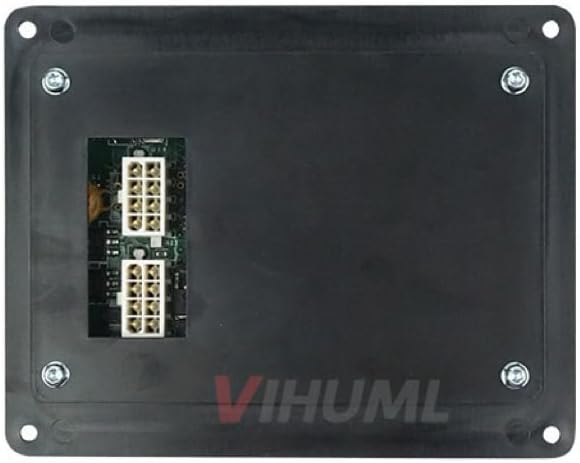
Figure 3.1: Rear view of the HMI 211 Controller, illustrating the connection ports for wiring harnesses.
- Power Up: Once all connections are verified, restore power to the generator set. The HMI 211 display should illuminate and begin its startup sequence.
- Initial Check: Verify that the display shows normal operating parameters and that there are no error indicators.
Note: This device is a brand new unit, fully programmed and tested, and ready for installation as a plug-and-play solution. Minor cosmetic scratches may be present on the back only, which do not affect functionality.
4. Operating Instructions
The HMI 211 display provides visual feedback on the generator set's status and allows for control input. The interface typically includes indicators for operational status and buttons for mode selection and navigation.
Display Indicators:
- NOT IN AUTO: Indicates the generator set is not in automatic operating mode.
- SHUTDOWN: Indicates the generator set has shut down due to a fault.
- WARNING: Indicates a non-critical fault or condition requiring attention.
- REMOTE START: Indicates the generator set is configured for remote start operation.
- AUTO: Indicates the generator set is in automatic operating mode, ready to start/stop based on external signals.
- MANUAL RUN: Indicates the generator set is operating in manual mode.
Control Buttons:
The HMI 211 features several buttons for navigation and control. Specific functions may vary slightly based on the generator set's configuration. Common button functions include:
- Mode Selection: Buttons to switch between AUTO, MANUAL RUN, and STOP modes.
- Navigation: Buttons (e.g., arrow keys, enter) to navigate through display menus and acknowledge alarms.
- Start/Stop: Dedicated buttons for manual starting and stopping of the generator set.
Refer to your generator set's specific operational manual for detailed instructions on using the HMI 211 in conjunction with your system.
5. Maintenance
The HMI 211 Generator Set Controller is designed for durability and requires minimal maintenance. Regular inspection and proper handling will ensure its longevity and reliable performance.
General Maintenance Guidelines:
- Cleaning: Keep the display screen and buttons clean using a soft, dry, lint-free cloth. Avoid abrasive cleaners or solvents that could damage the plastic or screen coating.
- Environmental Protection: Ensure the controller is protected from excessive moisture, dust, and extreme temperatures, as specified by the generator set manufacturer.
- Connection Checks: Periodically inspect all electrical connections on the rear of the unit to ensure they remain secure and free from corrosion.
- Software Updates: Any software updates or firmware changes should only be performed by qualified personnel following manufacturer guidelines.
6. Troubleshooting
This section provides guidance for common issues encountered with the HMI 211 controller. For complex problems, consult a qualified technician or contact support.
| Problem | Possible Cause | Solution |
|---|---|---|
| Display is blank or not illuminating. | No power supply; Loose connection; Internal fault. |
|
| "WARNING" indicator is active. | Minor fault detected; Sensor reading outside normal range. |
|
| "SHUTDOWN" indicator is active. | Critical fault detected; Safety shutdown initiated. |
|
| Buttons are unresponsive. | Software freeze; Physical damage; Contamination. |
|
7. Specifications
| Attribute | Detail |
|---|---|
| Model | HMI 211 |
| Part Number | 0300-6014 |
| Brand | VIHUML |
| Compatibility | Cummins Generator Panels / Power Command Systems (PCC1.1 Controllers, 0300-5875) |
| Included Components | ECU (Electronic Control Unit) |
| Condition | Brand new, fully programmed and tested |
| UPC | 739274926968 |
8. After-Sales Support
For any issues encountered after receiving the product, please contact our customer support team. We are committed to resolving your concerns and will respond within 24 hours.
Please have your product model (HMI 211) and part number (0300-6014) available when contacting support to expedite assistance.


