
1. Safety Instructions
Read and understand all safety warnings and instructions before operating the Zericuf 9505T Mini Table Saw. Failure to follow the warnings and instructions may result in electric shock, fire, and/or serious injury.
- Dual-Switch Control: The saw features a dual-switch, dual-motor control system. Each switch independently controls its corresponding motor (cutting or polishing).
- Important Note: Never activate both switches simultaneously during operation to prevent power adapter overload and potential accidents.
- Blade Lock: Utilize the upgraded, secure alloy blade lock to enhance operator safety during use.
- Work Area: Ensure your work area is clean, well-lit, and free from clutter. Keep children and bystanders away while operating the tool.
- Personal Protective Equipment: Always wear appropriate personal protective equipment, including safety glasses, gloves, and hearing protection.
- Material Securement: Always secure the material being cut or polished to prevent movement and kickback.
- Power Disconnection: Disconnect the power adapter before making any adjustments, changing accessories, or performing maintenance.
2. Product Overview & Components
The Zericuf 9505T Mini Table Saw is designed for precision cutting and polishing of various materials, ideal for craft projects and model making. It features a robust aluminum alloy tabletop and a dual-motor system for enhanced performance and safety.
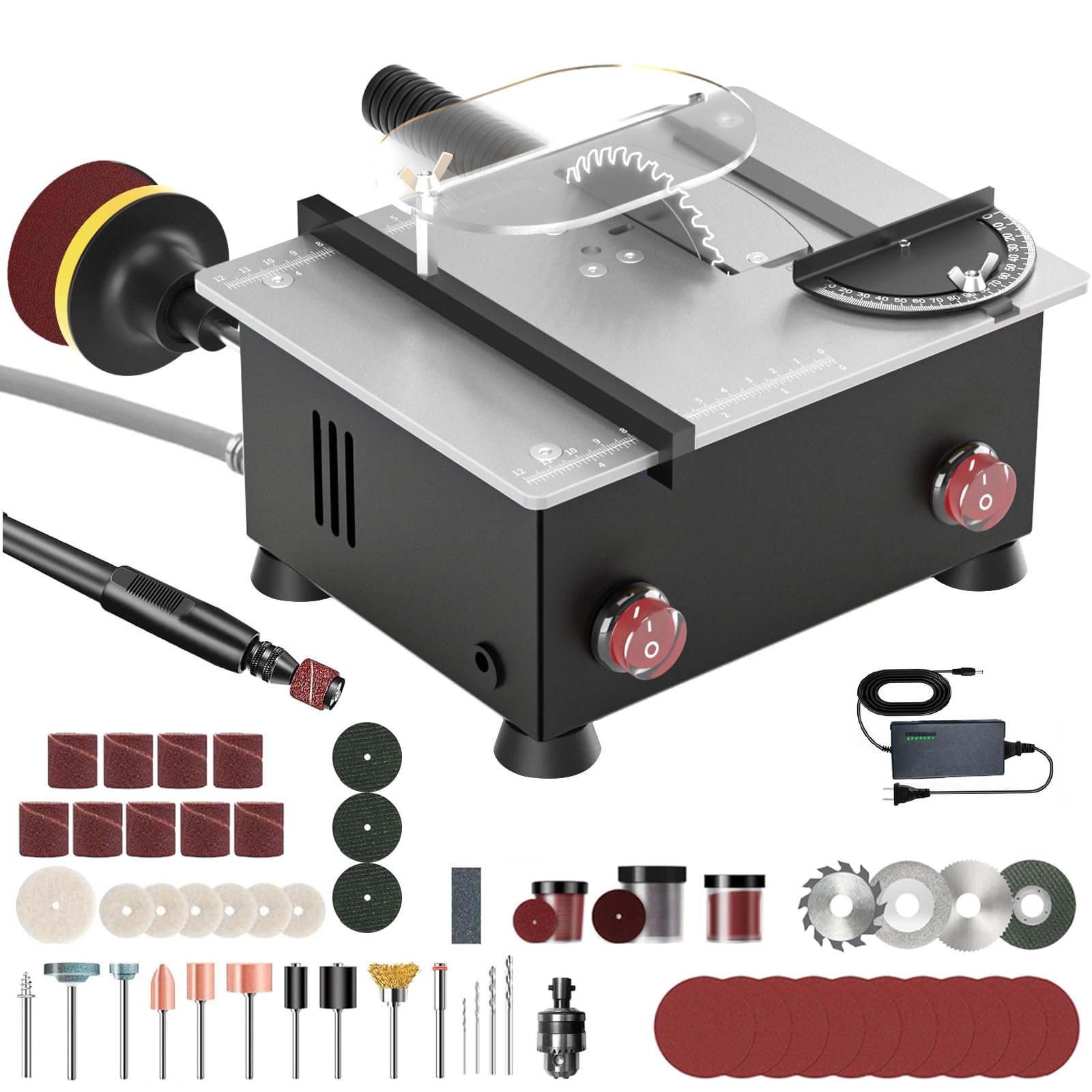
Figure 2.1: Zericuf 9505T Mini Table Saw (Silver model)
Key Features:
- Dual 795 Motors: Provides powerful and stable operation for both cutting and polishing functions.
- Dual-Switch Control: Independent control for cutting and polishing motors, enhancing safety.
- Adjustable Cutting Height: Up to 1 inch (26mm) cutting depth.
- Robust Tabletop: Reinforced 6MM aluminum alloy table (8x6.5 inches) for stability.
- Integrated Blade Bearing: Ensures stability during high-speed operation.
- Shock-Absorbing Feet: Four non-slip rubber feet for smoother operation.
- Small Window for Blade Replacement: Simplifies blade changes.
- Smart Dust Compartment & External Vacuum Adapter: For efficient dust management.
- Extended Tabletop Measuring Distance: 4.72 inches for versatile material processing.
- Widened Fence: 3.4 inches for improved safety and chip blocking.
Included Components:
- Zericuf 9505T Mini Table Saw Unit
- Power Adapter
- Assorted Saw Blades (High-speed Steel, Alloy, Diamond, Grinding Wheel)
- Polishing Discs (3-inch)
- Flexible Shaft with Grinding Head attachments
- Blade Lock/Wrenches
- Adjustable Fence
- Safety Shield
3. Setup Instructions
Follow these steps to set up your Zericuf 9505T Mini Table Saw for first use.
3.1 Installing the Saw Blade:
- Ensure the power adapter is disconnected.
- Locate the small window on the tabletop for blade replacement.
- Loosen the two cover screws using the provided wrench.
- Carefully insert the desired saw blade into the spindle. Ensure the blade's teeth are oriented correctly for cutting.
- Secure the blade with the alloy blade lock and tighten the screws.
- Replace the cover and tighten the screws.
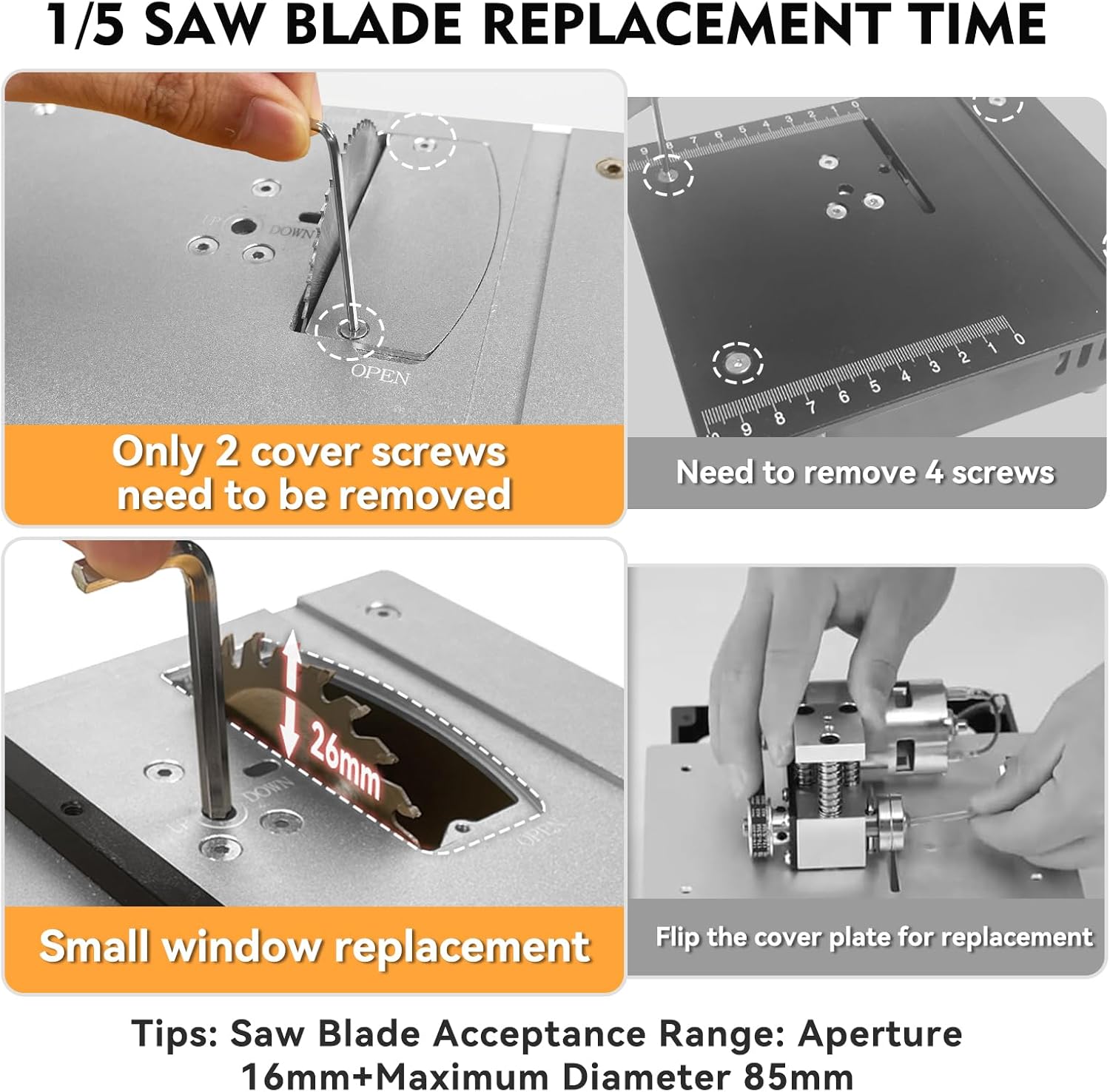
Figure 3.1: Blade replacement via the small window.
3.2 Attaching the Polishing Disc:
- Ensure the power adapter is disconnected.
- Attach the polishing disc holder to the designated spindle on the side of the unit.
- Securely fasten the polishing disc (e.g., 3-inch polishing disc) to the holder.

Figure 3.2: Attaching the 3-inch polishing disc.
3.3 Installing the Flexible Shaft:
- Ensure the power adapter is disconnected.
- Connect the flexible shaft to the dedicated port on the unit.
- Tighten the connection securely.
- Insert the desired grinding bit into the flexible shaft's chuck and tighten it firmly.

Figure 3.3: Flexible shaft with various grinding attachments.
3.4 Attaching the Adjustable Fence and Safety Shield:
- Slide the adjustable fence into the slots on the tabletop.
- Secure it at the desired measurement using the butterfly nuts.
- Attach the transparent safety shield over the saw blade area.
4. Operating Instructions
The Zericuf 9505T Mini Table Saw offers versatile functionality for various craft projects.
4.1 Powering On and Speed Adjustment:
- Connect the power adapter to the unit and then to a power outlet.
- Use the power adapter's control to adjust the speed (RPM) as needed for your material. The unit supports up to 12,000 RPM.
Video 4.1: Demonstrates the dual-switch control and speed adjustment of the Zericuf Mini Table Saw.
4.2 Cutting Operations:
- Select the appropriate saw blade for your material (e.g., High-speed Steel for thin cutting, Alloy for thick wood, Diamond for metal).
- Adjust the cutting height (0-26mm) using the mechanism under the tabletop.
- Position the adjustable fence to guide your material for precise cuts.
- Turn on the saw blade motor using its dedicated switch.
- Slowly and steadily feed the material into the rotating blade, maintaining firm pressure against the fence.

Figure 4.1: The saw offers an adjustable cutting thickness of up to 26mm.

Figure 4.2: Guide for selecting the correct blade type for various materials.
4.3 Polishing Operations:
- Ensure the saw blade motor is off.
- Turn on the polishing motor using its dedicated switch.
- Gently apply the workpiece to the rotating polishing disc, moving it evenly to achieve a smooth finish.
Video 4.2: Demonstrates various functions including cutting and polishing with the mini table saw.
4.4 Flexible Shaft Usage:
- Ensure the saw blade and polishing motors are off.
- Turn on the flexible shaft motor (if separate switch, otherwise the main power).
- Use the flexible shaft with appropriate grinding bits for detailed work, engraving, or drilling on smaller pieces.
Video 4.3: Shows functional demonstrations of the mini table saw, including flexible shaft use.
5. Maintenance
Regular maintenance ensures optimal performance and extends the lifespan of your Zericuf 9505T Mini Table Saw.
- Cleaning: After each use, disconnect power and clean the unit. Utilize the smart dust compartment and external dust extraction port for quick cleanup with a vacuum cleaner.
- Blade Inspection: Regularly inspect saw blades for sharpness and damage. Replace dull or damaged blades promptly.
- Motor Care: The internal smart dust collection system reduces debris impact on motors by 80%, contributing to extended motor life.
- Storage: Store the unit in a clean, dry place away from direct sunlight and moisture.
6. Troubleshooting
Here are solutions to common issues you might encounter:
| Problem | Possible Cause | Solution |
|---|---|---|
| Saw not powering on | Power adapter not connected; switch off; power outlet issue. | Check power connections; ensure switches are on; test power outlet. |
| Motor bogs down/lacks power | Dull blade; material too thick/hard; insufficient speed setting. | Replace blade; reduce material thickness; increase speed setting. |
| Excessive vibration/noise | Loose components; worn blade/bearing; unstable surface. | Tighten all screws; replace blade/check bearing; ensure unit is on a stable surface. |
| Dust accumulation | Dust compartment full; vacuum adapter not connected. | Empty dust compartment; connect external vacuum to adapter. |
7. Specifications
| Feature | Detail |
|---|---|
| Brand | Zericuf |
| Model Number | 9505T |
| Power Source | Corded Electric |
| Wattage | 200 watts |
| Speed | Up to 12,000 RPM (Max) |
| Max Cutting Height | 26 mm (1 inch) |
| Tabletop Dimensions | 20.3L x 16.5W x 10.2H Centimetres (8x6.5 inches) |
| Blade Material | Alloy Steel, High Speed Steel |
| Blade Length | 85 Millimeters |
| Special Features | Depth Adjustment, Keyed Blade Change, Lightweight |
8. Warranty & Support
Zericuf provides a 3-year warranty for this table saw. This warranty covers manufacturing defects and ensures the product's quality and durability.
For any issues encountered after receiving the product, please contact Zericuf customer service immediately via Amazon. Please have your purchase details and model number (9505T) ready for faster assistance.
Manufacturer Contact Information: Changsha Qiyu E-commerce Co., Ltd., 920 Yanggu Jinyuan, No. 39 Luhu Road, Lugu Street, Xiangjiang New Area, Changsha 410017, Hunan Province, China, Tel.+8619090242762