
1. Important Safety Information
Please read all instructions carefully before operating your KEENSTAR Nugget Countertop Ice Maker. Retain this manual for future reference.
- Ensure the ice maker is placed on a stable, level surface away from direct sunlight and heat sources.
- Do not immerse the appliance, power cord, or plug in water or other liquids.
- Use only potable water in the ice maker.
- Unplug the appliance before cleaning or when not in use.
- Keep children away from the ice maker during operation.
- Do not operate the appliance with a damaged cord or plug. Contact customer service for repairs.
- This appliance is for household use only.
2. Product Overview
The KEENSTAR Nugget Countertop Ice Maker produces soft, chewable nugget ice, ideal for various beverages and uses. It features a high daily output, quiet operation, and an automatic self-cleaning function.
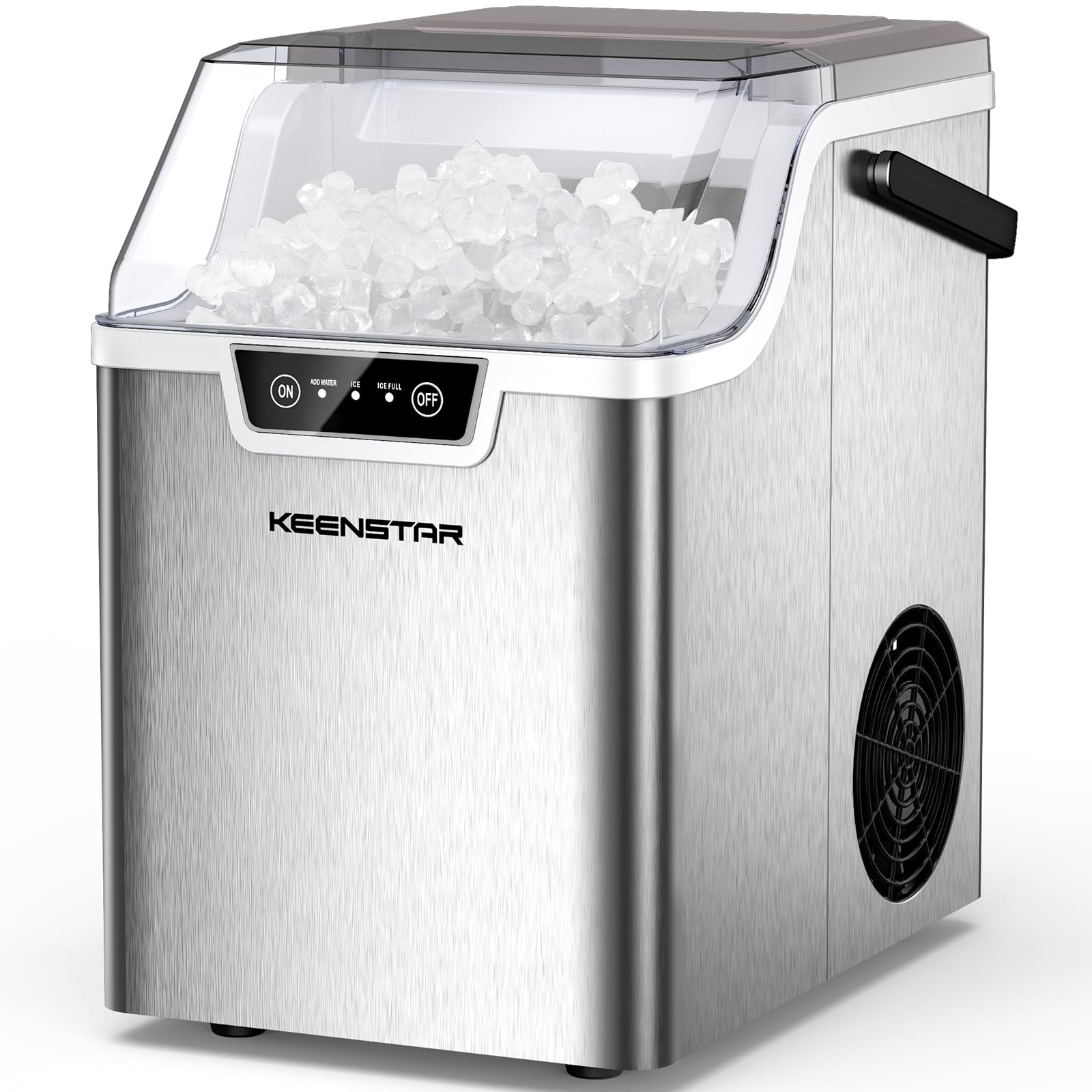
Image 2.1: The KEENSTAR Nugget Countertop Ice Maker, showcasing its compact design and the nugget ice it produces.
Key Features:
- High Daily Output: Produces up to 40 pounds of nugget ice per day.
- Fast Ice Production: Generates chewable nugget ice in approximately 5 minutes.
- Quiet Operation: Operates at a low noise level of 40dB.
- Automatic Self-Cleaning: One-touch 5-minute self-cleaning cycle for easy maintenance.
- Smart Alerts: Indicators for low water and full ice basket.
- Compact and Portable: Designed for easy placement on countertops and transport.
3. Setup
Follow these steps for initial setup of your ice maker:
- Unpack: Carefully remove the ice maker from its packaging. Remove all packing materials, tape, and labels.
- Placement: Place the ice maker on a flat, stable, heat-resistant surface. Ensure there is at least 4 inches of space around the unit for proper ventilation.
- Clean: Before first use, clean the interior of the ice maker according to the 'Cleaning and Maintenance' section.
- Power Connection: Plug the power cord into a grounded electrical outlet. Ensure the voltage matches the specifications of the appliance (110 Volts).

Image 3.1: The compact design of the ice maker, showing approximate dimensions (13.4"W x 17.6"H x 9.4"D) for placement consideration.
4. Operating Instructions
Operating your KEENSTAR ice maker is simple:
- Add Water: Open the lid and fill the water reservoir with potable water up to the MAX fill line. Do not overfill.
- Turn On: Press the ON button on the control panel to start the ice making process. The 'ICE' indicator light will illuminate.
- Ice Production: The ice maker will begin producing nugget ice. The first batch may take slightly longer. Subsequent batches will be ready in approximately 5 minutes.
- Ice Full Indicator: When the ice basket is full, the 'ICE FULL' indicator light will illuminate, and the ice making process will pause. Remove ice to resume production.
- Add Water Indicator: If the water level is too low, the 'ADD WATER' indicator light will illuminate. Add more water to the reservoir to continue ice production.
- Turn Off: Press the OFF button to stop the ice maker.

Image 4.1: Visual guide to the simple 3-step operation: 1. Add Water, 2. Turn on the Ice Maker, 3. Enjoy Nugget Ice.

Image 4.2: Close-up of the control panel, illustrating the ON/OFF buttons and indicator lights for 'ADD WATER', 'ICE', and 'ICE FULL'.
5. Cleaning and Maintenance
Regular cleaning and maintenance ensure optimal performance and longevity of your ice maker.
5.1 Automatic Self-Cleaning
- To activate the self-cleaning function, ensure there is water in the reservoir.
- Press and hold the ON button for 5 seconds. The self-cleaning cycle will begin and last for approximately 5 minutes.
- After the cycle, drain the water from the unit.

Image 5.1: The ice maker during its automatic self-cleaning cycle, showing water circulating within the unit.
5.2 Manual Cleaning and Draining
- Unplug the ice maker from the power outlet.
- Remove the ice basket.
- To drain the water, locate the drain plug at the bottom of the unit. Pull out the drain plug to empty the water reservoir.
- Clean the interior with a soft cloth and a mild detergent. Rinse thoroughly.
- Wipe the exterior with a damp cloth.
- Ensure all parts are dry before reassembling and plugging in the unit.

Image 5.2: Illustration of the easy-to-drain feature, showing the location of the drain plug at the bottom of the unit.
5.3 Descaling
Hard water can lead to mineral buildup. Descale your ice maker regularly:
- Moderately Hard Water Areas: Descale monthly.
- Hard to Very Hard Water Areas: Descale every two to three weeks.
- Use a descaling solution suitable for ice makers or a mixture of water and vinegar. Follow the descaling product's instructions.
- It is recommended to use purified or bottled water to minimize mineral buildup.

Image 5.3: A map indicating water hardness levels across the US, with recommendations for descaling frequency based on local water conditions.
6. Troubleshooting
If you encounter issues with your ice maker, refer to the following common problems and solutions:
| Problem | Possible Cause | Solution |
|---|---|---|
| Ice maker not producing ice. | No water in reservoir. Power not connected. Ambient temperature too high. | Add water. Ensure unit is plugged in and power is on. Move unit to a cooler location. |
| 'ADD WATER' indicator is on. | Water level is low. | Add potable water to the reservoir. |
| 'ICE FULL' indicator is on. | Ice basket is full. | Remove ice from the basket. |
| Ice tastes strange or has an odor. | Unit needs cleaning. Stale water. | Perform a self-cleaning cycle or manual clean. Replace water in the reservoir regularly. |
| Ice production is slow. | High ambient temperature. Poor ventilation. Mineral buildup. | Ensure proper ventilation. Descale the unit as per maintenance instructions. |
If the problem persists after attempting these solutions, please contact customer support.
7. Specifications
| Feature | Specification |
|---|---|
| Brand | KEENSTAR |
| Model Name | ICEMKER-ZB0501 |
| Product Dimensions (D x W x H) | 13"D x 11"W x 9"H |
| Capacity | 40 Pounds (daily output) |
| Wattage | 120 watts |
| Voltage | 110 Volts |
| Refrigerant | R600a |
| Included Components | ICE MAKER, Basket, Scoop |
8. Warranty and Support
8.1 Warranty Information
The KEENSTAR Nugget Countertop Ice Maker comes with a 2-year manufacturing warranty from the date of purchase. This warranty covers defects in materials and workmanship under normal use. It does not cover damage resulting from misuse, accident, alteration, neglect, or unauthorized repair.
8.2 Customer Support
For technical assistance, warranty claims, or any questions regarding your KEENSTAR ice maker, please contact our customer support team. Please have your model number (ICEMKER-ZB0501) and purchase date available when contacting support.
Contact Information:
- Email: support@keenstar.com
- Phone: 1-800-XXX-XXXX (Monday - Friday, 9 AM - 5 PM EST)
- Website: www.keenstar.com/support