
1. Introduction
The Arregui SPIN + BRIDGE Smart Electronic Lock transforms your door into an intelligent and secure access system without modifying the existing cylinder or lock. It installs on the inside of the door, remaining invisible from the exterior, and automatically operates the key.
Thanks to its direct attachment to the door (not the cylinder), it offers a robust and adaptable installation, allowing for vertical or horizontal placement to suit multiple door and cylinder types.
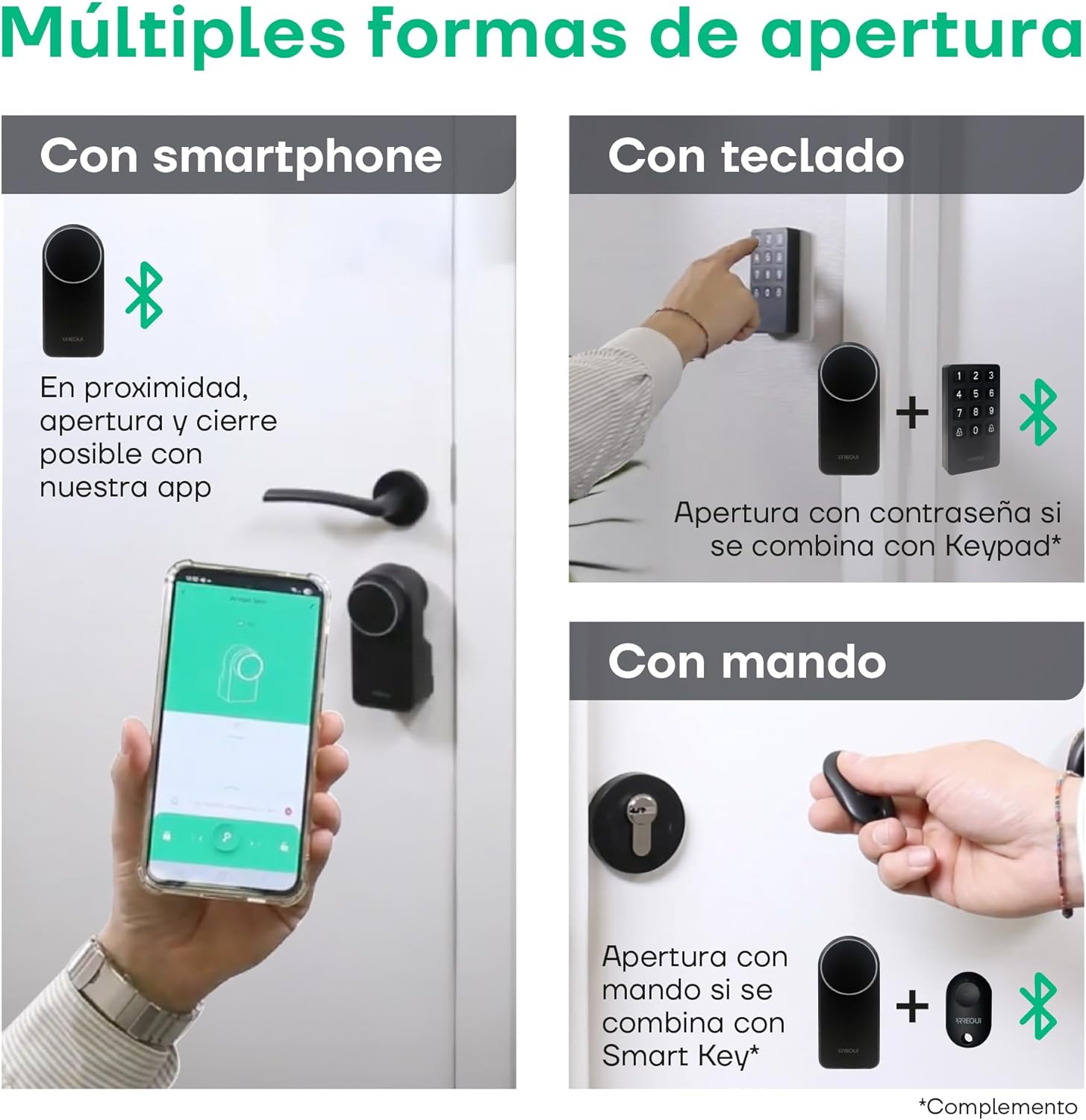
With SPIN, you can conveniently open your door using your smartphone with the Arregui Security app, the Smart Key remote control (not included), or the Keypad numeric keypad (not included). The included Arregui Bridge accessory enables remote door opening from anywhere and remote access control.
Manage temporary or permanent user permissions, program automatic closing for enhanced security, and review the access history at any time from the mobile app.
2. What's in the Box
The Arregui SPIN + BRIDGE package includes the following components:
- Spin Smart Lock Unit
- Knob
- Mounting Template
- Mounting Plate
- Adhesive Plate (x2)
- 20 mm Gasket (x2)
- Clamps
- Gaskets
- Gasket Adhesives
- Screws
- Allen Key
- Bridge Device (Wi-Fi Gateway)
3. Setup and Installation
The Arregui SPIN + BRIDGE lock is designed for quick and versatile installation without the need for drilling, cables, or screws. It attaches directly to the door, not the cylinder, ensuring greater security.
3.1 Compatibility Requirements
- Compatible with all types of cylinders.
- Can be installed vertically or horizontally.
- Requires a double-clutch cylinder, allowing a key to turn from the outside even if another key is inserted and turned from the inside.

3.2 Installation Steps
- Prepare the Door: Ensure the door surface is clean and dry.
- Position the Mounting Plate: Use the provided template to accurately position the mounting plate on the inside of your door. The plate can be oriented vertically or horizontally based on your door's handle type.
- Secure the Mounting Plate: Attach the mounting plate using the adhesive pads provided. For additional security, screws can be used if desired.
- Attach the Spin Lock Unit: Align the Spin lock unit with the mounting plate and secure it.
- Insert Batteries: Open the battery compartment and insert 4 AA 1.5V batteries.
- Calibrate the Lock: Follow the instructions in the Arregui Security app to calibrate the lock with your door's mechanism.

4. Operating Instructions
The Arregui SPIN + BRIDGE offers multiple convenient ways to control access to your home.
4.1 Smartphone App Control (Arregui Security)
- Download the Arregui Security app from your smartphone's app store.
- Pair your lock with the app via Bluetooth.
- Use the app to lock and unlock your door when in proximity.
- Manage user permissions, set temporary access, and view access history.
4.2 Remote Control with Arregui Bridge
The included Arregui Bridge connects your lock to your home Wi-Fi network, enabling remote access and voice control.
- Connect the Arregui Bridge to your home Wi-Fi network following the app's instructions.
- Once connected, you can lock/unlock your door from anywhere using the Arregui Security app.
- The Bridge is compatible with Google Assistant and Alexa, allowing for voice commands to control your lock.

4.3 User Management and Automation
- Invite Users: Grant temporary or permanent access to up to 20 users through the app.
- Activity Log: Monitor all door activities and access history in real-time via the app.
- Auto-Lock: Program the lock to automatically close after a set period for added security.

5. Maintenance
Proper maintenance ensures the longevity and optimal performance of your Arregui SPIN + BRIDGE lock.
5.1 Battery Replacement
The lock is powered by 4 AA 1.5V batteries, providing over 1,000 openings per set. The app will notify you when the battery level is low.
- When a low battery alert is received, replace all 4 AA batteries promptly.
- Access the battery compartment easily from the bottom of the unit.

5.2 Cleaning
Wipe the exterior of the lock with a soft, dry cloth. Do not use abrasive cleaners or solvents.
6. Troubleshooting
If you encounter any issues with your Arregui SPIN + BRIDGE lock, please refer to the following common solutions:
- Lock not responding: Check battery levels in the app or replace batteries. Ensure Bluetooth is enabled on your smartphone and you are within range.
- Remote access not working: Verify that the Arregui Bridge is properly connected to your Wi-Fi network and the internet. Check the Bridge's status indicator.
- Calibration issues: Recalibrate the lock through the Arregui Security app. Ensure the cylinder is a double-clutch type and the key is correctly inserted.
- App connectivity problems: Restart your smartphone and the Arregui Security app. Ensure your phone's operating system is up to date.
7. Specifications
| Feature | Detail |
|---|---|
| Manufacturer | Arregui |
| Product Dimensions | 6.3 x 4.8 x 13.6 cm |
| Product Weight | 800 g |
| Model Number | SSA100N-K1 |
| Color | Black |
| Material | Carbon Steel |
| Special Features | Remote Unlock |
| Power Source | 4 x AA 1.5V Batteries (not included) |
| Connectivity | Bluetooth BLE, Wi-Fi (via Bridge) |
| Voice Assistant Compatibility | Google Assistant, Alexa |
8. Warranty and Support
For warranty information, technical support, or any inquiries regarding your Arregui SPIN + BRIDGE Smart Electronic Lock, please contact Arregui customer service through their official website or the contact details provided in your product packaging.


