
Introduction
This manual provides essential information for the safe and effective operation, maintenance, and storage of your Ulfario LF-X2DF Walking Pad Treadmill. Please read all instructions carefully before use and retain this manual for future reference.
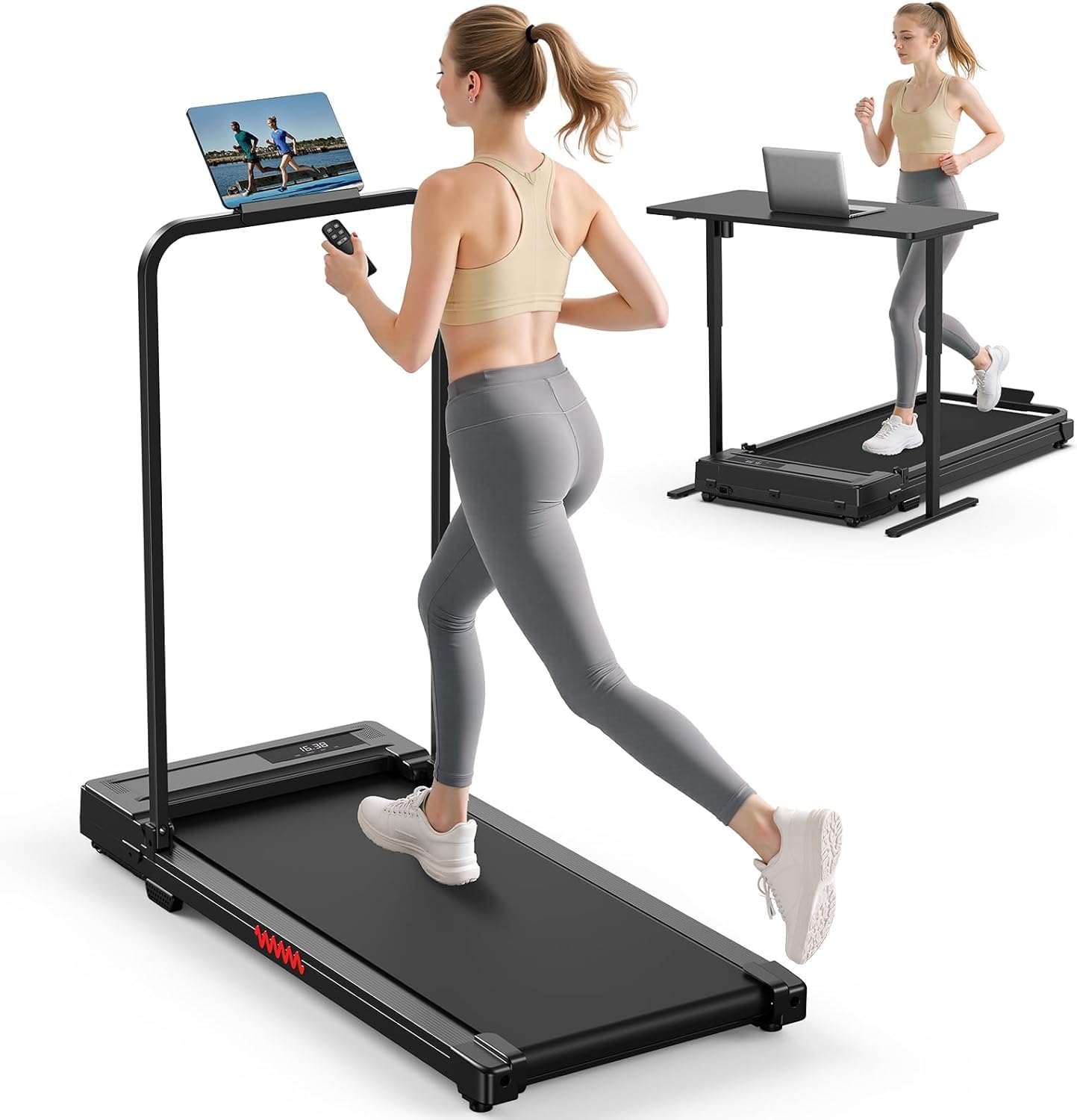
The Ulfario LF-X2DF Walking Pad Treadmill in its upright position with the handlebar extended.
Important Safety Instructions
To reduce the risk of electric shock, fire, and serious injury, always follow basic precautions when using electrical appliances, including:
- Read all instructions before using this appliance.
- Use this treadmill only for its intended use as described in this manual.
- Never operate the treadmill if it has a damaged cord or plug, if it is not working properly, or if it has been dropped or damaged.
- Keep the power cord away from heated surfaces.
- Do not use outdoors.
- Do not leave the treadmill unattended when plugged in. Unplug from outlet when not in use and before servicing.
- Do not operate where aerosol (spray) products are being used or where oxygen is being administered.
- Keep children and pets away from the treadmill during operation.
- Always wear appropriate exercise clothing and footwear.
- Ensure the treadmill is placed on a flat, stable surface.
What's in the Box
Your Ulfario LF-X2DF Walking Pad Treadmill package includes the following components:
- Treadmill Unit
- Remote Control
- Lubricant
- User Manual (this document)
- Smartphone Holder
- Hex Tool
- Self-tapping Screws (x2)
- T-shaped Allen Wrench
- Hex Socket Head Cap Screws (x2)

All components included in the Ulfario Walking Pad Treadmill package.
Setup
- Unpack the Treadmill: Carefully remove the treadmill and all accessories from the packaging.
- Position the Treadmill: Place the treadmill on a flat, stable surface, ensuring adequate space around it for safe operation.
- Raise the Handlebar: Gently lift the handlebar into its upright position.
- Secure the Handlebar: Use the provided tools and screws to firmly secure the handlebar in place.
- Attach Phone Holder: Secure the detachable phone holder to the handlebar using the self-tapping screws.
- Plug In: Connect the power cord to a grounded electrical outlet. Turn on the main power switch, usually located near the power cord connection.
- Remote Control Batteries: Insert 2 AAA batteries (not included) into the remote control.

The treadmill with its handlebar in the upright position.

The detachable phone holder provides convenience for media viewing during workouts.
Setup Video Guide
This video demonstrates the easy assembly process of the Ulfario Walking Pad Treadmill, including securing the handlebar and phone holder.
Operating Instructions
- Power On: Ensure the treadmill is plugged in and the main power switch is on. The LED display will illuminate.
- Start/Stop: Press the 'Play/Pause' button on the remote control to start or stop the treadmill. The belt will start moving at a low speed.
- Adjust Speed: Use the '+' and '-' buttons on the remote control to increase or decrease the speed. You can also use the preset speed buttons (e.g., '2' or '4' for 2 MPH or 4 MPH).
- Monitor Progress: The LED display will show real-time data including time, speed, calories burned, and distance.
- Pause Function: Press the 'Play/Pause' button to temporarily stop your workout. The treadmill will pause for up to 10 minutes, retaining your workout data. Press again to resume.
- Power Off: After your workout, press the 'Play/Pause' button to stop the belt, then turn off the main power switch and unplug the unit.

The clear LED display provides real-time workout metrics.

The remote control allows for convenient speed and mode adjustments.
Operation Video Guide
This video demonstrates the basic operation of the Ulfario Walking Pad Treadmill, including starting, stopping, and adjusting speed.
Modes and Speed Settings
The Ulfario LF-X2DF Walking Pad Treadmill offers three distinct speed modes to suit various fitness levels and goals:
- Walking Mode: 0.6–1.2 MPH (1-2 KM/H) - Ideal for light activity and warm-ups.
- Jogging Mode: 1.9–2.5 MPH (3-4 KM/H) - Suitable for moderate cardio workouts.
- Running Mode: 3.1–4 MPH (5-6 KM/H) - For more intense cardio and fat burning.

Visual representation of the three available exercise modes.
Key Features
- Powerful and Quiet Motor: Equipped with a 440-watt motor (2 Horsepower peak) operating at 50-60 Hz, ensuring smooth and quiet performance suitable for home or office environments. Maximum weight capacity is 264 lbs (120 kg).
- Advanced Shock Absorption: Features a 5-layer non-slip running belt and a stable, shock-absorbing design to provide comfort and protect your joints during workouts.
- Compact and Portable Design: The treadmill is designed for small spaces, with a folded size of 104 x 48.7 x 10.5 cm. Built-in wheels make it effortless to move and store under a bed or desk.

Internal view of the treadmill's motor and drive system.

The multi-layer running belt provides cushioning and shock absorption.
Maintenance
Regular maintenance ensures the longevity and optimal performance of your treadmill.
- Lubrication: Apply the included lubricant to the running belt every 30 hours of use or every 3 months, whichever comes first. Lift the edge of the belt and apply a small amount of lubricant to the center of the deck. Run the treadmill at a low speed for 5 minutes to distribute the lubricant.
- Cleaning: Wipe down the treadmill with a damp cloth after each use to remove sweat and dust. Do not use abrasive cleaners.
- Belt Adjustment: If the running belt becomes misaligned or too loose/tight, refer to the troubleshooting section or contact customer support for adjustment instructions.
Storage
The Ulfario LF-X2DF Walking Pad Treadmill is designed for convenient storage in small spaces.
- Fold the Handlebar: Unscrew the fixed bolts on the handlebar and gently lower it until it lies flat against the treadmill deck.
- Move for Storage: Utilize the built-in wheels to easily roll the folded treadmill to your desired storage location.
- Compact Storage: The treadmill can be stored flat under a bed, sofa, or upright against a wall.

The treadmill features built-in wheels for easy movement and storage.

The treadmill folds compactly to fit under furniture.
Troubleshooting
If you encounter any issues with your Ulfario LF-X2DF Walking Pad Treadmill, refer to the common problems and solutions below:
| Problem | Possible Cause | Solution |
|---|---|---|
| Treadmill does not power on. | Power cord not properly connected; Main power switch off; Circuit breaker tripped. | Ensure power cord is securely plugged in. Turn on the main power switch. Check your household circuit breaker. |
| Remote control not working. | Batteries are dead or incorrectly inserted; Remote not paired. | Replace batteries with new ones, ensuring correct polarity. Refer to pairing instructions in the full manual if available. |
| Running belt slips or stops. | Belt too loose; Insufficient lubrication. | Adjust belt tension (refer to full manual for specific steps). Apply lubricant as per maintenance instructions. |
| Unusual noise during operation. | Loose components; Lack of lubrication; Foreign object. | Check for and tighten any loose screws. Lubricate the belt. Inspect for any objects under the belt. |
If the problem persists after attempting these solutions, please contact Ulfario customer support.
Specifications
| Feature | Specification |
|---|---|
| Brand | Ulfario |
| Model Name | LF-X2DF |
| Color | Black |
| Product Dimensions | 41"D x 18.73"W x 4"H (104cm D x 47.5cm W x 10.16cm H) |
| Item Weight | 40 Pounds (18.14 kg) |
| Material | Acrylonitrile Butadiene Styrene (ABS), Polyvinyl Chloride (PVC) |
| Maximum Speed | 4 Miles per Hour (6.4 KM/H) |
| Minimum Speed | 0.38 Miles per Hour (0.6 KM/H) |
| Maximum Horsepower | 2 Horsepower (Peak) |
| Maximum Weight Recommendation | 264 Pounds (120 Kilograms) |
| Deck Length | 90 Centimeters |
| Deck Width | 38 Centimeters |
| Folded Size | 104 x 48.5 x 10.5 cm |
| Power Source | Corded Electric |
| Assembly Required | Yes |
| Metrics Measured | Speed, Time, Calories, Distance |
Warranty and Support
The Ulfario LF-X2DF Walking Pad Treadmill comes with a 1-year warranty from the date of purchase, covering manufacturing defects. Please retain your proof of purchase for warranty claims.
For technical support, troubleshooting assistance, or warranty inquiries, please contact Ulfario customer service through the contact information provided on your product packaging or the official Ulfario website.