1. Product Overview
The ACEMAGIC W1 Mini Gaming PC is a compact and powerful desktop solution designed for multitasking, content creation, and gaming. It features an AMD Ryzen 7 8745HS processor, integrated AMD Radeon 780M graphics, 32GB DDR5 RAM, and a 1TB PCIe 4.0 SSD.

Figure 1: Overview of ACEMAGIC W1 Mini PC features including CPU, RAM, SSD, cooling, size, OS, and display capabilities.
Key Features:
- Processor: AMD Ryzen 7 8745HS (8 cores/16 threads, up to 4.9GHz)
- Graphics: Integrated AMD Radeon 780M, supporting 8K resolution and triple display output
- Memory: 32GB DDR5 RAM
- Storage: 1TB PCIe 4.0 SSD
- Operating System: Pre-installed Windows 11 Pro
- Connectivity: USB4 Type-C, 2.5G LAN, Dual-band WiFi 6, Bluetooth 5.2, HDMI 2.0, DisplayPort 2.0
- Design: Compact and space-saving with a low-noise cooling system
2. Setup Guide
Follow these steps for initial setup of your ACEMAGIC W1 Mini PC:
- Connect to Power: Plug the power adapter into the DC IN port on the back of the Mini PC, then connect it to a power outlet.
- Connect to Display: Connect your monitor(s) to the Mini PC using the HDMI, DisplayPort, or USB4 Type-C ports. The device supports up to three displays simultaneously.
- Connect Peripherals: Connect your keyboard, mouse, and other USB devices to the available USB ports (USB3.2 Gen2x2 on front, USB3.2 Gen1x4 on back).
- Power On: Press the power button located on the front of the Mini PC.
- Initial Windows Setup: Follow the on-screen instructions to complete the Windows 11 Pro setup. It is recommended to initially connect to Wi-Fi for faster setup and to avoid potential update delays.
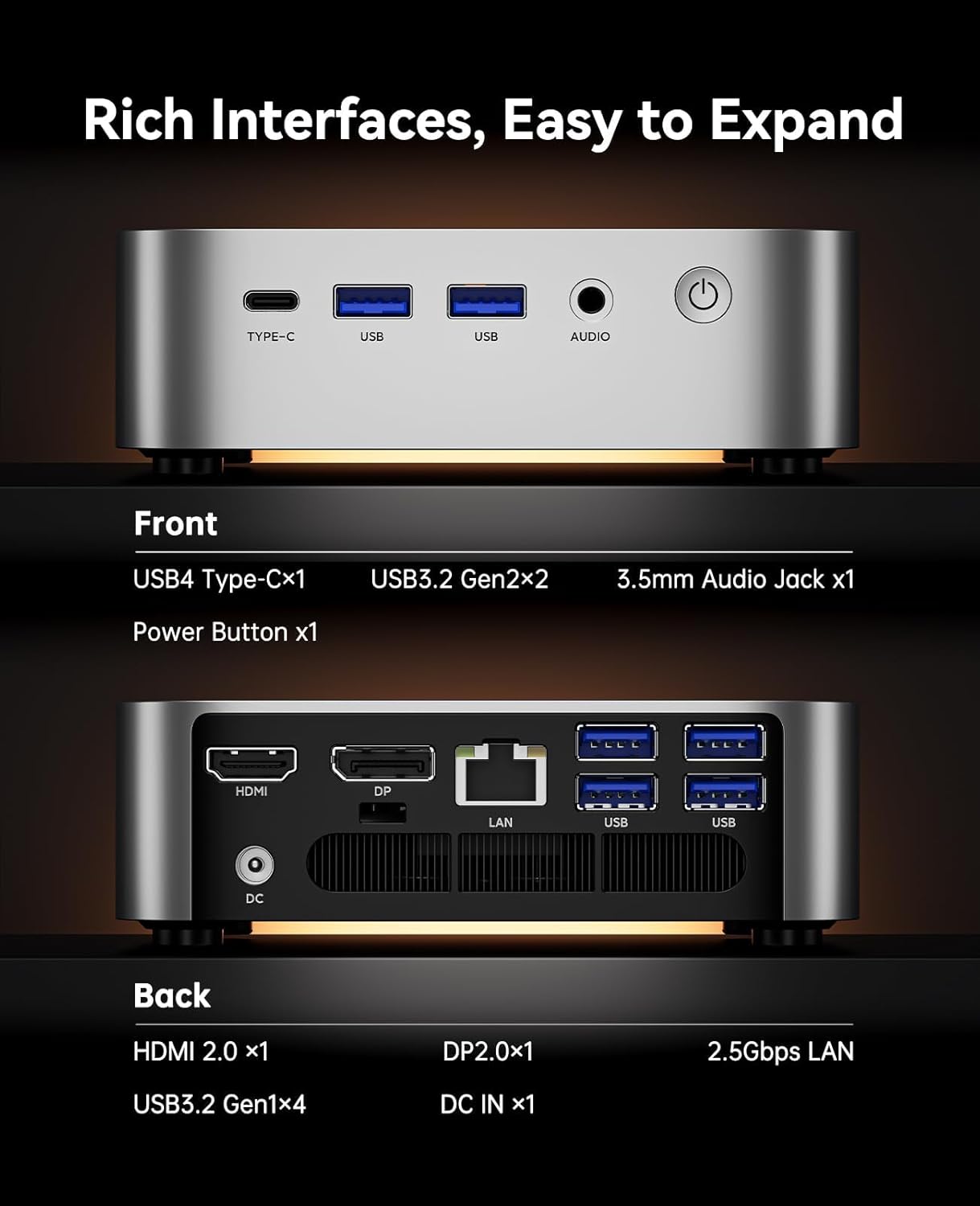
Figure 2: Detailed view of the front and back interfaces of the ACEMAGIC W1 Mini PC, including USB, HDMI, DisplayPort, LAN, and power input.
3. Operating Instructions
Power On/Off:
- To Power On: Press the power button on the front panel.
- To Power Off: Click the Start menu in Windows, then select Power > Shut down. Alternatively, press and hold the power button for 5 seconds for a forced shutdown (not recommended for regular use).
Connectivity:
- Wireless: The Mini PC supports dual-band WiFi 6 and Bluetooth 5.2 for seamless wireless connections to networks and peripherals.
- Wired Network: Use the 2.5G LAN port for high-speed wired internet access.
- USB Ports: Utilize the multiple USB ports (USB4 Type-C, USB3.2 Gen2x2, USB3.2 Gen1x4) for connecting external devices such as storage drives, cameras, and other accessories.
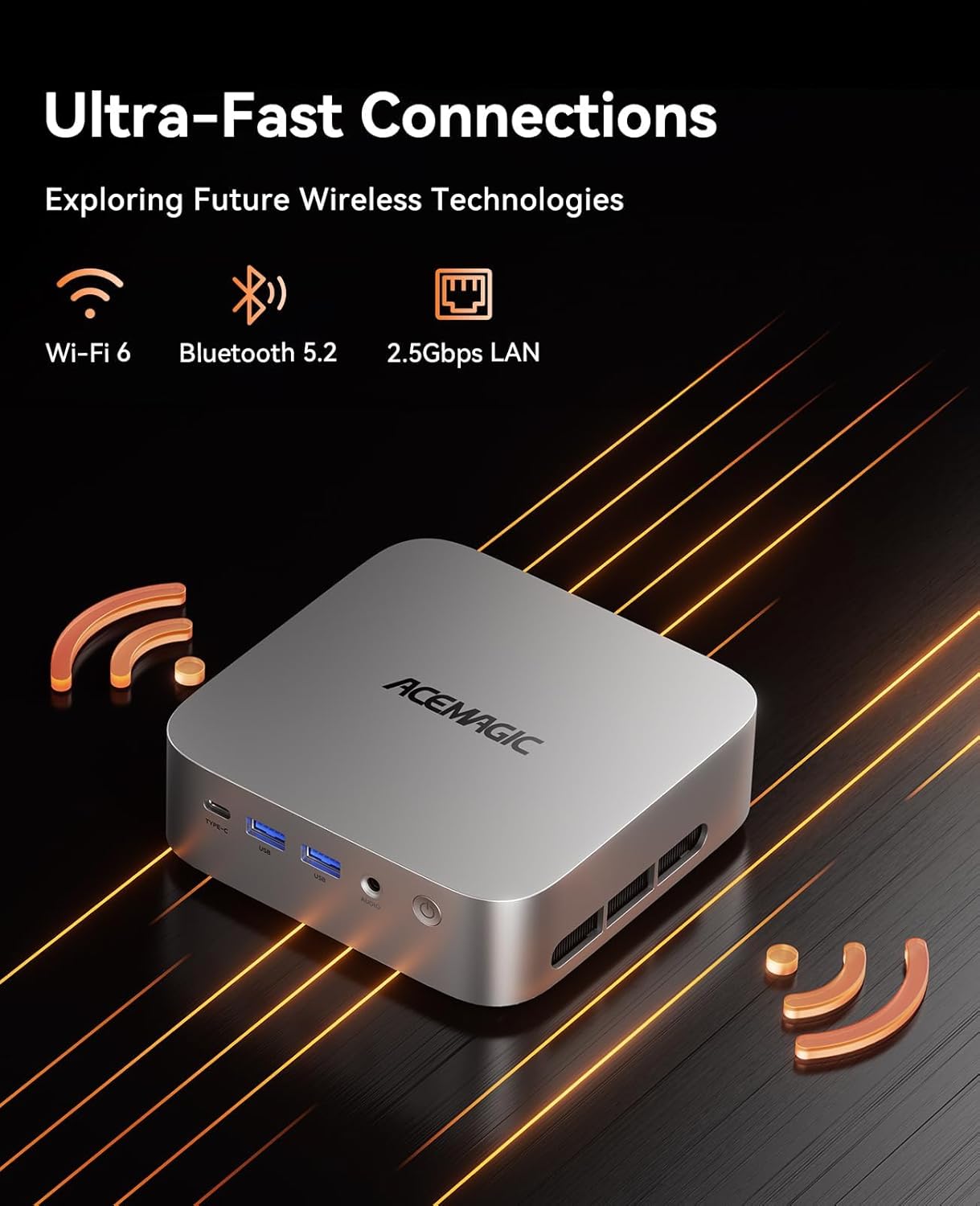
Figure 3: Visual representation of the ultra-fast wireless and wired connectivity options available on the ACEMAGIC W1 Mini PC.
Triple Display Support:
The integrated AMD Radeon 780M graphics allow for a triple-monitor setup, supporting up to 8K resolution. Connect your displays using a combination of the USB4 Type-C, HDMI 2.0, and DisplayPort 2.0 outputs.

Figure 4: Example setup demonstrating the triple-display support of the ACEMAGIC W1 Mini PC, showcasing high-definition visuals across multiple screens.
4. Maintenance
Cooling System:
The ACEMAGIC W1 Mini PC is engineered with a low-noise cooling system to maintain optimal performance and quiet operation. Ensure proper airflow around the device by keeping vents clear of obstructions.

Figure 5: Internal view illustrating the advanced cooling system of the ACEMAGIC W1 Mini PC, featuring a high-speed centrifugal fan, heat dissipation copper pipe, and dual exhaust design.
Storage Expansion:
The Mini PC is equipped with 2 M.2 2280 slots, allowing for storage expansion up to 4TB. This provides flexibility to increase your storage capacity as needed for games, media, or professional projects.
5. Troubleshooting
- No Display: Ensure all display cables (HDMI, DisplayPort, USB4 Type-C) are securely connected to both the Mini PC and the monitor. Verify the monitor is set to the correct input source.
- No Power: Check that the power adapter is correctly connected to the Mini PC and a working power outlet. Try a different outlet if necessary.
- Network Connectivity Issues: For Wi-Fi, ensure the device is within range of your wireless router and the correct password is entered. For wired connections, check the Ethernet cable and router status.
- Slow Performance: Close unnecessary applications. Check for background processes consuming high resources. Ensure the cooling vents are not obstructed.
- Initial Setup Tip: For faster setup, avoid initial LAN connection. Connecting via Wi-Fi initially can prevent updates from delaying the first boot.
6. Specifications
| Feature | Detail |
|---|---|
| Processor | AMD Ryzen 7 8745HS (3.8 GHz, up to 4.9GHz) |
| Graphics Coprocessor | AMD Radeon 780M |
| RAM | 32 GB DDR5 |
| Hard Drive | 1 TB SSD (PCIe 4.0) |
| Max Screen Resolution | 7680x4320 (8K) |
| Operating System | Windows 11 Pro |
| Wireless Type | 802.11ac (WiFi 6), Bluetooth 5.2 |
| LAN | 2.5G LAN |
| USB Ports (Front) | 1x USB4 Type-C, 2x USB3.2 Gen2 |
| USB Ports (Back) | 4x USB3.2 Gen1 |
| Video Output | 1x HDMI 2.0, 1x DisplayPort 2.0, 1x USB4 Type-C |
| Audio Jack | 1x 3.5mm Audio Jack |
| Item Weight | 2.42 pounds |
| Dimensions | 7.09 x 6.69 x 3.94 inches |

Figure 6: Detailed specifications of the AMD Ryzen 7 8745HS processor, including core/thread count, architecture, max boost clock, and TDP.

Figure 7: Performance overview of the AMD Radeon 780M Graphics, highlighting GPU cores, graphics frequency, and a comparison to other integrated graphics solutions.
7. Warranty and Support
The ACEMAGIC W1 Mini Gaming PC is covered by a complete 12-month assurance. For any questions or support regarding your purchase, please contact ACEMAGIC customer service, available 7 days a week, 24 hours a day, through Amazon.
All ACEMAGIC mini gaming computers have FCC, ROHS, and CE certifications, ensuring product quality and safety.


