
1. Introduction
The Crenova 8045mini is a 30000 counts True RMS digital multimeter designed for precise measurements in laboratory and industrial environments. This device offers a wide range of functions including AC/DC Voltage/Current, Resistance, Capacitance, Temperature, Frequency, Duty Cycle, Continuity, and Diode testing. It features a large 3.5-inch LCD with adjustable backlight, USB data logging capabilities, and robust safety ratings.

Image: The Crenova 8045mini Digital Multimeter, showcasing its display and various measurement functions.
2. Safety Information
Always adhere to safety precautions when operating the multimeter. This device is rated CAT I 1000V / CAT II 600V, providing protection on all ranges. Ensure proper connection of test leads and select the correct measurement function before testing. Do not exceed the maximum input values for any range. The multimeter is equipped with premium explosion-proof fuses for enhanced safety. Operating temperature range is 0°C to 40°C (32°F to 104°F).

Image: The Crenova 8045mini Multimeter highlighting its safety features and CAT ratings.
3. Package Contents
Verify that all items are present in the package:
- Crenova 8045mini Digital Multimeter (1)
- Probe Test Leads (1 pair)
- K-type Thermocouple Probe (1)
- USB A to USB B Cable (1)
- USB Type C Charging Cable (1)
- Software Installation Disc (1)
- User Manual (1)

Image: All components included in the Crenova 8045mini Digital Multimeter package.
4. Product Overview
The Crenova 8045mini features a clear display and intuitive controls for ease of use. Familiarize yourself with the main components:
- Display Screen: Large 3.5-inch LCD for clear readings.
- Selection Keys: For navigating menus and options.
- Operation Keys: For specific functions like Run/Stop, Record, Math, Utility, Dual.
- Range/Direction Keys: To adjust measurement range or navigate.
- Power Key: To turn the device on/off.
- Measurement Mode Keys: Dedicated buttons for Voltage (V), Current (A), Resistance (Ω), Frequency (Hz), Temperature (Temp), Capacitance (F), Diode, and Continuity.
- Input Terminals: Ports for connecting test leads (10A, uA/mA, COM, INPUT).
- USB Type B Port: For data connection to a PC.
- USB Type C (Charging) Port: For charging the internal battery.
- Operating/Charging Indicator: LED to show power status or charging.

Image: Detailed diagram of the multimeter's front, side, and rear panels with labeled components.
5. Setup
5.1. Charging the Battery
The multimeter is powered by a 5000mAh rechargeable battery. Connect the USB Type C charging cable to the multimeter's charging port and to a suitable USB power adapter (not included) or computer USB port. The operating/charging indicator will show charging status.
5.2. Connecting Test Leads
For most measurements, insert the black test lead into the COM (common) terminal and the red test lead into the appropriate input terminal (e.g., INPUT for voltage/resistance/capacitance, uA/mA for micro/milliamperes, 10A for high current measurements).
5.3. Software Installation (for Data Logging)
To utilize the USB data logging features, install the provided software. Insert the software installation disc into your computer's optical drive and follow the on-screen instructions. If your computer lacks an optical drive, download the latest software version from the website listed in the user manual.
6. Operating Instructions
The Crenova 8045mini offers 11 measurement functions and smart features for efficient operation.
6.1. Basic Measurements
Press the corresponding measurement mode key (V, A, Ω, Temp, Freq, etc.) to select the desired function. Ensure test leads are connected correctly for the selected measurement type.
- AC/DC Voltage (V): Measures alternating or direct current voltage.
- AC/DC Current (A): Measures alternating or direct current.
- Resistance (Ω): Measures electrical resistance.
- Capacitance (F): Measures electrical capacitance.
- Temperature (Temp): Measures temperature using the K-type thermocouple probe.
- Frequency (Hz): Measures the frequency of an AC signal.
- Duty Cycle (%): Measures the ratio of pulse width to period.
- Continuity: Tests for a continuous electrical path. An audible beep indicates continuity.
- Diode: Tests the forward voltage drop of a diode.

Image: Examples of the multimeter performing different measurements like voltage, current, resistance, and continuity.
6.2. Smart Features
- Auto/Manual Ranging: The multimeter can automatically select the appropriate measurement range or allow manual selection for specific needs. Use the 'Range' button to switch between modes.
- Dual Display: Allows simultaneous readout of two related measurements, such as AC voltage and frequency.
- Data Hold: Press the 'Hold' button to freeze the current measurement on the display for easy reading.
- Auto Power Off: The device will automatically power off after a period of inactivity to conserve battery life.
- Mathematical Functions: Calculate Max, Min, Average, dBW/dBmW, and Relative values using the 'Math' button.
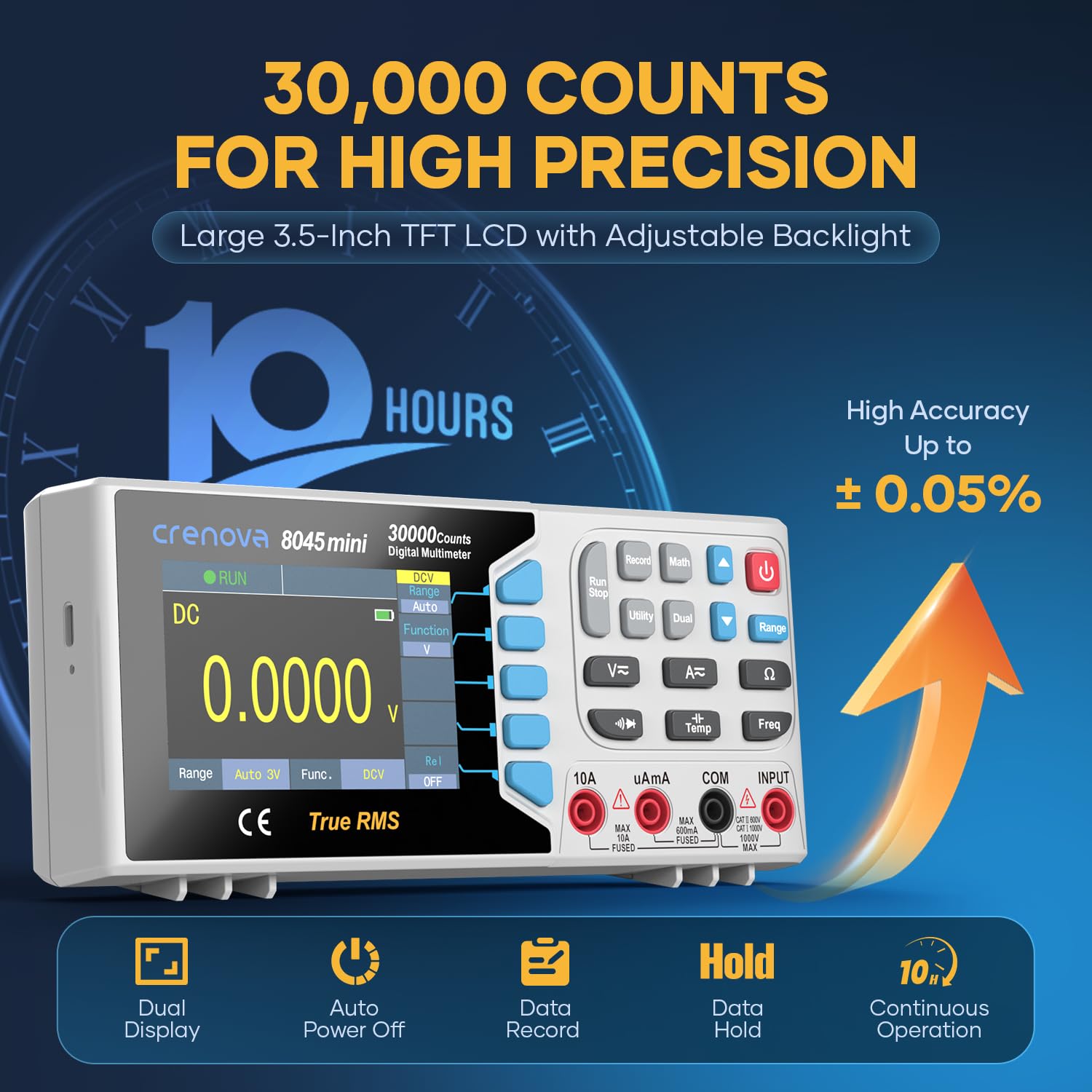
Image: The multimeter's display highlighting its 30,000 counts resolution and battery life.
6.3. Continuity Test Demonstration
Video: A short demonstration of the continuity test function on the Crenova 8045mini multimeter, showing an audible beep when a continuous path is detected.
7. Data Logging
The Crenova 8045mini supports USB connectivity for advanced data management. Connect the multimeter to your computer using the provided USB A to USB B cable. With the installed software, you can:
- Remote Control: Operate the multimeter functions directly from your PC.
- Firmware Updates: Keep your device up-to-date with the latest features and improvements.
- Data Logging: Log measurement data over time for analysis.
- Data Review and Printing: Easily review recorded data and print reports.

Image: The multimeter connected to a computer, demonstrating its USB data logging and analysis features.
8. Maintenance
To ensure the longevity and accuracy of your Crenova 8045mini Digital Multimeter:
- Cleaning: Wipe the device with a soft, damp cloth. Do not use abrasive cleaners or solvents.
- Storage: Store the multimeter in a dry, cool place away from direct sunlight and extreme temperatures.
- Battery Care: Recharge the battery regularly, especially if the device will not be used for an extended period. The 5000mAh battery provides up to 10 hours of continuous use.
- Fuse Replacement: If a fuse blows, replace it with a fuse of the same type and rating as specified in the full user manual to maintain safety ratings.
9. Troubleshooting
If you encounter issues with your multimeter, consider the following common solutions:
- No Display/Power: Ensure the battery is charged. Connect the USB Type C charging cable and allow it to charge for a period.
- Incorrect Readings: Verify that the test leads are correctly inserted into the appropriate input terminals for the selected measurement function. Check that the measurement range is suitable (use auto-ranging if unsure).
- 'Overload' Message: This indicates that the measured value exceeds the current range. Switch to a higher range or ensure the input is within the device's specifications.
- Software Connection Issues: Ensure the USB A to USB B cable is securely connected to both the multimeter and the computer. Verify that the software drivers are correctly installed.
- Temperature Measurement Issues: Ensure the K-type thermocouple probe is properly connected and in good contact with the object being measured.
For persistent issues, refer to the comprehensive user manual or contact Crenova customer support.
10. Specifications
Key technical specifications for the Crenova 8045mini Digital Multimeter:
| Feature | Specification |
|---|---|
| Brand | Crenova |
| Model | 8045mini |
| Display Counts | 30000 Counts |
| Measurement Functions | AC/DC Voltage, AC/DC Current, Resistance, Capacitance, Temperature, Frequency, Duty Cycle, Continuity, Diode, Max, Min, Average, dBW/dBmW, Relative |
| Safety Rating | CAT I 1000V / CAT II 600V |
| Power Source | 5000mAh Rechargeable Battery |
| Continuous Use Time | Up to 10 hours |
| Connectivity | USB for Data Logging and PC Control |
| Operating Temperature | 0°C to 40°C (32°F to 104°F) |

Image: Physical dimensions and approximate weight of the Crenova 8045mini Multimeter.
11. Warranty and Support
Crenova products are designed for reliability and performance. For warranty information, please refer to the specific terms provided with your purchase or visit the official Crenova website. For technical support, troubleshooting assistance, or inquiries regarding your Crenova 8045mini Digital Multimeter, please contact Crenova customer service through the contact details provided in the full user manual or on the official brand website.