Introduction
This manual provides instructions for the WDZP GK-001 replacement remote control, designed for use with various Bifanuo walking pads and under desk treadmills. This remote offers a convenient way to control your fitness equipment, enhancing your workout experience.
The GK-001 remote control is compatible with the following Bifanuo models:
- TM008
- TM008BK
- TM008CK
- TM006-BK
- TM002
- TM001
- TM008SL
- TM009
Constructed from durable ABS material, this lightweight remote (approximately 0.634 ounces) is designed for wear resistance and ease of use.
Setup and Pairing
Follow these steps to set up and pair your WDZP GK-001 remote control with your walking pad or treadmill:
- Install Battery: The remote requires one CR2032 lithium battery (not included). Open the battery compartment on the back of the remote and insert the battery, ensuring correct polarity.
- Power On Walking Pad: Turn on your Bifanuo walking pad or treadmill.
- Initiate Pairing: Wait approximately 20 seconds after powering on the walking pad.
- Pair Remote: On the GK-001 remote, press and hold the "Minus" (-) button until the walking pad emits two beeps. This indicates successful pairing.
Once paired, the remote control is ready for use. No additional setup or app is required.

Figure 1: Battery installation and basic setup steps for the GK-001 remote. The remote requires a CR2032 battery, which is not supplied.
Operating Instructions
The GK-001 remote control provides efficient and easy operation for your walking pad. While some button labels may not be immediately intuitive, their functions are straightforward once learned.
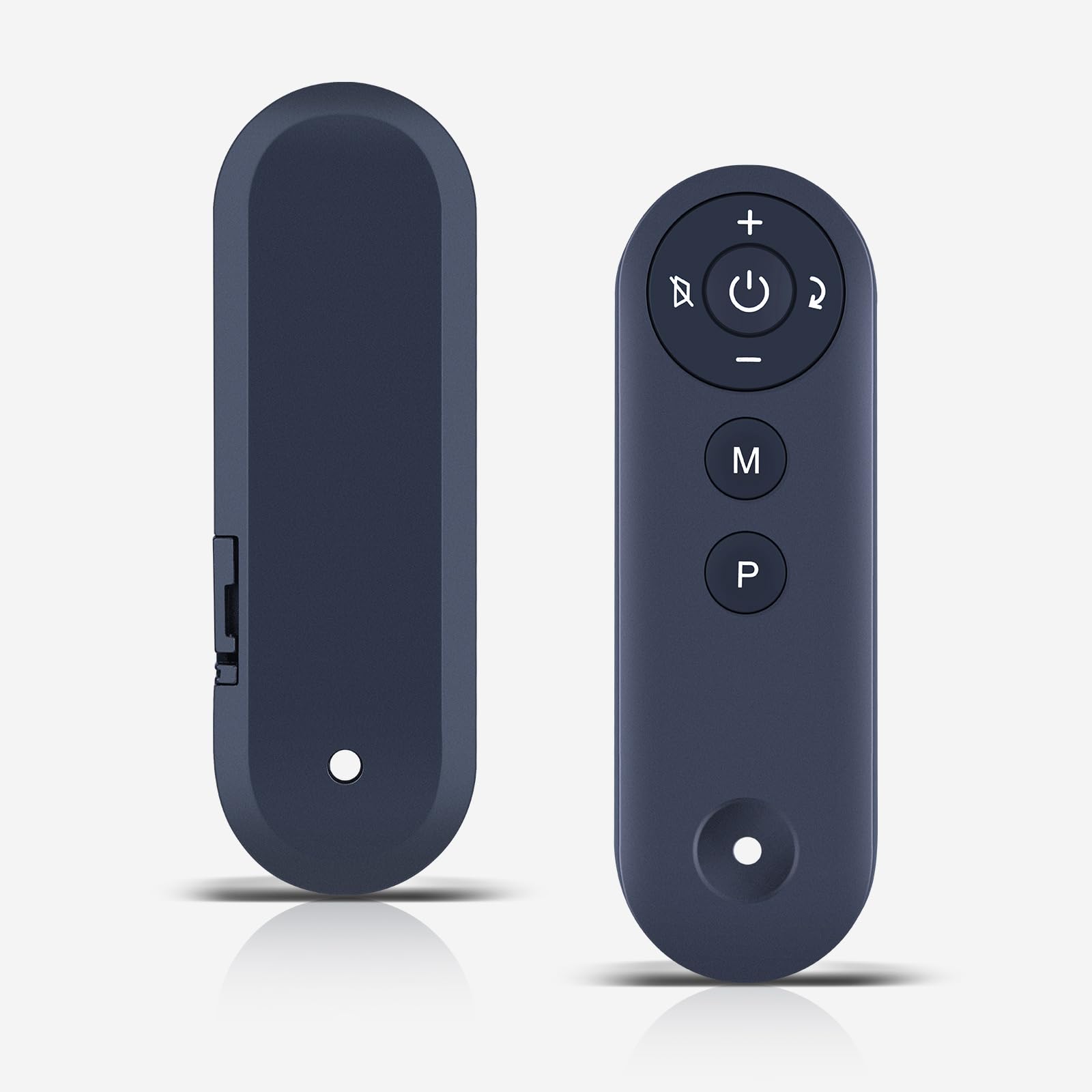
Figure 2: WDZP GK-001 remote control in use, highlighting the button layout.
Button Functions:
- Power Button (Circle with vertical line): Turns the walking pad on or off.
- Plus (+) Button: Increases the speed of the walking pad.
- Minus (-) Button: Decreases the speed of the walking pad. (Also used for initial pairing).
- "M" Button: Typically used to start the walking pad.
- "P" Button: Typically used to stop the walking pad.
- Other Circular Buttons (Arrows/Speaker icon): These buttons may control additional functions such as mode selection or volume, depending on your specific walking pad model. Refer to your walking pad's manual for detailed functionality.
You can effortlessly manage your workout pace, making each session more effective and enjoyable. The remote allows for quick adjustments without interrupting your exercise.

Figure 3: The GK-001 remote control in a fitness setting, demonstrating its compatibility and purpose.
Benefits of Using the Remote:

Figure 4: Benefits of using a dedicated remote control for your treadmill or walking pad, including safety, ease of use, and accuracy.
Maintenance
To ensure the longevity and optimal performance of your WDZP GK-001 remote control, follow these simple maintenance guidelines:
- Cleaning: Wipe the remote control with a soft, dry cloth. Avoid using liquid cleaners or abrasive materials, as these can damage the surface or internal components.
- Battery Replacement: Replace the CR2032 battery when the remote's responsiveness decreases or it stops functioning. Ensure correct polarity when inserting a new battery.
- Storage: Store the remote in a cool, dry place away from direct sunlight and extreme temperatures.
- Avoid Drops: While durable, avoid dropping the remote control to prevent internal damage.
Troubleshooting
If you encounter issues with your WDZP GK-001 remote control, refer to the following common solutions:
| Problem | Possible Cause | Solution |
|---|---|---|
| Remote not responding | Dead or incorrectly installed battery. | Replace the CR2032 battery, ensuring correct polarity (+/-). |
| Remote not pairing with walking pad | Incorrect pairing procedure or interference. |
|
| Buttons not performing expected functions | Misunderstanding of button labels or specific walking pad model variations. | Refer to the "Operating Instructions" section for common button functions. If issues persist, consult your walking pad's original manual for specific remote control button assignments. |
| Remote feels unresponsive or delayed | Low battery or signal interference. | Replace the battery. Ensure you are within a reasonable range of the walking pad and there are no strong electronic interferences. |
Specifications
Key technical specifications for the WDZP GK-001 Replacement Remote Control:
- Model Number: GK-001
- Brand: WDZP
- Compatible Devices: Bifanuo Walking Pads and Under Desk Treadmills (TM008, TM008BK, TM008CK, TM006-BK, TM002, TM001, TM008SL, TM009)
- Material: ABS
- Color: Black
- Item Weight: Approximately 0.634 ounces (18 grams)
- Package Dimensions: 4.57 x 1.93 x 0.55 inches (11.6 x 4.9 x 1.4 cm)
- Battery Type: 1 x CR2032 (not included)
- Special Feature: Ergonomic design
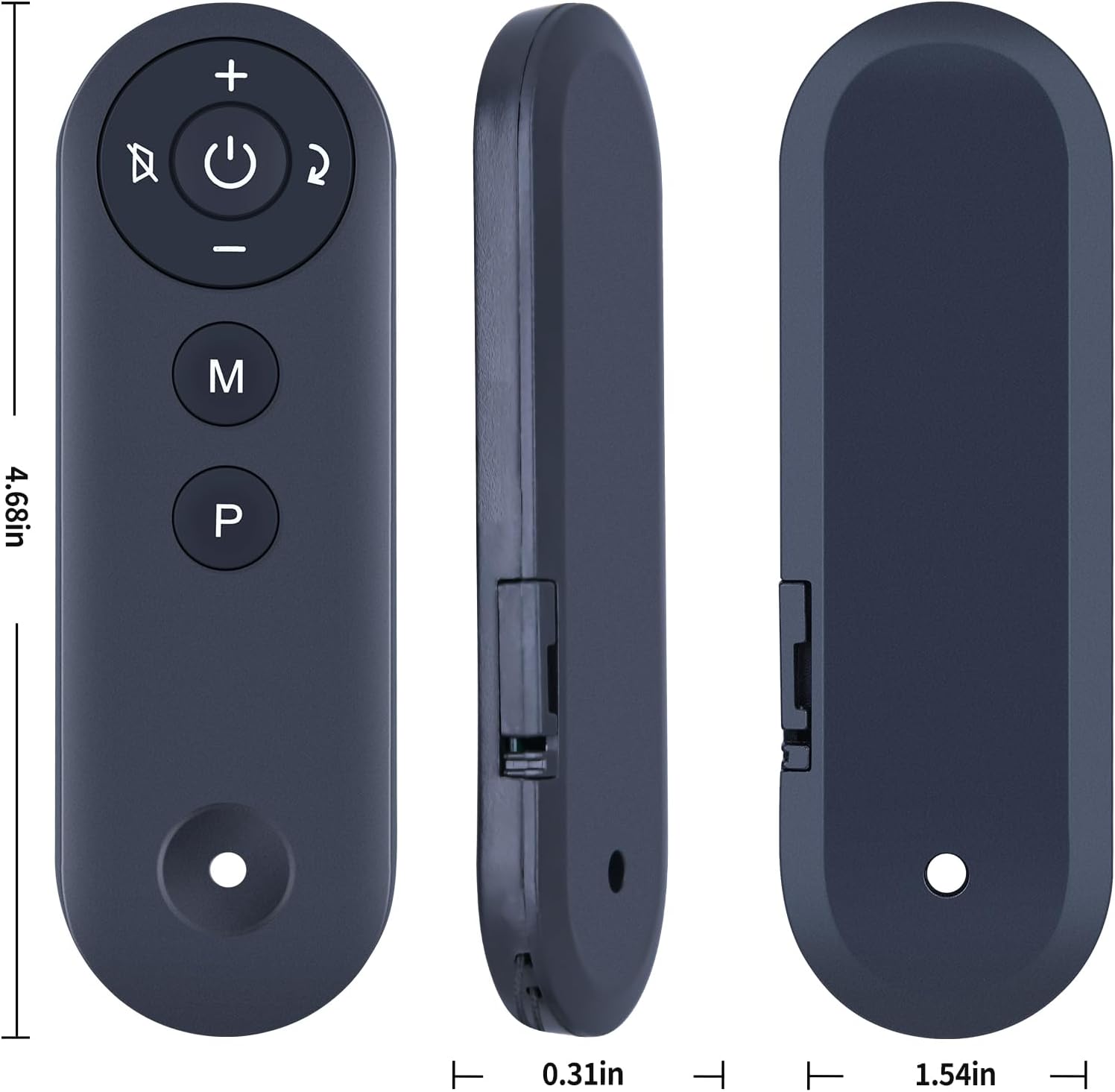
Figure 5: Physical dimensions of the WDZP GK-001 remote control.
Warranty Information
The WDZP GK-001 remote control comes with a 6-month warranty. This warranty covers manufacturing defects and ensures free exchange or refund for quality-related issues. Please retain your proof of purchase for warranty claims.
For any warranty-related inquiries, please contact customer support.
Customer Support
For further assistance, technical support, or warranty claims, please contact WDZP customer service. Contact information can typically be found on the product packaging or the retailer's website where the product was purchased.
Please have your product model number (GK-001) and purchase details ready when contacting support.


